


The highest-impact tactic for out of stock messaging is a sales-ready back-in-stock alert that lets a shopper commit to buying before the item even arrives. Start with three things: a clear stock status on the page, an action the shopper can take right now (notify me, preorder or backorder), and an automated restock email with a direct buy link. The sections below cover the best practices, templates and automation rules that make this work.
TL;DR:
- Keep the signup action beside the price rather than in a secondary tab, and collect consent plus the exact SKU, size, or color.
- For preorders or backorders, disclose delivery dates and charge timing; if shipment slips, FTC rules require a choice to accept the delay or cancel for a refund.
- Allocate available units to the earliest signups for each variant, sync inventory promptly, and cap each alert at the number of units actually available.
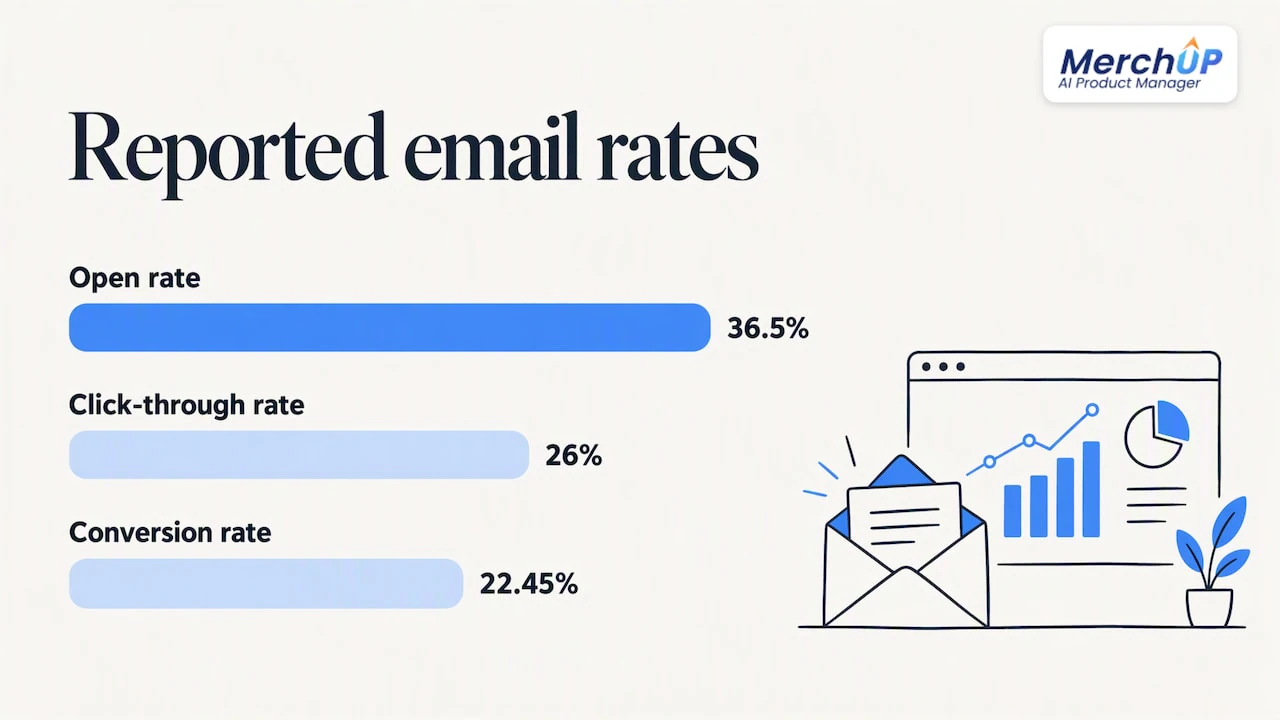
- One reported program achieved 36.5% opens, 26% click throughs, and 22.45% conversions by linking alerts to prefilled carts and capping sends at available stock.
Best practices for product pages and restock emails
Shoppers abandon a page the moment stock status is unclear. Usability testing from Baymard found that labelling an item simply “out of stock” causes many visitors to leave the site, and a majority of sites studied don’t allow orders for items that are temporarily unavailable, even when replenishment is close. Clear, consistent labelling and a visible next step change that outcome.
- Use a consistent four-state system: In stock, Low stock, Temporarily out of stock, Discontinued.
- Keep at least one action available: delayed-delivery purchase, preorder or a restock alert signup, with purchase preferred when restocking is imminent.
- Never leave a dead end; show alternatives or complementary products directly in the buy area.
- Capture variant-level detail (size, colour, SKU) in the signup form, since a generic notify-me request without that detail often produces mismatched alerts.
- Get explicit consent to send a notification, so the message is expected rather than unsolicited.
If you accept an order for an item you can’t ship immediately, you take on an obligation under the FTC’s Mail, Internet, or Telephone Order Merchandise Rule: you must either ship within the time you promised or offer the customer a clear choice to consent to the delay or cancel for a refund.
Pro Tip: Treat the “notify me” form as a mini checkout: ask for the exact variant, not just the product, so the eventual alert matches what the customer actually wants.
Ready-to-paste templates for subject lines, PDP copy and emails
Good wording does the heavy lifting once the structure above is in place. Group subject lines by intent so your team can test variants quickly.
- Alert: “It’s back: [Product Name] is in stock again”
- Alert: “Good news, [First Name]: your size is here”
- Urgency: “Only a few left: [Product Name] just restocked”
- Urgency: “Back for a limited time: [Product Name]”
- Apology: “Sorry for the wait, here’s your [Product Name]”
- Apology: “We know you’ve been waiting: it’s finally here”
- Preorder: “Reserve [Product Name] before it sells out again”
- Preorder: “Be first in line for [Product Name]”
- Confirmation: “You’re on the list for [Product Name]”
- Confirmation: “We’ll let you know the moment it’s back”
Three email bodies cover most cases: a sales-ready restock alert with a prominent buy button and the exact variant requested, a signup confirmation that sets expectations (“we’ll email you the moment it’s available, usually within [timeframe]”), and an apology or second-chance message for customers whose item sold out again before they purchased.
- On the product page, replace a flat “out of stock” with something specific: “Temporarily out of stock, expected in 10 to 14 days” or “Available to pre-order.”
- Pair that with action microcopy: “Notify me” or “Commit to buy, no charge until shipping.”
Personalisation tokens worth including: first name, size or colour, and the date the customer originally signed up, which reminds them of their own intent and improves open rates.
Where to place stock messages and actions on the page
Placement decides whether a shopper notices the option at all. Status and action belong inside the main buy module, next to the price and add-to-cart button, never tucked into a shipping tab or footer note.
- Put stock status and the action button together in the primary buy module, not in a secondary tab.
- If you allow backorders or preorders, state the revised delivery date and when the card is charged; if you can’t give a firm date, let the customer cancel.
- Show closely matched alternatives prominently, either above the fold or in place of the buy module itself.
- Use one consistent colour and icon system across the store so a shopper recognises “low stock” or “notify me” instantly, wherever they see it.
Automation playbook for restock alerts without false promises
A reliable alert system runs on a simple event chain: a customer signs up for a specific variant, the store records that intent, inventory syncs in real time or overnight, available units are allocated against the waiting list, and an alert fires once per unit actually available, pointing to a pre-filled cart.
- Record signup intent at the SKU and variant level, with consent to be notified.
- Sync inventory on a schedule tight enough to catch restocks quickly.
- Allocate available units to the earliest signups first, holding a short window for anyone who commits to buy.
- Send one sales-ready alert per available unit, never more than stock allows.
- Track signup-to-conversion, open rate, click-through rate and backlog size to spot demand spikes early.
A back-in-stock alert programme that linked emails straight to a pre-filled cart and capped sends at available stock reported a 36.5% open rate, 26% click-through rate and a 22.45% conversion rate. That gap between a plain notification and a buy-ready email is the difference a sales-ready flow makes.
Send the main alert once; only consider a reminder if stock remains unsold after a reasonable window. If you can’t meet a promised ship date, the FTC rule requires you to offer cancellation or get consent to the new date, and to document that revised date clearly.
Why consistent product content makes restock alerts work harder
A restock alert only converts if the shopper immediately recognises what they signed up for. Vague titles or missing attributes create hesitation at the exact moment you need a click, and that hesitation shows up as a lower CTR regardless of how well the email is written.
- Precise titles and attribute data (size, colour, material) remove ambiguity from the alert subject line and body.
- Bulk-editable templates and a visual editor let a small team keep PDP wording and restock emails consistent across hundreds of SKUs, which matters most during a demand spike.
- Real-time catalogue syncing, covered in our real-time catalogue sync piece, reduces the risk of an alert going out for stock that’s already gone.
Pro Tip: Audit your ten best-selling SKUs for title and attribute accuracy first: those are the pages carrying most of your restock traffic.
What actually moves the needle on out of stock messaging
The template is never the bottleneck. Most teams already know roughly what a good restock email should say; the gap is operational: nobody owns the inventory sync, the allocation logic doesn’t exist, and “notify me” becomes a spreadsheet nobody checks until a customer complains.
Conventional advice treats out of stock messaging as a copywriting problem, polishing subject lines while the underlying trigger still fires on stale stock counts. Fix the plumbing first: allocate units before you write a single email, cap sends at available quantity, and only then worry about whether “it’s back” beats “good news” in a subject line.
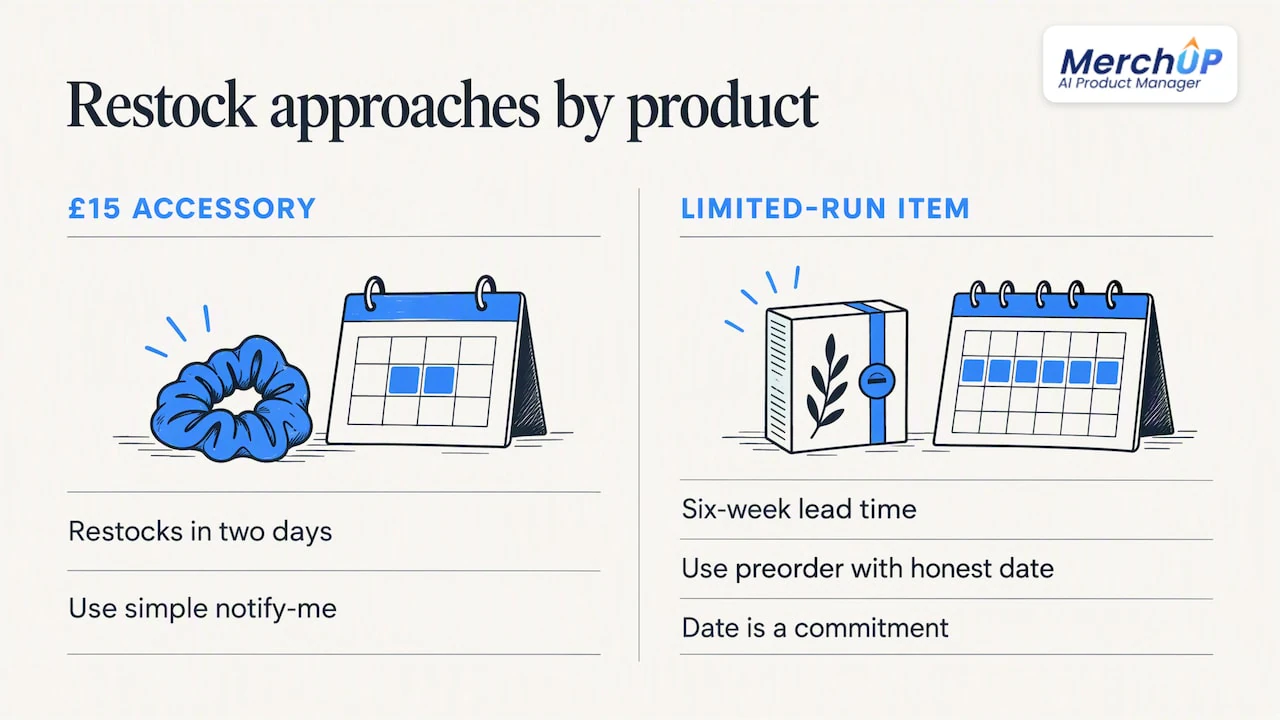
The other overrated idea is treating every unavailable item the same way. A £15 accessory restocking in two days needs a simple notify-me. A limited-run item with a six-week lead time needs a preorder path with a clear, honest date, because the FTC rule makes that date a commitment, not a marketing flourish. Match the mechanism to the product, not the other way round.
— Jamie Moss
MerchUp: a faster way to keep restock messaging consistent
Writing and updating accurate product titles, attributes and PDP microcopy across a large catalogue is where most of the delay in out of stock messaging actually happens, not in the email tool. We built an AI tool to close that gap: AI-generated product descriptions, customizable drag-and-drop templates and a visual editor, all built to publish directly to Shopify so your product pages and the content feeding your restock emails stay in sync.
- We generate descriptions and attribute data in bulk, so restock alerts always reference accurate variant details.
- Our visual editor and templates let a small team update hundreds of PDPs more efficiently than manual editing.
- Our integration publishes changes directly, so your live catalogue and your messaging never drift apart.
If your team is spending more time rewriting product copy than building the alert logic itself, see what a faster workflow looks like on our pricing page or walk through the MerchUp tutorial to see it generate descriptions in real time. For a broader approach, learn how to increase customer retention with proven strategies to complement your restock messaging.
FAQ
How do I inform customers about unavailability?
State the status plainly on the product page (temporarily out of stock, with an expected timeframe where you have one) and give a next step: a notify-me signup, a preorder option or visible alternatives. Avoid a dead page with no action, since usability testing links that pattern to higher abandonment.
How do I write an out of stock response in an email?
Confirm the item’s status, give a realistic timeframe if known, and offer either a notify-me signup or a preorder path. If you previously took an order you can’t fulfil on time, the FTC rule requires you to offer the customer a clear choice to consent to the delay or cancel for a refund.
How do you say “out of stock” professionally?
Replace a flat “out of stock” with something specific and actionable, such as “Temporarily out of stock, expected in 10 to 14 days” or “Available to pre-order.” Pair it with a clear action like “Notify me” rather than leaving the shopper with no next step.
What is a catchy subject line for a restock email?
Effective subject lines tend to fall into a few categories: direct alert (“It’s back: [Product Name] is in stock again”), personalised (“Good news, [First Name]: your size is here”), or mild urgency (“Only a few left: [Product Name] just restocked”). Test a few variants, since tone and personalisation both affect open rates differently across audiences.
Sources
- Business guide to the FTC’s Mail, Internet, or Telephone Order Merchandise Rule | Federal Trade Commission
- eCFR :: 16 CFR 435.2 – Mail, Internet, or telephone order sales
- Let users purchase temporarily ‘out of stock’ products – Baymard
- Email Marketing: Back-in-stock alert emails achieve 22.45% conversion rate | MarketingSherpa
Primary sources and further reading
- Business guide to the FTC’s Mail, Internet, or Telephone Order Merchandise Rule
- eCFR :: 16 CFR 435.2, Mail, Internet, or telephone order sales
- Let users purchase temporarily ‘out of stock’ products, Baymard
- Email marketing case study: back-in-stock alert emails, MarketingSherpa


Comments
No comments yet — be the first to share what you think.