


Ecommerce content automation uses templates, structured attributes and AI to turn supplier data into consistent, machine-readable product listings. Done properly, it cuts the hours spent writing and formatting listings, keeps every product page consistent across a catalogue, and makes items easier for AI shopping agents to find and recommend. The workflows and checklist below show how to build it.
TL;DR:
- Automate factual fields such as specifications and metafields, but review persuasive copy for flagship products; Google requires AI descriptions in structured_description with the source flagged.
- Shopify’s native tools suit stores with one data source and no strict approval process; add a PIM for multiple suppliers, localization, or formal governance.
- AI shopping agents need live inventory and pricing, variants grouped under one parent product, and specific taxonomy to recommend and transact accurately.
- Shopify reports AI referral orders grew nearly 13 times year over year, while visitors convert at nearly 50% higher rates than organic search visitors.
What counts as ecommerce content automation
Before automating anything, it helps to know what is actually on a product page and which parts are safe to hand over to software. A typical listing is a mix of structured fields and written copy, and each type carries different risk.
- Titles: short, usually built from attributes (brand, model, size, colour) and highly automatable.
- Short descriptions: snippet-length summaries used in search results and category pages.
- Long descriptions: the main persuasive copy, where brand voice matters most.
- Bullets and specs: feature lists and technical details pulled directly from attribute data.
- Metafields: custom structured fields (material, fit, care instructions) that feed filters, search and AI agents.
- Image captions and alt text: descriptive text tied to product images, useful for accessibility and discovery.
- Templates: the rules that assemble all of the above into a finished listing.
The useful distinction is between machine-parsable data, like a metafield storing “100% cotton”, and marketing copy, like a paragraph persuading someone to buy a jumper. Structured fields can be generated and published with little oversight because they are factual and checkable. Marketing copy benefits from a human pass, particularly for flagship products or anything where tone carries the sale.
This distinction also matters for compliance. Google Merchant Centre’s product data guidance requires AI-generated descriptions to be submitted through the structured_description attribute rather than the standard description field, with the content source flagged accordingly. Skipping this step risks disapprovals once a feed is reviewed, so it is worth building into any automation pipeline from the start rather than retrofitting it later.
Five automation workflows with the biggest return
Most catalogues get the bulk of their benefit from a handful of workflows, rather than trying to automate everything at once. These five cover the highest-friction, highest-volume tasks first.
- Description generation from attribute data: feed in SKU-level attributes (material, dimensions, use case) and generate short descriptions, long descriptions and bullet points in one pass, rather than writing each manually.
- Template-driven bulk publishing: build one template per product category, map it to metafields, then use a bulk editor to populate hundreds of listings in a single run instead of editing each page by hand.
- Image annotation and alt-text automation: generate alt text and captions directly from product specs so accessibility and discoverability improve without a separate writing pass.
- Feed generation and channel syndication: produce Merchant Centre-ready feeds with structured attributes so the same catalogue data flows cleanly into Google Shopping, marketplaces and AI shopping tools.
- Content governance: add automated QA checks (missing fields, character limits, banned words) plus a human review gate on a sample of listings before anything goes live.
The first two workflows alone usually resolve the biggest time sink: rewriting near-identical copy across product variants. The third and fourth extend that same structured data into channels that increasingly reward machine-readable listings over purely persuasive copy. The fifth is what keeps quality from slipping as volume increases, and it is the one teams skip most often, usually to their cost.
A practical starting point is a single category template with ten to fifteen required fields, tested on a small batch before it is applied catalogue-wide. For teams working specifically within Shopify, the Shopify SEO and AEO academy covers how structured data and publishing workflows interact with search and AI discovery, which is useful context before building templates at scale.
Pro Tip: Build your first template around your best-selling category, not your newest one. You will learn more from fixing problems on products that already convert than on ones nobody has bought yet.
A step-by-step checklist for moving to automation
Moving from manual listings to an automated pipeline works best as a sequence of small, checkable steps rather than a single big switch.
- Audit your data: confirm where product data actually lives and whether fields are accessible through an API or only visible in the rendered storefront.
- Define a content model: set the minimum required attributes per category (material, dimensions, use case, care instructions) before writing a single template.
- Build templates and rules: create one template per category with SEO and conversion rules baked in, such as keyword placement and minimum description length.
- Set QA and approval gates: decide a sampling rate for human review (for example, checking one in five listings before full rollout) and keep a rollback plan ready.
- Schedule publishing and monitoring: track time saved per listing, number of listings completed, and any shift in conversion once automated content goes live.
Data hygiene is the step most teams underestimate. Baymard Institute’s product page research found that around 62% of ecommerce sites have mediocre or worse product page UX, and 10% of large sites fail to maintain consistently detailed descriptions even at scale. An audit that surfaces missing fields or inconsistent formatting before automation starts avoids baking those same gaps into thousands of listings at once.
Templates and rules are where SEO and conversion intent get encoded once rather than repeated by hand on every product. A rule that forces every description to mention the primary use case and one differentiator tends to do more for conversion than a longer paragraph with no structure.
The rollback plan matters more than it sounds. If a bulk publish introduces an error, such as a mismatched attribute or a broken metafield, having a way to revert a batch quickly limits the damage to a handful of listings rather than the whole catalogue.
Choosing the right platform and stack for your catalogue
Shopify’s native admin and bulk editor handle most of what a small or mid-sized catalogue needs: metafields for structured attributes, a bulk editor for mass updates, and built-in feed support for Google Shopping. The question is when that stops being enough.
- Shopify native tools are usually sufficient for catalogues with a single data source, modest variant complexity and no strict multi-team approval process.
- A PIM becomes worth adding when product data originates from multiple suppliers, needs localisation across markets, or requires formal governance workflows that a bulk editor cannot enforce.
- Metafields reduce manual work by letting structured attributes (fit, material, compatibility) populate templates automatically rather than being typed into each listing.
- Feeds need structured attributes, including the
structured_descriptionfield for any AI-generated copy submitted to Google Merchant Centre, to avoid disapprovals once feeds are reviewed.
Shopify’s product content management guidance puts the PIM decision plainly: it becomes strategic once data originates from multiple sources, needs localisation, or requires strict approval workflows that exceed what native admin tools offer. For most single-brand Shopify stores under a few thousand SKUs, that threshold sits further out than owners often assume.
“Agentic readiness” is the newer consideration. AI shopping agents need real-time inventory and pricing, correct variant grouping under a single parent product, and specific taxonomy rather than vague category labels, so they can recommend and transact accurately. Getting this structurally right now avoids a second clean-up project later when AI-driven channels become a larger share of referral traffic.
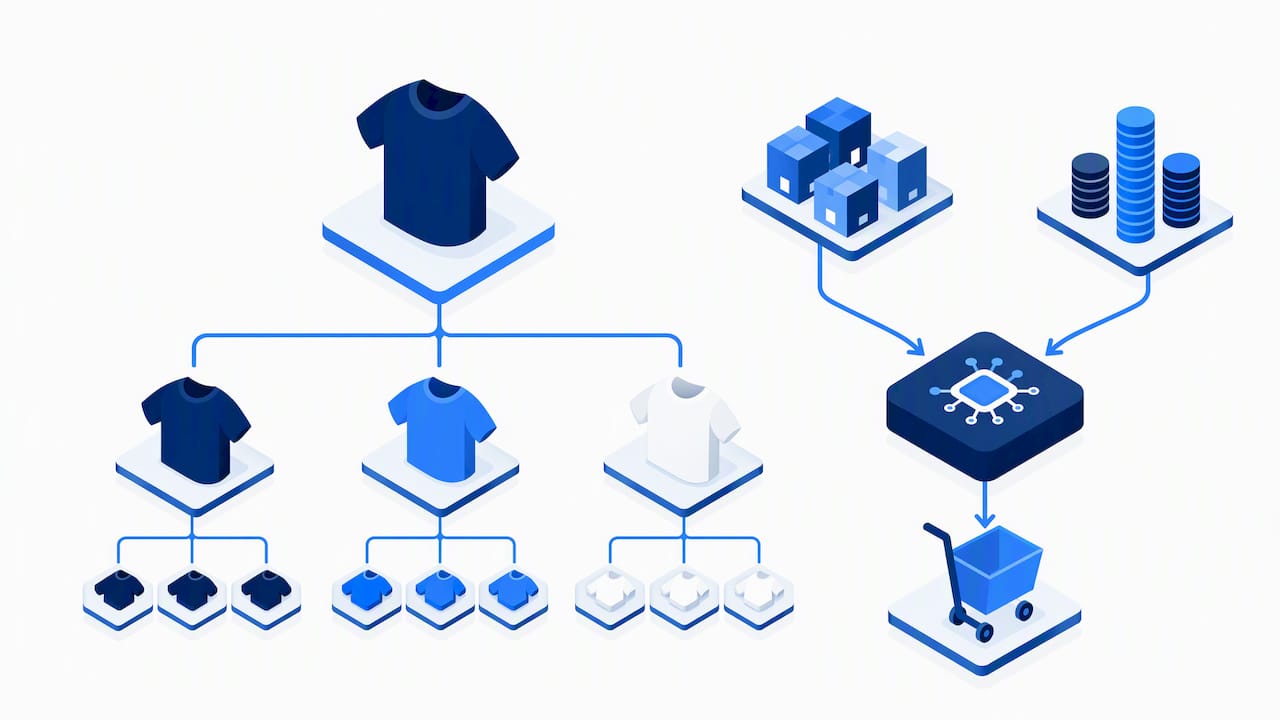
The data behind the urgency
The case for prioritising content automation and data hygiene now, rather than later, rests on a few concrete figures from recent retail data.
| Finding | Figure | Source |
|---|---|---|
| AI-referred order growth | Grew nearly 13x year-over-year | Shopify AI search insights |
| AI-referred visitor conversion | Converts at nearly 50% higher rates than organic search visitors | Shopify AI search insights |
| Product page UX quality | Around 62% of sites have mediocre or worse product page UX | Baymard product page UX benchmark |
| Description detail at scale | 10% of large sites fail to maintain consistently detailed descriptions | Baymard product page UX benchmark |
Put together, these figures describe a market where AI-referred traffic is growing fast and converting well, while most product pages are not yet good enough to take advantage of it. The gap between those two trends is exactly where structured, well-governed content automation pays off fastest.
To prove ROI on an automation project, track three things consistently: time spent per listing before and after, the number of listings brought up to the new content model, and any measurable shift in conversion rate on the categories touched first.
How MerchUp helps: practical example, pilot plan and proof points
We generate product descriptions, bullets and metafield content from attribute data, using customizable drag-and-drop templates and a visual editor so teams can adjust tone without rebuilding a template from scratch. Our integration with Shopify allows generated content to publish directly into the catalogue, with bulk publishing for larger batches and activity tracking so teams can see what changed and when.
For a first pilot, 50 to 200 SKUs is enough to test a template properly without risking the whole catalogue. Our guide on automating product descriptions for a pilot batch walks through choosing the batch, running it through a template, and measuring the result against the manual baseline.
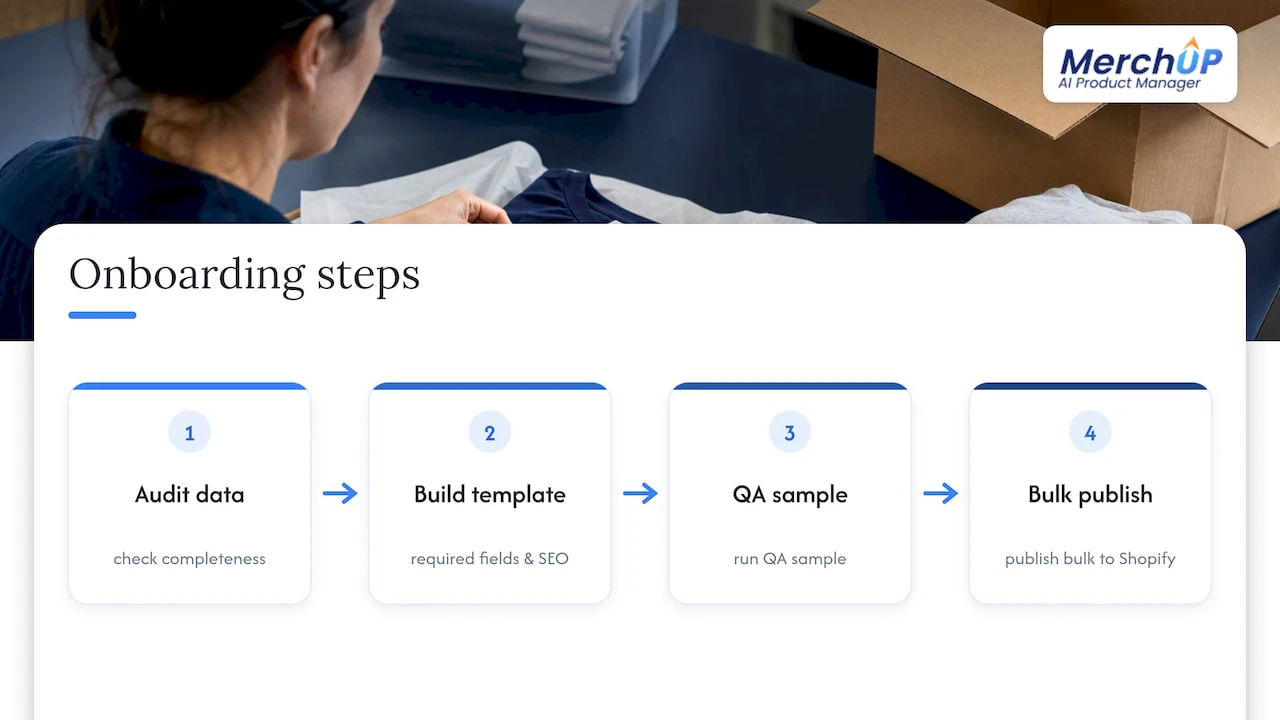
A typical onboarding sequence looks like this: audit the category’s data completeness, build a template with required fields and SEO rules, run a QA sample before publishing, then bulk publish the rest. Our copy-and-paste template guide is a useful starting point for building that first template.
Where content automation fits in a growth roadmap
Automate your best-selling or highest-margin categories first. That is where a small lift in conversion or a reduction in listing errors pays back fastest, and it is where you will learn the most about what your templates get wrong before extending them catalogue-wide.
Keep a human review gate even after automation beds in. Brand tone drifts, edge cases appear (a product with no clear category, a supplier feed with missing fields), and periodic sampling catches these faster than waiting for a customer complaint.
The bigger long-term payoff is data hygiene. Clean, structured attributes are what let a catalogue plug into AI-driven discovery and shopping agents later without a second clean-up project. Automation without that foundation just produces more listings that still need fixing.
— Jamie Moss
Get started with MerchUp: tutorial, templates and pricing
We built MerchUp around the exact workflow described above: customisable templates, a visual editor, and bulk publishing that connects directly to Shopify, so a catalogue audit turns into finished listings in days rather than weeks.

A sensible way to start is a small pilot, then scale once the template and QA process hold up.
- Try the 30-second tutorial to see how a description is generated and edited.
- Review the product page for template, visual editor and Shopify integration details.
- Compare plans on the pricing page, from Starter at £12.99 per month up to Scale at £149.99 per month.
Pick a batch of 50 to 200 SKUs, run it through a template, and measure time saved and listing completeness before rolling out further.
FAQ
What is ecommerce automation?
Ecommerce automation covers software that handles repetitive store tasks, such as generating product content, updating inventory, or syndicating listings to sales channels, without manual input for each item. In content specifically, it means using templates and AI to produce titles, descriptions and structured attributes at scale rather than writing each one by hand.
What is the 80/20 rule in ecommerce?
The rule in ecommerce generally refers to the idea that a small share of products or customers drives most of the revenue, so prioritising effort on that smaller group tends to produce the biggest return. Applied to content automation, it means tackling best-selling categories first rather than spreading effort evenly across the whole catalogue.
What are the 5 C’s of ecommerce?
Definitions of the “5 C’s” vary depending on the source, but a common version covers content, commerce, community, conversion and customer experience as the core pillars of a successful online store. There is no single official definition, so treat it as a general framework rather than a fixed standard.
Is ecommerce still profitable in 2026?
Ecommerce remains a growing channel, with AI-referred orders on Shopify growing nearly 13x year-over-year and converting at nearly 50% higher rates than organic search visitors, according to Shopify’s AI search data. Profitability still depends on margins, operating costs and execution, but demand through AI-driven discovery is a growing part of the picture.
How much does MerchUp cost?
MerchUp plans run from Starter at £12.99 per month to Scale at £149.99 per month, with Growth and Pro tiers in between, as listed on the pricing page. Each tier includes different feature sets and AI generation credits.


Comments
No comments yet — be the first to share what you think.