


This page gives you 15 ready-to-run product description prompts plus the short workflow to use them properly. Paste your product facts (specs, five real reviews, ideal customer) into the templates below, run one, and edit the output before it goes live. MerchUp can carry that whole workflow through to Shopify if you want it automated rather than manual.
TL;DR:
- Incorporating detailed customer reviews, specific use cases, and brand voice examples into prompts significantly improves the quality of AI-generated product descriptions.
- Structuring prompts around role, task, context, constraints, and examples ensures consistency and relevance across multiple SKUs.
- Fact-checking each AI output against source specs and claims is critical to prevent hallucinations and legal issues before publishing.
- Using a layered approach with headlines, benefits, specifications, and audience-specific details enhances both search ranking and customer engagement.
- Automating the workflow with tools like MerchUp can streamline bulk description creation and publishing, but human review remains essential for accuracy.
What makes a product description prompt actually work
Most people write prompts like “write a product description for this candle.” That produces generic filler because the model has nothing specific to work with. A prompt that actually earns its output has five parts, and skipping any one of them is where quality falls apart.
Role sets the voice before anything else happens. Telling the model to act as “a senior copywriter for a premium outdoor brand” produces noticeably different sentences than no role at all, because it constrains vocabulary and tone from the first word. Task defines the shape of the output: headline length, number of bullets, word count, whether you want a call to action. Without this, you get inconsistent formatting across every SKU you run, which becomes a real problem once you’re generating descriptions at volume.
Context is where most sellers underinvest. Specs alone aren’t enough. Feed the model the top five customer reviews, the actual use case, and who buys the product, and the output stops sounding like a spec sheet. This matches what a free AI prompt template built around Role, Task, Context, Constraints and Examples recommends as the backbone of any reusable prompt. Constraints tell the model what to avoid: banned superlatives, required keywords, a maximum adjective count, a rule to support any claim with a fact rather than an assertion. Shopify’s own guidance is blunt on this point: avoid vague superlatives and back claims with real customer experience or technical detail instead of adjectives that mean nothing.
Finally, examples anchor tone. Paste in one description you already love, even from a different product, and ask the model to match its rhythm.
Here’s the difference in practice:
- Short prompt: “Write a 60-word product description for a stainless steel water bottle. Mention it’s leak-proof and keeps drinks cold for 24 hours.”
- Full prompt: “Act as a copywriter for an outdoor gear brand. Write a 60-80 word product description for our 750ml stainless steel water bottle. Audience: hikers and commuters aged 25-45. Include: leak-proof lid, keeps cold 24 hours, keeps hot 12 hours. Use one line from this review: ‘Survived a 40-degree hike without sweating a drop.’ Avoid the words ‘perfect’ and ‘amazing.’ End with a soft call to action.”
The second version produces copy you can publish with minor edits. The first produces something you’ll rewrite from scratch.
15 ready-to-use prompt templates you can run right now
Each template below targets a different listing need. Copy one, swap in your product details, and run it.
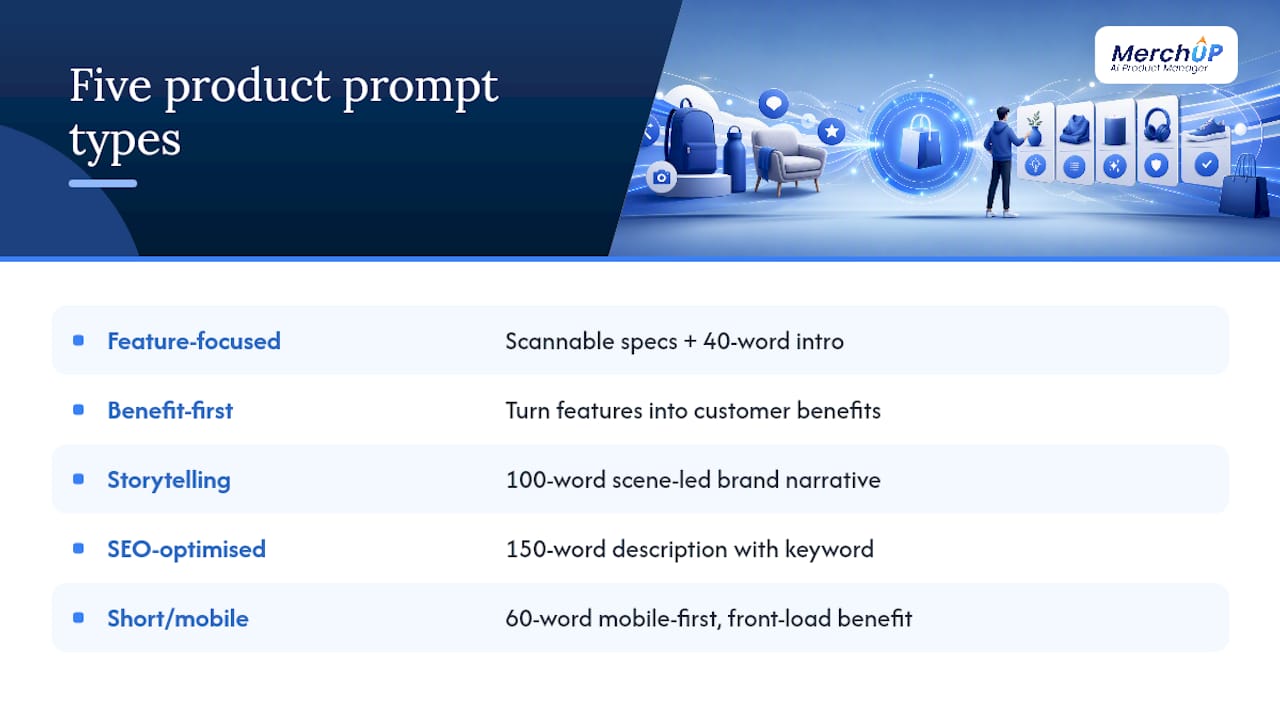
1. Feature-focused prompt “List the following specs for [product] in a scannable format, then write a 40-word intro paragraph that ties the specs to a real use case: [paste specs].”
2. Benefit-first prompt “Rewrite these features as customer benefits, focusing on what changes in the buyer’s day: [paste features]. Write two sentences per benefit, no jargon.” This forces the model to answer “so what?” for every spec, which is the gap that turns features into something a buyer actually wants.
3. Storytelling/brand narrative prompt “Act as a brand storyteller for [brand name]. Write a 100-word description for [product] that opens with a moment of use, not a spec. Brand tone: [warm/bold/minimal]. End with one line connecting the product to the brand’s mission.”
4. SEO-optimised prompt with keyword slot “Write a 150-word product description for [product]. Include the keyword ‘[primary keyword]’ in the first sentence and once more naturally later. Use one H3 subheading. Avoid keyword repetition beyond twice.”
5. Short/mobile-optimised prompt (50-80 words) “Write a 60-word mobile-first product description for [product]. Front-load the strongest benefit in the first 10 words. No subordinate clauses longer than eight words.”
6. Long/high-ticket prompt (300–500 words)
“Write a 400-word product description for [high-ticket product, e.g. sofa/mattress/appliance]. Structure: 40-word hook, three-paragraph story covering materials and craftsmanship, five-bullet spec list, one paragraph addressing a common buyer hesitation.”
7. Variant/size/material prompt “Write one base description for [product] plus three 20-word variant notes for [size/colour/material options], each highlighting why someone would choose that specific variant.”
8. Comparison/variant selector prompt “Write a short comparison guide (100 words) helping a buyer choose between [Variant A] and [Variant B] of [product], structured around who each variant suits best.”
9. Sensory-driven prompt “Write a 70-word description for [product] that leans on sensory detail: texture, sound, smell, or visual weight. Avoid abstract claims. Ground every sentence in something the buyer can physically notice.”
10. Problem-solution (PAS) prompt “Write a 90-word product description for [product] using the Problem-Agitate-Solution structure. Open with the specific frustration [target customer] has, agitate briefly, then resolve it with the product.”
11. Gift-focused prompt “Write an 80-word gift-angled description for [product]. Address the gift-giver directly, note who this suits (occasion/recipient), and include one line about unboxing or presentation.”
12. Review-fed authenticity prompt “Here are five real customer reviews for [product]: [paste five reviews]. Write a 100-word description that borrows phrasing and specific details these customers used, without directly quoting them.” Feeding real reviews this way is one of the more reliable ways to strip out generic AI phrasing, because the model adopts buyer language instead of inventing its own.
13. FAQ-enhanced product description prompt “Write a 70-word core description for [product], then add three FAQ-style Q&As addressing the most common pre-purchase questions: [list objections, e.g. sizing, care, compatibility].”
14. A/B test prompt (generate variants) “Write three distinct 60-word descriptions for [product]: one benefit-led, one story-led, one spec-led. Keep the same product facts across all three so only tone and structure change.”
15. Accessibility and alt-text prompt “Write a 125-character alt-text description for this product image showing [describe image], focused on what a screen reader user needs to know. Then write a one-sentence accessible summary of the product’s core function.”
How to turn these prompts into a repeatable workflow
Running one good prompt once is easy. Running fifteen products through a consistent process without losing quality is the actual job. Here’s the sequence that holds up at scale.
- Gather inputs before you open the AI tool. For every product, collect the title, full spec sheet, five genuine customer reviews (or the closest equivalent if the product is new), a one-line description of the ideal customer, and two or three target keywords.
- Run three variants from the same input set. Change only the angle (benefit-led, story-led, spec-led), not the underlying facts. This gives you raw material to combine rather than a single output you’re stuck editing from scratch.
- Read each variant against the source facts, not against how polished it sounds. Cross-check every claim, number, and material name against your actual spec sheet before anything gets near a live listing.
- Combine the strongest lines into one final draft. The opening hook from variant one, the bullet structure from variant two, the closing line from variant three, that sort of thing.
- Route anything touching legal or safety claims to a human sign-off. Health claims, weight limits, certifications, “clinically tested” language, none of that should publish on AI output alone.
- Publish through your CMS or platform’s product-description field, checking that formatting (bold, bullets, line breaks) survives the paste.
The single biggest failure mode here is hallucination: the model inventing a certification, a warranty length, or a material that doesn’t exist because it sounds plausible. Never treat AI copy as final until someone checks it against the actual product sheet.
Pro Tip: Keep a running “banned facts” note for each product category, things the AI keeps getting wrong (a discontinued feature, an old warranty term) and paste that note into every prompt for that category until you’ve retrained the pattern out.
SEO and length rules that actually move rankings
Where you place your keyword matters more than how often you repeat it. Put the primary keyword in the headline and again somewhere in the first 50 words; beyond that, natural variation reads better and avoids looking stuffed. That guidance comes straight from Shopify’s own advice on writing persuasive, search-visible product copy, and it holds regardless of category.
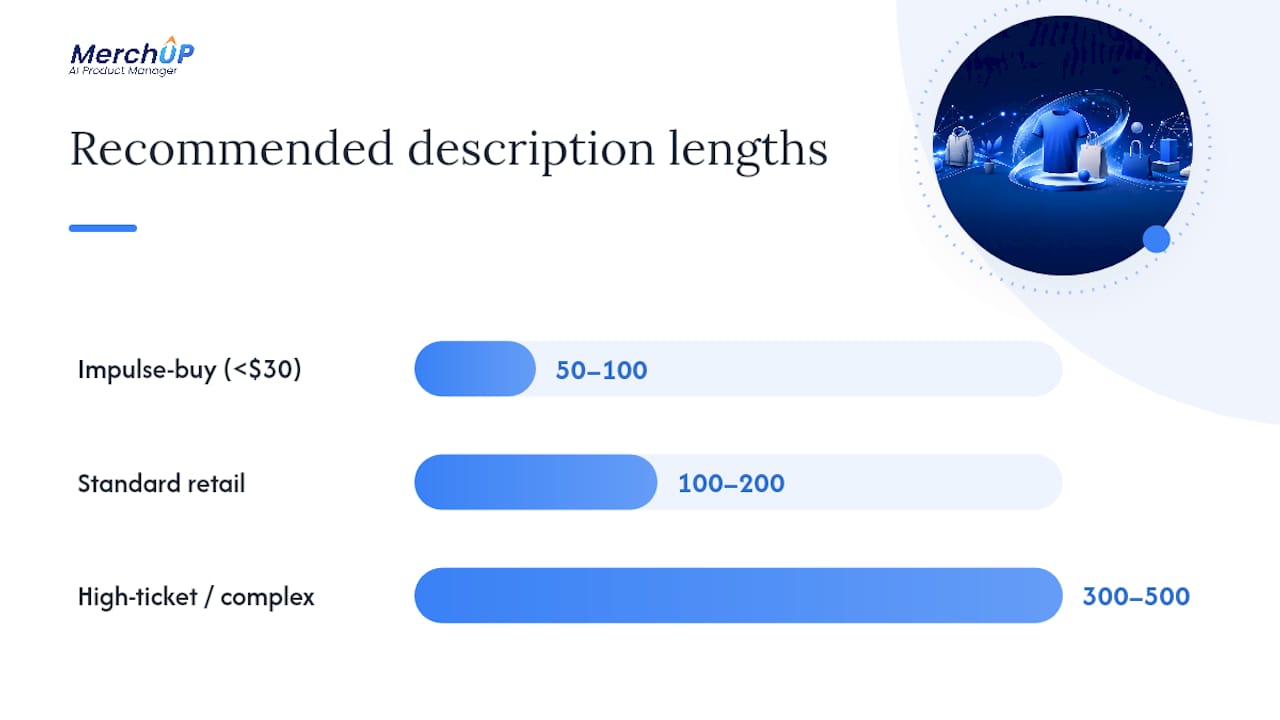
Length should flex with what you’re selling, not follow one fixed rule:
- Impulse-buy items (under $30, low consideration): 50-100 words is usually enough.
- Standard retail products: 100-200 words, structured around a short hook plus bullets.
- High-ticket or complex items: 300-500 words, because buyers researching a $2,000 purchase want the reassurance a two-line description can’t give.
Every SKU needs its own copy. Pasting the manufacturer’s boilerplate across ten listings is one of the fastest ways to tank organic visibility, since search engines treat duplicate product copy as low-value content. Add Product schema markup and descriptive alt text to images. These are small technical steps, but they’re the difference between a listing search engines can parse cleanly and one they’re guessing at.
A layered structure headline, short benefit paragraph, bullet list, expanded story, spec table, works because it serves both the shopper skimming for three seconds and the one reading every word before checking out. Shopify’s own conversion-focused guidance on structuring product pages backs this layered approach, and it’s worth building directly into your prompt templates so every generated draft comes out pre-structured rather than as one dense block.
Keep paragraphs short, three sentences at most, and stick to four to six bullets covering the benefits that actually decide the sale. Most shoppers aren’t reading your description; they’re scanning it, and dense text loses them before the second sentence.
Testing and quality control for AI-generated copy
Publishing AI copy without checking it is how a return-rate spike or a legal complaint happens. Testing and QA aren’t optional extras here; they’re what separates a scalable content process from a liability.
Track three metrics per listing: click-through rate on the headline (if it’s used in search snippets or ads), add-to-cart rate, and final conversion rate. A description can lift clicks and still tank conversion if it oversells, so watch both ends of the funnel, not just one.
- Run a simple A/B test on the headline and short paragraph first. These two elements carry the most weight for the least testing effort, and testing them in isolation tells you more per test than rewriting the whole page.
- Fact-check every spec against the source sheet before publishing, not after a customer complains.
- Sample a percentage of generated pages for editorial review each week, even after the process feels reliable. AI drift happens quietly.
- Log any hallucinated claim you catch so the same error doesn’t repeat across the next batch of products.
| Element | What to track | Why it matters |
|---|---|---|
| Headline | Click-through rate | Cheapest, highest-leverage test to run first |
| Short paragraph | Add-to-cart rate | Signals whether the hook converts interest into action |
| Full description | Conversion rate | Reveals whether detail resolves hesitation or adds friction |
| Specs/claims | Accuracy against source sheet | Prevents returns, complaints, and legal exposure |
Building a prompt library that scales without breaking
A handful of prompts you run manually works fine for twenty products. It falls apart at two hundred. Scaling means turning your best prompts into a governed, reusable system rather than a folder of half-remembered drafts.
- Use consistent placeholders like
[PRODUCT_NAME],[TOP_BENEFIT],[REVIEW_QUOTE]so anyone on the team can fill a template without guessing the format. - Name templates by category and intent, not by date, so “Sensory_Skincare_v2” is findable six months from now.
- Set a mandatory sample QA rate on every batch run, checking a meaningful slice of generated pages before they go live, not just the first one.
- Assign one person to sign off on batch runs touching health, safety, or certification claims, no exceptions.
- Track credit or usage spend per batch if you’re running AI generation at volume, so a bulk run doesn’t quietly burn through a month’s allowance overnight.
This is the exact gap MerchUp is built to close: it stores your templates, runs bulk generation against your product catalogue, and publishes straight into Shopify without the copy-paste step between your prompt library and your live store.
What actually works once you’re running this at scale
Throughput improves fast once decent prompts and review reviews replace blank-page writing. The bigger shift isn’t speed though, it’s consistency. Twenty listings written by one person on a Tuesday afternoon read wildly differently to twenty written the following Friday. A structured prompt closes that gap almost completely, because the format, tone rules, and constraints travel with the template rather than living in someone’s memory.
Where this breaks down is anywhere a claim carries real weight, safety certifications, medical-adjacent wording, warranty terms. AI will confidently state a fact that sounds right and isn’t, and no amount of clever prompting fully removes that risk. The fix isn’t avoiding AI copy. It’s accepting that a human has to check every factual claim before it goes live, every time, without exception.
The lesson that took longest to land: treat prompts as reusable starting points, not fixed rules. The same template rarely performs identically across two product categories. Refine it per SKU type instead of forcing one prompt to do every job.
— Jamie Moss
Generate, edit, and publish descriptions with MerchUp
MerchUp is built to run everything above without the manual copy-paste between your prompt library and your storefront. It generates SEO-optimised product descriptions from your catalogue data, gives you a visual editor to fine-tune tone and structure before anything publishes, and pushes finished copy straight into Shopify with live integration, no exporting, no re-uploading.

What you get from the tutorial: a walkthrough of generating a description in around 30 seconds, editing it against your brand voice, and publishing it directly to your store, using the same drag-and-drop templates and activity tracking that keep a growing catalogue consistent instead of chaotic. If you’re already running fifteen prompt templates manually across dozens of SKUs, this is the point where doing it by hand starts costing more time than it saves. Try the MerchUp tutorial to see the workflow end to end, or head to the MerchUp product page to start generating descriptions for your own catalogue today.
Sources
For deeper guidance beyond this article, Shopify’s own advice on product descriptions that sell and product copy that converts covers the fundamentals of evidence-based copywriting and search visibility in more depth. PracticalEcommerce’s piece on AI prompts for product descriptions is worth bookmarking for prompt-specific tactics, and Scale Growth Digital’s breakdown of layered description structure pairs well with the templates covered here. For broader context on AI’s role in ecommerce search visibility, see this overview of AI and ecommerce SEO.
- How to write product descriptions that sell (Shopify)
- How to write product descriptions that convert (Scale Growth Digital)
- Product Description — Free AI Prompt Template | PromptItIn
- AI prompts for better product descriptions (PracticalEcommerce)


Comments
No comments yet — be the first to share what you think.