


Real time catalogue sync pushes an authorised product update (a new price, a rewritten description, a stock change, a fresh image) straight from your content source to connected storefronts within seconds. For most stores, the right starting point is a webhook-driven push, backed by a scheduled incremental sync as a safety net. MerchUp handles the content side of that pipeline, and Shopify’s productSet mutation covers the technical delivery layer worth exploring first.
TL;DR:
- Webhook-driven updates provide real-time synchronization for price drops and stock changes, significantly reducing redundant network requests by approximately 98%.
- Combining webhook notifications with scheduled incremental sync ensures both speed and reliability, especially for large catalogs and SEO updates.
- Prioritizing fields like availability and price over descriptions and images improves sync efficiency and reduces data drift risks.
- Proper testing, monitoring success rates, latency, and implementing reconciliation passes are critical to maintaining sync accuracy and preventing silent data staleness.
- Starting with a sandbox environment and small SKU batches helps validate sync workflows without risking live catalog errors.
What does real time catalog sync actually involve?
Every catalogue sync setup has three moving parts: an authoring source, an integration layer, and the storefronts that display the final product. The authoring source is wherever product truth lives, a PIM, a spreadsheet, or a content platform like MerchUp where descriptions get written and approved. The integration layer is the plumbing: webhooks, APIs, and queues that carry the change. The storefront, usually Shopify plus any marketplaces you sell on, is where the customer actually sees the update.
Modern syndication setups lean on this same structure. A PIM paired with feed management and APIs keeps titles, descriptions, images, and pricing consistent across every channel a product reaches. Without that central source, you end up updating five places by hand and hoping nothing drifts.
There are two ways a change actually travels from source to storefront:
- Webhook push: the source fires an event the instant something changes, and the storefront updates within seconds. Best for price drops, flash sales, or urgent stock corrections.
- Scheduled or polling sync: the integration checks for changes on a timer (every 15 minutes, hourly, nightly) and pushes a batch. Best for bulk description rewrites or catalogue-wide SEO updates where a short delay is harmless.
Retailers running sync at scale often add a third layer: a central catalogue service that publishes updates outward and logs every propagation for audit and reconciliation. That log becomes essential the first time someone asks why a product still shows the old price.
Not every field needs the same urgency. Prioritise, in roughly this order: availability and price (customer-facing and revenue-sensitive), SKU and title (identity fields that break matching if wrong), description and images (SEO and conversion), and a last-updated timestamp on every record so you can always answer “when did this actually change?”
Which integration pattern fits your store?
Two architectures cover almost every real-world setup, and the choice usually comes down to how fast your catalogue moves.
Event-driven webhooks fire the moment a record changes. This is the right default for fast-moving SKUs, live inventory corrections, and anything time-sensitive. Polling or scheduled incremental sync checks for changes on an interval and is better suited to large, predictable batches, an overnight SEO rewrite across 4,000 SKUs doesn’t need to be instant, it needs to be complete and correctly sequenced.
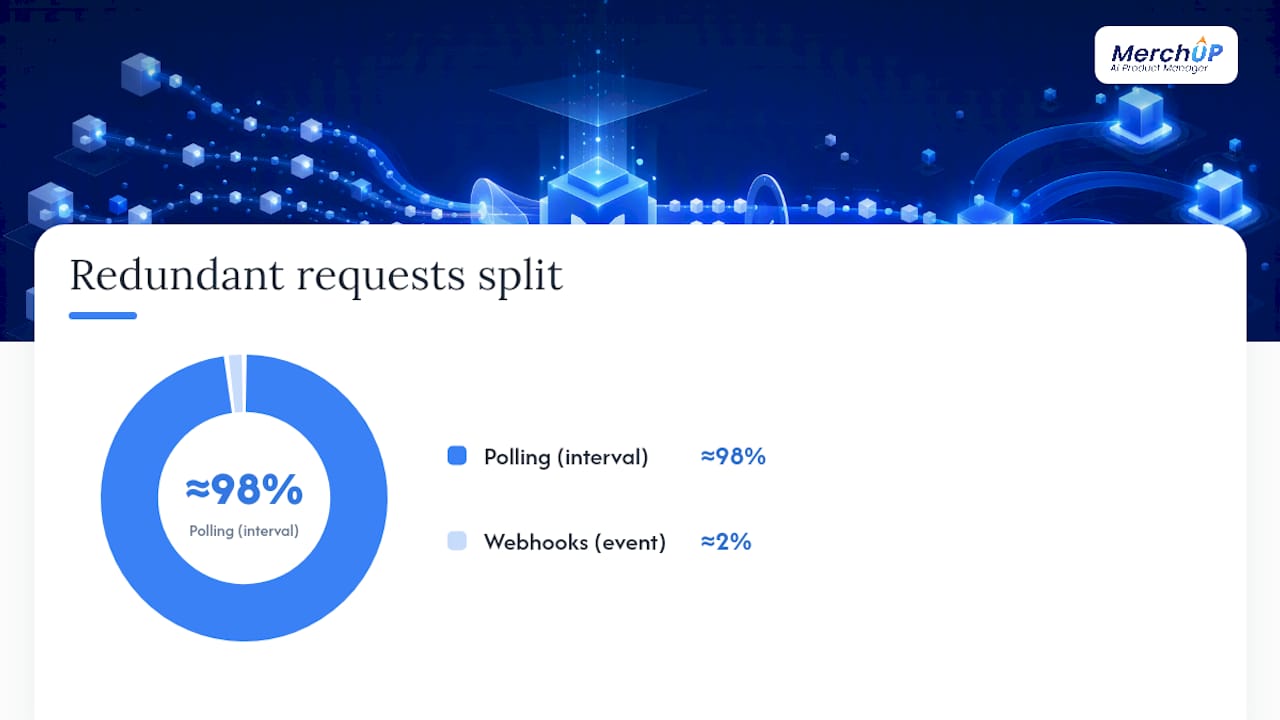
The performance gap between these two isn’t marginal. Moving from frequent polling to webhook-driven updates cuts redundant network requests by roughly 98%, because you stop asking “did anything change?” a thousand times an hour and instead get told the answer once, when it’s true.
On Shopify specifically, the productSet mutation in the GraphQL Admin API synchronises a product’s complete state in a single operation. It runs synchronously for quick, small updates or asynchronously for bulk changes, returning an operation ID you poll until it completes. If your source of truth lives outside Shopify and needs to mirror exactly, productSet is the pragmatic tool built for that job.
For storefronts serving multiple markets, contextual product feeds handle localised data per country or language and keep channels in sync through incremental updates rather than a full resync every time.
A few practical guardrails matter regardless of which pattern you pick:
- Scope your queries to the fields you actually need, pulling every attribute for every product wastes bandwidth and slows every sync cycle.
- Authenticate with the narrowest access scope Shopify allows for the task, not a blanket admin token.
- Watch rate limits closely. A webhook storm during a flash sale can hit API ceilings if your queueing isn’t ready for it.
By the numbers: cutting unnecessary polling requests by around 98% isn’t just a bandwidth saving, it’s the difference between a sync that scales past a few hundred SKUs and one that grinds under its own weight at product number 501.
How do you build the sync pipeline step by step?
Treat this as a build order, not a wish list. Skipping steps is how teams end up publishing broken listings at 2am.
- Name your source of truth. Decide whether MerchUp, your PIM, or another system owns the authoritative product record, and set enrichment and approval gates so incomplete items can’t publish by accident.
- Define schema and validation rules. Empty fields, malformed HTML, and length mismatches are the most common cause of failed syncs. Catch these inside the content tool before anything reaches an API.
- Choose your sync model. Webhook-driven for time-sensitive changes, incremental scheduled sync as the backstop. Most stores need both, not one or the other.
- Build idempotent update logic. Every operation should produce the same result whether it runs once or five times, because duplicate deliveries will happen.
- Queue everything through background workers. Accept incoming changes quickly, then process them asynchronously so a traffic spike doesn’t take your endpoint down.
- Plan backfill and reconciliation windows. Schedule a periodic full resync alongside the real-time feed, and track a last-successful-sync timestamp per destination so you can spot drift and replay safely.
Pro Tip: Store the last-success timestamp per product, per destination, not just per sync job. That granularity is what lets you backfill three broken SKUs instead of re-running the entire catalogue.
Idempotency and precise timestamps aren’t optional polish, they’re what makes safe replay possible without duplicating or losing data further down the line.
How should you test and monitor catalogue sync?
Test before you build, not after. A visual sandbox portal that lets you run sample queries and inspect real responses exposes field formatting quirks and edge cases while they’re still cheap to fix, long before they turn into a production incident.
Once live, track four numbers on every sync run: success rate, latency, record counts processed, and the last-success timestamp per destination. Schedule a full reconciliation pass on top of the real-time feed, because even reliable pipelines drift over weeks.
Watch for these specifically:
- Repeated failures on the same SKU or field, usually a validation gap you missed
- Queue depth climbing steadily rather than draining, a sign your workers can’t keep pace
- Shopify userErrors appearing in productOperation responses, which need their own line in your monitoring dashboard rather than getting buried in a general error log
Worth remembering: the 98% cut in redundant requests that makes webhooks efficient also means fewer chances to notice a silent failure through simple polling. Monitoring has to replace the visibility you lose by not constantly checking.
Keep replay and backfill procedures documented and tested, not theoretical. The first time you need them will be during an incident, not a quiet Tuesday.
Where does MerchUp fit in this pipeline?
MerchUp sits at the authoring end of everything described above; the source of truth your sync pipeline pulls from. It generates SEO-optimised descriptions with AI, applies them through customisable drag-and-drop templates, and lets a store team review changes in a visual editor before anything publishes. Activity tracking gives you the audit trail that pairs naturally with the run logs a real-time sync needs.
Because MerchUp already integrates with Shopify, bulk rewrites and SEO-safe publishing flow directly into the productSet based sync patterns covered earlier, no separate export step required. If you want to see this working before touching your live catalogue, generate descriptions for a small batch of SKUs and publish them to a sandboxed Shopify test store first. That single pilot tells you more about field mapping and formatting quirks than any amount of documentation reading.
What actually goes wrong with real-time sync?
The biggest failure mode isn’t dramatic, it’s silent staleness. A webhook drops, nobody notices, and a product sits with yesterday’s price for three days because there was no reconciliation pass to catch it. Real-time systems create a false sense of security precisely because they usually work.
Rate limits are the second recurring headache. A flash sale or a bulk SEO rewrite can generate a burst of updates that exceeds what your API allows, and without a queue absorbing that spike, some updates simply get dropped or delayed. Payload size compounds this: pulling every field for every product instead of scoping queries slows every cycle and increases the odds of a timeout.
Then there’s data quality. A sync pipeline faithfully pushes exactly what it’s given, including a malformed price, a description with broken HTML, or a duplicated SKU. Fast delivery of bad data is still bad data, only now it’s live in front of customers within seconds instead of hours.
Multi-channel complexity adds a further wrinkle. A change that’s correct for Shopify might need a different format for a marketplace feed, and without contextual handling, one destination ends up wrong while another looks fine. None of this makes real-time sync fragile by nature, but it does mean the validation and monitoring steps covered earlier aren’t optional extras, they’re what keeps speed from becoming a liability.
How do you keep large catalogues fast?
Scale changes the maths. A sync pattern that works cleanly for 200 SKUs can buckle at 20,000 unless you build for volume from the start.
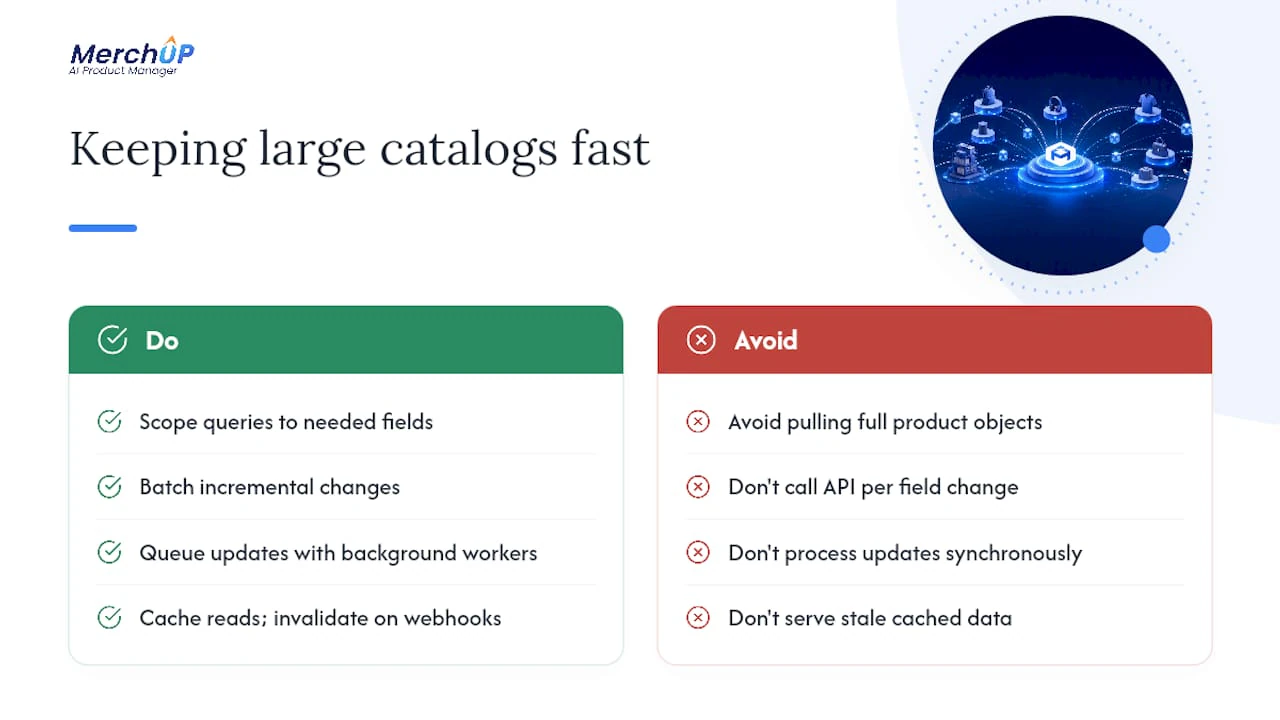
Scoping queries to only the fields you need is the single biggest lever, pulling full product objects when you only need price and availability multiplies payload size for no benefit. Batching matters too: grouping incremental changes into sensible chunks rather than firing one API call per field change reduces overhead dramatically.
Queueing with background workers, rather than processing updates synchronously as they arrive, is what protects your system during genuine spikes, a flash sale, a bulk rewrite, a marketplace-wide price adjustment. Workers absorb the burst and process it at a sustainable pace instead of overwhelming the destination API.
Caching helps on the read side. If a storefront queries the same product data repeatedly, serving from a cache that’s invalidated on webhook events avoids redundant round trips. And incremental sync, sending only what changed rather than the full record every time, keeps both bandwidth and processing time proportional to actual change volume rather than catalogue size.
For genuinely large catalogues, a central sync hub that fans updates out to multiple destinations from one place tends to outperform point-to-point integrations built per channel, partly because it’s the only place logging and monitoring need to live.
What security steps does live sync need?
Every real-time connection is an open door, and it needs to be a narrow one. Authentication should use the smallest access scope the task requires, a token that can update product descriptions has no business also holding permission to issue refunds or access customer data.
Webhook endpoints need signature verification on every incoming payload, confirming a request genuinely came from Shopify (or whichever platform is sending it) rather than a spoofed call hitting your public endpoint. Encrypt data in transit as standard, and avoid logging full payloads in plaintext if they ever touch pricing or customer-adjacent fields.
Rate limiting and request throttling double as a security measure, not just a performance one, they blunt the impact of a compromised credential firing rapid requests. And access reviews shouldn’t be a one-off setup task: rotate API keys periodically and audit which integrations still hold live scopes, because forgotten test connections are a common quiet vulnerability.
None of this is exotic. It’s the same discipline any API integration needs, applied consistently rather than skipped because “it’s just product descriptions.”
Real-time sync versus the alternatives
Manual updates are the baseline every store starts from, and they don’t scale past a handful of products before errors creep in. Someone forgets a store, a price goes stale, a description never gets the SEO pass it needed.
Batch export and import, CSV files pushed on a schedule, solves consistency but not speed. It’s fine for a monthly full catalogue refresh, poor for anything time-sensitive like a flash sale or urgent stock correction.
Scheduled polling sits in the middle: better than manual, still limited by the interval you set. Check every hour and you accept up to an hour of staleness on every field, every time.
Webhook-driven real-time sync closes that gap, at the cost of more setup complexity, idempotency logic, queueing, monitoring. The right answer combines webhooks for fast changes with periodic reconciliation for guaranteed consistency, rather than treating either pattern as sufficient alone. Pure real-time without a reconciliation pass drifts quietly; pure batch without any real-time layer is simply too slow for anything customer-facing and price-sensitive.
How does sync affect systems beyond the storefront?
A product update rarely stays contained to one screen. Change a price on the authoritative source and it needs to reach the storefront, any connected marketplace feed, search indexing, and potentially a recommendation engine or email campaign pulling live product data, all without one lagging behind the others.
Inconsistency here is what erodes customer trust fastest: a shopper sees one price in a marketplace ad and a different one on arrival at your store, because the marketplace feed synced ten minutes after the storefront did. That’s a real-time sync architecture problem, not a marketing one, and it’s exactly why last-success timestamps per destination matter so much, they let you see which downstream system is lagging before a customer does.
Analytics and reporting depend on this consistency too. If your sync pipeline updates Shopify but not the data warehouse feeding your dashboards, you’re making decisions off numbers that no longer match what customers actually see. Full reconciliation passes exist partly to catch this kind of quiet divergence between systems that are supposed to agree but drift apart under load. Treat every downstream consumer of product data as a stakeholder in the sync pipeline, not an afterthought bolted on once the storefront works.
When is real-time sync worth the setup effort?
Real-time sync earns its complexity for fast-moving SKUs, flash sales, and anything feeding a chatbot or agent-assist tool that needs genuinely live data, stale stock counts there create real customer friction. For a catalogue that changes slowly, a scheduled incremental sync every 15 to 30 minutes solves the same problem with a fraction of the engineering overhead.
The mistake I see most often isn’t choosing the wrong architecture, it’s skipping approval workflows and data hygiene checks before flipping automatic publishing on. Speed amplifies mistakes as readily as it amplifies good updates. Get validation right first; the sync pattern matters less than most teams assume.
— Jamie Moss
Try MerchUp before you touch your live catalogue
The safest way to evaluate any of this is on a small, contained batch, not your entire live catalogue on day one. Start with the MerchUp tutorial, which walks through generating a product description in around 30 seconds, and connect it to a sandbox Shopify store rather than your production site for the first run.

From there, three steps get you a genuine pilot: build a template that matches your brand’s tone, run a bulk rewrite across a test batch of SKUs, and enable publishing to that test channel to watch the sync actually happen end to end. You’ll see exactly how MerchUp’s visual editor, activity tracking, and Shopify integration behave together before a single change reaches a real customer. If the results hold up on twenty SKUs, scaling to your full catalogue on the MerchUp platform is the same workflow, just wider.
Sources
- Product Data API integration patterns for ecommerce platforms
- Ecommerce data integration — Shopify enterprise blog


Comments
No comments yet — be the first to share what you think.