


Send your copy in description when a person wrote it, and in structured_description (with digital_source_type set to trained_algorithmic_media) when generative AI produced it. Whichever you use, keep the text about the product only, make it match your landing page, and put the essential facts in the first 160–500 characters. Leave out promotions, links, competitor mentions and gimmicky characters.
TL;DR:
- For generative AI copy, use structured_description.content and set digital_source_type to trained_algorithmic_media; leave description empty so another field cannot override it.
- Lead with product identity, variant, and key facts such as material or capacity in the first 160–500 characters, since shoppers may see only a snippet.
- Keep descriptions factual, product specific, and consistent with the landing page; exclude promotions, links, competitor references, unrelated accessories, all caps, and gimmicky symbols.
- Review Merchant Center’s Needs attention report for short, long, or title matching descriptions; edit isolated cases individually and fix repeat errors at the feed source.
Which attribute should you send for your Google Shopping description?
Merchant Center gives you two routes for description text. The description attribute takes plain text. The structured_description attribute wraps the text in a content field and pairs it with a digital_source_type. Google’s product data specification says non-generative-AI copy may use either attribute with the default source type, while generative AI copy must go through structured_description. Pick one route per product and be consistent across your feed.
The allowed length is 1–5,000 characters. Do not read that as a target. Google’s guidance on text that is too long advises putting the most important product information in the first 160–500 characters, because longer text may require the shopper to expand the product details.
What Google expects inside the field
Google describes the description as information that helps match products to shoppers. Its rich product description guidance lists the content that does that job:
- Features: what the product does and what it includes.
- Technical specifications: capacity, wattage, compatibility, model details.
- Materials and dimensions: the physical facts a shopper would filter on.
- Visual attributes: pattern, finish and shape.
- Variant-defining details: size, colour, flavour or any other attribute that separates this item from its siblings.
What to keep out
The product data specification is equally clear about exclusions. Keep these out of the field:
- Promotional language such as “free shipping” or “limited-time offers”.
- Links to your store or any other site.
- Competitor details and references to other products.
- Accessory lists that belong on their own product entries.
- All-capital copy and gimmicky foreign characters.
Think of the description as structured product information, not an ad slogan. The Manufacturer Center description guidance makes the same point: material, dimensions, compatibility and visual attributes give Google usable signals and help shoppers tell similar products apart.
How should you format and length-manage a Google Shopping description?
Google permits line breaks, lists and italics where appropriate, according to the product data specification. A well-formatted description is not a promotional one. The test is whether the text stays product-only and matches the landing page, not whether it uses a bullet.
Write for the excerpt, not the full field. Although up to 5,000 characters are accepted, many placements show only a short snippet, and shoppers may need to expand to read the rest. So treat the opening as the whole description and everything after it as a bonus.
A practical structure for the opening block:
- Lead with identity: brand, product type and the variant shown (size, colour, flavour).
- Add the core specification next: the one or two facts a shopper compares first, such as capacity or material.
- Keep paragraphs short: two or three sentences, with line breaks between ideas.
- Move secondary detail down: care instructions, extended compatibility and use cases can follow the opening.
- Skip decoration: no ALL-CAPS, stacked exclamation marks or symbol borders.
Say you sell a stainless steel water bottle. A weak opening reads “Amazing bottle you will love!” A usable one reads “Stainless steel insulated water bottle, matte black, double-walled, fits standard cup holders.” The second version gives Google, and the shopper, something to match on within the first line.
Pro Tip: Read only the first 160 characters of ten random descriptions from your feed. If you cannot tell what the product is, which variant it is and what it is made of, rewrite the opening before touching anything else.
If you also manage your own storefront copy, our Shopify product description formatting guide covers the admin side of line breaks and lists, which helps keep feed and page consistent.
How do you submit AI-generated descriptions correctly?
Provenance tagging is a fixed rule, not a judgement call. The description and structured description specification requires generative AI descriptions to use structured_description, with the text placed in content and digital_source_type set to trained_algorithmic_media. Ordinary human-written copy must not be mislabelled as AI output. Google’s 2024 specification update frames this as an operational requirement: mark AI-created text in the structured field instead of debating whether AI was involved.
One trap catches teams that migrate gradually. If a product carries both description and structured_description, check Google’s specification to determine which field applies. If your old human-written text is still mapped in the feed, it can silently override the properly tagged AI copy, or the reverse can leave untagged AI text live. Send only the attribute that matches how the text was produced.
An operational checklist for feeds and Content API submissions:
- Audit the source of every description: decide which products carry generative AI text and which carry human copy.
- Map AI text to
structured_description.content: and nothing else. - Set
digital_source_typetotrained_algorithmic_media: for generative-AI descriptions. - Empty the plain
descriptionfield: for those same products, so it cannot take precedence. - Keep human copy in
description: and do not tag it as AI. - Apply the same logic to titles: Google’s title specification asks for
structured_titlewith the same source type when a title is generated. - Re-check after every feed rule or app change: a new mapping rule can quietly reintroduce both fields.
If you push rich data through the API, Google’s Content API guide shows how description, highlights and structured product details are uploaded together.
Which description errors trigger warnings, and how do you fix them?
Most description problems fall into a small set of patterns. Work through them in this order, since each one can hide the next.
- Identical title and description. The title exists for query matching, while the description supplies design details, specifications, features and use cases. Google’s page on identical values confirms that repeating the title verbatim can raise an issue. Fix it by rewriting the first 160–500 characters to add material, dimensions, variant and use, instead of restating the product name.
- Text too long or truncated. Do not paste a full manual into the field. Cut repetition, then move variant-defining facts such as size and colour to the front so a truncated view never hides them.
- Missing or empty descriptions. Start with your highest-revenue product groups and add short, factual descriptions. Even a few accurate sentences beat an empty field.
- Too-short copy. Google’s troubleshooting guidance shows that keywords alone are not enough. Text must meet a minimum standard of grammar, punctuation and product specificity.
- Disallowed content. Strip promotional phrases, store links, competitor names, accessory lists and ALL-CAPS passages. These are the routine causes of disapproval.
How do you triage description issues at scale in Merchant Center?
Merchant Center’s workflow is built for this. The same troubleshooting page describes the route: go to Products, open Needs attention, choose the description-related issue, and review the affected items. The relevant checks cover descriptions that are too short, too long or identical to the title.
You then have two ways to fix them:
- Single product edit: open the issue, choose Edit product, correct the field and save. This suits a handful of high-value items.
- Bulk correction: download the affected product list, correct the descriptions in your feed or spreadsheet, and re-upload it. This is the right path for hundreds or thousands of SKUs.
- Fix at the source: if your feed is generated from your store, change the template or mapping so the same fault cannot return on the next sync.
- Verify the result: after reprocessing, check that the issue count in Needs attention falls and that the products are accepted. Reprocessing is not instant, so give it time before assuming a fix failed.
For a large catalogue, audit before you rewrite. Inspect the first 160–500 characters of a sample, compare feed copy with the landing page, and look at the Needs attention report for short, long or duplicated descriptions. That tells you whether you have a template problem, which one change fixes, or a data problem that needs product-by-product work.
What optimisation tactics work for a Google Shopping description?
Treat the description as a set of consistent signals rather than creative writing. Google may combine your data with information from other sources and may not use your text exactly as submitted, according to its rich product description guidance. So the feed description, landing page, structured data and variant information should all say the same thing.
- Use consistent attribute phrasing: write material, dimensions and compatibility the same way across similar products (“100% cotton”, not “pure cotton” on one and “all cotton” on another).
- Build attribute-based templates: fill a fixed pattern from your product data so thousands of variants get accurate, non-promotional copy. Our guide to attribute-based descriptions at 10,000 SKUs walks through the approach.
- Answer likely questions: what it is, what it is made of, how it differs and which variant is shown. Completeness beats cleverness.
- Align feed, page and markup: conflicts between feed, landing page and structured data can undermine presentation. Our piece on syncing copy, schema and product pages covers the page side, and this structured data SEO guide is a useful companion for the markup.
- Handle variants deliberately: if each size or colour is its own item, its description should name that variant. See our notes on Shopify variant descriptions.
- Measure after each change: track impressions, clicks, conversions and the Needs attention trend, and change one thing at a time so you can tell what worked.
Pro Tip: Run a monthly spot check of a sample of SKUs, comparing each feed description with its landing page. Any mismatch in material, size or variant may put the product’s presentation at risk.
A broader view of how this fits your wider search work is in our product description SEO guide.
Why consistency and operational checks beat clever copy in 2026
Here is the stance we take. Most description trouble comes from mismatches and process gaps, not from weak prose. Start by making values consistent between the feed and landing page, which can help avoid mismatches.
Treat structured_description for AI output as an engineering requirement, not a marketing choice. It belongs in your feed logic, your mapping rules and your release checks, the same way a price field does. And audit the opening 160–500 characters across a sample of SKUs before anything else: it is a practical place to start, because that is the text shoppers and Google see first.
— Jamie Moss
How MerchUp AI helps you write Merchant Center-ready descriptions at scale
MerchUp AI is an AI product manager for Shopify stores. We turn a product photo or barcode into a complete listing, write the description into a designed template, and create AI product photos, so your copy starts from structured product facts instead of a blank page. That keeps openings specific and consistent across variants, which is exactly what the rules above reward.
We also handle the search side. Our AI does all your SEO in one click: it reads your store’s own Google Search Console data and live Google results, picks keywords, writes meta titles, descriptions and image alt text, checks rankings on live Google and pushes everything to your store. You need no SEO knowledge. Review changes before they go live.
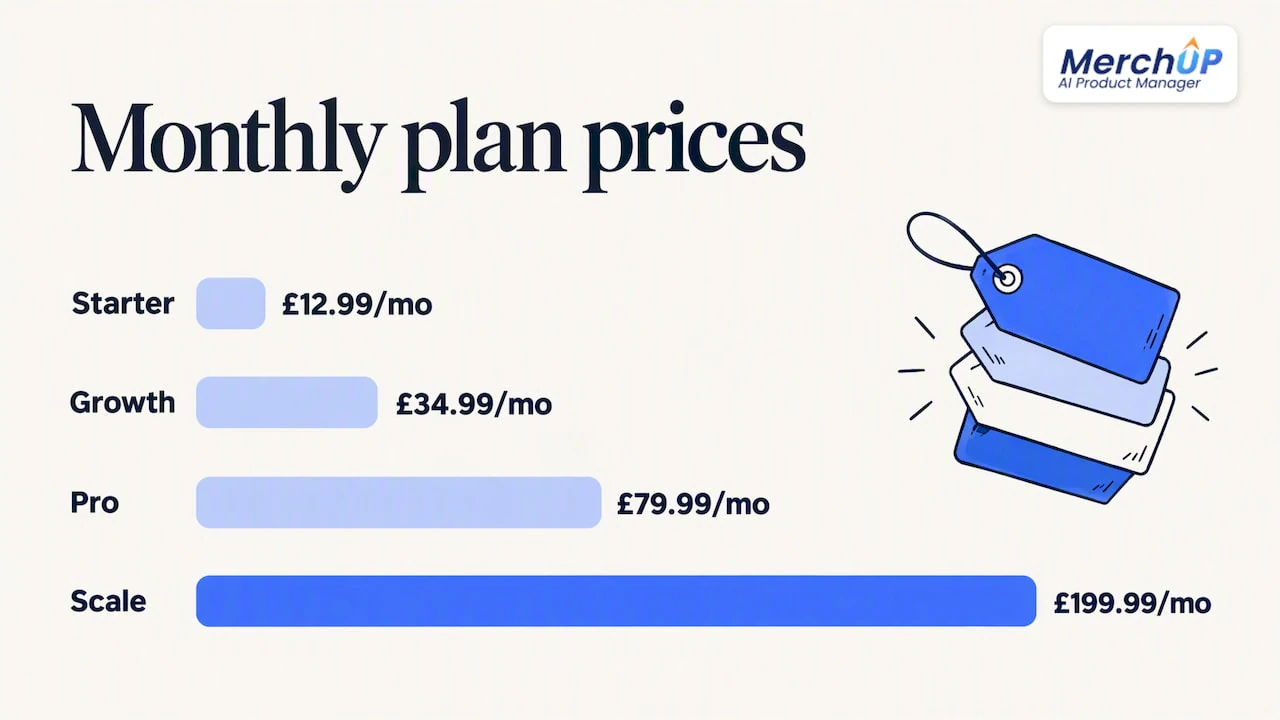
We are available now for Shopify, with Webflow, Wix and WordPress coming soon. There is a Free plan, and paid plans start at £12.99 a month on Starter, with Growth at £34.99, Pro at £79.99 and Scale at £199.99. You can compare them on our pricing page, or watch our tutorial to see how descriptions are generated.

Start on the Free plan today and create product descriptions with MerchUp AI.
FAQ
How do I sell on Google Shopping?
You create a Merchant Center account, submit a product feed with required attributes such as title, description, price and availability, and make sure each item matches its landing page. Once products are approved, they can appear in free listings and, if you choose, in Shopping ads.
How do I edit the Google description of a site’s products?
In Merchant Center, go to Products, then Needs attention, open the affected issue and choose Edit product. For many items, download the affected list, correct the descriptions in your feed and re-upload it. See Google’s troubleshooting steps.
What is the best Google Shopping description length?
Descriptions can run from 1 to 5,000 characters, but the key facts should sit in the first 160–500 characters. Google’s text too long guidance explains that longer text may require the shopper to expand the product details.
Can I use AI to write Google Shopping descriptions?
Yes, but you must send generative AI text through structured_description, with the text in content and digital_source_type set to trained_algorithmic_media. Google sets this out in its description specification.
Sources
- Create rich product description pages - Google Merchant Center Help
- Description description and structured description structured_description - Google Merchant Center Help
- How to fix: Identical values: title title, description description - Google Merchant Center Help


Comments
No comments yet — be the first to share what you think.