


Attribute-based descriptions convert structured product fields, such as size, material, compatibility, and specs, into buyer-facing copy that improves search relevance and conversion. Instead of a generic paragraph, each listing draws its claims from verified data. The result: descriptions that read naturally, hold up under scrutiny, and give both shoppers and search systems something concrete to work with, at whatever scale your catalogue demands.
TL;DR:
- Ensuring accurate data for materials, dimensions, and compatibility is critical, as vague or incorrect attributes lead to high abandonment rates.
- Normalizing attribute data involves standardizing units, explicitly flagging missing data, and separating raw source information from generated copy.
- Match template complexity to product importance, with simple text blocks for low-value SKUs and feature highlights for high-margin, complex items.
- Implement automated quality checks, enforce mandatory fields, and monitor key metrics like error rate, click-through, and conversions to maintain feed and copy health at scale.
- Starting with normalization and category-specific rules improves accuracy more than focusing on tone, and pilot testing small batches reveals data issues before full rollout.
Why attribute-based descriptions matter for search and shoppers
Missing detail costs sales. Baymard’s research found that 10% of the largest ecommerce sites still fail to deliver consistently high-quality product detail, with materials, dimensions, and compatibility flagged as the attributes shoppers rely on most before buying.
That gap exists because most listings are written for one audience when they need to serve two. Search systems want structured, unambiguous values; shoppers want a sentence they can scan in three seconds and trust. Attribute-based writing satisfies both by starting from the data and dressing it in plain English, rather than starting from a template and hoping the specifics fit.
Three attributes carry disproportionate weight across almost every category:
- Materials — what something is made of, because it signals durability, feel, and care requirements.
- Dimensions — exact measurements, including feature dimensions like strap length or seat depth, not just overall size.
- Compatibility — what a product works with, from phone cases to printer cartridges to furniture fittings.
Get these three wrong or vague, and shoppers abandon the page. Baymard’s separate benchmark on listing pages found that a significant portion of sites fail to display list-item attributes consistently, and many do not make each piece of information visually distinct enough to scan quickly, which directly undermines comparison and, ultimately, conversion.
Prepare and normalise attribute data before you generate copy
Good copy cannot rescue bad data. Before any description gets written, structured fields need to be treated as the single source of truth, kept entirely separate from the generated prose that will eventually sit on the page.
- Separate source fields from generated text. Every sentence in a description should trace back to a specific attribute field, not a value invented on the fly.
- Standardise units and canonical values. Decide once whether dimensions run in centimetres or inches, then apply that rule catalogue-wide. Where confusion is likely, such as clothing sizing across regions, show both systems rather than forcing a guess.
- Flag missing data explicitly. A blank field should register as “no data,” never as an assumed default. Silent gaps are how inaccurate claims creep into copy.
- Set mandatory fields per category. Furniture needs materials and dimensions; electronics need compatibility and power specs; cosmetics and food need ingredients and shelf life.
- Keep both raw and normalised values. The raw import stays for audit purposes; the normalised version feeds the generation engine.
Pro Tip: Run a weekly audit that counts how many SKUs are missing a mandatory field for their category. A rising number usually means a supplier feed changed format upstream, not that your data is simply incomplete.
Templates and structure: bullets, text blocks or feature highlights
Not every product deserves the same treatment, and forcing one template across an entire catalogue is one of the fastest ways to waste both writing effort and shopper attention. Match the template tier to the product’s complexity and commercial importance instead.
- Lightweight tier: a short text block plus three or four bullets, suited to simple, low-consideration SKUs where shoppers decide fast.
- Standard tier: labelled spec groups (materials, dimensions, compatibility) followed by bullets, for products with enough detail to warrant structure but not enough drama to need visuals.
- Highlight tier: an image or icon paired with two to six feature callouts, reserved for best sellers or complex, high-value SKUs where a shopper needs convincing, not just informing.
Feature-highlight layouts genuinely lift engagement on complex or important products, but they’re resource-intensive to build and maintain, which is exactly why only a minority of sites use them despite the payoff. Save them for the SKUs that carry your margin, not the entire range.
Within the standard tier, group specs the way a shopper’s brain groups them: everything about size together, everything about material together, everything about fit or compatibility together. A structured template approach that mirrors how people actually compare products beats one built around whatever order the supplier feed happens to list fields in.
Google Merchant Center and feed mapping: practical rules
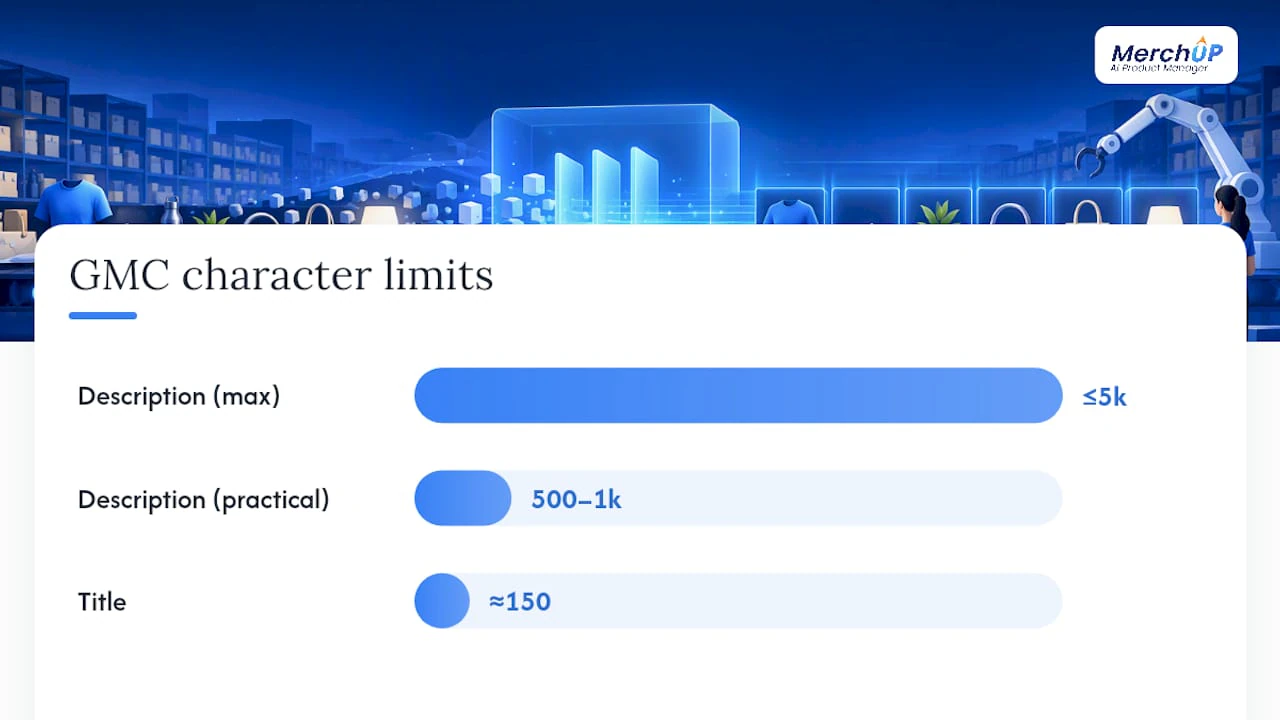
Feed compliance and readability aren’t separate goals. Google’s own guidance sets a description limit of up to 5,000 characters, with a practical recommendation closer to 500–1,000 characters, and titles capped at roughly 150 characters. Cramming every attribute into the description field ignores that structure entirely.
A cleaner mapping looks like this:
- Title: the two or three attributes that most influence a search match, such as brand, key material, and size.
- Description: buyer-facing prose covering benefits, use cases, and the attributes that don’t have a dedicated feed slot.
- product_detail: technical specifications as sectioned name and value pairs, which Google’s own specification recommends precisely to avoid duplicating attributes already captured elsewhere in the feed.
Getting this division right stops the same fact appearing three times across a single listing, once in the title, once in the description, once in a spec field, which does nothing for search relevance and clutters the page for shoppers trying to compare items quickly.
Scale operations: rule sets, validation and QA for catalogue-wide generation
Generating one accurate description is easy. Generating ten thousand accurate descriptions without drift is the actual job, and it needs rules, not vigilance.
- Enforce category-specific required attributes at the point of generation, blocking any SKU that’s missing a mandatory field rather than letting the system quietly skip it.
- Build traceability into every generated sentence. Each claim should map to a confirmed attribute ID, and generation should fail rather than publish when a claim has no backing field, a pattern Google’s product_detail structure supports directly.
- Run automated feed conformity checks before anything goes live, catching character limits, unit mismatches, and duplicate attributes before a human ever sees them.
- Sample for human review. A daily random check across roughly 0.5 to 1% of new SKU generations, alongside full manual review for your top-revenue lines and anything with complex compatibility rules, catches the errors automation misses.
- Watch four metrics on an ongoing basis: attribute coverage per category, feed error rate, click-through rate, and conversion rate. A drop in any of them, particularly straight after a template change, should trigger a rollback.
Pro Tip: Treat a sudden spike in feed errors as a data problem before you treat it as a copy problem. Nine times out of ten, a supplier changed a field format upstream and nobody flagged it.
Author perspective and practical trade-offs
Most teams over-invest in tone and under-invest in coverage. A beautifully written description built on a missing or wrong attribute does more damage than a plain one that’s accurate, because shoppers who spot the error stop trusting the rest of the listing too.
The recurring failures are boring and preventable: mixed units on the same page, inconsistent labelling between categories, and a single template forced onto products that have nothing in common with each other. None of these need cleverness to fix. They need a rule and someone willing to enforce it.
If you’re starting from scratch, resist the urge to launch catalogue-wide. Normalise one category properly, generate copy for twenty SKUs, and measure feed errors and conversion movement before you scale further. That small sample tells you more about where your data actually breaks than any amount of planning will.
— Jamie Moss
Running a pilot with MerchUp
Merchup AI turns exactly the structured fields this guide has walked through, materials, dimensions, compatibility, and category specs, into buyer-facing copy at catalogue scale, without a wall of manual rewriting between your data and your storefront.

The platform’s field-based templates map directly onto the tiered structure covered above, its visual editor lets you adjust spec groupings without touching code, and bulk publishing pushes finished copy straight into your live Shopify catalogue. A sensible pilot sequence: pick one category, apply the matching template tier, generate copy for a small batch, validate against your feed rules, then publish and watch conversion and feed-error metrics for a week before rolling out further.
Plans run from £12.99 per month on Starter up to £149.99 per month on Scale, with Growth and Pro sitting between them on MerchUp’s pricing page. If you want to see the generation step itself before committing, the 30-second tutorial shows exactly how a set of attributes becomes a finished listing.

Sources
For the feed specifications and research referenced throughout, see Google’s product data guidance and product_detail documentation, plus Baymard’s listing design principles and analysis of AI’s role in ecommerce SEO.
FAQ
What counts as an attribute in a product description?
An attribute is any structured data field describing a product, such as material, dimensions, colour, compatibility, or a technical spec. These fields feed the description rather than appearing as raw labels.
How long should a Merchant Center description be?
Google allows up to 5,000 characters but recommends around 500 to 1,000 for most listings. Anything longer tends to bury the details shoppers actually scan for.
Should technical specs go in the description or product_detail?
Technical specifications belong in product_detail as sectioned name and value pairs, keeping the description focused on benefits and use cases. This also stops the same fact being duplicated across two feed fields.
How much does MerchUp cost for generating descriptions at scale?
MerchUp’s plans start at £12.99 per month for Starter, rising through Growth and Pro to £149.99 per month for Scale. Each tier includes bulk publishing and template access suited to different catalogue sizes.
What’s the biggest mistake teams make with attribute-based copy?
Applying one template to every product regardless of complexity, and letting missing or mixed-unit data pass through unflagged. Both problems trace back to skipping the data normalisation step before generation begins.


Comments
No comments yet — be the first to share what you think.