


The template that works for most product videos is hook, value, demo, proof, call to action, in that order, because it front-loads the single claim that makes someone keep watching before asking for anything. Duration and exact wording shift with the channel and the goal, but the beats stay fixed. Before you open a blank document, write a one-sentence mission statement: who is watching, what they need, and what you want them to do next.
TL;DR:
- Define the viewer, their prior knowledge, main objection, and desired action first; then choose one matching call to action and success metric.
- Videos under one minute retain around half of viewers; longer videos need a clear hook within 5 to 10 seconds to hold attention.
- Give complex products more demonstration time, while simple products can combine the hook and value proposition and rely on a single visual.
- Make the call to action specific and match its commitment to the viewer’s stage; longer videos can include a brief earlier reminder.
- Pair every beat with a concrete visual, mark dialogue and captions separately, and use engagement graphs to test hooks before changing pacing.
Define the audience and the video’s single objective before you write
A script without a stated objective tends to try to say everything, which means it says nothing clearly. Start with a mission statement of one or two sentences: name the viewer, their need, and the single action you want from them. “This video helps a first-time Shopify seller understand how bulk editing saves them hours, and gets them to start a free trial” gives every later line a job to do.
Fill in three quick fields before drafting:
- Role: who exactly is watching (a buyer, a current customer, a browsing prospect).
- Prior knowledge: do they already know the category, or do you need to explain it from scratch.
- Main objection: the one doubt most likely to stop them acting.
Once you know the objective, map it to a primary call to action and a success metric: awareness videos aim for watch time, demo videos aim for sign-ups or demo requests, and retention videos aim for feature adoption.
A practical script template (beats) for product videos you can reuse
The beat structure below works whether you’re writing a 15-second teaser or a three-minute demo; only the time spent in each beat changes.
- Hook (0 to 5 to 10 seconds): open with a question, a bold claim, or the result the viewer wants, never with a logo or company history.
- Value proposition: state in one sentence what the product does and why it matters to this viewer, not a feature list.
- Demo or show the result: show the product doing the thing you just claimed, ideally in real use rather than a staged montage.
- Social proof or credibility: a specific detail (a use case, a category of customer, a recognisable outcome) that makes the claim believable.
- Explicit CTA: tell the viewer exactly what to do next and where, in one short sentence.
For a 15-second social teaser, compress the hook and value proposition into a single opening line, cut the demo to one visual beat, and fold proof into the CTA (“Join thousands of sellers already doing this, try it free”). For a 60-second product overview, give each beat roughly 10 to 15 seconds and keep the demo to one clear before-and-after moment. For a 2 to 3 minute explainer or demo, you can slow the hook slightly, add a second demo beat showing a secondary use case, and let proof run a full sentence or two before the CTA.
Distribution matters as much as length. A script written for a paid social placement needs the hook in the first frame, since many viewers never unmute. A script for an email-embedded or landing-page video can assume more attention and afford a softer opening.
Write for speaking: voice, phrasing and natural lines actors can say out loud
Scripts are meant to be heard, not read, so write the way people actually talk. Short sentences, strong verbs, and plain words beat long compound clauses every time a narrator has to say them in one breath.
- Replace noun-heavy phrases (“utilisation of the platform”) with a verb (“using the platform”).
- Cut jargon unless your audience already uses that exact term daily.
- Pull real phrases from customer support tickets, reviews, or sales calls rather than inventing marketing language, since genuine customer wording tends to sound more authentic and is easier for a presenter to deliver convincingly.
- Mark stage directions separately from dialogue so a presenter never has to guess what’s an instruction and what’s a line.
- Leave room for silence: a half-second pause after a hook or before a CTA gives the viewer a beat to absorb the claim and gives an editor a natural cut point.
Read every script aloud before locking it, ideally with the person who will deliver it. If you stumble on a sentence twice, rewrite it rather than blaming the reader.
Pro Tip: Record yourself reading the script on your phone before the shoot; anything that sounds stiff on playback will sound stiff on camera too.
Timing, length and pacing: how long each product video format should be and why
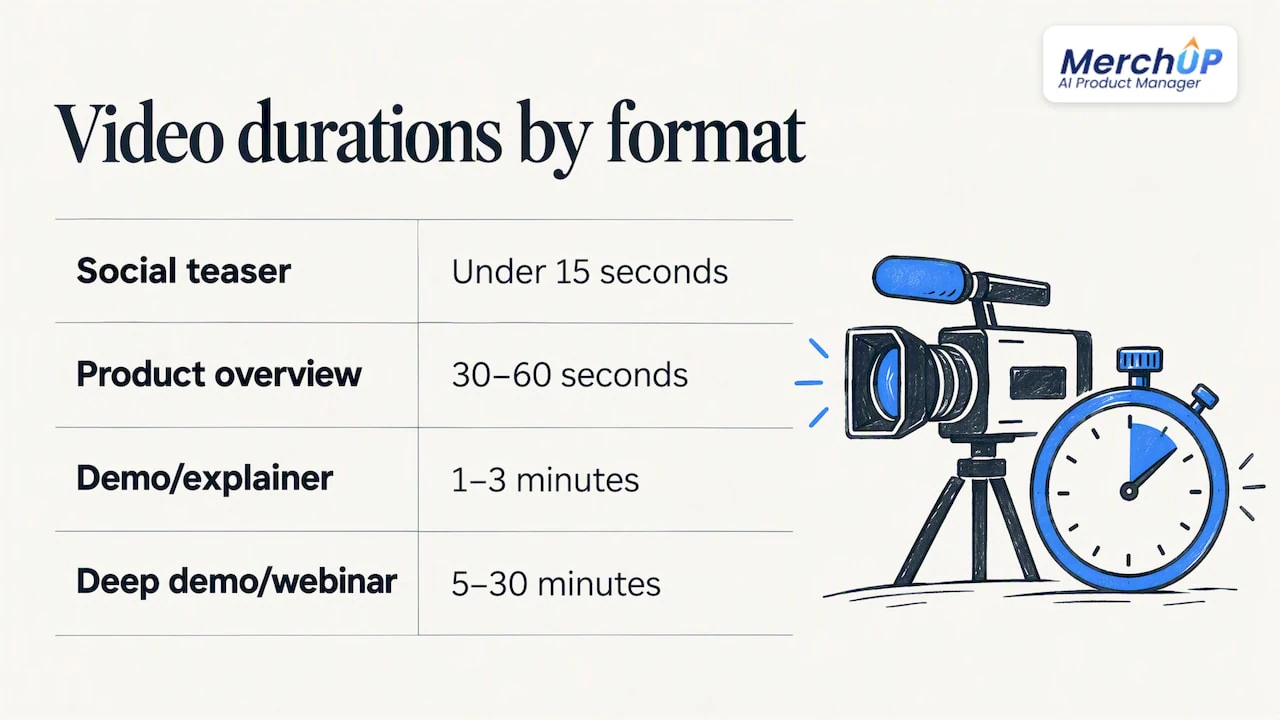
Length should follow the goal, not the other way around. A social teaser under 15 seconds works for awareness, a 30 to 60 second overview suits a product page, a 1 to 3 minute video fits a demo or explainer, and anything from 5 to 30 minutes belongs to a deep demo or webinar excerpt.
Short-form videos under one minute typically retain around half of viewers, which is why the single strongest claim needs to land before the halfway point rather than being saved for a big finish. For anything longer, treat the first 5 to 10 seconds as the hook test: if a viewer doesn’t get a reason to stay by then, length stops mattering. When you have access to an engagement graph from a published video, use the drop-off curve as an edit note, tightening wherever attention falls and expanding only where a viewer base genuinely sticks around.
Formatting and collaboration: make scripts usable for producers and editors
A script that only makes sense to the person who wrote it slows down production. Use a simple two-column format, voice on one side and visuals on the other, or a single column with clear timing markers if your team prefers reading top to bottom.
- Label on-screen text and captions separately from spoken lines so an editor never has to guess what’s narration and what’s a graphic.
- Mark rough timing next to each beat (0 to 5 seconds, 5 to 15 seconds) so pacing is visible at a glance.
- Build a short sign-off checklist: marketing approves tone and claims, product confirms accuracy, and legal reviews anything making a quantified promise.
- Use simple version naming (v1, v2-final, v3-shot) so nobody films an outdated draft.
Measure and iterate: using engagement graphs and KPIs to improve scripts
Once a video is live, the engagement graph becomes your edit notes for the next draft. A sharp drop in the first 10 to 15 seconds signals a failed hook; a dip in the middle usually points to pacing or a weak demo section; a drop right before the end often means the CTA arrived too late or the video signalled its ending before actually finishing.
- Track plays and watch time for awareness goals.
- Track click-through rate and demo requests for consideration goals.
- Track revenue-attributed conversions for bottom-funnel assets, since organisations that measure video against revenue outcomes tend to find it easier to justify further investment in the format.
Prioritise tests in this order: hooks first, since they affect retention more than any other variable, then CTA wording and placement, then pacing changes within the body of the script.
The revision pass: checklist for tightening, trimming and polishing a product video script
Before a script goes to production, run it through one deliberate edit pass rather than trusting the first draft.
- Read it aloud against a stopwatch; if it runs long for its intended length, cut rather than speed up the delivery.
- Rehearse it with whoever will present or voice it, and flag any line that trips them up twice.
- Cut filler phrases and multi-clause sentences; each beat should do one job only.
- Confirm captions are planned for every spoken line, since many viewers watch with sound off.
- Check the CTA is explicit, singular, and timed correctly, and that timing markers are in place for the editor.
Pro Tip: If a sentence needs a comma to fit two ideas, it’s probably two sentences and two edits waiting to happen.
Tips on integrating SEO keywords naturally in scripts for video content
Search engines increasingly index spoken words through captions and transcripts, which means the language in your script can affect discoverability as much as the title and description do. The fix isn’t to stuff keywords into dialogue, since that reads as unnatural the moment it’s spoken aloud.
Instead, work the terms your audience actually searches for into the value proposition and demo beats where they fit the sentence anyway. If “product video script writing” or “video script template” is a term your audience searches, a line like “here’s how a simple video script template saves you hours on your next product launch” carries the phrase without sounding forced. Keep variations natural: a viewer searching “how to write product scripts” and one searching “scriptwriting for videos” are often the same person using different words, so your script doesn’t need to repeat either phrase exactly, just cover the concept clearly.
Captions and on-screen text are a second opportunity. Since these get indexed alongside the video, make sure any on-screen title cards or summary text reflect the same core terms used in the spoken script, without duplicating sentences word for word. Keep the focus on clarity first: a script that reads naturally and matches what the video delivers will usually align with search intent better than one engineered around a keyword list.
Guidelines for aligning script content with visual elements and storyboard planning
A script written in isolation from the visuals almost always needs rework once filming starts. Build the storyboard alongside the script from the first draft, not after it, so each beat has a matching visual plan before anyone picks up a camera.
For every beat, note what the viewer sees as well as what they hear. The hook needs a visual strong enough to stop a scroll, not just a strong opening line. The demo beat needs a specific shot list: screen capture, product in hand, before-and-after split, whatever actually shows the claim being true. If a line references “this” or “here,” the storyboard needs to specify exactly what’s on screen at that moment, since mismatched audio and visuals are one of the fastest ways to lose a viewer.
Keep a simple rule: if a sentence can’t be paired with a concrete visual, either the sentence or the visual plan needs to change. This also helps with pacing, since a storyboard frame that has nothing happening for several seconds is a sign the script has drifted into narration without demonstration. Review the paired script and storyboard together before the shoot, not during it, so editors aren’t guessing which clip matches which line.
Methods for tailoring scripts to different product categories or buyer personas
A script for a complex B2B tool and a script for a simple consumer product shouldn’t follow the same rhythm, even if both use the same beat structure. For technical or high-consideration products, the demo beat usually needs more time, since the viewer needs to see the product solve a specific, recognisable problem before proof and CTA will land. For simple, low-consideration products, the hook and value proposition can often fold into one line, and the demo can be as short as a single satisfying visual.
Persona matters as much as category. A script aimed at a first-time buyer should spend more time on the value proposition and less on technical specifics, since the viewer doesn’t yet have the vocabulary to evaluate detail. A script aimed at an existing customer considering an upgrade can skip the basic explanation entirely and go straight to what’s new, since credibility is already established.
The objection you identified in the audience profile should shape which beat gets the most attention. If the main objection is price, proof needs to carry the comparative weight. If the main objection is complexity, the demo needs to show ease of use directly rather than describing it. Writing one script and hoping it works for every segment usually means it works moderately for none; a short, targeted variant for your two or three main personas tends to outperform a single generic version across the board.
Strategies for including strong calls-to-action effectively
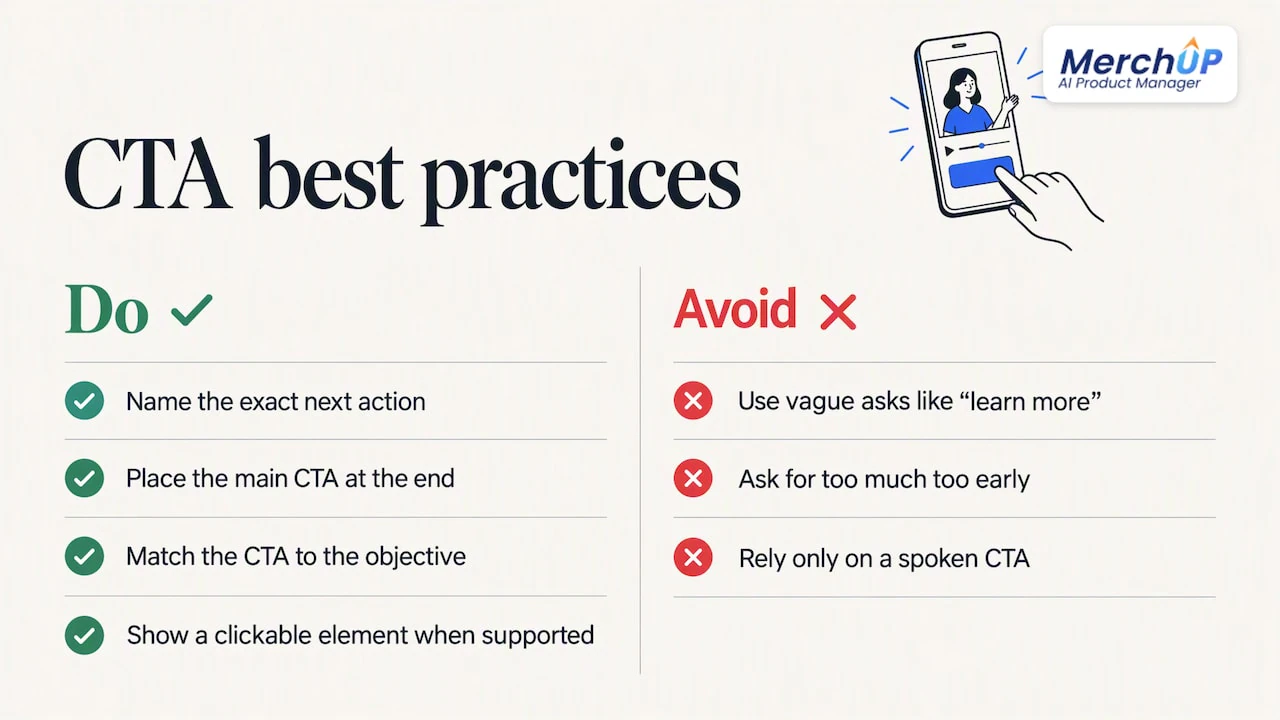
A weak CTA is often the reason a well-built script doesn’t convert, even when the rest of the beats work. The CTA needs to be specific: “try it free” beats “learn more,” and “start your 14-day trial” beats “try it free” again, because specificity removes ambiguity about what happens next.
Placement matters as much as wording. The CTA almost always belongs at the end, but a second, smaller CTA mention earlier in longer videos (anywhere from 1 to 3 minutes and beyond) can catch viewers who won’t make it to the final beat. Keep that early mention brief, a single line, so it doesn’t compete with the value proposition or demo for attention.
Match the CTA to the objective you set at the start. A top-of-funnel awareness video should ask for something low-commitment, like a follow or a visit to a page, while a bottom-of-funnel demo video can ask directly for a sign-up or purchase. Asking for too much too early is a common reason CTAs underperform, since the viewer hasn’t yet been given a reason to trust the claim.
Visually reinforce the spoken CTA with on-screen text and, where the platform supports it, a clickable element timed to appear exactly when the line is spoken. A CTA that’s only spoken and never shown relies entirely on the viewer remembering what to do after the video ends, which is a weaker position than giving them something to click immediately.
Techniques for incorporating brand voice and tone into product video scripts
A script can follow every structural rule and still feel off if it doesn’t sound like the brand saying it. Start by identifying three or four words that describe how your brand communicates elsewhere, in product descriptions, emails, or social captions, and check every line of the script against that list.
Tone should also flex slightly by beat without breaking character. The hook can be punchier and more direct than the rest of the script, since its job is to interrupt attention, while the demo beat often reads more neutrally since it’s describing what’s happening on screen. Proof statements tend to work best in a slightly more understated tone, since an authentic-sounding claim is more persuasive than one that oversells itself.
Consistency across videos matters more than perfection within one. If your brand voice is casual elsewhere, a formal, corporate-sounding script will feel like a different company speaking, even if the content is accurate. Keep a short style reference, a few sentences pulled from your best existing copy, next to the script as you write, and read new lines against it rather than relying on memory. Over time, this consistency becomes part of what makes a product recognisable across every channel it appears on, separate from the product itself.
Author perspective: why this template works in real product launches
Applying this exact beat structure across several product launches, the biggest shift wasn’t in the final video but in production speed: a clear hook-to-CTA skeleton means fewer rewrite cycles and a much easier handoff to editors, since everyone already agrees on what each beat is supposed to do. Pick one upcoming video, apply the template, and track a single metric, ideally watch time through the first 15 seconds, before deciding whether it earns a permanent place in your process.
— Jamie Moss
How MerchUp can help scale script-to-video copy and caption workflows
Writing one great script is manageable; writing on-screen text, caption variants and product copy for dozens of videos across a growing catalogue is where most teams lose time. We built AI-assisted copy generation and a visual editor to speed up exactly that kind of repeatable text work, so the captions, headlines and product lines feeding your video scripts don’t each need to be written from scratch.

If you’re curious how the generation process works in practice, our tutorial walks through creating product copy in under a minute. For teams ready to put it to work across a catalogue, our pricing page lists the Starter, Growth, Pro and Scale plans so you can find the right fit for your output volume.
FAQ
How to write the script for a video essay?
A video essay script usually opens with a clear thesis or question, then builds supporting points in a logical order, closing with a conclusion that ties back to the opening claim. Write it the way you’d speak the argument aloud, and read it back before recording to catch any sentence that only works on the page.
What is an example of video marketing?
A product demo video showing a tool solving a specific customer problem, published on a landing page or social feed, is a common example of video marketing. Short customer testimonial clips and explainer videos embedded on product pages also fall into this category.
How much do YouTube script writers get paid?
Pay for YouTube script writers varies widely depending on experience, video length and the channel’s budget, and no single standard rate applies across the industry. Freelance marketplaces and job boards are a more reliable source for current rate ranges than any fixed figure.
How long is a script for a 2 hour movie?
Screenwriting convention generally treats one script page as roughly one minute of screen time, so a feature-length film typically runs to about as many pages as minutes of screen time. This is a general guideline rather than a fixed rule, and pacing, dialogue density and genre all affect the final count.


Comments
No comments yet — be the first to share what you think.