


The single highest-impact change you can make to a product feed today is rewriting your titles to lead with what buyers actually type. Not your brand name, not an internal SKU, not a vague category label. The buyer’s search phrase goes first, every time. Use this formula as your starting point:
[Brand or Product Type] + [Primary Keyword / Product Name] + [Key Attribute] + [Size, Colour, or Variant] + [Model or Quantity]
Three actions to take this week:
- Audit your top 20 SKUs by revenue and pull their current titles into a spreadsheet. Flag any that open with a brand name the buyer wouldn’t search, a model number, or a promotional phrase.
- Rewrite those hero titles using the formula above, placing the buyer’s most likely search phrase within the first 60 characters.
- Push the revised titles to your feed and monitor impressions, click-through rate (CTR), and search term reports for two to three weeks before drawing conclusions.
Top-performing advertisers treat titles as a query-matching field, not a merchandising label.
How to optimise product titles: what each component should communicate
A product title is doing several jobs at once: matching a search query, earning a click, and signalling relevance to a platform’s algorithm. Each component carries a specific weight.
- Leading identifier (brand or product type). Lead with brand when it carries purchase intent (“Nike”, “Dyson”, “KitchenAid”). Lead with product type when buyers search generically (“running shoes”, “cordless vacuum”, “stand mixer”). Google Ads community guidance recommends testing category-first ordering when buyers search on product type rather than brand.
- Primary keyword. This is the phrase your buyer types at the moment of purchase intent. It belongs as early in the title as possible, ideally within the first five words.
- Audience or gender signal. “Women’s”, “Men’s”, “Kids’” — these narrow the match and reduce wasted spend on irrelevant queries.
- Key attribute(s). Material, technology, style, or function. “Merino wool”, “noise-cancelling”, “non-stick” — the detail that differentiates your product from the generic category.
- Size, quantity, or model. Buyers searching for a specific size or pack count are closer to purchase. Include it even when it’s also in a separate feed attribute, because repeating attributes in the title itself improves query matching.
- Colour or variant. Particularly important in fashion, home, and beauty. Buyers often include colour in their search (“navy blue linen trousers”, “rose gold earrings”).
The Product Title Quality Score (PTQS) framework scores titles across five dimensions: search match clarity, attribute precision, scan simplicity, conversion signalling, and category intelligence. Running your titles through that lens helps cross-functional teams agree on which SKUs need manual attention versus templated fixes.
Pro Tip: Use sentence case for product titles rather than Title Case. “Men’s waterproof hiking boots size 10” reads more naturally in a search result than “Men’s Waterproof Hiking Boots Size 10”, and platforms like Google Shopping render it more cleanly. Always use digits (“10”) rather than words (“ten”) — they take up less space and scan faster.
Step-by-step process for writing and improving a product title
1. Start with keyword research
Pull your Google Ads Search Terms report and your Shopping query report. Look for high-impression, high-conversion queries that don’t appear in your current titles. Supplement with tools like Google Keyword Planner or your platform’s autocomplete to find long-tail purchase-intent phrases. You’re looking for what buyers type when they’re ready to buy, not when they’re browsing.
2. Build category templates
Group your catalogue into five to eight category clusters. For each cluster, define a title template. Three to five templates cover most catalogues. Examples:
- Fashion:
[Brand] [Gender] [Product Type] [Material] [Colour] [Size] - Electronics:
[Brand] [Product Type] [Model] [Key Spec] [Connectivity/Colour] - Home & Garden:
[Brand] [Product Type] [Material/Finish] [Dimensions] [Pack Quantity]
3. Map attributes to templates
Identify which feed attributes map to each template slot. In a Shopify feed, “vendor” maps to brand, “product_type” maps to category, and variant attributes map to colour and size. This mapping is what makes bulk automation possible.
4. Apply editing rules
- Avoid promotional language: “Best”, “Sale”, “Free Shipping”, “Top Rated” are disallowed or suppressed on most platforms.
- Don’t front-load model numbers or internal SKUs — buyers don’t search for them.
- Use numerals: “500ml”, “3-pack”, “32GB”.
- Limit punctuation to commas and pipes where needed for readability. Avoid excessive hyphens, asterisks, or exclamation marks.
- Don’t stuff keywords. A title that reads “running shoes men’s running shoes athletic running shoes” will be suppressed or penalised.
5. Segment and execute
Apply templated rules via feed rules or CSV transforms to your long-tail SKUs. Reserve manual editing for hero SKUs — your highest-revenue products. Hand-written titles for high-value products consistently outperform pure automation because a human can judge nuance that a template cannot.
Pro Tip: Schedule a regular title audit every few months. Search behaviour shifts, new competitors enter, and seasonal queries emerge. A title that was optimal in January may be underperforming by April. Block two hours per quarter to review your top SKUs’ search term reports and refresh accordingly.
What are the platform rules for product title length and format?
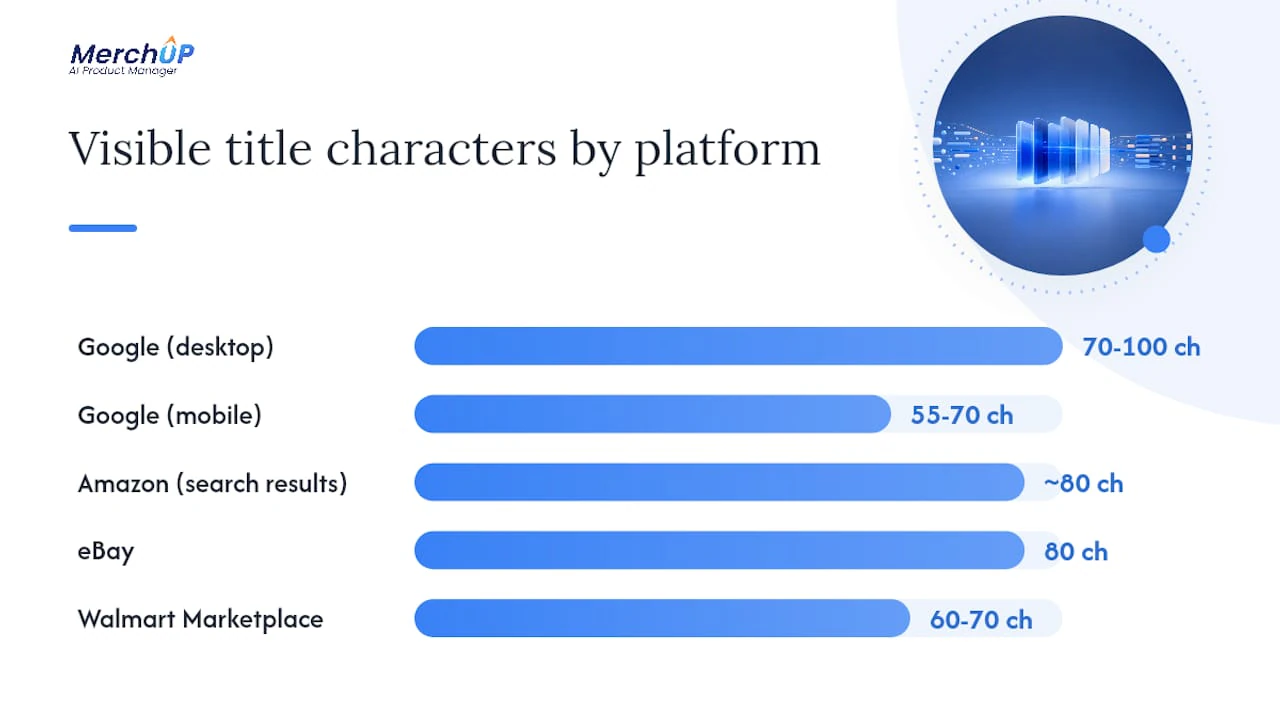
Platform constraints are non-negotiable. Writing a brilliant title that gets truncated at character 55 on mobile is a wasted effort.
| Platform | Character limit | Typical display window | Key rules |
|---|---|---|---|
| Google Shopping | ~150 characters (technical) | 70–100 chars (desktop), 55–70 chars (mobile) | No promotional text; sentence case preferred; title is the primary matching field |
| Amazon | 150 characters (category-dependent) | ~80 chars on search results page | Brand + model + key attributes; no promotional phrases; category style guides apply |
| eBay | 80 characters | Full title usually visible | Keywords front-loaded; no special characters |
| Walmart Marketplace | 60–70 characters | Full title usually visible | Brand + product name + key attributes; no promotional language |
Google Shopping treats the title as the most important feed field, with a technical limit of around 150 characters, though the display window is typically 70–100 characters depending on device and placement. On mobile, that window shrinks further.
Amazon and other marketplace guidelines favour a clear structure of brand, model or product name, and key attributes. Promotional language (“Best Seller”, “Amazing Value”) and excessive punctuation are disallowed or actively suppressed.
A few fast rules that apply across channels:
- Keep the most important information inside the first 60–70 characters. Front-loading the customer intent phrase into that window is the simplest single change that improves both ad relevance and CTR.
- Use ALL CAPS sparingly or not at all — most platforms flag it.
- Model numbers and brand names belong near the front on Amazon (buyers search by model) but can sit further back on Google Shopping (buyers often search by product type first).
- For on-site display, a shorter title (50–70 characters) often performs better on product listing pages where space is constrained.
How do you A/B test product title changes effectively?
Testing titles is simpler than most marketers assume, but it requires discipline around experiment design.
Design the test:
- Select several hero SKUs with sufficient traffic for meaningful data.
- Write one variant title per SKU. Change one variable at a time — keyword order, or attribute addition, not both simultaneously.
- Run the variant for several weeks minimum. Shorter windows produce noise, not signal.
- Keep all other variables constant: bids, budget, imagery, and landing page.
KPIs to track:
- Impressions: Did the new title match more queries?
- CTR: Are more people clicking after seeing the title?
- Conversion rate: Did the click quality improve?
- Revenue per visitor: The composite metric that tells you whether the title attracted buyers, not just browsers.
- CPC (for paid): A title that matches more relevant queries can lower your effective cost per click by improving ad relevance.
After the test period, check your Google Shopping search terms report to confirm that the new title is matching the queries you intended. If impressions rose but CTR fell, the title is matching broader queries but not compelling clicks — the attribute order or the keyword choice needs adjustment.
Roll changes across the catalogue only after at least two hero SKUs show consistent improvement across impressions, CTR, and conversion rate. One positive result can be noise; two or more is a pattern worth scaling.
Ready-to-use title templates and before/after examples
Templates by vertical
Fashion:
- Feed/ads:
[Brand] [Gender] [Product Type] [Material] [Colour] [Size] - On-site:
[Brand] [Product Type] in [Colour] — [Material]
Electronics:
- Feed/ads:
[Brand] [Product Type] [Model Number] [Key Spec] [Colour/Finish] - On-site:
[Brand] [Model] [Product Type] — [Key Spec]
Home & Garden:
- Feed/ads:
[Brand] [Product Type] [Material] [Dimensions] [Pack Size] - On-site:
[Product Type] by [Brand] — [Material], [Dimensions]
Beauty:
- Feed/ads:
[Brand] [Product Type] [Skin Type/Concern] [Size/Volume] [Formulation] - On-site:
[Brand] [Product Type] for [Skin Type] — [Volume]
Grocery/FMCG:
- Feed/ads:
[Brand] [Product Name] [Flavour/Variant] [Pack Size] [Pack Quantity] - On-site:
[Brand] [Product Name] [Flavour] — [Pack Size]
Before/after examples
Fashion (before): Blue Jeans - Women - Levi's
Fashion (after): Levi's Women's Slim Fit Jeans Mid Blue 32W 30L
Electronics (before): Sony Headphones WH-1000XM5
Electronics (after): Sony WH-1000XM5 Wireless Noise-Cancelling Headphones Black
Home (before): Cast Iron Pan - Large
Home (after): Lodge 12-Inch Cast Iron Skillet Pre-Seasoned Oven Safe
Beauty (before): Vitamin C Serum
Beauty (after): CeraVe Vitamin C Serum for Oily Skin 30ml Brightening
For long-tail SKUs, automate template application through your feed management tool or a CSV transform. For hero SKUs, the before/after examples above show the kind of manual judgement that automation alone won’t replicate — knowing that “Pre-Seasoned” belongs in a cast iron title because buyers search for it, or that “Brightening” is the conversion signal in a vitamin C serum title.
For broader listing copy that pairs with these titles, product description templates give you copy-and-paste frameworks across the same verticals.
Pre-publish checklist and red flags to avoid
Run every title through this checklist before uploading to your feed:
- Mandatory attributes present (brand, product type, primary keyword, at least one key attribute)
- Title length within the recommended window for the target platform (60–150 characters)
- Most important information within the first 60 characters
- Sentence case used; no ALL CAPS words
- Numerals used for sizes, quantities, and measurements
- Each variant has a unique title (colour, size, or model differentiated)
- No promotional language (“Best”, “Sale”, “Free”, “Cheap”, “#1”)
- No excessive punctuation (no asterisks, exclamation marks, or repeated symbols)
- No keyword stuffing (no phrase repeated more than once)
Red flags that actively harm performance:
- Manufacturer default titles left unchanged (“Product Model XYZ-123A”)
- SKU or internal reference codes front-loaded in the title
- Identical titles across colour or size variants
- Promotional phrases that platforms suppress
- Inconsistent formatting across a product family (some titles with brand, some without)
- Titles written for internal catalogue logic rather than buyer search behaviour
Legal considerations and trademark issues in product titles
Trademark law in the United States means you cannot use a competitor’s registered brand name in your product title to imply affiliation, endorsement, or equivalence. Describing your product as “compatible with [Brand]” or “fits [Brand] model” is generally permissible under nominative fair use, but claiming your product is a “[Brand] product” when it isn’t is infringement.
The practical rules:
- Use “compatible with” or “fits” language when describing third-party device compatibility — never imply you are the brand.
- Avoid using another brand’s trademark as a primary keyword in your title if it could mislead buyers about the product’s origin.
- For private-label or white-label products, use your own brand name or a descriptive product type — don’t borrow equity from a brand you don’t own.
- Platform policies (Amazon’s Brand Registry, Google’s trademark complaint process) add a layer above legal requirements. A competitor can file a trademark complaint that gets your listing suppressed even if your use is technically legal. When in doubt, use descriptive language rather than brand names you don’t own.
If you sell genuine branded products as a reseller, you can use the brand name in your title — that’s standard practice and legally sound. The risk arises when the brand name is used to attract traffic to a product that isn’t actually that brand.
How do product titles affect ad bidding and quality score?
In Google Shopping campaigns, the title is the primary signal the algorithm uses to match your product to a search query. A title that matches the buyer’s query closely tends to earn a higher relevance score, which feeds into the ad auction. Higher relevance can lower your effective cost per click because Google rewards relevant ads with better placement at lower bids.
The mechanism works in both directions. A vague or mismatched title forces Google to guess at relevance, which typically results in broader, less efficient matching. You end up paying for impressions from buyers who weren’t looking for your product, which raises CPC and lowers conversion rate simultaneously.
For Amazon Sponsored Products, the title feeds into the search index that determines organic ranking and ad eligibility. A title that includes the exact phrase a buyer searches for makes your product eligible to appear for that query in both organic and paid results. Sellers running Amazon ad campaigns consistently find that title relevance is one of the highest-leverage inputs to ad efficiency, because it affects both the auction and the organic rank that supports it.
The practical implication: title optimisation is not just an organic SEO task. Every improvement to title relevance has a direct effect on paid campaign efficiency.
How does title localisation work for different markets?
If you sell across multiple US regions or internationally, a single title set rarely performs equally well everywhere. Localisation goes beyond translation.
Within the US, regional terminology matters more than most sellers expect. “Sneakers” versus “trainers”, “soda” versus “pop”, “shopping cart” versus “shopping trolley” — these aren’t trivial differences when they appear in search queries. Pull your search term reports by geographic segment to spot regional query patterns and adjust titles for your highest-revenue markets.
For international expansion, machine translation of titles is a starting point, not a finish line. A translated title that preserves the English word order often reads unnaturally in the target language, which reduces CTR even when the keywords are technically correct. Native-speaker review of hero SKU titles is worth the investment. For long-tail SKUs, a localised template applied via feed rules is a practical compromise.
Currency, units of measurement, and sizing conventions also belong in the title when they’re part of the buyer’s search. A UK buyer searching for a “12-inch skillet” is using the same unit as a US buyer, but a European buyer may search in centimetres. Adapt the attribute format to the market’s convention, not your internal catalogue standard.
How should you adapt titles for mobile versus desktop display?
Mobile truncation is the most underestimated formatting problem in product feeds. On a desktop Google Shopping result, a title might display 80–100 characters. On a mobile device, that window can shrink to 55–70 characters, and sometimes fewer depending on the placement.

The consequence is straightforward: if your primary keyword and key differentiating attribute aren’t in the first 60 characters, mobile buyers may never see them. A title like “Patagonia Men’s Down Sweater Hoody Full-Zip Fleece Jacket Navy Blue Large” is fine on desktop. On mobile, a buyer may only see “Patagonia Men’s Down Sweater Hoody Full-Zip Fleece Ja” — which loses the colour and size entirely.
The fix is front-loading. Write titles as if the display window is 60 characters, then add supplementary attributes after that point for desktop and feed-matching purposes. Test your titles in a character-count tool before uploading, and check how they render in Google Merchant Center’s preview function.
For on-site product listing pages, mobile display is often even more constrained. Many themes truncate titles at 40–50 characters on category pages. A separate, shorter on-site title (distinct from the feed title) is worth maintaining for your top-traffic categories.
How to use seasonal terms without hurting your SEO
Seasonal and promotional terms in titles are a double-edged tool. “Christmas Gift”, “Valentine’s Day”, “Back to School” can capture high-intent seasonal queries during the relevant window. Outside that window, they make your title look stale and can reduce CTR.
The practical approach is to maintain two title versions for high-revenue SKUs: a base title that performs year-round, and a seasonal variant that you activate for four to six weeks around the relevant event. Most feed management tools support scheduled rules that swap titles on a date trigger.
What to avoid: embedding promotional language (“Sale”, “Discount”, “Limited Time”) in titles permanently. Platforms suppress these terms, and buyers who see them in a title before clicking often expect a price that isn’t there, which raises bounce rate. Seasonal descriptors (“Holiday”, “Summer”, “Winter”) are generally safer than promotional ones, because they describe the product’s use context rather than making a price claim.
For SEO on your own site, seasonal landing pages with their own title tags are a cleaner solution than modifying individual product titles. That way, your product titles stay stable and indexable year-round, while seasonal traffic lands on a dedicated page optimised for the event query.
The part of title optimisation most sellers get wrong
Title work is almost always treated as a one-time setup task. A seller rewrites their titles during a feed audit, sees a lift in CTR, and then leaves those titles untouched for two years while the market shifts around them.
The sellers who consistently outperform aren’t writing better titles once. They’re running quarterly reviews, monitoring search term reports, and treating titles as a live asset rather than a static field. The PTQS framework is useful precisely because it gives teams a shared scoring language — when everyone agrees on what “search match clarity” means, the quarterly audit becomes a structured process rather than a subjective argument about word order.
There’s also a tendency to over-invest in automation and under-invest in hero SKUs. Templates are essential for scaling across thousands of products, but a template cannot know that “Pre-Seasoned” is a conversion signal for cast iron cookware, or that “Brightening” outperforms “Vitamin C” as a lead attribute in the beauty category. Those judgements require a human who understands the buyer. Automate the long tail, hand-write the top 50.
One more thing worth saying plainly: title optimisation and on-site UX are not the same problem. A title that wins the click needs a product page that closes the sale. If you’re investing heavily in feed titles but your product page conversion rate is low, the title work is generating traffic that your listing isn’t converting. Both levers matter.
Scaling title optimisation faster with Merchup AI
Writing and maintaining feed-ready titles across hundreds or thousands of SKUs is where most teams hit a wall. Merchup AI is built specifically for that problem. Its AI-driven template engine maps your existing product attributes into structured, feed-ready titles at bulk scale, applying the same ordering logic and formatting rules you’d apply manually to hero SKUs — across your entire catalogue in a fraction of the time.

The Shopify integration means titles and descriptions publish directly to your store without a CSV round-trip. The visual editor lets you review and adjust AI-generated titles before they go live, and the activity tracking gives you a clear record of what changed and when. For teams running quarterly title audits, that audit trail alone saves hours of version-control headaches.
If you’re managing a growing catalogue and want to apply consistent product description SEO principles at scale, start with Merchup AI and see how quickly templated title optimisation can move from a quarterly project to a continuous process.
Sources
The recommendations in this guide draw on the following sources:
- Optimize Product Titles: Insights from Top 10% Advertisers
- Product Title Optimization for Google Shopping: Best Practices
- Ultimate Guide to Product Title Optimization
- Amazon product title optimization best practices (with examples)
- How to optimize the product title? - Google Ads Community


Comments
No comments yet — be the first to share what you think.