



The fastest, most reliable route to good bulk product descriptions is an AI-assisted template workflow: export your catalogue, run it through a generator built on structured prompts, then review the batch before it goes live. Tools like Matrixify handle the Shopify side; other platforms handle the writing. For small tweaks, a straight CSV edit or your platform’s native bulk editor is quicker and just as safe.
TL;DR:
- CSV edits are effective for mechanical, pattern-based updates but are inadequate for rewriting long-form or tone-sensitive descriptions.
- Using AI templates with prompts yields higher quality, consistent descriptions, but requires proper QA, especially for avoiding tone drift.
- Shopify lacks native tools for nuanced bulk description edits, so most merchants rely on export, edit, and re-import cycles with tools like Matrixify.
- A pilot batch of 20 to 30 SKUs is crucial to identify data issues and fine-tune templates before full-scale bulk updates.
- Automated API or third-party tools become necessary when managing thousands of SKUs regularly, reducing manual workload and improving scaling.
What counts as bulk product descriptions, and which method fits your catalogue?
“Bulk product descriptions” covers anything from updating 50 SKUs after a rebrand to writing copy for 5,000 new items ahead of a launch. The method that works depends entirely on scale and how much each description needs to change.
CSV export and edit suits structured, repetitive changes. Say you need to swap a discontinued material name across 300 listings. You export, use find-and-replace across a column, and re-import. It costs nothing beyond time, but it is only practical for changes that follow a clean pattern.
Platform bulk editors (Shopify’s native bulk editor, for instance) work for quick field-level tweaks: pricing, tags, short titles. They are not built for rewriting long-form body copy at volume.
Spreadsheet plus mail-merge style prompting bridges the gap. You build a sheet with attribute columns (material, size, use case) next to a prompt column, then run it through an AI tool that reads each row and writes a unique description.
AI generators with templates, such as MerchUp, go further by applying a consistent structure and tone across the whole batch while still varying wording per SKU, which is where most stores land once they pass a few hundred products.
- CSV edit: low effort, low uniqueness, minimal QA needed for simple find-replace jobs
- Platform bulk editor: low effort, fine for fields, poor for long-form rewriting
- Spreadsheet plus AI prompts: medium effort, high uniqueness, needs a proper QA pass
- Template-driven AI generator: low ongoing effort once set up, high uniqueness, QA focused on spot-checks rather than full rewrites
Pick CSV edits when the change is mechanical. Pick AI generation when you’re rewriting for tone, benefits, or SEO at scale.
How do you bulk edit descriptions in Shopify?
Shopify doesn’t give you a built-in way to mass-rewrite body_html with any nuance, so most merchants use an export, edit, import cycle. Matrixify is the tool most commonly used for this, and it supports exactly that flow.
- Export your product CSV. Pull
title,body_html, relevant metafields, and variant-specific fields if descriptions differ by size or colour. - Edit in a spreadsheet, not a text editor. Keep the HTML tags intact inside
body_htmlso bullet points and bold text survive the round trip. - Add a prompt column if you’re feeding rows into an AI tool, so each SKU gets attribute-aware copy rather than one generic paragraph copied across the sheet.
- Re-import through Matrixify. Check file encoding (UTF-8) and confirm required headers match Shopify’s expected format, since a missing or renamed column is the most common cause of import errors.
- Spot-check before going fully live. Pull ten random product pages post-import and confirm formatting rendered correctly.
Pro Tip: Keep a backup export from before you touch anything. If an import goes wrong, you can re-import the original file and undo the damage in minutes rather than rebuilding descriptions by hand.
Matrixify’s own tutorial flags encoding and header mismatches as the two errors that trip up most first-time bulk imports.
What template structure actually converts at scale?
A description that converts follows a predictable shape: a one-line headline, an opening sentence built around the main benefit, three scannable bullets that turn specs into outcomes, then a short technical block for the details that matter to a decision but not to the pitch. Shoppers rate detailed product content as extremely important, with one guide putting the figure as very high, nearly nine out of ten shoppers, and that detail has to be organised, not dumped.
For a spreadsheet-driven batch, structure your columns to match: SKU, category, key benefit, 3 spec points, and a prompt cell that references all of them. Vary prompt complexity by price tier. A £15 commodity item needs a tight, benefit-first paragraph. A £250 premium SKU can carry a longer prompt pulling in material provenance, use case, and care instructions.
Compare the two:
- Commodity SKU (before): “Stainless steel water bottle. 750ml. BPA free.”
- Commodity SKU (after): “Keeps drinks cold for 24 hours, so it survives a full day at the gym without a top-up. 750ml, BPA-free stainless steel.”
- Premium SKU (after): “Hand-finished in small batches, this 750ml bottle uses double-wall vacuum insulation to hold ice-cold water through a full workday. Includes a lifetime seal warranty.”
As a rule of thumb, keep commodity SKUs under 60 words and let premium or complex SKUs run to 120 to 150.
How do you keep bulk-edited listings SEO-friendly?
Bulk edits create one obvious risk: near-duplicate copy across similar SKUs, which search engines can flag and shoppers find dull. The fix is structural, not just wording.
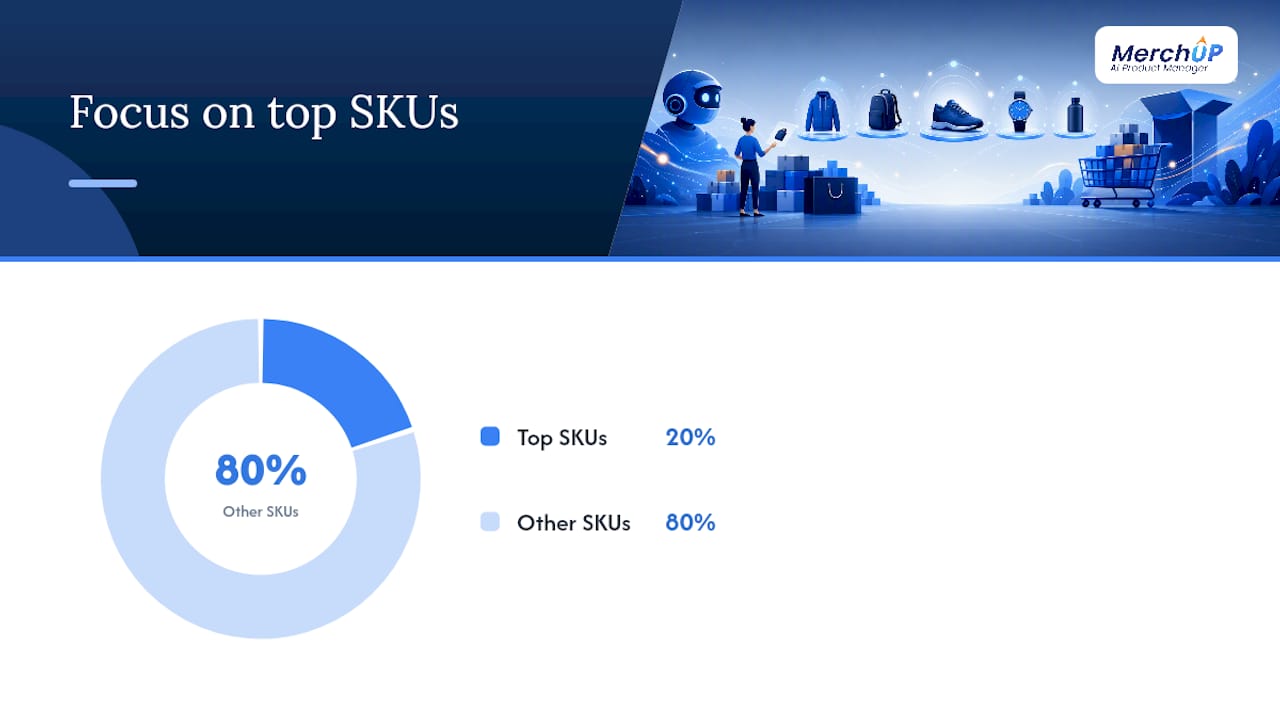
Convert every feature into a benefit before it hits the page, and keep paragraphs short enough to scan in under ten seconds. Place your primary keyword naturally in the opening sentence and once in a subheading or bullet, never forced into every sentence. For the SKUs that actually drive revenue, write genuinely unique copy rather than templated variations; guidance from SEO product description templates recommends prioritising unique writing for at least the top 20% of SKUs by sales.
- Add basic product schema (price, availability, review rating) to the top revenue-driving pages first, not the whole catalogue at once
- Track click-through rate, sessions, and add-to-cart rate before and after a bulk update, not just rankings
- Watch return rate on updated listings; overselling in copy tends to show up there first
- Run a simple A/B test on your highest-traffic SKUs before rolling a new template across the full catalogue
A partner guide on optimising product pages covers additional tactics for measuring the impact of copy changes on conversion, worth a read once your bulk update is live.
What operational lessons matter most when using AI at scale?
Bad attribute data breaks AI-generated copy faster than anything else. If your variant mapping is messy, a template-driven generator will happily write confident, well-formatted nonsense for the wrong colour or size. Clean data first, generate second.
A practical rollout looks like a pilot on your best-selling 20 to 30 SKUs, a measurement window of a week or two, then a full catalogue push once the template holds up. Community discussion on the Shopify forums backs this up: merchants who skip the pilot tend to discover variant-level edge cases only after a full-catalogue import, when fixing them is far more expensive.
A pilot batch does one job better than anything else in this process: it surfaces the variant and attribute problems you didn’t know you had, before they’re live across a thousand product pages.
Pro Tip: Run your QA checklist against the pilot batch specifically for tone drift, since AI models can quietly shift voice across a long batch even when the template stays fixed.
Some visual editors and drag-and-drop templates exist largely to solve this: locking structure and tone at the template level, so the AI has less room to wander page to page.
Can you automate bulk description updates with APIs or third-party tools?
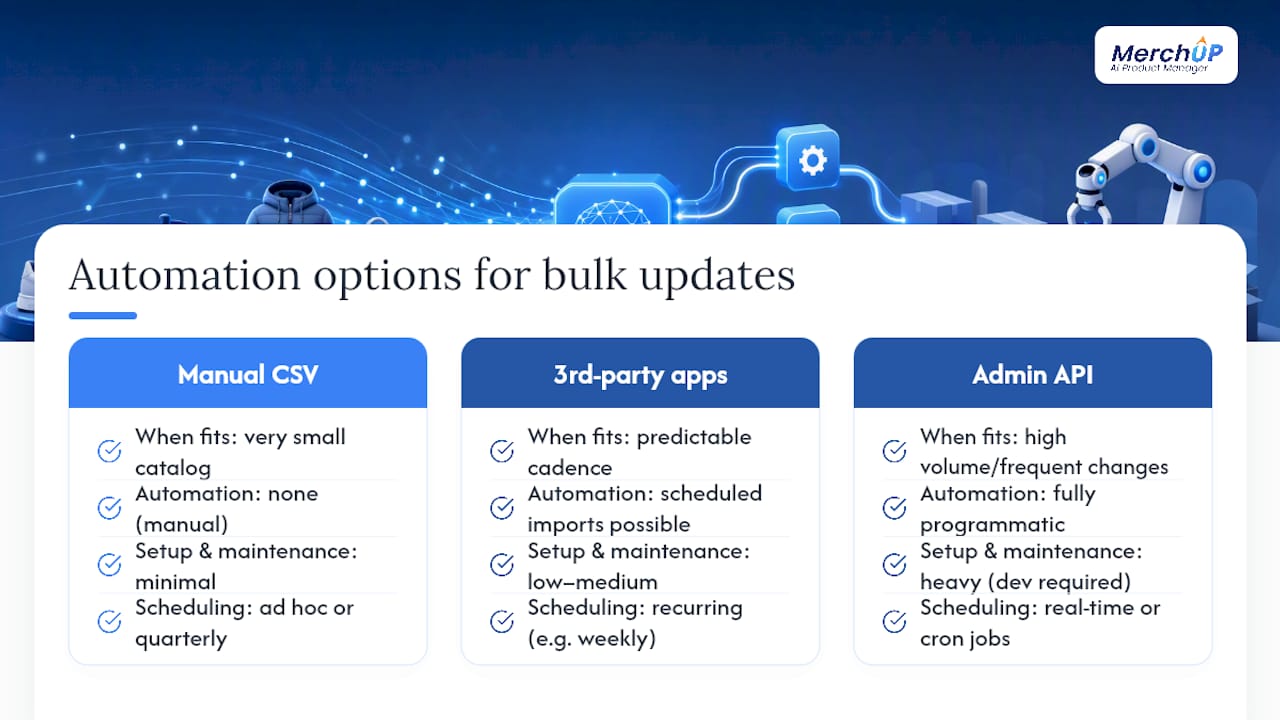
Once your catalogue passes a few thousand SKUs, or you’re adding new products weekly, manual export-edit-import cycles stop scaling. This is where API-based automation and third-party tools take over.
Shopify’s own Admin API lets developers push description updates programmatically, which suits stores with in-house engineering resources or an agency on retainer. It’s the most flexible route but the heaviest to set up and maintain: someone has to build and monitor the integration, handle rate limits, and manage failed requests.
Third-party tools sit between manual CSV work and a full custom API build. Apps like Matrixify can be scheduled to run recurring imports, which suits stores with a predictable update cadence, such as weekly price and copy syncs from a supplier feed. AI platforms with native Shopify integrations can go further by connecting directly to your store, pulling product data automatically, and pushing generated or edited descriptions back without a manual export step at all.
The right choice depends on frequency and volume. A once-a-quarter catalogue refresh rarely justifies API development. A store adding hundreds of new SKUs a month, or one running constant supplier-driven price and spec changes, usually reaches a point where an integrated tool or a proper API connection pays for itself in the hours it saves the team.
Why the “write it once, fix it later” approach to bulk copy fails
Most advice on bulk product descriptions focuses on speed: generate everything fast, worry about quality later. That gets the order backwards. The stores that actually see conversion lift from bulk updates treat the pilot phase as the real work and the full rollout as the easy part.
The conventional wisdom oversells CSV find-and-replace as a universal shortcut. It’s genuinely useful for mechanical changes, but store teams that use it for full rewrites end up with copy that reads like it was written by a spreadsheet, because it was. The gap between a merely acceptable description and one that actually sells is almost always in the benefit framing, not the spec list, and that’s precisely the part templates and AI generation handle better than manual bulk editing ever will.
Prioritise clean attribute data before anything else. A brilliant template fed dirty variant data produces confident, wrong copy faster than a human ever could.
— Jamie Moss
Turn your catalogue into on-brand copy in three steps
Everything above, the templates, the spreadsheet prompts, the QA pilot, is exactly what some platforms are built to run without you stitching together three separate tools. They combine AI-generated copy, customisable templates, and a visual editor in one place, and connect directly to Shopify so there’s no manual CSV round trip for most updates.

The trial flow is deliberately short: connect your Shopify store or upload a product CSV, generate a sample batch using templates, then review and publish the batch you actually like through the visual editor. You keep full control over tone and structure before anything goes live, which matters most in that first pilot batch where you’re still checking the template holds up across your real catalogue.
If you want to see the generation step before committing to anything, the MerchUp tutorial walks through creating a batch in under a minute. For full feature and pricing detail, the MerchUp product page covers what’s included at each tier.
Where to go next for the technical details
For the exact CSV headers and metafield formats Shopify expects, Shopify’s help centre is the primary reference. Matrixify’s own bulk update tutorial covers import error troubleshooting in more depth than fits here. For template structure and prompt examples, MerchUp’s guide on product description templates is worth bookmarking.
Sources
- Product description template + examples for effortless writing
- How To Bulk Edit Product Descriptions In Shopify
- Free SEO Product Description Template — E-Commerce Copy Optimization (2026)


Comments
No comments yet — be the first to share what you think.