


Yes, AI can accelerate Shopify SEO, but only when paired with accurate catalogue data and the technical fixes search engines require. That means checking your Product structured data, understanding how Shopify Catalog feeds AI shopping agents, and choosing tools like MerchUp that scale content without breaking the basics. Start with three things: audit your schema, submit your sitemap to Google Search Console, and pilot AI-generated descriptions on a small batch of priority SKUs.
TL;DR:
- Accurate catalogue data, proper schema markup, and sitemap submission to Google Search Console are essential for AI to effectively improve Shopify SEO.
- AI tools aid with content creation, keyword research, image alt-text, and analytics, but require human oversight to prevent hallucinations and outdated information.
- Shopify’s built-in features and apps for schema, feeds, AI copy, and image optimization are necessary for AI discovery and product visibility.
- Implementing structured data directly in HTML, feeding product info to Google Merchant Center, and auditing catalog coverage are critical technical steps.
- A phased approach over 180 days—including pilot tests, catalog mapping, and full schema coverage—is recommended for scalable, accurate AI-driven SEO improvements.
What ‘AI for Shopify SEO’ actually means and where it helps
AI earns its place in Shopify SEO through specific, bounded tasks rather than wholesale automation. The clearest wins come from content generation at scale, keyword and topical research, image alt-text drafting, internal search query tuning, and crawl or analytics pattern-spotting that would take a human day to spot manually.
Shopify’s own blog on types of AI draws a useful line between generative AI (writing copy, suggesting titles), narrow AI (recommendation engines, search ranking tweaks) and the newer agentic features that act on a store’s behalf, such as Sidekick or agentic storefronts. Each category needs different oversight.
The limits matter as much as the wins. Generative tools hallucinate: they can invent a material, a size range or a warranty term that was never true. Product data drifts too, prices change, stock runs out, and an AI tool working from a stale export will happily publish outdated claims. Price and availability should always be verified against your live catalogue before anything goes public, never left to an AI’s best guess.
Shopify features and apps that matter for AI discovery
Shopify has built dedicated plumbing for AI shopping agents, and ignoring it means your products simply will not surface where buyers increasingly search. Shopify Catalog is the mechanism that shares product title, description, images, price and availability with agentic storefronts and AI assistants; it draws on discovery endpoints such as /agents.md and /llms.txt, which tell AI crawlers what they are allowed to read and how to interpret it, as explained in Shopify’s guidance on agentic storefronts.
Getting your store ready for this layer usually means auditing four app categories rather than chasing a specific vendor:
- Schema helpers: apps that inject or validate Product and Offer markup across templates.
- Feed managers: tools that sync catalogue data to Google Merchant Center and other channels.
- AI copy tools: generators that produce descriptions, FAQs and metafields at scale.
- Image optimisers: apps that compress images and generate descriptive alt text automatically.
One decision merchants often skip: whether to opt in or out of agentic discovery for specific products. Discontinued lines, samples or regionally restricted items are good candidates for unlisting or setting seo.hidden, since letting an AI agent surface a product you cannot fulfil damages trust faster than a missed sale. For broader implementation steps, our Shopify SEO checklist for AI-powered stores walks through the audit in sequence.
Technical essentials: structured data, sitemaps and feed best practice
Structured data is the layer that turns a product page into something Google, and increasingly AI agents, can read reliably. Google’s structured data guidance distinguishes merchant listings, which require a full Offer nested inside Product markup, from simpler product snippets, which accept Offer or AggregateOffer; in both cases, priceCurrency must follow the ISO 4217 standard and availability needs an explicit value such as InStock or OutOfStock.
One figure worth flagging: Google recommends placing Product markup directly in a page’s initial HTML, because JavaScript-generated markup can make Shopping crawls less frequent, a caveat documented in Google’s merchant listing guidance. For Shopify themes that render schema client-side, this is worth checking directly in page source rather than assuming the theme handles it correctly.
Page-level schema alone is not enough for large or fast-changing catalogues. Feeding product data into Google Merchant Center as well closes gaps that a once-a-day sitemap crawl cannot, since a Content API feed can update price and availability close to real time.
Practical steps in order:
- Locate your sitemap at the root of your domain (
example.com/sitemap.xml); Shopify generates this automatically for every store, as confirmed in Shopify’s sitemap documentation. - Submit that sitemap to Google Search Console once your domain is verified.
- Use the URL Inspection tool to confirm Google can render and index individual product pages.
- Check Merchant Center for eligibility errors, missing GTINs and mismatched prices between feed and page.
- Review
robots.txtand your/agents.mdor/llms.txtfiles to confirm AI crawlers have the access you intend.
Our longer guide on Shopify product schema covers the exact properties and code patterns if you want to go deeper on any one step.
Content and workflow: using AI to create SEO-ready product pages at scale
A workflow that actually holds up under volume looks like this: extract canonical product data from your source of truth, generate templated copy with AI, have a human fact-check and apply brand voice, attach structured data and metafields, then QA and publish through a bulk tool rather than one page at a time.
Template design is where most hallucination risk gets designed out before it happens. Build templates with required fields for material, dimensions and compatibility, use variable placeholders rather than free text for anything that changes per SKU, and write fixed microcopy for shipping and returns once rather than letting AI reinvent it per product.
A few safeguards keep this workflow safe at scale:
- Pilot on a small, controlled batch (20 to 50 SKUs) before rolling out store-wide.
- Version every template change so you can trace what shifted and when.
- Run generated copy through an editorial queue before it goes live.
- Keep an audit log and a rollback runbook for anything published in error.
Pro Tip: Keep one “golden record” spreadsheet per product line as the single source of truth; every AI template should pull from it, never from a previous page’s copy.
Shopify’s enterprise content notes that this kind of structure, templates plus metafields plus a visual editor, is what lets AI workflows scale without drifting into inconsistent claims, a point echoed in Shopify’s piece on AI transformation.
Writing product pages for LLMs and AI search
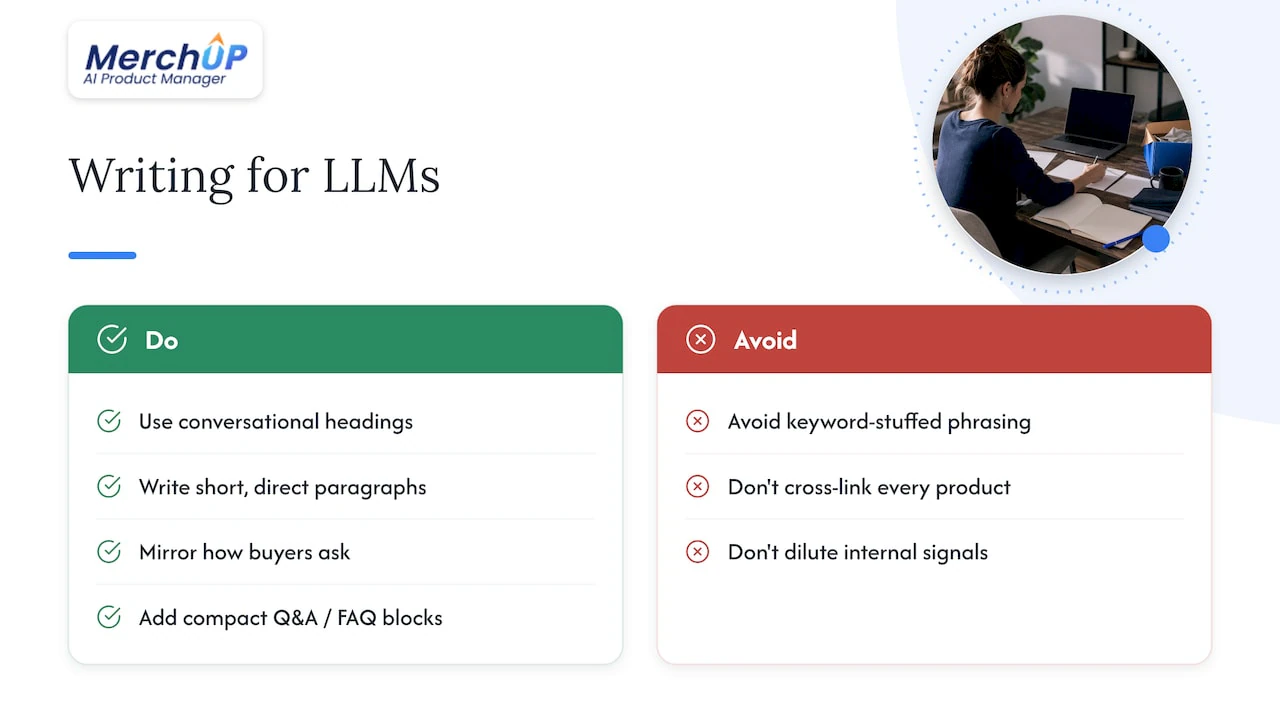
Large language models favour pages that answer a question plainly rather than pages built purely to rank. That means conversational headings, short paragraphs that state a direct use case, and language that mirrors how a buyer would actually ask about the product rather than keyword-stuffed phrasing.
Compact Q&A or FAQ blocks at both product and collection level do real work here. A few direct question-and-answer pairs, sizing, care instructions, compatibility, give an AI assistant something quotable, and the Shopify SEO and AI readiness playbook from Search Engine Land lists exactly this kind of semantically rich, FAQ-supported content as a key preparation step for AI-powered shopping.
Internal linking still matters for passing signal between pages. Cluster related SKUs into tight collections, link from each product back to its parent collection, and link sideways to close alternatives, but stop there: cross-linking every product to every other product dilutes the signal rather than strengthening it. Our guide on turning product pages into internal-linking assets covers the structure in more detail.
Quick implementation checklist: 30, 90 and 180 days
Turning this into a schedule rather than a wish list makes it far more likely to actually happen.
- Days 1 to 30: submit your sitemap, fix mandatory schema fields on your top-selling SKUs, add product FAQs, and pilot AI description templates on around 20 SKUs.
- Days 31 to 90: map Shopify Catalog fields correctly, set up a Merchant Center feed, automate image optimisation and alt text, and roll out internal-linking updates across collections.
- Days 91 to 180: audit schema across the entire catalogue, A/B test template variants for click-through and conversion, and fold the AI workflow into your regular release cycle.
| Timeframe | Primary focus | Key output |
|---|---|---|
| 30 days | Sitemap and schema basics | Top SKUs indexed and compliant |
| 90 days | Feed and catalogue mapping | Merchant Center eligibility, automated alt text |
| 180 days | Full-catalogue audit and testing | Schema coverage, tested template variants |
Author perspective: a pragmatic view on AI for Shopify SEO
The hype around AI SEO tools outpaces what most stores actually need. Before touching generative copy, get your data right: clean titles, accurate availability, working schema. AI then becomes a multiplier rather than a gamble.
I’d rather see a merchant run a 20-SKU pilot with proper human review than batch-publish a thousand AI descriptions overnight. Treat it as a governed workflow, not a shortcut, and keep a human in the loop on anything touching price or stock. Our own resources on product-description workflows reflect that same caution: scale carefully, verify constantly.
— Jamie Moss
How MerchUp helps you scale product content without losing accuracy
We built MerchUp to handle exactly the workflow described above: AI-generated product descriptions, customisable templates, a visual editor, and bulk publishing that integrates directly with Shopify. Rather than writing each listing by hand, you generate from a template, edit visually, and publish at catalogue scale while keeping brand voice consistent.

- Generate SEO-optimised descriptions from reusable templates.
- Edit visually before anything goes live, no code required.
- Publish in bulk directly to your Shopify catalogue.
See it in action with the MerchUp tutorial, or go straight to the pricing page to compare the Starter, Growth, Pro and Scale plans and pick the one that fits your catalogue size.
FAQ
Is there an AI that can do SEO?
AI tools can handle specific SEO tasks well, including content generation, keyword clustering and schema suggestions, but no tool manages SEO end to end without human oversight. Technical fixes like sitemap submission and structured data still need deliberate setup, as outlined in Shopify’s sitemap guidance.
Is there an AI for Shopify?
Yes, Shopify has built native AI features such as Sidekick and agentic storefront support, alongside a wider app ecosystem covering AI copywriting, schema management and feed automation. Some tools integrate directly with Shopify to generate and publish AI-written product descriptions at scale.
Can ChatGPT build me a Shopify store?
A general-purpose chatbot can help draft copy, suggest structure or troubleshoot settings, but it cannot configure your theme, catalogue, schema and feeds as a working store on its own. Store setup still requires manual configuration within Shopify’s admin and app ecosystem.
Can ChatGPT help with SEO?
A conversational AI tool can help brainstorm keywords, draft meta descriptions or outline FAQ content, which supports SEO work. It cannot submit sitemaps, fix structured data errors or monitor Merchant Center eligibility, tasks that still need the tools and steps described in Google’s and Shopify’s own documentation.
Sources
- Search Gallery – Structured data types — Google Developers
- Finding and submitting your sitemap — Shopify Help Center
- The Shopify SEO and AI readiness playbook — Search Engine Land
Key primary sources and documentation to consult
For implementation detail beyond this guide, Google’s developer pages on Product structured data and merchant listing eligibility cover the exact schema properties required. Shopify’s Help Centre has dedicated pages on sitemaps, Shopify Catalog mapping and agentic storefront configuration. For a broader industry view on preparing stores for AI-driven shopping, the Search Engine Land playbook linked earlier in this guide is worth a full read, and automation-focused merchants may also find value in Shopify SEO automation resources.


Comments
No comments yet — be the first to share what you think.