


Write the hero benefit first, back it with three to five bullets that turn features into outcomes, then close with a short SEO paragraph and a couple of buyer FAQs. That structure, in that order, is what makes a Shopify product description convert shoppers and rank in search at the same time. Most stores get this backwards: they open with materials and dimensions, bury the benefit halfway down, and stuff the primary keyword three times in the first sentence.
The fix is a fixed structure, applied consistently:
- Hero sentence – the single biggest reason to buy, in plain language
- 3–5 benefit bullets – each pairs a feature with what it actually does for the buyer
- Spec block – the facts a comparison shopper needs, scannable in seconds
- Short SEO paragraph – 40–80 words that naturally answers “what is this and who is it for”
- Buyer FAQs – two or three questions real customers ask before checkout
Place your primary keyword in the product title, the opening sentence of the description, and one subheading, nowhere else. Search-engine algorithms reward pages written for buyers over pages written for crawlers, and Google’s own helpful content guidance penalises copy that reads like it was optimised rather than written.
Pro Tip: If you’re publishing more than 50 SKUs, write your hero sentence and bullets first, save the spec block and FAQs as reusable template blocks, and only hand-write the differentiator line per variant. That one habit stops product pages turning into boilerplate clones of each other.
Ready-to-use description templates by category
Fill these with your own attribute tokens, adjust the tone, and you have a publishable draft in minutes rather than hours.
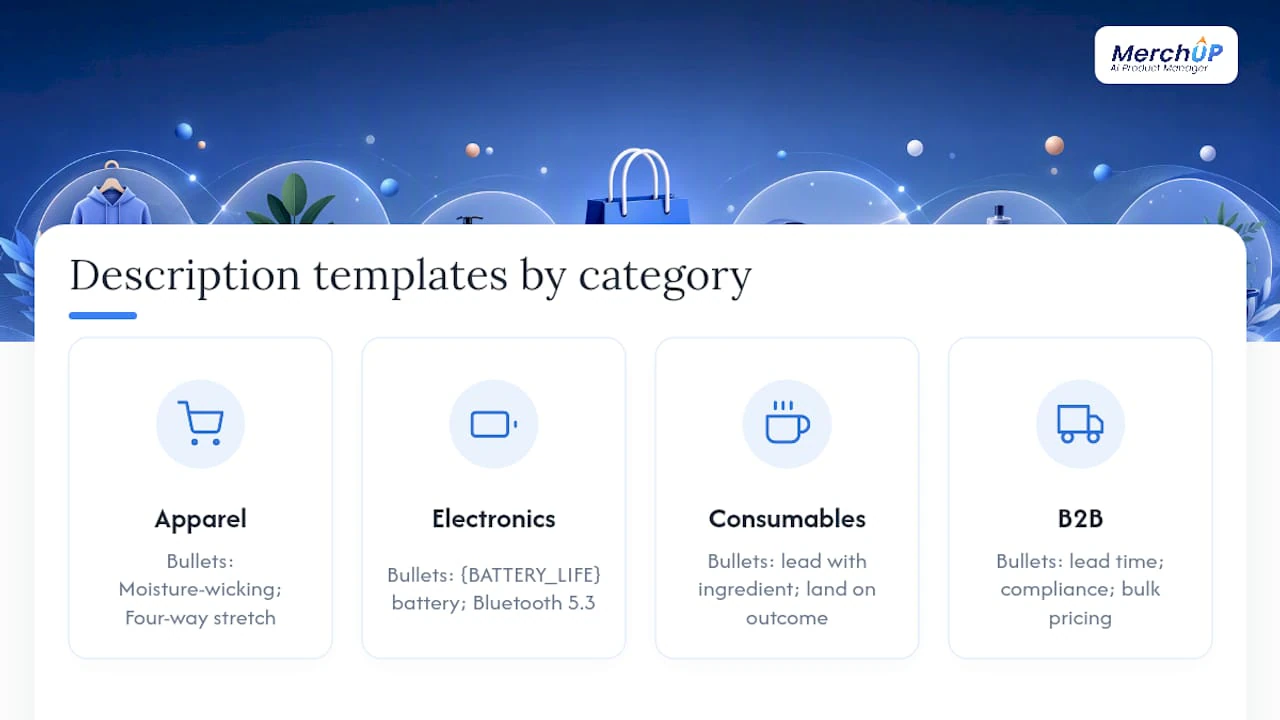
Apparel
SEO title: {PRODUCT NAME} – {FIT} {MATERIAL} {CATEGORY}
Hero: “Built from breathable {MATERIAL}, this {FIT} {CATEGORY} moves with you from the morning commute to the evening run.”
Bullets: Moisture-wicking fabric → stays dry through long shifts. Four-way stretch → full range of motion. Reinforced stitching → holds up after 100+ washes.
Paragraph (40–80 words): a short story about the fabric, the fit, and who it suits. Meta description (120–150 characters): include size range and one standout feature.
Electronics
SEO title: {PRODUCT NAME} – {BATTERY_LIFE} Battery, {COMPATIBILITY}
Hero: “Get {BATTERY_LIFE} of playback from a single charge, with instant pairing across {COMPATIBILITY}.”
Bullets: {BATTERY_LIFE} battery → fewer charging interruptions. Bluetooth 5.3 → stable connection at range. IPX4 rating → sweat and splash resistant.
Consumables Hero: “Made with {KEY_INGREDIENT}, this {PRODUCT NAME} delivers {BENEFIT} without {COMMON_DRAWBACK}.” Bullets should lead with the ingredient and land on the outcome, not the process.
B2B Hero: “Reduce {PAIN_POINT} with {PRODUCT NAME}, engineered to {SPEC_CLAIM} for teams running {USE_CASE}.” Bullets should speak to procurement concerns: lead time, compliance, bulk pricing.
Pro Tip: Write one SKU-specific differentiator sentence per variant (colour, size, capacity) and drop it into the paragraph slot. That single sentence is what stops near-identical products from cannibalising each other in search.
Should you write descriptions manually, with AI, or both?
Write for the person buying, not the algorithm indexing. Search engines increasingly treat product pages as answer pages, rewarding copy that resolves a buyer’s actual question, includes parseable facts for schema markup, and never repeats the keyword mechanically. Get that right and ranking follows; chase the algorithm directly and it usually backfires.
Which method you use depends on catalogue size and how clean your product data already is. Manual writing scales to roughly 5,000 SKUs; AI-only approaches work past 50,000. Most stores sit in between, where a hybrid method wins.
Three hybrid patterns worth testing:
- AI drafts, human review – fast, but every draft needs an editor’s eye before publishing
- Templated slot-filling – reliable and quick, weaker on nuance for hero SKUs
- Attribute extraction then generation – best long-term fit, but needs upfront data cleanup
Pro Tip: Rotate your hero sentence structure across near-identical SKUs (start one with a material fact, another with a use case, another with a comparison) so AI-generated batches don’t read like the same sentence with nouns swapped.
What belongs in each Shopify product field?
Copy alone doesn’t sell a page; where it lives inside Shopify’s fields determines whether it gets indexed and understood correctly.
- Product title (H1) – primary keyword near the front, brand or model after
- Description (body) – hero sentence, bullets, spec block, FAQs
- Search engine listing preview – meta title under 60 characters, meta description 120–150 characters, keyword included naturally
- Image alt text – describe the product and its use, e.g. “navy cotton crew socks, pair worn on foot”
- Variant labels – consistent naming across colour and size so filters work cleanly
- Vendor and collections – filled in for every SKU, they quietly support internal linking and filtered navigation
- Metafields – store structured attributes (material, dimensions, compatibility) that can feed both your template placeholders and product schema markup
Check canonicalisation before you publish variants as separate pages: near-identical colourways rarely need their own URL unless they carry genuinely distinct specs or independent search demand. Adding FAQ schema to answer buyer questions directly in search results is worth the extra ten minutes, particularly as AI-driven search increasingly surfaces structured Q&A content.
Pro Tip: Use Shopify metafields to store your SEO keyword tokens and template placeholders once, then pull them into every description automatically instead of retyping them per product.
Which microcopy changes actually lift conversions?
Small wording changes near the buy button tend to move conversion rates more than a full rewrite of the description. Lead with the benefit, not the feature, then give the shopper exactly one action to take.
- Benefits-first hero line – state the outcome before the spec
- Single clear CTA – one button, one message, no competing calls to action
- Scannable bullets – each one names a benefit, not just a feature
- Trust lines – “Free returns within 30 days”, “Ships in 2 business days”, “2-year warranty”
- Sparing urgency – “Only 4 left in stock” works; fabricated countdown timers erode trust fast
Compatibility and returns notes matter more than most teams assume: a single line like “Fits iPhone 14/15/16 cases” or “Machine washable, tumble dry low” quietly resolves the hesitation that would otherwise send a shopper back to Google. Weaving a short review snippet into the description (“Rated 4.8 by 200+ buyers for durability”) adds proof without duplicating the reviews widget further down the page.
Pro Tip: A/B test one microcopy element at a time and track add-to-cart rate, product-page bounce rate, and return rate together. A description that lifts conversions but also lifts returns hasn’t actually improved anything.
How do you keep descriptions accurate at scale?
Scaling copy safely is a data problem before it’s a writing problem. Treat it as data architecture: normalise your product attributes, route each category through its own template, and validate every generated fact against the source record before it ever reaches a live page.
A workable sequence: audit your product information management (PIM) data, define templates per category, assign SEO targets per SKU, run generation, validate programmatically, route flagged items to a human editor, then publish and monitor.
| Approach | Throughput (SKUs/week, approx.) | Editorial burden |
|---|---|---|
| Manual | 50–150 | High |
| Hybrid | 5,000 | Moderate |
| AI-only | 5,000+ | Low, exception-based |
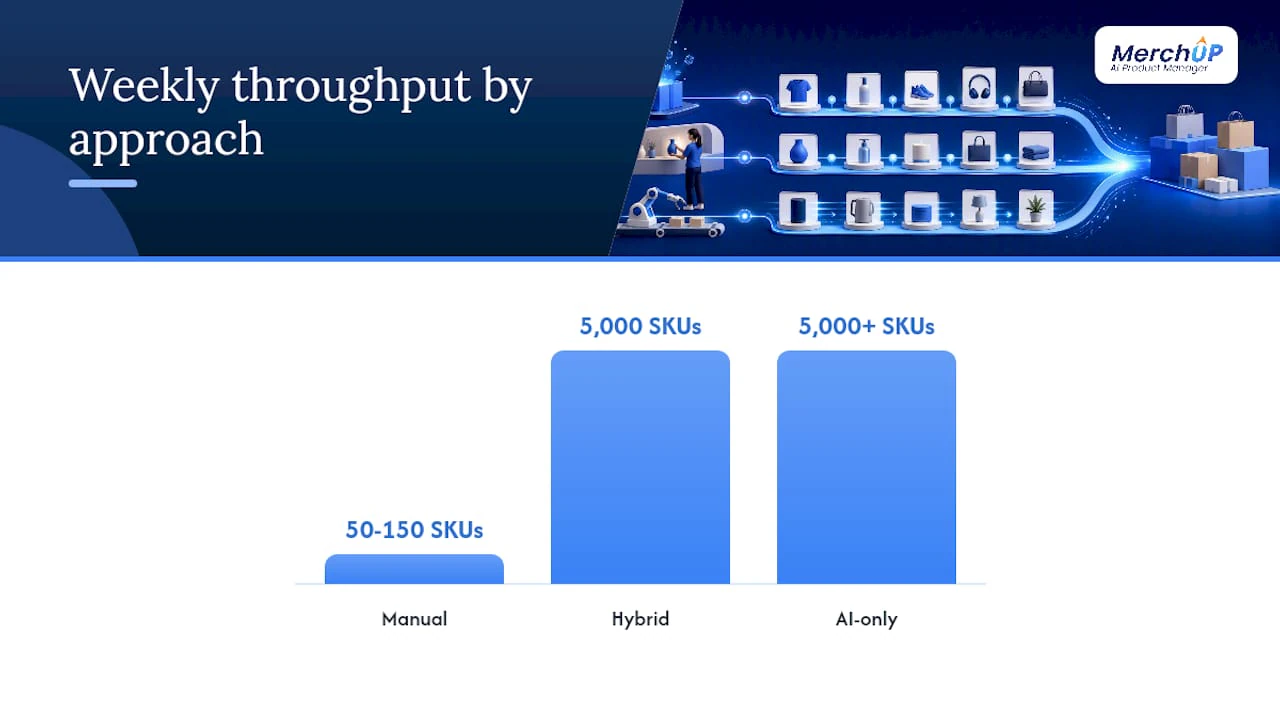
Automate checks for mismatched specs, forbidden claims, and missing attributes; anything that fails gets flagged rather than published blind. Route templates by vertical rather than using one generic prompt everywhere.
Pro Tip: Pilot one category first, measure indexation and conversion, then expand. Staged rollouts catch template problems before they touch your whole catalogue.
What does a before-and-after rewrite actually look like?
Apparel, before: “This t-shirt is made of cotton. Available in sizes S to XL. Machine washable.” After: “Soft, breathable cotton that holds its shape wash after wash. Available S–XL, with reinforced seams built for daily wear.” The rewrite adds a benefit up front and answers the unspoken buyer question: will this last?
Electronics, before: “Wireless earbuds with Bluetooth and long battery.” After: “Get 30 hours of playback from wireless earbuds that pair instantly with iOS and Android, so you’re never digging through settings menus.” The primary keyword sits naturally in the opening line, and the specific battery figure replaces a vague claim.
B2B consumable, before: “Industrial adhesive, strong bond, various uses.” After: “A high-tack industrial adhesive rated for metal-to-metal bonds, engineered to cut assembly-line downtime for manufacturers running high-volume production.”
The pattern across all three: replace a vague claim with a specific outcome, and answer the question the buyer was already Googling.
Why hybrid usually wins beyond a certain catalogue size
Most Shopify stores don’t need to choose between “handwritten and slow” or “automated and generic.” Once you’re past a few thousand SKUs, hybrid generation, structured templates with human review on the SKUs that matter most, is usually the pragmatic middle ground. The common pitfall is skipping the data audit and generating straight from messy attributes. Start with one category, templated generation plus manual review, before rolling out further.
When it makes sense to bring in MerchUp
Building and maintaining the workflow above by hand, template design, attribute mapping, validation rules, is real work, and that’s precisely the gap MerchUp is built to close. It generates product descriptions from your existing catalogue data, gives you a visual editor to adjust tone without touching code, and bulk-publishes straight to Shopify once you’re happy with a batch.

Three things matter most against the decision framework above: templated generation that respects category-specific structure rather than one generic prompt, a visual editor for the human review step hybrid workflows depend on, and bulk publishing that pushes finished copy to Shopify without manual copy-pasting per SKU. If your catalogue has outgrown manual writing but you’re not ready to trust AI output unchecked, that’s exactly the middle ground MerchUp is built for. Explore MerchUp’s plans to see which tier fits your catalogue size, or start with the MerchUp product generator to run a first batch against your own SKUs.
Frequently asked questions
Where exactly should I put my primary keyword in a Shopify product description? In the product title, the first sentence of the description, and one subheading. Placing it anywhere else risks reading as stuffed rather than natural.
How many SKUs before I need AI help? Manual writing holds up reasonably well to around 5,000 SKUs. Past that, a hybrid or AI-assisted workflow saves considerable editorial time.
Do I need separate pages for every product variant? Only if a variant has distinct specifications or measurable search demand of its own. Otherwise, canonicalise to the parent product page to avoid index bloat.
What’s the biggest mistake stores make with AI-generated descriptions? Publishing without a validation layer. Numbers, materials, and compatibility claims need checking against the source data before anything goes live.
Sources
- StartWithData — Writing product descriptions at scale: Manual, AI or hybrid?
- BigCommerce — Ecommerce product description
- VWO — Ecommerce product page design
- ProgSEO — How I auto generate product descriptions for 50k items


Comments
No comments yet — be the first to share what you think.