


A product page that converts and ranks needs eight fields working together: a keyword-led title, a benefit-first short description, 3–6 scannable bullets, a spec block, visible price and availability, an FAQ block, image alt text, and valid Product and FAQPage JSON-LD schema. Together they cut returns, improve organic visibility, and lift conversions. Jamie Moss at MerchUp has built this checklist from what actually moves the needle on Shopify catalogues, large and small.
TL;DR:
- Most effective Shopify pages combine key elements like benefits-focused descriptions, specifications, FAQs, images with alt text, and schema markup.
- Above the fold on mobile, prioritize the product image, title, price, short description, bullet features, and add-to-cart button.
- Consistent batch creation using templates with mapped keywords minimizes duplicate content issues and speeds up large catalog updates.
- Error correction should focus on benefits over features, complete specs, visible stock status, and properly formatted bullets for mobile screens.
- Using schema markup for product and FAQ details significantly improves visibility in rich results and AI answer engines.
Which fields belong on a Shopify product page?
Every Shopify product page is really a stack of discrete content fields, and each one earns its place by answering a specific shopper question. Treat the page as a technical reference document with marketing polish, not the other way round, and the structure gets far easier to audit.
Here’s what belongs in each field, what format it needs, and why search engines and shoppers both look for it:
- Product title (H1): states what the product is and its key differentiator in under 70 characters; this is the first thing both Google and a scanning shopper read.
- Short description: one or two benefit-led sentences immediately below the title, front-loading the primary use case because users scan rather than read.
- Bulleted features: 3–6 lines translating specs into outcomes, visible in HTML, never buried inside an image.
- Specification block: dimensions, materials, compatibility, and warranty, sitting close to the price rather than at the foot of the page.
- Images and alt text: every hero and gallery image needs descriptive alt text that repeats the product name and one distinguishing feature.
- Price, availability, and variant copy: always visible in HTML, never rendered only after a variant is selected via JavaScript that search crawlers might miss.
- FAQ block: four to eight support-driven questions with full answers on the page, not hidden behind a support link.
- Meta title and meta description: written for the search results page, distinct from the on-page H1 and short description.
Long-form background, brand history, or care instructions can sit inside an accordion. Specs, price, and core claims cannot; anything that supports the buying decision belongs above the fold or immediately below it. The most common pitfall is pasting manufacturer copy wholesale, which duplicates content across dozens of competing stores and gives Google nothing unique to rank. A close second is a bullet list that dumps features without ever saying what they do for the buyer, and a third is hiding stock status until checkout, which spikes abandoned carts.
How to write each product page field
Each field has a rough word count and a job to do. Here’s a working template for the fields that carry the most SEO and conversion weight.
- Title (H1). Structure it as [primary attribute] + [product type] + [brand, optional], keeping the whole string under roughly 70 characters so it doesn’t truncate on mobile search results or the Shopify theme header.
- Short description. Open with the primary keyword inside a benefit statement, not a dry feature list, within the first 50 to 100 words of the page. One to two sentences is enough; save detail for the bullets and specs below.
- Bullets. Write 3 to 6 lines using a feature, then “which means,” then the benefit, keeping every bullet under roughly 20 words and grammatically parallel so they scan as a set rather than a jumble.
- Long description. Expand to 300–500 words only when the product is complex, high-ticket, or needs context a shopper can’t get from a photo. A simple T-shirt rarely needs it; a mattress or a power tool usually does.
- Specs block. List compatibility, dimensions, materials, and warranty as a scannable table or definition list, placed directly under the price, not scrolled past three screens down.
- FAQ. Choose four to eight questions your support team actually gets, and answer each in 40 to 100 words directly on the page.
Templates worth testing include PAS (problem, agitation, solution) for pain-point products, sensory description for anything tactile or edible, and spec-to-benefit for technical goods where the buyer already knows what they want and just needs confirmation. A benefit-first opening followed by objection-handling bullets covers most product categories without reinventing the format every time. Our product description structure guide walks through worked examples of each pattern.
Pro Tip: Write the bullets before the long description. If you can’t summarise the product in six short lines, the long-form copy you write afterwards will ramble.

What should appear above the fold on mobile?
Shopper attention drops fast on a phone screen, so the order of elements matters more than the content itself. The sequence that performs consistently is: primary image, H1, price, short description, bullets, then the add-to-cart button and variant selectors. Anything below that line needs to earn a scroll.
- Put compatibility and dimensions where scanners look first, not two accordions deep, because most shoppers skim and want immediate specs to avoid ordering the wrong size or fit.
- Use accordions for care instructions, brand story, and shipping policy, never for the specs someone needs before they’ll commit to buying.
- Explain variant differences (size, colour, storage capacity) in plain language next to the selector itself, not in a separate tab a shopper has to hunt for.
- Show stock state directly on the button or beside it (“Only 3 left,” “In stock,” “Ships in 2 days”) rather than after the shopper clicks through.
- Confirm every add-to-cart action with a visible signal, whether that’s a slide-out cart, a toast notification, or an inline “Added” state, so shoppers don’t click twice and duplicate their order.
Desktop shoppers tolerate more information density, so a secondary column of specs or a comparison table can sit beside the gallery. On mobile, that same information needs to collapse into a single stacked column without disappearing.
How does Shopify product schema help SEO?
Product and FAQPage schema turn your page copy into machine-readable facts, and that matters more now than it did two years ago because AI answer engines pull facts directly from HTML and structured data, not just from crawled prose.
- Product schema needs name, description, an image array, SKU, brand, and the offers object with price, price currency, and availability status.
- FAQPage schema should mirror four to eight visible Q&A pairs, each answer running 40 to 100 words, because Google and AI crawlers penalise schema that doesn’t match what’s actually on the page.
- Never let a critical spec live only inside a product photo. If the material or dimension is only visible in an image, both search engines and AI tools may fail to extract it, so duplicate every key fact into HTML text as well.
- Keep the meta title under 60 characters and the meta description around 150, with the primary keyword near the start of both.
Pages with visible facts and valid schema together stand a measurably better chance of surfacing in rich results and AI-generated answers than pages relying on either alone. Our Shopify product schema guide covers the exact JSON-LD structure Shopify themes expect.
How do you scale product page content across a catalogue?
A single well-written page is easy. Two hundred consistent, unique pages by Friday is a different problem, and it’s usually where teams either burn out or start pasting supplier copy out of desperation.
Start with a template that locks in the fields already covered: a short description slot, 3–6 bullet placeholders, a spec table, FAQ slots, and dedicated meta title and meta description fields, plus a required alt-text field for every image. Our Shopify product description templates give you a working starting point rather than a blank page.
From there, run a batch process:
- Map your primary keyword to each SKU or product category before writing a word.
- Fill the template per SKU, drawing on supplier specs but rewriting every sentence in your own voice.
- Run an editorial QA pass checking for duplicate phrasing across SKUs, a mobile preview, and schema validation.
- Publish in batches rather than all at once, so you can catch formatting errors before they multiply across the catalogue.
This two-stage approach, AI draft into template, then human QA and schema check, reduces duplicate-content risk while preserving brand voice at volume. MerchUp builds this workflow directly into its editor: it drafts benefit-led opening lines and bullets from your product data, lets you customise templates once and reuse them across a category, and pushes finished copy straight into your live Shopify catalogue through its integration, with bulk publish for larger runs.
Once copy is live, track click-through rate, conversion rate, and return rate per SKU category, and run A/B tests on your highest-traffic pages first rather than spreading test traffic thin across the whole catalogue.
Pro Tip: Run your QA checklist before schema validation, not after. Catching a duplicated bullet is cheaper than catching a schema error that’s already indexed.
Where merchants go wrong, and a realistic monthly cadence
The same five mistakes turn up on almost every catalogue audit: dumping features with no stated benefit, pasting manufacturer copy verbatim, leaving specs out entirely, hiding stock status until checkout, and formatting bullets that wrap into three lines on a phone screen. Each one is a five-minute fix once you know to look for it.
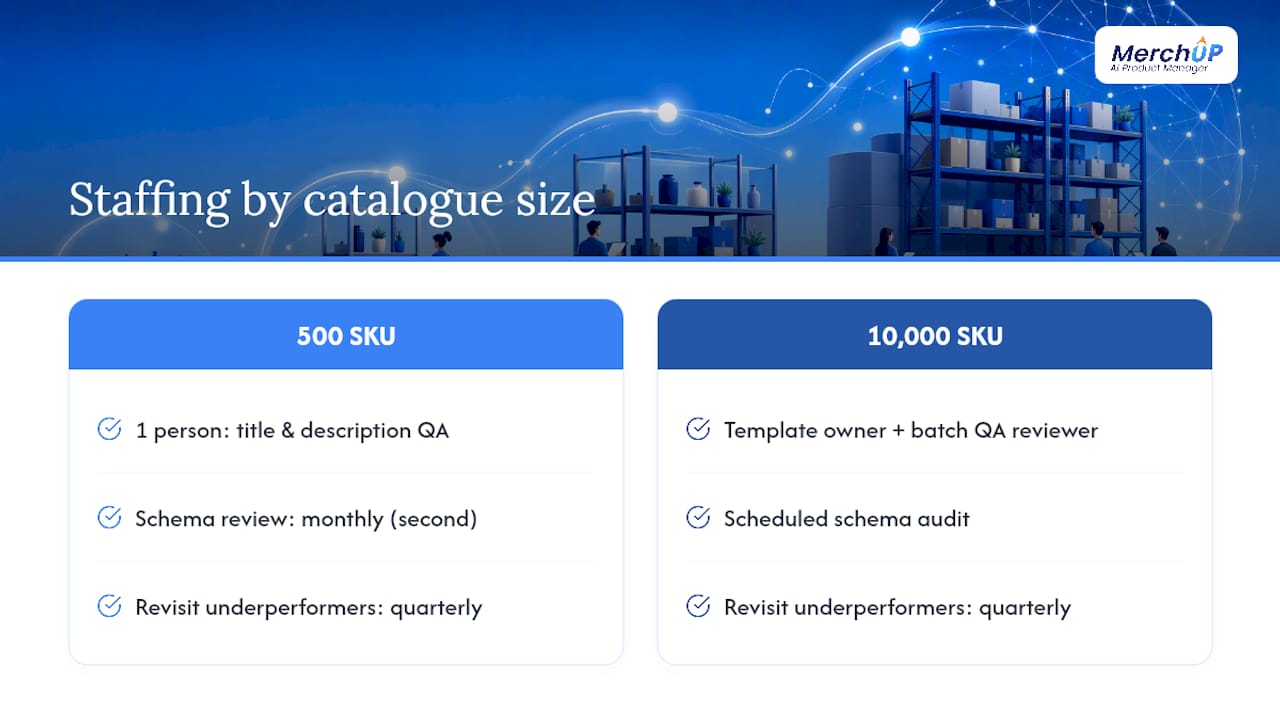
For a 500-SKU store, one person can realistically own title and description QA, with a second reviewing schema monthly. A 10,000-SKU catalogue needs a template owner, a batch QA reviewer, and a scheduled schema audit, because errors compound fast at that scale. Revisit underperforming pages quarterly rather than rewriting everything at once.
— Jamie Moss
Put this playbook into MerchUp
Building every field by hand across a growing catalogue is where most of this playbook falls apart in practice, not in theory. MerchUp is built specifically to close that gap for Shopify sellers: it generates benefit-led descriptions, bullets, and FAQ copy from your existing product data, lets you save the structure as a reusable template, and gives you a visual editor to fine-tune tone before anything goes live.

The core feature set covers what this article has walked through: AI-drafted descriptions and bullets, customisable templates per category, a visual editor for manual polish, direct Shopify integration, and bulk publishing for catalogues that need dozens or hundreds of pages updated at once. The aim is fewer hours per SKU and more pages that actually follow the structure search engines and shoppers both respond to.
If you’re ready to see it against your own catalogue, the MerchUp product description tutorial shows the workflow in under a minute, and the MerchUp product page has full details on plans and Shopify setup.
Sources
- Product description best practices (BigCommerce)
- Product schema & FAQ schema for ecommerce (Kerkar Media)
- Product description writing guide (ConversionStudio)


Comments
No comments yet — be the first to share what you think.