


“Shopify product schema” refers, in this guide, to AI-generated product descriptions built and published for Shopify stores, complete with the SEO groundwork that gets them found. Running this process properly, you get three things fast: a publish speed measured in minutes rather than days, a brand voice that stays consistent whether you have 50 SKUs or 15,000, and copy structured to earn organic traffic and clicks. Merchup AI builds this exact workflow for Shopify merchants, and the platform that most merchants are missing out on is the one that treats product copy as a repeatable system, not a one-off writing task.
The scale problem is where most stores actually lose money. A merchant with 3,000 SKUs and no systematic description process typically ends up with duplicate copy, thin specs, or blank fields, all of which suppress search visibility. Shopify’s own SEO guidance is blunt about this: unique, benefit-led descriptions per product page are not optional if you want to rank.
Here’s what to expect once an AI-assisted workflow is running properly:
- Faster time to publish: batch generation turns a week-long copywriting backlog into an afternoon task.
- Consistent brand voice: templates and gold-standard examples stop tone drifting between SKUs written months apart.
- Measurable SEO and conversion gains: unique copy targeting long-tail keywords tends to outperform generic manufacturer descriptions in search.
One practitioner case study found a catalog where 60% of product pages had duplicate or missing descriptions, and organic traffic rose noticeably after a structured pipeline replaced them.
Pro Tip: Don’t run your entire catalog through AI on day one. Pick 20 to 30 hero SKUs, get the voice and structure right, then scale once you trust the output.
Why AI-generated product copy matters for Shopify SEO and sales
Search engines can’t rank what they can’t distinguish, and duplicate or thin product descriptions are exactly the kind of content that gets buried. Every SKU with unique, keyword-relevant copy is a chance to rank for a long-tail search term a competitor’s boilerplate text can’t touch. That’s the commercial case in one sentence: description quality is a discoverability lever, not a cosmetic one.

The operational case is just as strong. Writing 500 words of genuinely differentiated copy per SKU by hand costs real time, and most in-house teams simply stop once the top-selling 10% of the catalog is covered. AI generation flips that maths. It makes the long tail affordable to write for, which is precisely the part of the catalog most competitors ignore.
AI product description generators speed up production, keep tone consistent across large catalogs, and make multi-channel variants far cheaper to produce, provided editorial checks stay in place. Skip that oversight and you trade one problem (thin content) for another (inaccurate content).
The business case breaks down into a few concrete wins:
- Broader long-tail search coverage across SKUs that would otherwise never get bespoke copy.
- Improved click-through rates from descriptions written around what buyers actually search for.
- A visible drop in cost-per-description once templates and review queues are in place.
| Point | Details |
|---|---|
| Duplicate content risk | Unedited manufacturer copy pasted across SKUs actively suppresses Shopify search rankings. |
| Long-tail coverage | AI generation makes writing for low-volume SKUs financially viable at scale. |
| Editorial oversight required | Faster output only pays off if human review catches errors before publishing. |
How the AI, edit, and bulk-publish workflow connects to Shopify
The pipeline that works in practice has five stages, and skipping any one of them is usually where things go wrong.
- Extract product data from Shopify. Titles, variants, metafields, and existing descriptions get pulled via the Shopify Admin API, giving the AI real structured inputs instead of guesswork.
- Enrich the record. Missing specs, materials, and dimensions get filled in from vendor PDFs, spec sheets, or product images, because an AI fed incomplete data will quietly invent the gaps.
- Apply a templated prompt. Brand voice rules, tone examples, and SEO targets get bundled into a structured prompt rather than a blank instruction.
- Generate and route to review. Output goes to a human review queue, weighted more heavily towards hero SKUs and technical or safety-related claims.
- Batch publish back to Shopify. Approved descriptions push back through the API in batches, updating metafields and variant-level copy without manual re-entry.
Structuring product content for machine readability matters at every stage of this, not just the last one. Clear, structured attribute fields make it easier for both the AI and downstream shopping engines to interpret what a product actually is.
The pipelines that succeed keep templated factual output, spec tables built from structured fields, separate from the persuasive narrative an AI writes. Mixing the two is how specs get quietly invented.
Pro Tip: Feed the AI a structured brief, not a paragraph. A short bullet list of confirmed specs produces far fewer hallucinations than a loosely worded prompt asking it to “write something compelling.”
Seven steps to generate, edit, and bulk-publish product descriptions
- Export or connect your product data. Sync your Shopify catalog so titles, variants, and metafields are visible to the generation tool.
- Define your brand voice templates. Write or select five to ten gold-standard descriptions that represent the tone you want replicated across the catalog.
- Set SEO targets per category. Decide which primary and long-tail keywords matter for each product type before generation begins.
- Run batch generation on a test group. Start with 20 to 50 SKUs, not the whole catalog, so you can spot pattern errors early.
- Route output through a review queue. Prioritise hero SKUs and anything with a safety, size, or material claim.
- Batch publish to Shopify. Push approved copy in controlled batches to avoid API rate limits and partial publish failures.
- Monitor early results. Track impressions, click-through rate, and conversion for the test batch before scaling further.
Before you generate a single description, make sure the AI has these minimum fields: product title, variant options, materials, key specs, and your target keyword for that category. Anything less, and you’re asking the tool to guess.
- Batch in groups of 50 to 100 SKUs rather than pushing the whole catalog at once.
- Stagger publish windows to avoid hitting Shopify API rate limits mid-batch.
- Keep a rollback list of the pre-AI descriptions in case a batch needs reverting.
Pro Tip: Run your first full batch on a Tuesday or Wednesday. If something breaks, you’ve got the rest of the week to fix it before a weekend sales spike.
SEO checklist for product descriptions that actually rank
Good product copy does two jobs at once: it reads naturally to a buyer and it gives search engines a reason to rank the page. Shopify recommends writing for buyers first, leading with benefits rather than a dry feature list, and never duplicating text across product pages.
Do this:
- Lead with the single strongest benefit, not the product category name.
- Place your primary keyword in the first sentence, naturally.
- Use a short bullet list to convert features into buyer benefits.
- Write a unique meta description for every product, not a truncated copy of the body text.
Avoid this:
- Reusing manufacturer copy verbatim across multiple listings.
- Burying the keyword three paragraphs deep, after the buyer has already lost interest.
- Writing feature lists with no benefit attached (“100% cotton” tells a buyer nothing about comfort).
An opening line like “Built for cyclists who commute in the rain, not just the showroom” earns more attention than “This jacket is waterproof and lightweight.” Follow it with a benefit-led bullet: “Waterproof shell keeps you dry through a 40-minute commute” beats “Waterproof material” every time.
AI-generated descriptions should also produce channel-specific variants from the same source data, since a Shopify PDP, a marketplace listing, and a shopping feed all have different length and tone constraints.
Modern search rewards specificity. A description that answers a practical, non-replicable question, exactly which fabric weight, exactly which use case, tends to earn more authority than one written to sound impressive.
| Point | Details |
|---|---|
| Keyword placement | Put the primary keyword in the first sentence and the meta description. |
| Bullet structure | Convert every feature into a stated buyer benefit. |
| Uniqueness | Never duplicate copy across product variants or competing SKUs. |
For a fuller breakdown of copy patterns that convert, see this guide to product description SEO.
Governance and scale: keeping brand voice consistent
AI copy generation isn’t a switch you flip once. High-performing teams treat the AI like an operational employee: give it strict inputs, five to ten gold-standard examples, and clear rules, and it produces consistent copy across thousands of SKUs. Skip that setup and voice drift creeps in within weeks.
- Build a reusable brand voice template with tone words, banned phrases, and a sample paragraph.
- Store five to ten “gold standard” descriptions in your visual editor as reference examples.
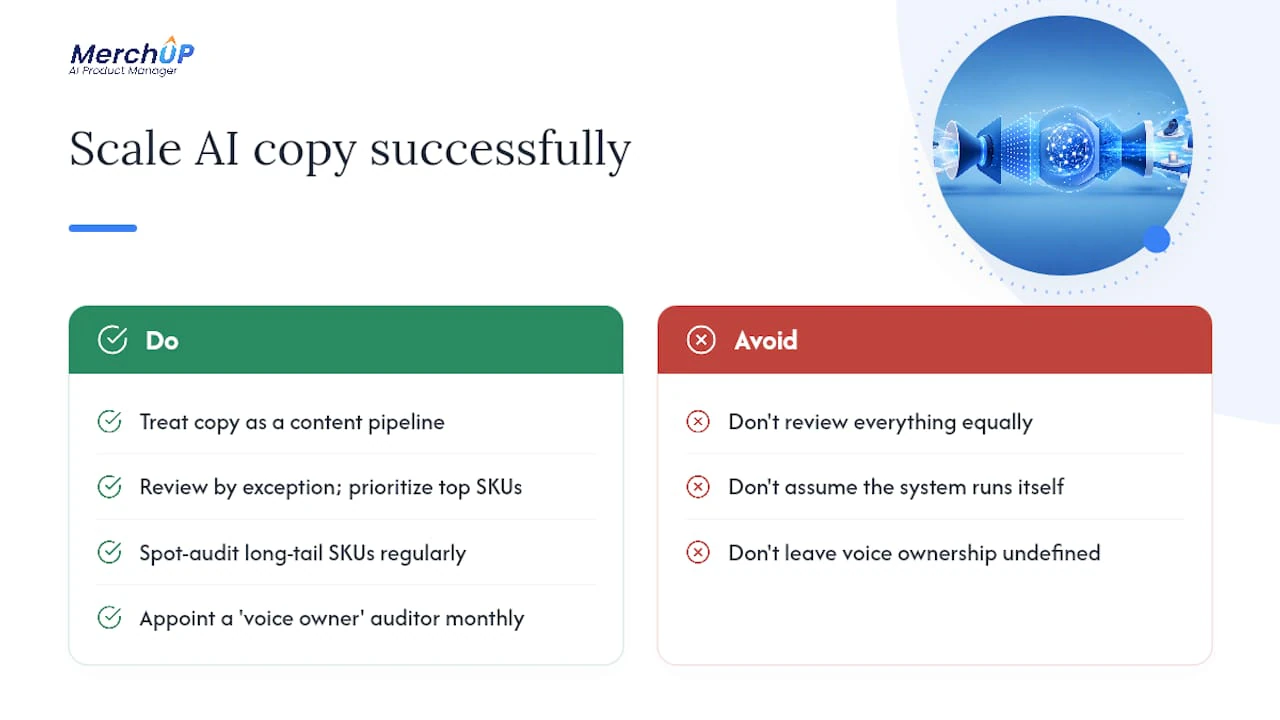
- Set a review-by-exception rule: human polish for your top-revenue SKUs, spot audits for the rest.
- Flag any technical, safety, or measurement claim for mandatory human sign-off before publishing.
- Draft the brand voice playbook first, before generating a single description.
- Load reusable “negative instructions” into every prompt, explicit bans on invented specs, exaggerated claims, or unverifiable language.
- Route hero SKUs and anything revenue-critical through full human review every time.
- Spot-check the remaining catalog on a rolling schedule rather than reviewing everything equally.
- Escalate any factual dispute (materials, dimensions, certifications) to a human before it ever reaches the storefront.
Pro Tip: Write your negative instructions as explicitly as your positive ones. “Never state a specific washing temperature unless it appears in the source data” stops more hallucinations than a vague instruction to “be accurate.”
For ready-made templates you can drop straight into a review workflow, this product description template library is worth bookmarking.
Measuring impact: KPIs, testing, and what to expect
Prove the workflow is working before you scale it further. Track a small, specific set of metrics rather than everything Google Analytics offers.
| Metric | Why it matters | Review cadence |
|---|---|---|
| Organic impressions per product page | Shows whether unique copy is earning search visibility | Monthly |
| Click-through rate | Flags whether meta descriptions and titles are compelling | Bi-weekly |
| Conversion rate on updated PDPs | Confirms copy changes affect buying decisions, not just traffic | Monthly |
| Time-to-publish per batch | Tracks operational efficiency of the review queue | Per batch |
| Editorial hours saved | Quantifies the labour reduction from AI-assisted drafting | Quarterly |
- Pick a test group of 50 to 100 SKUs and freeze all other variables (price, imagery, placement).
- Run the new AI-generated copy for a minimum of four to six weeks before judging results.
- Compare organic impressions and conversion rate against a control group of unchanged SKUs.
- Roll out to the next tier of the catalog only once the test group shows a clear, sustained shift.
Expect gains to build gradually rather than overnight. The pipeline case study referenced earlier saw traffic increases only after months of consistent structured input and review, not from a single batch publish. Treat the first quarter as a calibration period, not a verdict.
For a broader framework covering technical SEO alongside copy, see this Shopify SEO checklist.
Common pitfalls and how to fix them before they cost you rankings
Most failures trace back to one root cause: feeding raw, incomplete product data into a generic AI tool with no enrichment step. Here’s what that looks like in practice, and how to catch it.
- Missing specs get invented. If materials or dimensions aren’t in the source data, the AI will often fill the gap with a plausible-sounding guess.
- Prompt noise produces generic copy. Vague instructions (“write something engaging”) produce interchangeable output across unrelated SKUs.
- Wrong product data gets matched. Variant mismatches (wrong colour, wrong size range) slip through when data extraction isn’t checked before generation.
Run this troubleshooting sequence before any batch goes live:
- Cross-check generated specs against the original vendor data, not just the Shopify listing.
- Search for repeated phrasing patterns across unrelated SKUs, a sign the prompt is too generic.
- Flag any sensory or performance claim (“waterproof,” “hypoallergenic,” “shatterproof”) for mandatory human verification.
- Run an automated word-count and required-section check before the description reaches a reviewer.
Pro Tip: Build an automated flag list for high-risk words like “waterproof,” “medical-grade,” or “certified.” Anything containing them should never publish without a human sign-off, regardless of how confident the copy sounds.
What separates teams that scale AI copy successfully
Watching Shopify merchants adopt AI-assisted product copy over the past couple of years, the pattern that separates the ones who succeed from the ones who quietly abandon the tool has almost nothing to do with the AI itself. It’s operational discipline. The merchants who get real SEO and conversion gains treat this as a content pipeline with checkpoints, not a magic button.
The most instructive shift I’ve seen described in practitioner accounts is moving from “review everything equally” to review by exception, where human polish concentrates on the top-revenue SKUs and the rest get spot-audited. That single change does two things at once: it protects the pages that matter most from any AI misstep, and it frees up enough reviewer time to actually scale the long tail, which is where most of the untapped SEO opportunity sits in the first place.
The mistake to avoid is treating a strong first batch as proof the system runs itself. Voice drifts. Product lines change. New reviewers join without the same instinct for what “on brand” means. Revisit your gold-standard examples every quarter, not just at launch.
Pro Tip: If you’re rolling this out across a marketing team, appoint one person as the “voice owner” whose sole job is auditing a sample of published descriptions each month. Without that ownership, quality drift is almost guaranteed.
Getting started with Merchup AI on Shopify
Merchup AI runs the exact pipeline this guide describes: connect your Shopify store, generate SEO-optimised product descriptions from your existing catalog data, edit them in a visual editor, and bulk-publish back to your storefront without manual re-entry. The Shopify integration is live today, which means the export, enrichment, and publish steps covered above aren’t a future roadmap item, they’re available now.

The platform includes a template library for building brand voice playbooks (the gold-standard examples referenced throughout this guide), plus activity tracking so you can see exactly what’s been generated, edited, and published across your catalog at any point. That visibility matters once you’re managing review-by-exception at scale rather than checking every SKU by hand.
If your catalog has SKUs still running on thin or duplicated manufacturer copy, that’s the fastest place to see measurable movement. Start with your top 50 SKUs, connect your Shopify store, and run a test batch through Merchup AI to see how the generate, edit, and publish workflow fits your catalog before committing further.
Sources
- SEO Product Descriptions: 7 Tips To Optimize Your Product Pages
- AI Product Descriptions for Shopify: Automated Pipeline
- What are the benefits of using an AI product description generator? - AIBIZTOOLS
- The Definitive Guide to Product Description Optimization for AI | RankHub Blog


Comments
No comments yet — be the first to share what you think.