


Write collection descriptions as two blocks: a 50–100 word intro above the product grid, with your primary keyword in the first sentence, and a 150–400 word buyer-guidance section below it. This split is the single highest-impact change you can make to a Shopify category page. Add three or four FAQs beneath that, wire up the right schema, and you have a page built to be found, read, and trusted.
TL;DR:
- Properly optimised collection descriptions should be 50–100 words above the grid and 150–400 words below, tailored to category competitiveness.
- Incorporating the primary keyword naturally in the first sentence of the intro is crucial for both SEO and user clarity.
- Using schema markup for collections and FAQs enhances search visibility but only if the content is substantial and unique.
- Avoid thin, templated descriptions, duplicate content, and automated tags to prevent ranking penalties and improve search relevance.
- Focusing on top-performing collections first yields faster SEO gains than attempting to optimise the entire catalogue simultaneously.
Why collection descriptions matter for SEO and conversions
A Shopify collection is a standalone SEO landing page with its own title, handle, and description fields, not just a folder of products. When a shopper searches “waterproof hiking boots” or “organic baby blankets”, that query usually maps to a category page, not a single product listing, and search engines lean on the copy around the grid to work out what the page is actually about.
That copy also matters to AI shopping assistants. Answer engines pull from the intro text, the buyer guidance, and any FAQ block rather than the product tiles themselves when deciding what to cite in response to a category-style question.
Get the words right and you get three things at once:
- Clearer shopper intent matching, so the right people land on the page.
- Higher-quality clicks from search, because the snippet already filters out the wrong buyer.
- Better internal navigation, since a well-written collection naturally links to siblings and hero products.
How to write the above-grid intro (50–100 words)
Keep this block short enough that products stay visible without scrolling, especially on mobile. It has one job: tell the reader and the search engine exactly what this collection is, in the first sentence, then back it with a signal of quality or curation.
A tight structure works every time:
- Sentence one: state what the collection is, using your primary keyword naturally (for example, “This collection description covers our range of…”).
- Sentence two: name who it suits and what problem it solves.
- Sentence three: add one concrete curation signal — a price band, a material, a certification, or a bestseller callout.
Here’s a working example for a homeware store: “This collection of ceramic dinnerware covers everything from everyday plates to gift-ready serving bowls. Built for households who want durable, oven-safe pieces without a formal china price tag, most sets run £25–£60. Every design is hand-glazed in small batches, so no two plates are identical.”
That’s 54 words, keyword in sentence one, audience named, curation signal delivered.
Pro Tip: Write the intro last, after you’ve drafted the below-grid section. It’s far easier to compress a full explanation into three sharp sentences than to pad three sentences out to fill space.
How to write the below-grid detail and place FAQs
This is where you answer the questions a buyer is actually holding in their head: what to look for, how sizes or grades differ, how to care for the product, and what separates your £30 option from your £90 one. Multiple practitioner sources converge on roughly 200–300 words here for most collections, stretching towards 400 for genuinely competitive terms.
Structure this with H2 or H3 subheads and short paragraphs, not one dense block. That formatting choice isn’t cosmetic. It’s what lets search engines and AI systems lift a specific answer out of a specific paragraph rather than ignoring the whole section as undifferentiated text.
Cover ground like:
- What separates the options inside this collection (material, size, technique, origin).
- How to choose based on use case, not just price.
- Basic care or maintenance guidance where relevant.
- Price bands and what justifies the jump between them.
Beneath that, add three to four targeted FAQs. Good candidates: “What size should I choose?”, “How do I care for [material]?”, “What’s the difference between [subtype A] and [subtype B]?” These map cleanly onto FAQPage schema and give AI tools a ready-made, extractable answer. If a topic genuinely needs 800 words to do justice (a full sizing guide, a detailed care regimen), write it as a blog post and link to it from the collection instead of bloating the category page itself.
Technical and SEO checklist for collection pages
Copy quality only carries a collection page so far without the surrounding technical setup pulling its weight. Run through this before you consider a collection finished:
- Title tag and H1: lead with the primary keyword, and you can append one differentiator (a location, a material, “sale”) while staying under roughly 60 characters.
- Meta description: aim for 140–155 characters, written like a reason to click, not a repeat of the H1.
- URL handle: set it deliberately once and leave it alone. Changing a live handle without a 301 redirect is one of the more common causes of a sudden ranking drop.
- Schema: add CollectionPage and ItemList markup, BreadcrumbList for navigation context, and FAQPage where you’ve written Q&As.
- Product count and pruning: thin collections under five products rarely earn a ranking on their own; merge them into a broader category or expand the range before publishing.
- Internal linking: link to the parent category, two or three sibling collections, and two or three hero products inside the copy itself, not just the navigation menu.
One thing worth remembering: schema and FAQ markup only help when there’s something real underneath them. Structured data cannot rescue a page built on templated, thin description text.
Common mistakes and quick fixes
Most collection pages that underperform share the same handful of faults, and each one has a fast fix.
- Duplicate templated descriptions across collections. If your “Men’s Trainers” and “Women’s Trainers” pages read almost identically with a word swapped, merge the weaker one into the stronger and set a redirect rather than running two thin pages against each other.
- Collections with under five products. These rarely have enough unique content or crawl signal to rank. Merge into a related category or hold off publishing until stock justifies a standalone page.
- A missing or one-line intro above the grid. Add the 50–100 word block with the keyword in sentence one. This alone often lifts an ignored page into contention.
- Tag chaos in automated collections. When rules pull in unrelated products because of loose tagging, standardise your tag taxonomy or switch the SEO-critical categories to manual curation instead of automated rules.
Scaling notes and editorial triage
Rewriting every collection at once is the wrong instinct. Pull your top ten collections by traffic or revenue and start there, because merging overlapping or thin pages and concentrating effort on your strongest categories tends to move rankings faster than spreading thin edits across the whole catalogue.
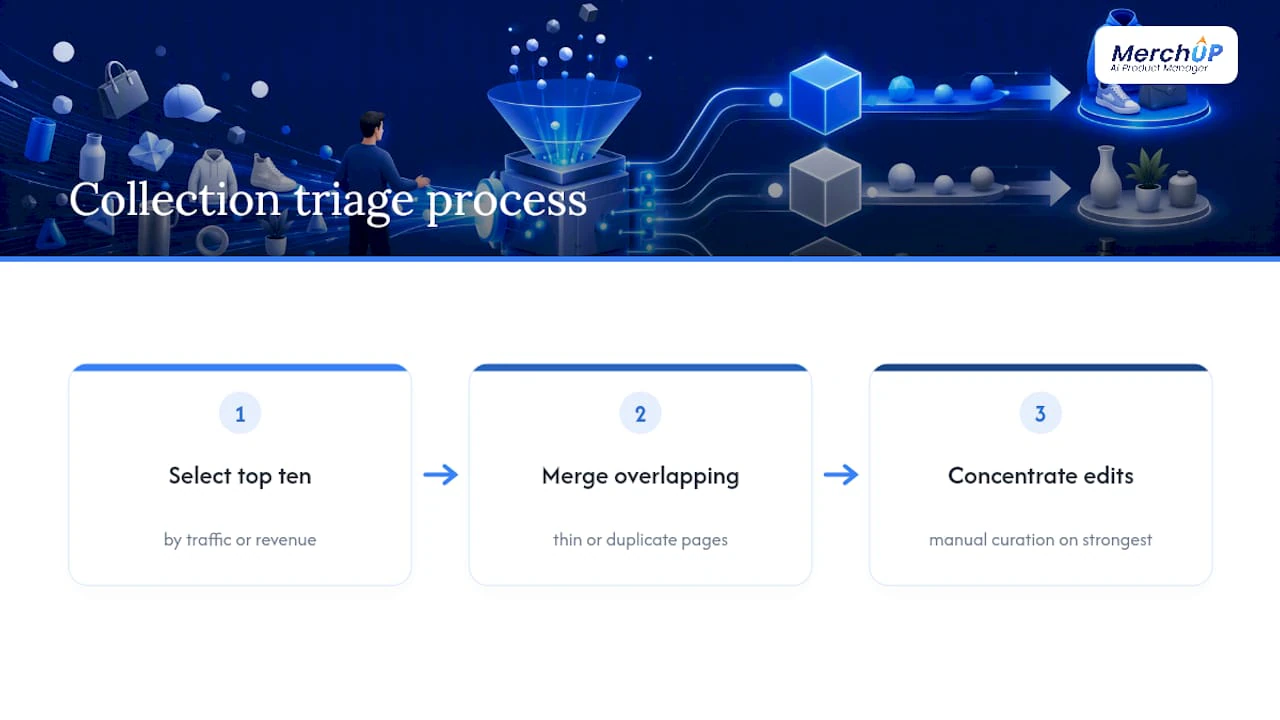
Reserve automated collection rules for high-volume, low-stakes categories, and switch to manual curation for anything genuinely SEO-critical, where you want control over which products anchor the page. For the above/below-grid split itself, metafields scale better than a single description field once you’re managing more than a handful of collections, since they let you edit each block independently without hunting through HTML comments in a theme file.
Having reviewed product content workflows across dozens of Shopify catalogues, the pattern is consistent: stores that triage first and template second finish faster and rank better than those that try to rewrite everything simultaneously.
— Jamie Moss
Scaling collection copy without losing your voice
Writing one great collection description is a Tuesday afternoon job. Writing 80 of them, each with a unique above-grid intro, a distinct below-grid buyer guide, and its own FAQ set, without any of them reading like a find-and-replace exercise, is a different problem entirely. That’s the gap this AI-powered tool addresses: Shopify integration, a visual template editor, and bulk publishing that keeps every collection’s copy structurally consistent but genuinely unique, not duplicated with a noun swapped.
Set up one template for your above-grid intro pattern and another for below-grid buyer guidance, then run it across your full collection list while keeping each output distinct enough to avoid the duplication problem that flattens rankings across a catalogue. The visual editor shows you exactly what publishes before it goes live, and the pricing page lays out the Starter, Growth, Pro, and Scale plans depending on how many collections and products you’re managing. If you want to see the workflow before committing, the tutorial walks through generating a description in under a minute.
Sources
For deeper technical detail, Seegea’s complete guide to Shopify collections covers handles, metafields, and automation rules. On the AI-search side, Babylovegrowth’s roundup of AI applications in ecommerce is worth a look for wider context on where this category is heading.
- Shopify collection: the complete 2026 guide (create, automate, rank) | Seegea
- Shopify Collection Page SEO for the AI-Search Era | Monkeyman Agency
- Shopify Collection Page SEO: The Underused Ranking Lever | Studio Niza
- How to optimise Shopify collections for SEO (2026 guide) | Charle
FAQ
How long should a collection description be?
Aim for 50–100 words above the product grid and 150–400 words below it, depending on how competitive the category is. Multiple practitioner sources converge on this 50–100 / 200–300 word split as the practical sweet spot for most Shopify stores.
Where does the primary keyword go in a collection description?
Put it in the first sentence of the above-grid intro, then let it appear naturally once or twice more in the below-grid section. Forcing it repeatedly into headings or FAQ answers reads as stuffing and tends to hurt engagement more than it helps ranking.
Does MerchUp write collection descriptions as well as product descriptions?
MerchUp is built primarily for generating and bulk-publishing product descriptions, with Shopify integration and customisable templates that can be adapted to draft above and below-grid collection copy. Plans start at £12.99 per month on the Starter tier.
Should I use FAQPage schema on every collection?
Only where you’ve written genuine, extractable Q&A content beneath the grid; schema on thin or duplicated text doesn’t help and can look manipulative to search engines. Three to four targeted questions per collection is usually enough to qualify.
What happens if I change a collection’s URL handle?
Changing a live handle without setting up a 301 redirect commonly causes a ranking loss, because the old URL’s accumulated signals don’t transfer automatically. Always redirect the old handle to the new one the moment you make the change.


Comments
No comments yet — be the first to share what you think.