


Use a short, keyword-led intro above the product grid and longer, structured guidance below it. That “double-decker” split protects the shopping experience while still giving search engines the unique, keyword-rich copy they need to rank the page. Fix your title tag and meta description at the same time, tidy up canonical URLs on filtered pages, and check Google Search Console 20 to 90 days later to confirm the change is working.
TL;DR:
- Properly optimized collection descriptions should have a 50 to 100 word intro placed above the product grid, focusing on the primary keyword and audience.
- Below the grid, include concise sections like buying guides, materials and care, sizing guidance, and FAQs, structured with clear subheadings.
- Use separate, unique templates for different collection types, such as category, use-case, or seasonal, and avoid copying boilerplate from manufacturers.
- Proper technical SEO involves canonicalizing filtered and paginated URLs, and implementing schema like CollectionPage and ItemList to prevent duplicate content issues.
- Scaling description writing with automation tools like MerchUp AI can maintain consistency across many collections without sacrificing SEO quality.
What is Shopify collection description SEO?
Shopify collection description SEO is the practice of writing and structuring the text on a category page (a “collection” in Shopify’s terminology) so it satisfies both shoppers scanning for products and search engines trying to understand what the page is about. It sits alongside product description SEO as one of the two content jobs every Shopify store owner has to get right, but it behaves differently: a collection page needs to rank for broader, higher-volume terms (“men’s running shoes” rather than a specific model number), which means the copy has to work harder per word.
Position matters more than most merchants assume. Text placed above the product grid carries more immediate weight, both because it’s the first content a crawler encounters in the page’s rendered HTML and because it’s the only copy a shopper reliably sees without scrolling. Cram everything into a wall of text below the grid and you’re asking Google to wade further into the page for the signal it needs, and asking shoppers to scroll past products to reach information that might have changed their mind.
The intro above the grid should run 50 to 100 words. Open with your primary keyword in the first sentence, state who the collection is for, and give one concrete reason to buy from this range rather than browse elsewhere.
Two templates that adapt to most stores:
- Category collection: “Our [primary keyword] collection covers [range of sub-types], built for [audience] who need [specific benefit]. Every piece is [key attribute], so you can [outcome] without [common frustration].”
- Use-case collection: “Shopping for [occasion/use-case]? This [primary keyword] edit brings together [product types] chosen for [use-case need], with sizes/options for [audience segment].”
Pro Tip: Write the intro last, after you’ve drafted the longer copy below. It’s far easier to compress your strongest point into 80 words once you know what the full argument is.
Keep the grid visible as the user scrolls. If your theme pushes it below the fold to make room for this text, you’ve traded conversions for a ranking signal that a shorter intro would have delivered anyway.
What belongs in the detailed copy below the grid?
Not every collection needs a long block of text underneath the product grid. Reserve it for competitive search terms, categories with genuine buying complexity, or products that need explaining before someone commits. A collection of plain white t-shirts rarely needs 400 words of supporting copy. A collection of hiking boots, mattresses, or espresso machines usually does, because shoppers arrive with questions and Google rewards pages that answer them.
Four blocks are worth building into most below-grid sections, depending on category:
- A short buying guide covering the two or three decisions a shopper actually has to make (fit, material, power output, whatever applies).
- Materials and care information, particularly for apparel, homeware, or anything with a maintenance routine.
- Sizing guidance, ideally with a link through to a dedicated size chart rather than repeating it collection by collection.
- A handful of short FAQs addressing the questions your customer service team already answers on repeat.
Word count should adjust with the category’s complexity, ranging from brief for simple collections to more detailed for competitive or complex ones. Structure it with H2 and H3 subheadings rather than one dense paragraph. Beyond helping Google parse the topic hierarchy, structured content skims better on mobile, where most collection traffic lands.
If the copy runs long, put it behind an accordion or collapsible section rather than deleting it. That keeps the content indexable while stopping it from dominating the page visually. Just make sure your theme renders the content in the page’s HTML rather than loading it only on click, or you risk hiding it from crawlers along with your shoppers.
Getting the title tag, meta description and URL right
Shopify gives you direct control over three fields that matter more to rankings than almost anything else on the page: the title tag, the meta description, and the URL handle. Shopify’s own SEO guidance recommends unique values for each, with your primary keyword placed early and echoed in the page’s H1.
Work through these on every collection:
- Title tag: lead with the primary keyword, keep it between 40 and 60 characters, and avoid repeating your brand name on every single page. “Men’s Running Shoes | [Brand]” is fine once; forty near-identical variants of it is not.
- Meta description: roughly 150 characters, stating the concrete benefit of shopping this collection plus a light call to action. This doesn’t directly move rankings, but it shapes click-through rate, which does influence how Google treats the page over time.
- URL handle: short and keyword-containing, with no query parameters or filter strings baked into the canonical version.
- Editing path: in Shopify admin, open the collection, scroll to “Search engine listing,” and edit the page title, meta description, and URL handle directly.
Fixing canonicalisation, faceted URLs and schema
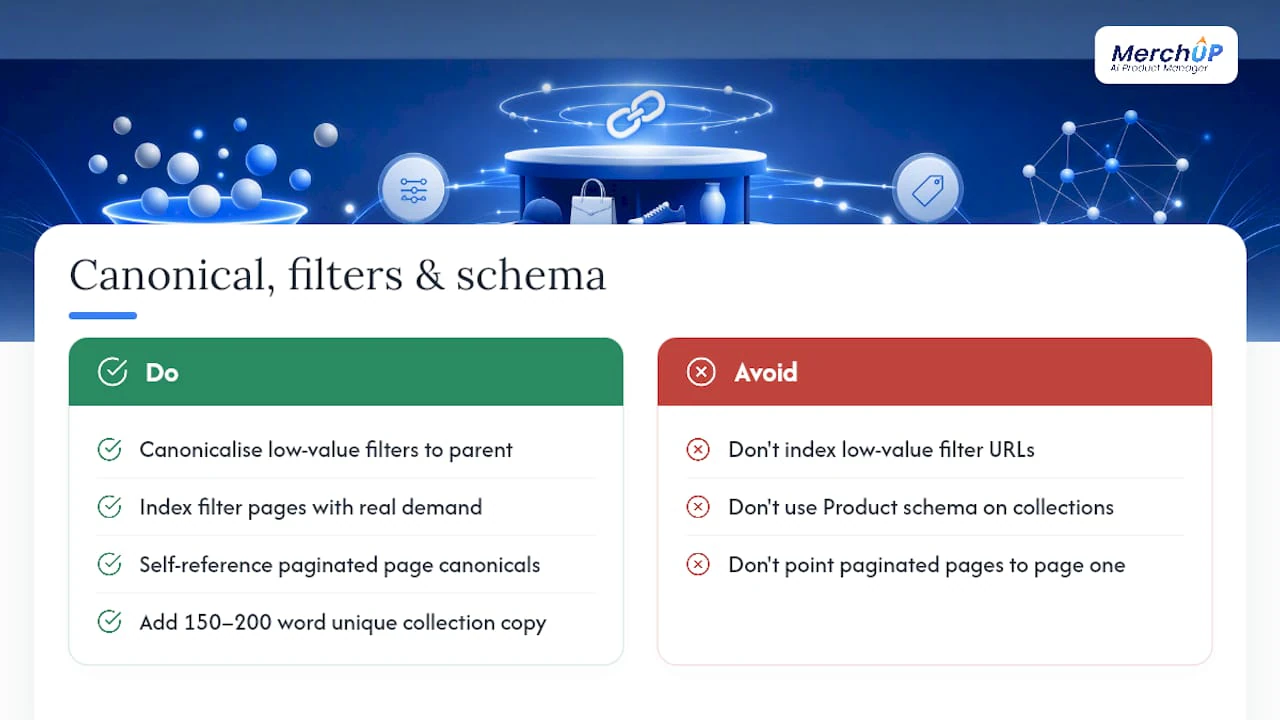
Faceted navigation, the filters that let shoppers narrow a collection by size, colour, or price, is one of the biggest hidden causes of poor collection SEO. Every filter combination can generate its own URL, and most of those pages are near-duplicates of the parent collection with a slightly different product order. Left unchecked, this splits ranking signals across dozens of near-identical URLs and wastes crawl budget that should be spent on pages you actually want ranked.
The fix isn’t to block every filtered URL. Decide deliberately: a filter combination with genuine search demand (“blue running shoes”) might deserve its own indexable page with unique copy, while low-value combinations should canonicalise back to the parent collection. Paginated pages (page 2, page 3 of a large collection) should also carry a self-referencing canonical rather than pointing everything back to page one, which can cause Google to miss products further down the list.
On structured data, collection pages should carry CollectionPage, ItemList, and BreadcrumbList schema, not Product schema, which belongs on individual product pages only. Misapplying Product schema at the collection level is a common and avoidable error.
Three tools cover most of this audit: Screaming Frog to crawl and find duplicate or thin collection URLs, Search Console’s Coverage report to see what Google has actually indexed, and Google’s Rich Results Test to confirm your schema validates. One analysis of Shopify stores found collections with unique 150 to 200 word descriptions ranked for three times more keyword variants than thinner pages, a gap that starts with the technical foundation, not just the copy sitting on top of it.
How to actually write the collection description
Start by picking one primary keyword and two or three modifiers, not a dozen. “Waterproof hiking boots” plus “men’s” and “wide fit” gives you enough range to write naturally; ten keywords crammed into 100 words gives you nothing but stuffing. Match the page to buyer intent: a category page needs different language from a gift-guide or seasonal edit, even if the products overlap.
Weave in real product attributes, materials, sizes, use-cases, rather than vague adjectives. “Breathable mesh upper, reinforced toe cap, sizes 6 to 13” tells a shopper and a search engine more than “great quality footwear you’ll love.” Add one soft internal link from the description through to a relevant blog post or buying guide; it costs nothing and internal linking from product pages, the homepage, and blog content is one of the more underused levers available to Shopify stores.
Three ready-to-adapt structures:
- Category: Short intro naming the range and audience, then a below-grid section on materials, fit, and a short FAQ.
- Use-case: Intro framed around the occasion (“gifts for new parents”), below-grid content addressing what to consider when buying for that use-case.
- Seasonal: Intro with urgency and season-specific language, below-grid content covering styling or pairing suggestions, refreshed each year rather than reused verbatim.
Pro Tip: Never publish manufacturer boilerplate on a collection page. If ten other stores carry the same paragraph, Google has ten reasons to ignore yours.
Before publishing, run every description through a short checklist: is it unique across your own catalogue, has a human actually read it, and does it avoid copying language from a supplier or manufacturer feed?
Rolling out changes and measuring what worked
Don’t rewrite every collection at once. Pull your top five collections by traffic or impressions in Search Console and start there, prioritising pages with high impressions but poor click-through rate or ranking position, since those are the ones most likely to move quickly once fixed.
- Rewrite the above-grid intro and below-grid detail using the split structure.
- Update the title tag, meta description, and URL handle.
- Fix canonical tags on any filtered or paginated variants.
- Add or correct CollectionPage and BreadcrumbList schema.
- Submit the updated URL for re-crawling in Search Console.
Track impressions, click-through rate, average position, and organic sessions to each collection before and after. Practitioner rollouts typically see measurable ranking movement within a few weeks to a few months, though competitive categories sit at the slower end of that range.
Where you can, A/B test intro placement or length on a couple of collections before rolling changes out store-wide. Search Console’s query report will also surface secondary keywords you’re already ranking for by accident, often worth folding into the next round of edits.
What five years of writing product copy taught me about collection pages
Most merchants over-invest in product description SEO and under-invest in collection pages, which is backwards given how much more search volume sits on category-level terms.
The workflow that scales without creating duplicate-content problems looks like this: build a template per collection type (category, use-case, seasonal), store the split intro and detail copy in metafields so anyone on the team can edit it without touching Liquid, then bulk-publish once the templates are approved. That’s essentially the process MerchUp AI is built around, using drag-and-drop templates and a visual editor to apply a consistent structure across dozens of collections rather than writing each one from scratch.

AI can draft the first pass at speed, but every generated description still needs a human check for factual accuracy, on-brand tone, and genuine uniqueness against the rest of the catalogue. Skip that step and you risk the exact thin, repetitive content that got collection pages a bad SEO reputation in the first place.
The double-decker split isn’t optional anymore
Most of the advice circulating about collection pages still treats the description as an afterthought, a paragraph bolted on beneath the grid because someone said Google wants text there. That’s the conventional wisdom the research here actually contradicts. Position, structure and intent matter more than sheer word count, and a thin 40-word blurb crammed above the fold does less for rankings than a properly split description that respects both the shopper and the crawler.
Where most stores go wrong isn’t laziness. It’s treating every collection the same, writing one generic template and pasting it across fifty pages with the product name swapped out. A hiking boots collection and a phone case collection have almost nothing in common as search queries, and copying the same structure onto both wastes the opportunity either page had.
Prioritise your highest-traffic collections first, get the split structure right there, and only then think about scaling the approach across the rest of the catalogue. Speed matters less than getting the first five pages genuinely right.
— Jamie Moss
Scale the split description without hiring a copywriter for every page
Writing genuinely unique, well-structured collection copy for five pages is manageable. Doing it for fifty, with a consistent above-grid and below-grid split on every single one, is where most in-house teams run out of hours. MerchUp AI is built for exactly that gap: customisable drag-and-drop templates that apply your chosen structure across an entire catalogue, a visual editor for the fine-tuning a template can’t do alone, and bulk publishing straight into Shopify once descriptions are approved.
It suits stores with a large or growing number of collections, or a marketing team stretched too thin to write structured, SEO-sound copy for every category page by hand. For the mechanics of setting up templates and metafields properly, the Shopify Liquid and metafields playbook is a useful companion to this guide, as is the wider Shopify SEO checklist for what to tackle beyond collection pages. If you manage collections across multiple filters and want the process automated further, Shopify SEO automation tools are worth a look too. Try the MerchUp tutorial to see the workflow in under a minute, then decide if it’s worth running against your own catalogue.
Where to check this yourself
Shopify’s own SEO guidance covers the admin steps for editing titles, meta descriptions and URL handles, while the Shopify blog’s category page guide walks through above and below-grid placement in more depth. For the double-decker pattern itself, Charle’s collection SEO breakdown is worth reading in full. Audit your own store with Screaming Frog, Search Console’s Coverage report, and Google’s Rich Results Test before and after any changes.


Comments
No comments yet — be the first to share what you think.