


Lead bullet points with the strongest buyer outcome to emphasize benefits rather than features. That’s the whole rule. Everything else in a bullet point list is execution detail.
If you write nothing else after reading this, do this: use five bullets, front-load bullets one and two with the outcome the customer cares about most, and give each bullet exactly one idea.
- Bullet 1 and 2: the biggest reason to buy, stated as a benefit
- Bullets 3 to 5: supporting features, specs, and one bullet for trust or reassurance
- One idea per bullet, no run-on lists of specs crammed into a single line
- Check Amazon’s own Seller Central guidance before publishing, since content rules vary by category
Why product bullet points matter for visibility and conversions
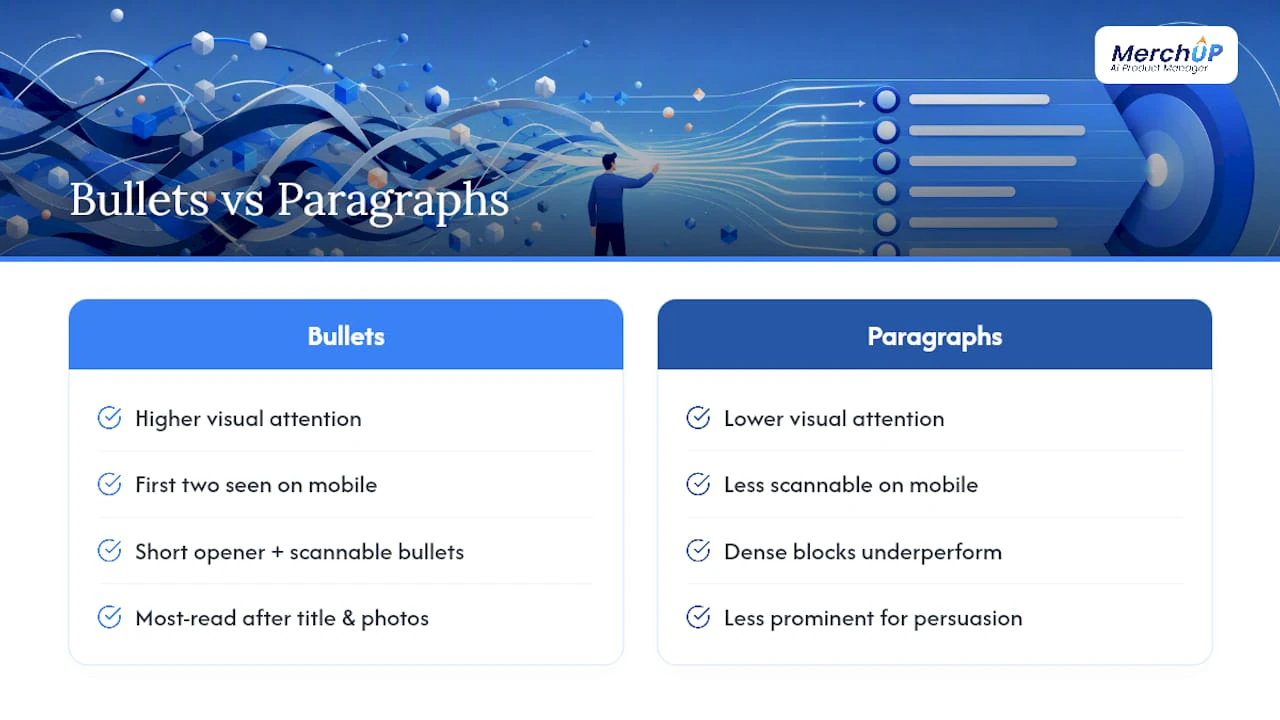
Mobile shoppers see the product title, the image, and often only the first two bullets before they have to tap to expand the listing. Desktop shoppers get more real estate, but the ordering still matters because attention drops fast as people scroll. That’s the practical reason bullet order isn’t a cosmetic choice. It decides what a huge share of your audience actually reads.
Eye-tracking research on product pages shows bulleted lists draw significantly more visual attention than the same information written as a paragraph, and a short opening line followed by scannable bullets consistently outperforms dense blocks of text. Bullets do two jobs at once. They persuade, because they’re the most-read part of the page after the title and photos, and they index, because Amazon and Google both parse the text for relevant keywords. Treat them as the highest-leverage copy on the entire listing, not filler between the title and the description.
What are Amazon’s bullet point rules and character limits?
Amazon restricts what you can say in a bullet point before it restricts how much you can say. Get the content rules wrong and the listing risks suppression regardless of how well it’s written.
According to Amazon’s own product content guidance, bullet points cannot include:
- Pricing, promotions, or time-limited offers (“50% off this week”)
- Shipping information or seller-specific claims
- External links or references to other websites
- Subjective or unverifiable claims (“the best on the market”, “guaranteed to work”)
- Reviews, testimonials, or quotes from other customers
Character limits vary by category, and Brand Registry sellers sometimes get more room than standard third-party sellers in the same category. Rather than chasing the maximum, aim well under it. Around 150 to 200 characters per bullet tends to read cleanly on a mobile screen without forcing a wrap into three or four lines. Always confirm the exact limit for your specific category on Seller Central before you finalise copy, since Amazon updates these thresholds without much notice.
How do you write a bullet point that actually converts?
The formula is feature, then benefit, in that order or reversed depending on how much space you have. If a feature needs explaining, lead with the feature and follow with why it matters. If the benefit is obvious and space is tight, lead with the benefit and let the feature justify it afterwards.
- Open with a short, punchy phrase in capitals or bold (the “hook”), such as ALL-DAY COMFORT or BUILT TO LAST.
- Follow with an em-dash or colon, then the feature in plain language.
- Close with the benefit: what the buyer actually gets from that feature.
- Stop. One idea, one sentence, one bullet.
Put your two strongest buyer outcomes in bullets one and two, since mobile shoppers frequently only see the first two bullets before deciding whether to expand the listing. Dedicate one of the remaining bullets to resolving the single biggest purchase objection, whether that’s durability, sizing, or a warranty concern.
Three quick templates:
- Technical product: “PRECISION FIT — Machined from anodised aluminium to a 0.1mm tolerance, so it locks onto your device without wobble or slippage.”
- Lifestyle product: “READY IN SECONDS — No assembly, no charging, no waiting: pull it from the box and it’s ready for your morning routine.”
- Consumable product: “ZERO ARTIFICIAL SWEETENERS — Sweetened only with monk fruit, so you get the taste without the sugar crash an hour later.”
Our guide on turning features into benefits walks through more of these conversions if you want a deeper library of examples.
Pro Tip: Read your five bullets back to back with no other copy around them. If they don’t tell a complete, persuasive story on their own, a shopper skimming on a train with patchy signal definitely won’t get it either.
How should you use keywords in bullet points without stuffing them?
Bullets sit below the title and search terms field in Amazon’s indexing hierarchy, but they still carry real weight for both relevance and readability. A workable approach is to place one or two secondary keywords naturally into bullets one and two, where they double as ranking signal and persuasive copy, then let bullets three to five focus purely on features, specs, and trust.
Cramming five keywords into a single bullet is the fastest way to make it unreadable and to trigger a listing quality flag. Write for the human first and check the keyword coverage second, not the other way round.
- Run Amazon’s Manage Your Experiments tool if you have Brand Registry access, testing one bullet order or opening phrase against another
- Track click-through rate, unit session percentage, and conversion rate, not just impressions
- Preview every draft on an actual phone screen, since a bullet that looks fine on a wide desktop monitor can wrap awkwardly into four lines on mobile
Shopify’s own guidance on product copy makes a similar point for non-Amazon listings: lead with the benefit that matters most, then let bullets carry the supporting detail, because that’s what scanning shoppers actually read first.
What mistakes make bullet points underperform?
Four mistakes account for most weak bullet points, and each one costs you either a sale or a suppressed listing.
- Keyword stuffing. Avoid overloading bullet points with keywords to maintain readability and listing quality to Amazon’s systems.
- Vague benefit claims. “High quality” and “great value” tell the shopper nothing specific; name the actual outcome instead.
- Multiple ideas crammed into one bullet. A bullet trying to cover size, material, and use case at once loses all three points.
- No trust element. Skipping any mention of warranty, certification, or guarantee leaves the shopper’s biggest objection unanswered.
Run a fast audit against this checklist before you publish: readable in under five seconds, one idea per bullet, a trust signal somewhere in the five, character count within your category’s safe range, keywords placed naturally rather than stacked, and a clean mobile preview with no awkward line wraps.
Scaling bullet point production without losing quality
Writing five sharp bullets for one listing is manageable. Writing five sharp bullets for four hundred SKUs across a dozen categories is a different problem entirely, and it’s the one most sellers actually struggle with.
Merchup AI approaches this with customisable templates and a visual editor built specifically for the feature-to-benefit structure this article has walked through. You feed it product specs, choose a template suited to the category, whether that’s technical, lifestyle, or consumable, and it drafts benefit-led bullets that follow the same ordering logic: strongest outcome first, trust and objection-handling covered, one idea per line. The recommended workflow is to let AI produce the first draft at volume, then have a human editor review for category-specific nuance and tone, since automation speeds up production but still benefits from a final human pass for specificity and trust anchors.
The bottleneck in most catalogues isn’t knowing the formula. It’s applying it consistently across hundreds of listings without every bullet starting to sound the same.
Use automation for the first draft and speed, and use manual editing for the products where nuance genuinely changes the sale, a premium item with a complex use case, for instance, rather than a straightforward commodity product.
What actually moves the needle on bullet points
Most advice on this topic treats every bullet as equally important, and that’s the biggest thing worth pushing back on. It isn’t true, and treating it as true is where a lot of sellers waste effort polishing bullet four while bullet one still opens with a spec nobody asked about.

The research on mobile behaviour is blunt about this: a large share of buyers make their decision on the first two bullets alone. That means the return on effort isn’t spread evenly across five bullets, it’s concentrated almost entirely on the first two. Spend eighty percent of your revision time there. Get those two right and mediocre bullets three through five will barely dent conversion. Get them wrong and a beautifully written bullet five won’t save the listing.
The other place conventional advice falls short is treating character limits as a target to hit rather than a ceiling to respect. Writers pad bullets to fill available space instead of stopping at the point where the idea is complete. A tight, 120-character bullet that says one clear thing beats a 200-character bullet padded with a second, weaker idea almost every time.
Start with the first two bullets. Everything else is refinement.
Scale your bullet points with Merchup AI
Merchup AI turns raw product specs into benefit-led bullet points in seconds, using customisable templates and a visual editor built around the feature-to-benefit structure covered above, then publishes straight to your live Shopify catalogue.

Instead of rewriting five bullets by hand for every SKU in a four-hundred-item catalogue, you pick a template suited to the product category, let the AI draft the copy, and adjust tone or trust elements in the visual editor before publishing. It’s built for sellers scaling a growing catalogue who need consistent, conversion-focused bullets without hiring a copywriter for every new listing. If you want to see the drafting and publishing flow before committing to anything, the MerchUp tutorial walks through generating a full set of bullets in under 30 seconds, and you can start a trial directly from the MerchUp product page once you’ve seen how it handles your own catalogue.
Sources
- How to Write a Product Description That Sells (2026) - Shopify
- Amazon Seller Central — product detail content guidance
- How to write bullet points that convert - Seller Labs


Comments
No comments yet — be the first to share what you think.