


Keep it as short as possible and as long as needed to answer the questions a buyer has before they click “add to basket.” For simple, low-price items, a short description is usually sufficient. For most everyday products, aim for 150 to 300 words. For technical, expensive, or genuinely unique products, go to 300 to 600 words or more. If you write only one range today, make it 150 to 300 words. That band satisfies Google Merchant Center’s recommendation of over 200 characters, matches Shopify’s advice on complexity-driven length, and gives shoppers enough to scan without drowning them, a point Nielsen Norman Group’s reading research backs up repeatedly.
- Simple or commodity products: 50 to 100 words (batteries, socks, basic accessories)
- Standard consumer goods: 150 to 300 words (most apparel, home goods, gifts)
- Technical, high-value, or unique items: 300 to 600+ words (electronics, furniture, software, anything with a learning curve)
Word-range callout: if you’re unsure where to start, 150 to 300 words is the safest default for a typical product detail page. It’s long enough to rank and short enough to read on a phone.
What counts as a short-form vs long-form product description
Short-form copy is the scannable stuff: a punchy opening line, then bullets covering size, material, and use case. It’s built for mobile browsing and category pages, where a shopper is comparing five products in ten seconds. Long-form copy is the extended version, covering features, benefits, use cases, and often a mini-FAQ, and it lives on the product detail page (PDP) itself rather than a thumbnail grid.
You’ll see short-form on collection pages and marketplace listing previews, and long-form on dedicated PDPs or landing pages for flagship items. Both need the same brand voice. A playful, direct tone shouldn’t turn corporate the moment the word count climbs. Length changes; personality doesn’t.
A four-factor framework for picking the right length
Run every product through four questions before you write a word.
- How complex is it? A phone charger explains itself. A standing desk with six memory presets does not.
- What’s the price point? Higher prices demand more reassurance, more detail, more reasons to justify the spend.
- Where is the buyer in their journey? Someone scanning a category page wants a hook and a spec. Someone who’s already added it to their basket wants confirmation, not a sales pitch.
- Which channel are you writing for? A marketplace listing might cap character counts; your own Shopify store gives you full control.
Combine the answers. Low complexity plus low price plus early-funnel browsing equals short copy, every time. High complexity plus high price plus late-funnel intent equals long-form, no exceptions worth making. Channel can override both: Amazon’s bullet-point structure and character limits will flatten even a genuinely complex product into a tighter format than you’d choose on your own site.
Pro Tip: If you’re staring down a catalogue of 2,000 SKUs, don’t write bespoke copy for each one. Batch products by category complexity, write one strong template per batch, then A/B test the top three or four sellers in each batch before rolling the winning version out to the rest.
Google, Shopify, and the platform rules behind product description length
Search engines and marketplaces don’t leave length entirely up to you. Google Merchant Center recommends more than 200 characters in the description field, treating shorter fields as a signal of a thin, unhelpful listing. Amazon’s style guides push sellers toward tight, bullet-heavy copy, while Shopify’s own advice leans on the complexity rule already covered above rather than a fixed count.
- Aim for at least 200 characters on every listing to satisfy merchant feed guidance.
- Never copy manufacturer text verbatim. Duplicate descriptions hurt discoverability because search engines struggle to rank near-identical pages against each other.
- Longer isn’t automatically better for ranking. Search engines want enough context and keyword coverage to understand the product, not padding.
One structural detail worth fixing early: use the description property from Schema consistently across your catalogue. It won’t rewrite your copy, but it gives crawlers a clean, structured field to read, which matters more as your catalogue grows. For a deeper look at how length interacts with rankings, see product description SEO.
Formatting rules that make any length easier to scan
Length only works if the structure supports it. Open with a one-sentence hook that states the core benefit, follow with three to five bullets covering the specs that actually decide purchases, then close with a short reassurance line, delivery, warranty, or a fit guarantee. That’s the shape whether you’re writing 80 words or 500.

Keep paragraphs to two or three sentences and put your primary keyword in the first sentence, not buried in paragraph three. On mobile, white space does more work than most sellers assume; a wall of text loses shoppers before they reach the second sentence. Nielsen Norman Group’s research on web reading confirms what most sellers suspect: people scan in an F-shaped or zigzag pattern, landing on headings, bold text, and bullets far more than on dense prose blocks.
Product description templates you can copy right now
Short-form (commodity item, 45 words): “Charge two devices at once without hunting for a spare outlet. This dual-port charger delivers 20W fast charging, fits in a coat pocket, and comes with a 12-month warranty. Compatible with all USB-C devices.”
Short-form (fashion basic, 60 words): “The everyday tee that actually fits right. Soft, breathable cotton blend that softens with every wash. Relaxed fit through the shoulders, tapered at the hem so it doesn’t balloon. Machine washable, pre-shrunk, true to size. Available in six colours.”
Long-form (technical product, ~220 words): Open with the core problem it solves, follow with a features section (bulleted specs), a benefits section explaining what those specs mean day to day, a use-case paragraph describing who it suits, and a closing FAQ addressing the two or three questions your support team hears most.
| Category | Recommended length |
|---|---|
| Commodity items | 50 to 100 words |
| Apparel | 100 to 200 words |
| Home goods | 150 to 300 words |
| Electronics | 250 to 500 words |
| Software or high-consideration | 300 to 600+ words |
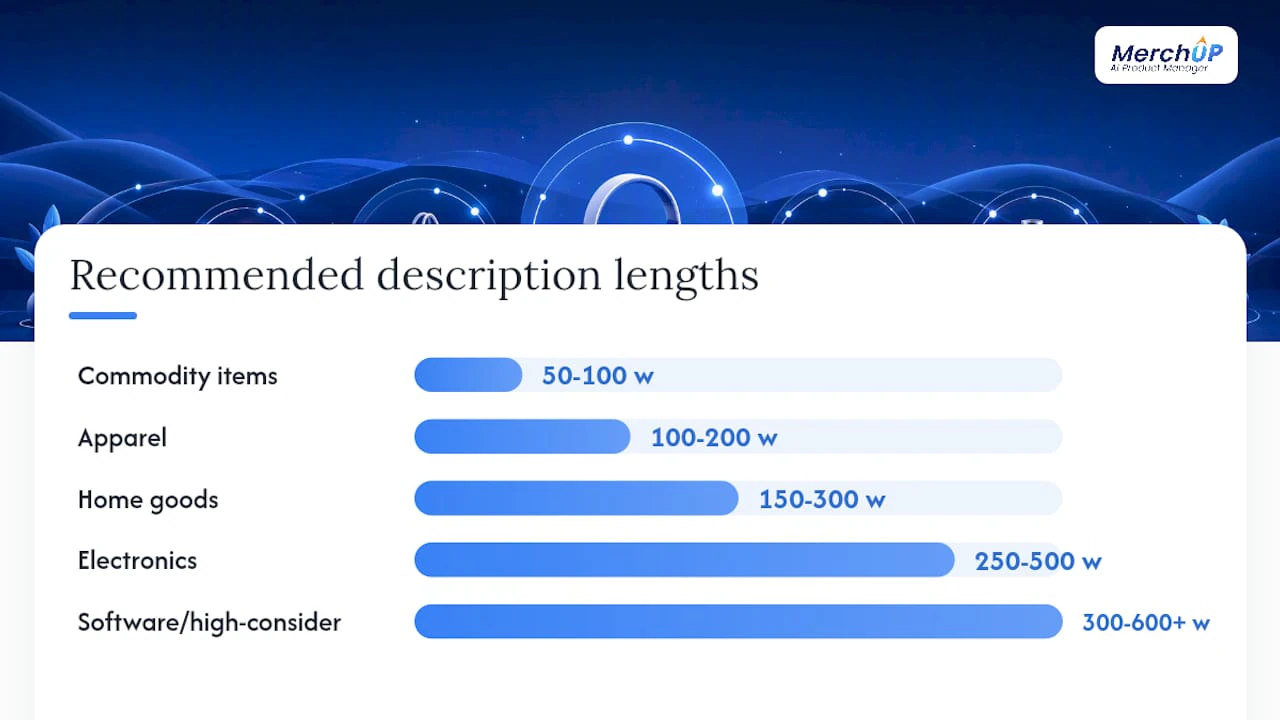
Full worked examples with annotations live in product description templates and product description examples, if you want to see the structure applied to real listings. Tools with drag-and-drop templates and a visual editor cut the time it takes to apply these structures across hundreds of SKUs, rather than rebuilding each one from scratch.
Testing description length: what to measure and how
Run a straightforward A/B test: pick one hypothesis (say, “300-word descriptions outperform 100-word ones for this category”), split traffic evenly, and let it run long enough to capture a full weekly cycle across desktop and mobile.
- Set a clear hypothesis and pick one variable to change, length only.
- Segment results by device; mobile and desktop shoppers often respond differently to longer copy.
- Watch conversion rate, add-to-basket rate, revenue per visitor, bounce rate, and organic impressions for your target keywords.
- Let the test run a full week minimum before calling a winner.
A high bounce rate paired with low add-to-basket often means the copy is too thin to answer basic questions. Good keyword rankings paired with weak conversion usually means the opposite problem: the content ranks but doesn’t persuade. A/B testing description length is standard practice for a reason; opinion alone won’t tell you which band your customers actually respond to.
Pro Tip: Run tests in batches by category, not product by product. Once you’ve got a winning length for “electronics under £100,” apply it across every similar SKU instead of re-testing each one individually.
A publisher’s take on balancing speed and depth
Teams rarely have time to hand-craft every description. The practical move is triage: write considered, longer copy for your top revenue drivers, then lean on templates for the long tail. Favour speed and scannability when a product is simple or the catalogue is huge; favour depth when the price or complexity justifies the reader’s attention. MerchUp’s template and editor approach exists precisely because most catalogues need both modes running at once, not one philosophy applied uniformly.
Scaling product descriptions without losing consistency
Writing one great description is easy. Writing three hundred consistent ones, across mixed categories and price points, without duplicating manufacturer text, is where most teams stall. Merchup AI generates and edits product descriptions using customisable templates and a visual editor, built specifically to handle catalogues with wildly different complexity levels sitting side by side.

It works best when you’re managing a large seasonal update, launching a new Shopify catalogue, or dealing with a marketplace that flags duplicate content. Rather than choosing between speed and quality, you generate SEO-aware copy in the appropriate range for each product category, then adjust tone or detail in the visual editor before publishing. If your catalogue needs consistent, unique copy at scale, try Merchup AI and see how quickly a mixed catalogue comes into line.
Sources
The recommendations above draw on platform guidance and readability research rather than guesswork. For merchant feed rules, check Google Merchant Center’s description guidance directly. For complexity-based word counts, Shopify’s product description guide and BigCommerce’s breakdown both offer practical ranges.
- Create rich product description pages - Google Merchant Center Help
- How to write a product description that sells (Shopify)
- How users read on the web (Nielsen Norman Group)
- Schema
For UX and scannability specifically, Nielsen Norman Group’s research on web reading remains the clearest source available.


Comments
No comments yet — be the first to share what you think.