


Here, “product description localization” means AI-generated, SEO-optimised product copy adapted into channel-specific variants, not language translation. The fastest, safest way to scale this is a grounded AI pipeline that writes from your product’s actual attributes, then publishes through Shopify’s own tools. Pick one representative category, freeze a brand-voice brief, generate drafts against real specs, run automated and human checks, then publish through the Shopify admin bulk editor. Track conversion rate before rolling MerchUp or any similar workflow across your full catalogue.
TL;DR:
- Grounded AI pipelines improve description accuracy by strictly using real product data and reducing the risk of fabricating specifications.
- For fewer than 50 products, Shopify’s native bulk editor is the simplest method; larger catalogs require CSV exports or the Admin API to manage updates effectively.
- Human review and automated checks are crucial before publishing to ensure specifications are accurate, claims are lawful, and SEO factors are optimized.
- Operating in staged environments prevents accidental live edits, with comprehensive audit trails and version control to track changes and facilitate reversals.
- Building channel-specific prompts that emphasize different product aspects ensures descriptions resonate with distinct audiences and optimize conversion across platforms.
What does product description localization actually mean here?
This is not translation and it is not cultural adaptation for different countries. That is a separate discipline entirely, and if you searched this phrase expecting a guide to swapping currencies or adjusting idioms for a French audience, you are in the wrong place.
Here, localization means tailoring one product’s description into the different formats each sales channel demands: a long, keyword-rich version for your Shopify product page, a tight marketplace snippet, a stripped-back Google Shopping line, and a punchier social caption. All from the same underlying facts, restyled for where they will appear.
The problem it solves is a familiar one for anyone running more than a few hundred SKUs: thin content copied across variants, duplicated boilerplate that Google flags as near-identical, and a tone that drifts depending on which freelancer wrote which batch. Grounded AI pipelines fix this at speed. Merchants running structured generation pipelines typically see improved Google Search Console impressions as thin pages get real, specific copy, and publishing timelines shrink from weeks to days.
Building the pipeline: stages, pilot and KPIs
A working pipeline has seven stages, each with a clear handoff to the next:
- Data ingestion. Pull structured attributes, title, materials, dimensions, and existing tags straight from your catalogue.
- Brand-voice brief. Freeze a short document: tone samples, three banned words, and your brand pillars.
- Grounded generation. Draft descriptions using only the ingested attributes, never invented specifications.
- Automated checks. Run spec-matching, length, and keyword-presence tests before anything reaches a person.
- Human review queue. A reviewer approves, edits, or rejects each draft against the brief.
- Staged publish. Push approved copy to a duplicate theme or drafts view first, not live.
- Measure and iterate. Track uplift, then expand the batch size.
“Grounded generation” is the term for prompting an AI model strictly against the product attributes you feed it, with instructions never to invent a spec it wasn’t given. This matters because Shopify’s own AI tooling still recommends human review of every draft precisely because unguarded generation tends to fabricate plausible-sounding details, and one guide to running this at scale calls grounding “the most effective guardrail against hallucinated specifications” in a bulk generation pipeline.
For your pilot: export a full backup first, select three to five SKUs, set a clear approval deadline for whoever reviews the drafts, and track conversion rate, add-to-cart rate, and Search Console impressions before you scale to your next batch.
Shopify implementation: bulk editor, CSV or Admin API?
Which method you use depends almost entirely on catalogue size and how much you trust the change.
For fewer than roughly 50 products, Shopify’s native bulk editor is the quickest route. The Description column is hidden by default, so open the Columns picker in the product grid and add it before you start pasting in generated copy.
Larger catalogues need a CSV workflow. A few rules keep this from going wrong:
- Export the full product CSV first as your rollback copy, before touching anything.
- Keep the required columns intact: handle, title, option name, option value, and description.
- Write one row per variant, never one row per product with variants collapsed.
- Set “Overwrite products with matching handles” only when you genuinely intend to replace existing values, per Shopify’s import documentation.
- Keep the file under 15MB and save it as UTF-8, since Excel’s default encoding corrupts image links and special characters in Shopify imports, according to one bulk-editing walkthrough.
For catalogues running into the thousands, the Admin API is the only sane option. You’ll need read_products and write_products scopes, a batching strategy that respects Shopify’s rate limits, and a writeback audit log recording who approved each publish and when.
Pro Tip: Never let blank, non-required CSV columns slip into your import file. An empty cell in a column Shopify recognises will overwrite live values with nothing, silently wiping descriptions across products you never meant to touch.
Our detailed walkthrough on bulk editing descriptions in Shopify covers the grid-versus-CSV decision in more depth if you’re weighing catalogue size against risk tolerance.
What makes a prompt template actually work?
A reusable template needs specific inputs every time, not a vague “write me a description” prompt. Feed the model: product title, full spec sheet, materials and dimensions, existing tags, the target keyword for that SKU, and your frozen brand-voice brief with two or three example sentences showing the tone you want.
Output specs should be defined per channel before generation starts:
- Website long copy: 150 to 300 words, built for the Shopify product page and structured around the target keyword.
- Marketplace short form: 50 to 80 words, stripped of brand flourishes that marketplaces often truncate anyway.
- Google Shopping snippet: under 150 characters, factual, front-loaded with the highest-value attribute.
- Social caption: 20 to 40 words, conversational, built around one hook rather than a spec dump.
Brand-context-loaded prompts, meaning ones carrying tone samples and a banned-word list, convert noticeably better than generic AI output, according to one workflow guide covering Shopify-specific AI copy.
How do you quality-check descriptions before they go live?
Run automated checks before any human ever sees the draft.
Human review comes next, and it should follow a fixed checklist every time:
- Confirm every spec mentioned actually exists on the product record.
- Check the draft against the brand-voice brief, not just for typos.
- Verify any claim with legal exposure (safety, health, sustainability) against real documentation.
- Flag the specific reason for rejection so the regeneration prompt actually improves.
Once a batch clears review, test it properly rather than assuming the new copy performs better. Run an A/B test against the existing description, measuring conversion rate lift and Search Console impressions, and give each test four to eight weeks before deciding whether to scale or revise. A staged pipeline like this, generation into a review queue, automated checks, human approval, then measured rollout, is what separates a controlled scale-up from a content disaster, according to the Shopify bulk generation pipeline referenced earlier.
How do you publish at scale without breaking your live store?
Never write generated copy straight to your live theme. Stage it first.
- Push drafts to a duplicate theme or a drafts-only view, then manually promote only the descriptions that clear review to the live site.
- Batch your Admin API calls with deliberate pacing between requests rather than firing every SKU update at once, which respects Shopify’s rate limits and avoids partial, half-applied updates.
- Keep your pre-batch product export as the permanent backup, and record approval metadata, who signed off, the timestamp, and a version number, against every published change.
- If a batch goes wrong, revert using that backup export rather than trying to manually undo individual product edits.
This audit trail is what turns “we think it was fine” into a documented, reversible decision.
Do you need to consider culture beyond language?
Even within a single-language, single-market pipeline, cultural context still shapes which attributes matter. A grounded AI system needs to know that a size chart, a material claim, or a use-case example resonates differently depending on who is reading it, even when nothing gets translated.
Consider a product sold on both a general marketplace and a niche hobbyist site. The specs don’t change, but which specs deserve emphasis does. A cycling helmet’s weight matters enormously to a competitive rider browsing a specialist retailer; a parent buying for a child cares more about the certification badge and adjustable fit. Your brand-voice brief should capture this by defining audience context per channel, not just tone.
This is where templates earn their keep. Build channel-specific instructions into the prompt itself: “for marketplace listings, lead with practical use cases; for the brand website, lead with material quality and craftsmanship.” That’s a content-emphasis decision, not a linguistic one, and it belongs in the same brief that governs your banned-words list.
Seasonal and regional buying patterns matter too, even domestically. A product description written with a generic “great for any occasion” line performs worse than one referencing an actual, specific use case your customer data shows people search for. Grounded generation pulls this from real attribute data and purchase context rather than guessing at a universal audience that doesn’t exist. The lesson: cultural nuance in this sense is about matching emphasis to audience, and that’s a template rule you write once and reuse across every batch touching that channel.
What legal and regulatory checks apply to your product copy?
Product descriptions carry real legal exposure, and it scales with how many descriptions you’re publishing at once. A single hand-written page might get a lawyer’s eye before launch; a thousand AI-generated variants rarely get that luxury unless you build the check into your pipeline.
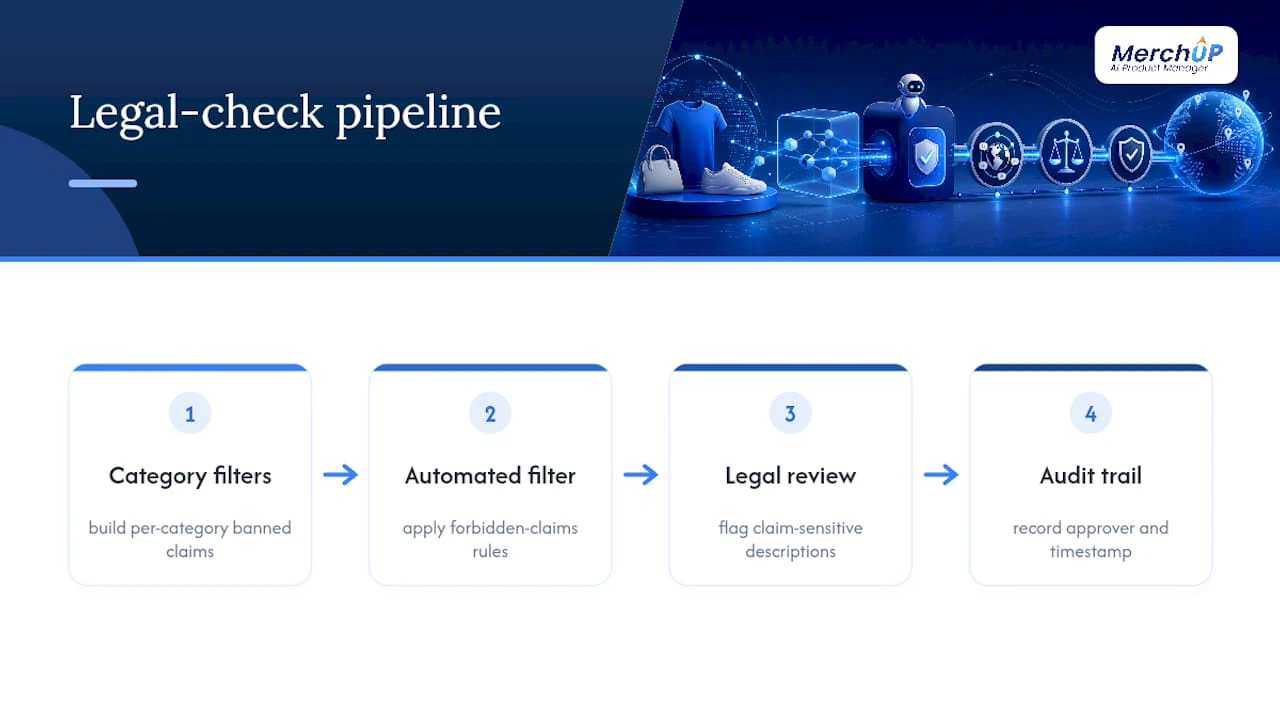
The forbidden-claims filter mentioned earlier in the quality-control stage is your first line of defence, but it needs specific rules, not a generic “don’t lie” instruction. Health and safety claims, “hypoallergenic,” “medical grade,” “child safe”, need verification against actual certification documents before publication, never generated from a product’s category alone. Sustainability language carries similar risk: claiming a product is “eco-friendly” or “recyclable” without a verifiable basis behind it invites regulatory scrutiny in most markets that police advertising standards.
Build a category-specific banned-claims list into your brand-voice brief. Electronics need different guardrails than supplements; supplements need far stricter ones than apparel. If your catalogue spans multiple categories, don’t run one generic filter across everything, build one filter per category and update it as regulations shift.
The human review checklist from the quality-control stage should explicitly flag any claim with legal exposure for a second check, separate from the standard brand-voice review. That’s not redundancy, it’s the difference between a reviewer checking tone and a reviewer checking whether a claim could get you a warning letter. Document who approved each claim-sensitive description and when, feeding the same audit trail you’re already keeping for rollback purposes.
How should SEO strategy change for AI-generated descriptions?
The core SEO risk with AI-generated descriptions at scale isn’t ranking badly, it’s ranking identically across too many pages. Google’s systems are built to detect near-duplicate content, and a pipeline that generates 500 descriptions from the same template with only the product name swapped out will get flagged as thin content regardless of how polished each individual page reads.
The similarity threshold check from the quality-control stage is your primary SEO safeguard here, not an afterthought.
Beyond duplication, target keyword placement should happen once per SKU during the prompt stage, not retrofitted afterward. Feed the target keyword into the generation prompt directly, alongside the product’s real attributes, so it appears naturally in the opening sentence rather than stuffed in as an afterthought. A guide to adapting product descriptions for search intent makes the same point: the strongest Shopify SEO gains come from matching each product page’s copy to the actual search intent behind its target keyword, not from keyword density alone.
Track Search Console impressions and click-through rate per SKU category after publishing, not just overall traffic. A batch that lifts impressions but not clicks usually means the meta description or title tag needs work independently of the body copy. Give each SEO change four to eight weeks before judging it, the same testing cadence recommended for conversion A/B tests, since search ranking signals move slower than on-page conversion data.
How do you manage updates without losing version history?
Product descriptions aren’t static. Specs change, seasonal copy needs refreshing, and a description that converted well in January might need a different angle by autumn. Without version control, every update risks losing the context of why the previous version existed.
The approval metadata you’re already recording for audit purposes, who approved a change, when, and at what version number, doubles as your version control system if you structure it that way. Treat every regeneration as a new version rather than an overwrite, and keep the previous version retrievable rather than deleted.
This matters most when a description is mid-A/B-test. If someone updates the “losing” variant’s underlying spec data while a test is still running, you’ve corrupted your own results without realising it. Lock descriptions that are actively in a test cycle, and only let updates through once the four-to-eight-week measurement window closes.
For catalogues where the same base product feeds multiple channel variants, changing the master attribute record should trigger a review flag on every downstream variant, not a silent, unreviewed regeneration. A material change on the long website copy needs the marketplace short-form and Google Shopping snippet checked too, since they were all grounded on the same now-outdated spec.
Keep a simple rule: no description goes live without a version number and an approver’s name attached, and no live description gets silently replaced without that same record updating. It’s the difference between a content history you can audit and a black box you’re guessing at six months later.
What integration issues come up across e-commerce platforms?
Shopify’s Admin API and CSV import tools are well documented, but that ease doesn’t automatically carry over if your catalogue also touches other platforms, and most growing merchants eventually do.
The most common friction point is field mapping. Shopify’s product schema, handle, title, option values, description, doesn’t map one-to-one onto every other platform’s structure. A field that holds rich HTML formatting in one system might strip formatting entirely in another, meaning a description that renders beautifully on your Shopify store could arrive as a wall of unformatted text elsewhere.
Character limits vary sharply too. A marketplace snippet built to Shopify’s flexible description field might exceed a hard character cap elsewhere, silently truncating mid-sentence unless your channel-specific output specs, covered in the prompt-template section, already account for the strictest limit across every platform you publish to.
API rate limits differ by platform as well, and pacing that works comfortably against Shopify’s limits may still throttle or fail against another system’s stricter thresholds. If you’re running a pipeline that writes to more than one platform, batch and pace conservatively for whichever integration has the tightest limit, rather than optimising for the most generous one and hoping the rest keep up.
The practical fix is treating each platform’s schema as a separate output template fed from the same grounded product data, not a single description you reshape on the fly. Your core attributes stay identical across every channel; only the formatting, length, and field structure change per destination.
How do you measure whether localization actually worked?
Vague satisfaction with “the new copy reads better” isn’t a metric. Four numbers actually tell you whether a batch of generated, channel-adapted descriptions is working: conversion rate, add-to-cart rate, Search Console impressions, and time-to-publish.
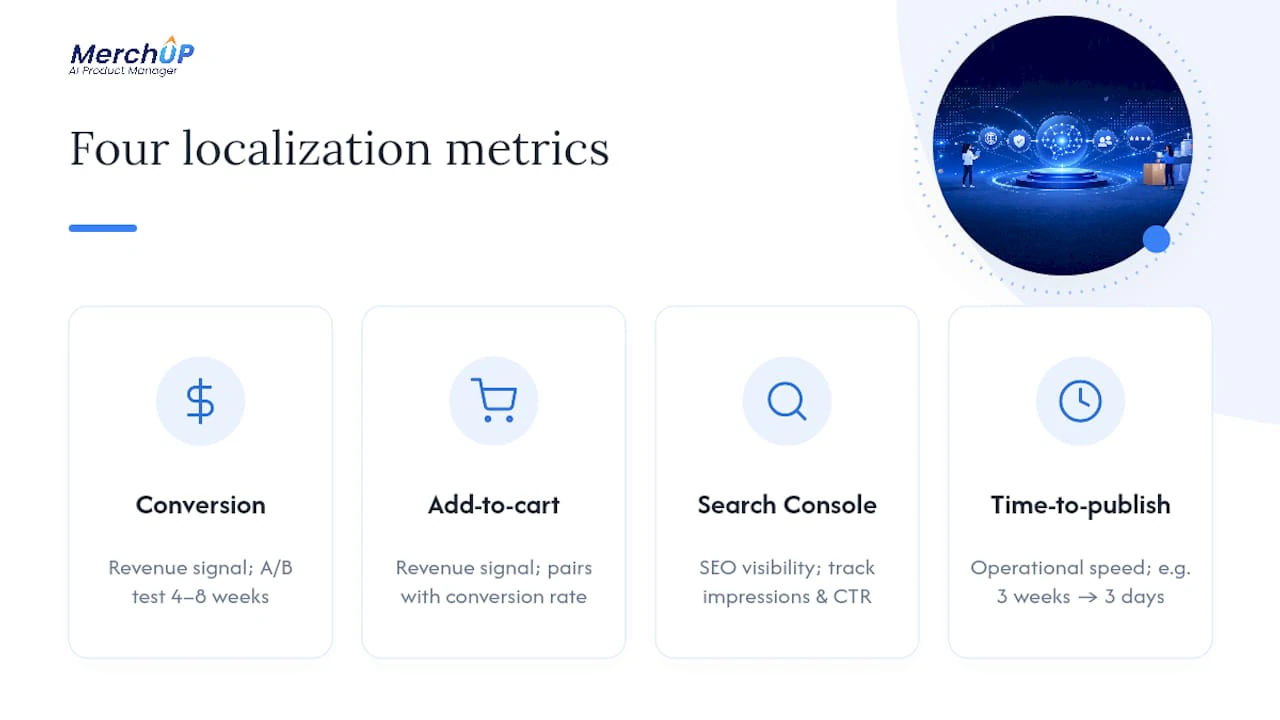
Conversion rate and add-to-cart rate are your revenue signals, and they need the A/B testing structure from the quality-control section to mean anything, comparing new copy against the existing description over the same four-to-eight-week window rather than judging on gut feeling after a few days.
Impressions and click-through rate from Search Console tell you whether the SEO work landed, specifically whether the similarity-threshold fixes and keyword placement described earlier actually pulled more search visibility, separate from whether visitors who land convert.
Time-to-publish is the operational metric that’s easy to ignore but matters just as much. If your pipeline cuts publishing time from three weeks to three days but conversion stays flat, that’s still a genuine win, it means your team can run more tests, cover more of a long-tail catalogue, and catch underperforming descriptions faster than a manual process ever could.
Track these four numbers per batch, not just in aggregate across your whole catalogue. A batch covering your best-selling category will move differently than one covering long-tail SKUs nobody searches for by name, and averaging them together hides which parts of your pipeline are actually earning their keep.
What I’ve learned watching teams make this shift
Most retailers moving to AI-generated copy still overstaff the writing stage and understaff review. That’s backwards. The bottleneck isn’t generating drafts, it’s checking them properly, and teams that flip their headcount toward review see fewer regenerations and cleaner publishes.
Start small. A three-SKU pilot with a frozen brief tells you more than a thousand-SKU launch with a vague one. Tools like MerchUp exist precisely to make that pilot fast to run and easy to measure before you scale.
— Jamie Moss
How MerchUp fits into your Shopify description pipeline
MerchUp is built around exactly the workflow this guide describes: MerchUp uses AI to generate high-converting, SEO-optimised product descriptions from your actual product data, provides customisable drag-and-drop templates and a visual editor for the channel-specific variants covered above, and integrates directly with Shopify so drafts move from generation to your catalogue without a manual CSV round trip.

If you’ve been nodding along through the pipeline stages and thinking “that’s a lot to build ourselves,” that’s the gap MerchUp closes. Rather than stitching together a spreadsheet, a prompt library, and a CSV export process by hand, you get the brand-voice brief, grounded generation, and template structure in one place, with the human review step still firmly in your control before anything publishes.
Run your own pilot using the MerchUp tutorial to see the generation-to-publish flow in under a minute, then compare plans on the MerchUp pricing page, where Starter runs £12.99 a month, Growth £29.99, Pro £69.99, and Scale £149.99, to match the tier to your catalogue size before committing to a full rollout.
Sources
- Bulk editing in Shopify admin
- AI product descriptions (Shopify blog)
- AI product descriptions at scale: a Shopify bulk generation pipeline
FAQ
Is product description localization the same as translation?
No. Here it refers to adapting AI-generated product copy into channel-specific formats, long web copy, marketplace snippets, Google Shopping lines, and social captions, rather than converting text between languages. The pipeline works from the same underlying product attributes across every variant.
How many products should a first AI description pilot cover?
Three to five SKUs is enough to test the full pipeline without overwhelming your review capacity. Choose products from a category with clear specs and reliable sales data, so you can measure conversion rate and add-to-cart impact cleanly within a four to eight week test window.
When should I use the Shopify bulk editor instead of a CSV?
The bulk editor works best under roughly 50 products, since it’s a direct grid edit with no import risk. Above that, a CSV import or Admin API batch becomes more practical, provided you back up your catalogue first.
What is grounded generation and why does it matter?
Grounded generation means the AI model drafts copy strictly from the structured product attributes you feed it, never inventing specifications it wasn’t given. This is the main defence against hallucinated claims, which is why even Shopify’s own AI drafting tools still call for human review of every output.
Does MerchUp handle the whole pipeline described here?
MerchUp covers generation, templating, and Shopify publishing, using AI to draft SEO-optimised descriptions with customisable templates and a visual editor built for Shopify integration. Pricing starts at £12.99 a month on the Starter plan, with Growth, Pro, and Scale tiers available as your catalogue grows.


Comments
No comments yet — be the first to share what you think.