


The most expensive product description mistakes are not typos. They are missing information, copy lifted from the manufacturer, features with no benefit, and text that is hard to read on a phone. Shoppers who hit any of these leave, or buy and send the item back. If you add products every week, the fix is a repeatable process rather than more hours at the keyboard. MerchUp AI turns a product photo, barcode or trading-card scan into a complete Shopify listing, with the description written into a designed template, so every product starts from the same complete structure.
TL;DR
- The biggest mistakes are incomplete details, manufacturer copy-paste, features without benefits, walls of text, and weak or inconsistent information across the catalogue.
- Poor product information is linked to abandoned carts and returns. In a 2025 industry study, 44% of shoppers abandoned a purchase because information was insufficient.
- AI drafts speed things up but can invent specs or swap details, so every listing needs a fact check before it goes live.
- A fixed structure, a short checklist and a consistent template stop most mistakes before they reach the product page.
Why description mistakes cost more than you think
A description does the job a shop assistant does in a physical store. It answers the questions a shopper cannot ask. When it fails, the shopper has only two options: guess or leave.
Nielsen Norman Group’s e-commerce research found that 20% of overall task failures could be traced to incomplete or unclear product information. In the same research, one participant left the site, searched Google, and found the same product with a fuller description and a lower price elsewhere.
The cost does not stop at the lost sale. Nielsen Norman Group’s Amy Schade describes two outcomes of a poor product page: the shopper cannot decide and abandons, or the shopper assumes, buys, and then finds the product is not what they needed. That second outcome produces an unhappy customer and an expensive return.
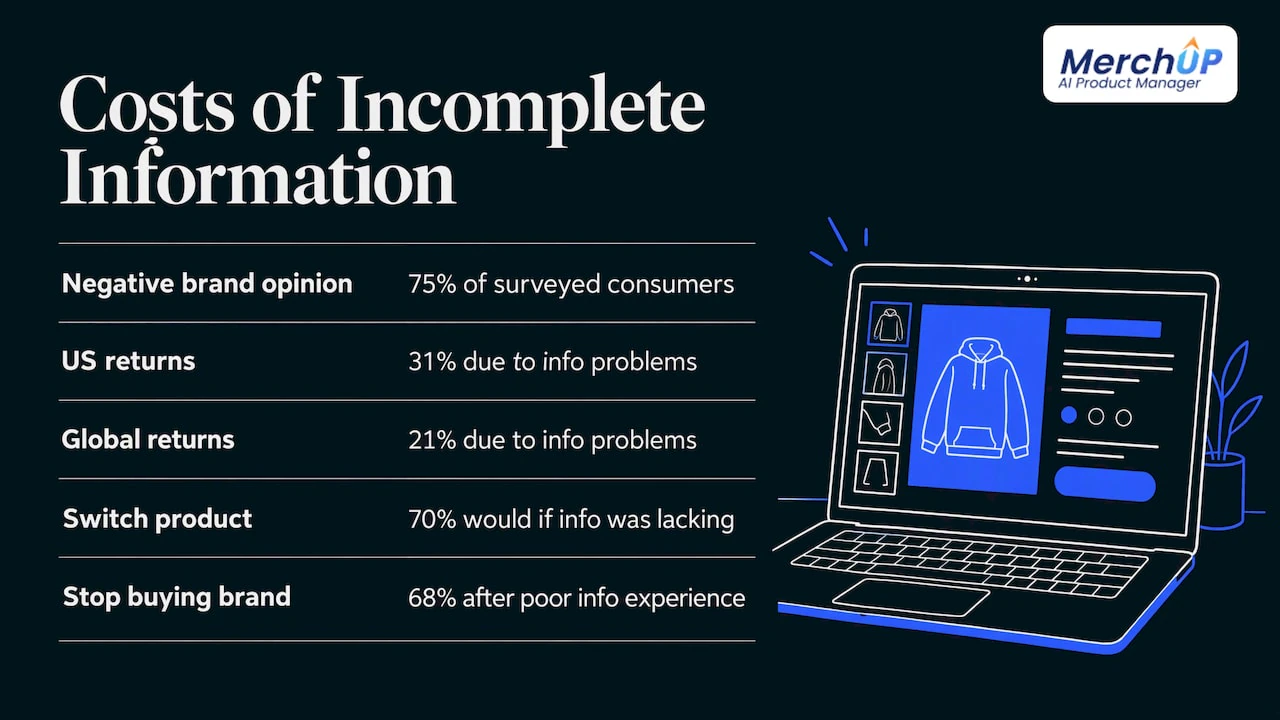
The numbers from the 2025 State of Product Experience study, reported by Chain Store Age, show the scale. 75% of surveyed consumers form a negative opinion of a brand that shows incomplete or inaccurate product information. US respondents reported returning items because of product information problems at a rate of 31%, against 21% globally.
A March 2026 report from Ecommerce News UK adds that 70% of consumers would buy a different product if information was lacking, and 68% would stop buying from a brand after a poor product information experience. Most of this is fixable at the writing stage.
The product description mistakes to fix first
1. Copying the manufacturer’s description
It is the fastest way to fill a page, and it is the first thing to go wrong. The same paragraph appears on every other store that stocks the item, so nothing tells a shopper or a search engine why yours is the page to choose. It also usually describes the product from the maker’s point of view, not the buyer’s.
The fix: keep the manufacturer’s facts, rewrite everything else around your customer and your own angle: who it is for, what problem it solves, how it compares to similar items you sell. If you have a catalogue full of supplier text, our guide to duplicate content on product pages explains how to clean it up in priority order.
2. Listing features without saying what they do
‘600 thread count’ and ‘5,000 mAh’ are facts. A shopper needs to know what they mean in daily use. Copy that stops at the specification forces the reader to do the translation, and many will not.
The fix: pair each important feature with its outcome. A battery figure becomes how many days of normal use it covers. A fabric weight becomes how it feels in summer. Keep the spec, add one line of meaning.
The opposite error is just as common: copy that talks only about the brand (‘we are passionate about quality’). Speak about the customer’s situation, not your own.
3. Leaving out the details people look for
Baymard Institute’s research found that 10% of the largest e-commerce sites fail to keep product descriptions consistently detailed. The details users sought most were materials or ingredients, dimensions and compatibility. In their testing, one shopper chose a product at Sephora because the ingredients were clearly shown, while another rejected one because a single ingredient on the list was one she disliked.
That last example matters: a clear list does not just help people buy, it helps the right people buy and the wrong people skip, which cuts returns.
The fix: build a minimum fact set per product type and never publish without it. For most physical goods that means:
- Materials or ingredients
- Dimensions and weight
- Compatibility, where relevant
- Care or maintenance
- What is in the box
For more specialised categories the list changes. Our electronics product descriptions guide and B2B product descriptions guide show what buyers in those categories expect.
4. Walls of text, especially on mobile
A long unbroken block is hard to read on a desktop and nearly impossible on a phone. Shoppers scan for the one fact they need, and if they cannot find it quickly, they go back to the results.
The fix: open with a one- or two-sentence summary, follow with a short bulleted list of key facts, and keep paragraphs to two or three lines. Then view the page on your own phone before publishing. Our guide to mobile product descriptions covers formatting in detail, and the product description structure article gives the order that works.
5. Too much information, badly chosen
Completeness does not mean piling everything on. An Accenture report cited by Consumer Goods Technology found that 75% of consumers abandoned a cart in the previous three months partly because they felt bombarded by content and overwhelmed by choice. The same source quotes an expert saying that brands do best when they identify what differentiates a product from a similar one, in a value-proposition way rather than a dry, educational one.
The fix: lead with the two or three things that set this product apart, then put the full specification in a clearly labelled block below. The reader who wants everything can find it, and the reader who wants a reason to buy gets it first.
6. Not answering the questions shoppers actually ask
If your inbox or your reviews keep repeating the same question (‘Does it fit a 15-inch laptop?’, ‘Is it dishwasher safe?’), the description has a hole in it. Each unanswered question is a shopper who left instead of writing to you.
The fix: go through recent customer messages and reviews and add the answers to the page. For high-traffic products, a short FAQ block on the page is a sensible home for them. Shipping times and returns terms belong in this group too: shoppers look for them before they commit.
For trading-card and collectibles sellers, the questions are specific: which card, which set, what condition, how centred. If a buyer cannot see those answers, they will not pay a collector’s price. MerchUp AI’s trading card scanner identifies cards against real catalogues and prices them from the market, and its AI card grading estimates centering and condition, so those facts go into the listing from the start.
7. Vague or exaggerated claims
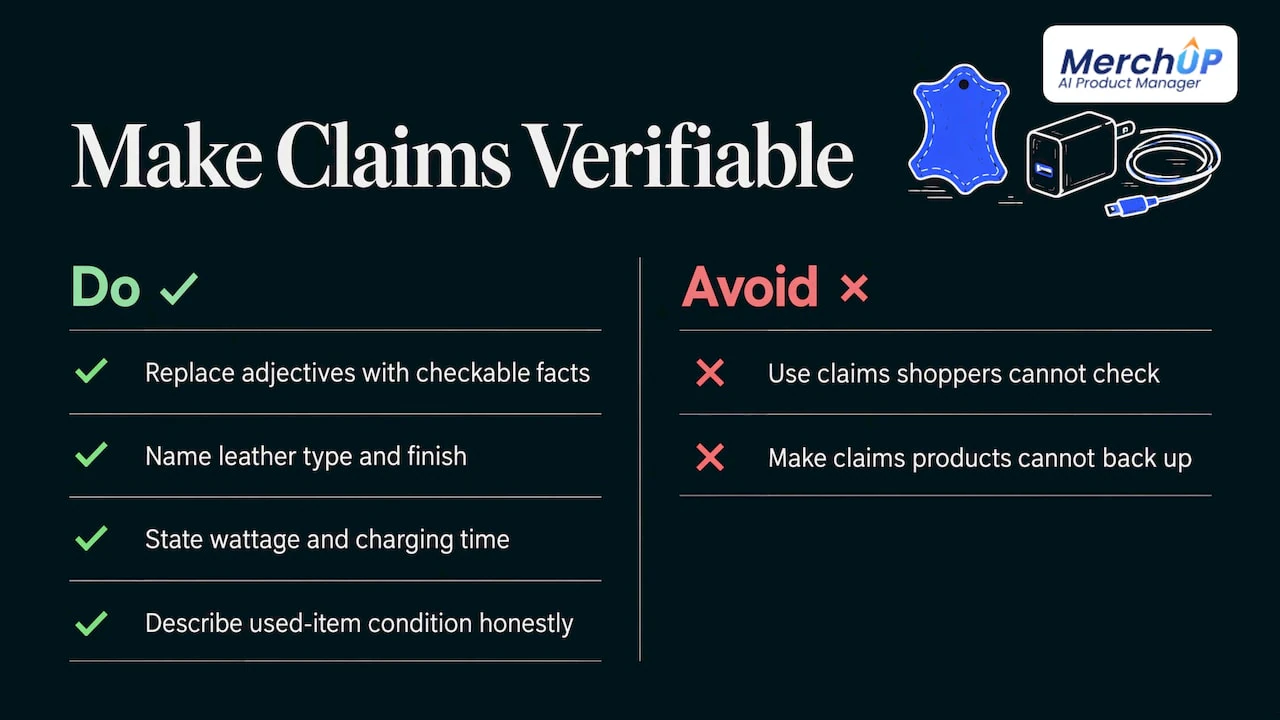
‘Premium quality’, ‘best in class’ and ‘perfect for everyone’ say nothing a shopper can check. Worse, a claim the product cannot back up sets up the return. The Syndigo figure above is the cost in numbers: US shoppers return items over information problems at 31%.
The fix: replace every adjective with a fact. ‘Premium leather’ becomes the type of leather and the finish. ‘Fast charging’ becomes the wattage and the time. Describe the condition of used or collectible items honestly and specifically. If a claim has a condition attached, state the condition next to it.
8. Inconsistent tone and facts across the catalogue
When one product reads like a friend talking and the next reads like a data sheet, the store feels unreliable. Worse is when the specs contradict each other: the title says one size and the table says another. Salsify, Netguru and others publish figures on conflicting information, but the practical point is simple: a shopper who sees two answers trusts neither.
The fix: write one short voice guide (three adjectives, words you always use, words you never use) and use the same description structure for every product. A fixed description template is the simplest way to enforce it. In MerchUp AI the description is written into a designed template, so the layout stays the same from product to product.
9. Ignoring search basics
A description that nobody finds sells nothing. The usual errors are no keyword anywhere, a keyword stuffed into every sentence, no unique text per product, and missing meta titles, meta descriptions and image alt text.
The fix: choose one primary phrase a real buyer would type, use it naturally in the title and the first paragraph, and write the meta title, meta description and alt text for each product. Our product description SEO guide walks through it.
Doing this for hundreds of products by hand is where most stores stall. MerchUp AI does all your SEO in one click. It reads your own Google Search Console data and live Google results, picks keywords, writes meta titles, descriptions and image alt text, checks rankings on live Google, and pushes everything to your store. You need no SEO knowledge, and every change is reviewed before it goes live, with full history and restore.
10. Weak photos and a description that leans on them
A description cannot rescue a blurry photo, and a photo cannot replace the facts the description should carry. Shoppers who cannot see the product clearly, or cannot see it in use, hesitate. Equally, relying on images alone leaves out anything a photo cannot show, such as materials and dimensions.
The fix: treat photo and text as one job. Show the product clearly from several angles, then use the text for everything the picture cannot say. MerchUp AI creates AI product photos alongside the listing, so image and copy are produced together.
Mistakes that are specific to AI-written descriptions
AI makes the first draft fast, which is the reason to use it. It also introduces its own errors. AIJourn lists the typical ones: tone drift, hallucinated features, swapped ingredients and misquoted certifications. Its advice is to fact-check specifications against supplier data and to review brand voice and any regulated terminology.
A short check before publishing catches nearly all of it:
- Specs and price: do the size, material, compatibility and price match your supplier data or your own product record?
- Claims: is every claim something you can stand behind? Delete anything invented.
- Duplicates: does this read like your other listings for similar items? Differentiate it.
- Required details: are any category-specific disclosures or warnings included?
- Format: do headings, bullets and paragraph length match the rest of the catalogue?
The starting data matters most. When a listing begins from the real product, a photo, a barcode or a catalogue match for a card, there is less for the writer, human or AI, to guess. That is why MerchUp AI builds the listing from the scan: title, type, vendor, price, tags and SEO come from what the product actually is.
A pre-publish checklist you can reuse
Print it, pin it, or build it into your process:
- The first two lines say who the product is for and what it does for them.
- Every key feature has its benefit next to it.
- Materials, dimensions, compatibility, care and box contents are all present where relevant.
- Nothing is copied word for word from the manufacturer.
- Claims are specific and provable.
- Shipping and returns information is findable.
- The text reads cleanly on a phone.
- The meta title, meta description and alt text are written.
- The tone matches the rest of the store.
If you want to see what good looks like, our product description examples article shows finished listings, and product descriptions that sell covers the wider approach.
Fixing it at scale with MerchUp AI
The mistakes above share a cause: when you are adding products every week, steps get skipped. MerchUp AI is an AI product manager built for Shopify. You scan or photograph the product, it builds the full listing, writes the description into a designed template, creates AI product photos and publishes it. Trading-card sellers also get card identification, market pricing and AI centering and condition grades, and can buy, sell and trade stock in person with Shopify POS.
There is a free plan, and paid plans start at £12.99 a month for Starter, with Growth at £34.99, Pro at £79.99 and Scale at £199.99 a month. The card scanner add-on starts at £7.99 a month for 1,000 scans. See the plans and pricing, or watch the tutorial on AI product descriptions first.

MerchUp AI is available now for Shopify. Webflow, Wix and WordPress are coming soon.
Our view: fix the process, not each page
Most stores do not have a writing problem. They have a consistency problem. The description for the product added on Monday is thorough, and the one added on Friday evening is the manufacturer’s paragraph pasted in, because that is what the time allowed.
That is why we built MerchUp AI as a product manager rather than a text box. When a product enters your store from a photo, a barcode or a card scan, the listing, the template-designed description, the photos and the SEO all come from one flow, so the basics are never the step that gets skipped. For card sellers, the facts a collector cares about, the exact card, the market price, centering and condition, are part of that same flow.
We would still read every listing before it goes live, and the product is designed around that. SEO changes are reviewed before they publish, with full history and restore. Quality comes from a good structure followed every time, with a person making the final call.
Jamie Moss
FAQ
What is the most common product description mistake?
Leaving out the information shoppers need to decide. Nielsen Norman Group attributes 20% of task failures in its e-commerce studies to incomplete or unclear product information. Copying the manufacturer’s text and listing features without benefits are close behind.
How long should a product description be?
As long as it takes to answer the buyer’s questions, and no longer. A simple item may need a short summary and a few bullet points. A technical or high-value item needs more detail, but it should be structured so the key points come first and the full specification sits below.
Can I use AI to write product descriptions without making these mistakes?
Yes, if you treat the output as a draft. Check specifications and price against your product data, remove any claim you cannot support, and keep the voice consistent. The typical AI errors are invented features, swapped details and misquoted certifications, so those are the points to review.
Do product description mistakes affect returns?
They do. In the 2025 State of Product Experience study, US respondents reported returning items because of product information issues at a rate of 31%. Accurate, specific descriptions set the right expectations before the purchase, which is where returns are best prevented.
Does fixing descriptions help with SEO?
It does. Unique, specific copy gives search engines something other than the manufacturer’s text to index, and a clear primary phrase, meta title, meta description and image alt text all help the page be found. The product description SEO guide covers each step.
Sources
- Tips for Better Product Descriptions on Websites, Nielsen Norman Group
- 10% of E-Commerce Sites Have Product Descriptions That Are Inconsistent, Baymard Institute
- Inaccurate product information hurts online sales, Chain Store Age
- Poor product information fuels returns and lost sales, Ecommerce News UK
- Consumers May Suffer From Product Information Overload, Consumer Goods Technology
- AI vs Human in Product Description Writing, AIJourn


Comments
No comments yet — be the first to share what you think.