



Rewrite supplier descriptions by first saving every spec into a metafield or reference field, then rewriting the shopper-facing copy with a consistent data→benefit template, using manual edits for hero products and AI-assisted single or bulk runs for the rest. Test a small batch, check for accuracy and uniqueness, then scale.
TL;DR:
- Save all product specs in dedicated metafields before rewriting descriptions to prevent losing critical information during edits.
- Use a category-based approach to set appropriate tone and style for different product types, avoiding generic descriptions across categories.
- Apply manual edits to high-value, legally sensitive, or complex SKUs, while utilizing AI-assisted bulk rewriting for large, low-margin catalog segments.
- Run sample batches through AI and review for spec accuracy, voice consistency, and SEO before executing large-scale updates to minimize errors.
- Back up original supplier text, set clear metrics, and conduct pilot tests to ensure description quality and performance before full catalog deployment.
How do you rewrite supplier descriptions safely?
Before touching a single word, capture what you already have. Supplier text is often the only place certain specs live: fabric blend percentages, voltage ranges, allergen warnings, compatibility notes. Overwrite it without saving that detail first and you lose it for good, often without noticing until a customer asks a question your new copy can’t answer.
Start with an export. Pull descriptions, SKUs, images and any attribute fields into a spreadsheet or CSV, then scan for specs that exist only in the prose, not in a dedicated field. Those are the ones at risk.
Once you’ve flagged them, map the original supplier description into a non-published metafield or reference field during import. This keeps the raw text on the product record, invisible to shoppers, but available if you need to check a claim or restore something later. Importing supplier copy verbatim commonly drags conversion down compared with descriptions rewritten to frame specs as benefits, so this isn’t just a safety net, it’s the reason you’re doing this rewrite in the first place.
Then group products by category or buyer psychology before you decide on style. A commodity item like batteries needs a different tone from a lifestyle product like a leather weekend bag, and grouping first means:
- You choose the description length and tone per group, not per product
- You catch category-specific spec requirements (care instructions, sizing, certifications) before writing starts
- You avoid running one generic style across a catalogue that clearly needs several
Pro Tip: Create the metafield mapping before you import a single new supplier feed. Retrofitting it onto products that have already overwritten the original text is far slower than building it in from day one.
Three practical methods to rewrite supplier descriptions (when to use each)
Not every product deserves the same treatment. Picking the wrong method wastes either time or quality, so match the method to the product’s importance and your catalogue size.
- Manual edits. Reserve this for hero SKUs, best sellers, and anything with legally sensitive claims (health, safety, sizing guarantees). A human should be the one writing and checking these, because the cost of getting a regulatory claim wrong far outweighs the time saved.
- AI-assisted single edits. This suits curated updates where a person reviews every output before it publishes. It’s the fastest route for a few dozen products a week when you want quality control without full manual drafting.
- AI-assisted bulk. This is the only realistic option once you’re past a few hundred SKUs, but it depends entirely on having structured source data and running a pilot first. Feed it messy, unstructured supplier text and you’ll get messy, unstructured output at scale. AI output quality depends directly on the persona and context you give it, so define your brand voice before you run thousands of products through it, not after.
A few signals tell you which path a product needs:
- High price point or high return rate → manual
- Legal, medical, or safety claims in the copy → manual
- Large volume, low individual margin, similar structure across SKUs → bulk
- Mixed quality supplier feeds with inconsistent detail → single edits first, bulk later
Shopify-lean bulk workflow: mapping, sample runs and safe replace
Shopify’s admin already gives you most of what you need for this. Vendor fields and bulk CSV editing are built into the platform, so the workflow below leans on existing functionality rather than bolting on something new.
- Map the import. During your CSV or app-based import, send the original supplier description into a reference metafield rather than the live Description(HTML) field. This keeps specs retrievable without exposing raw supplier text to shoppers.
- Generate structured AI fields. Set up short, bulleted, and long description variants, then map the version you want into Description(HTML) through a Liquid wrapper that enforces your brand voice consistently across every product.
- Run a sample batch. Before touching the full catalogue, process 10 products per style group and check three things: did the spec data survive, does the voice match your brand, and are the SEO fields populated correctly.
- Set your replace rules. Decide whether updates should skip products with manual edits already applied, or whether you’re isolating the bulk replace to specific collections only. Getting this wrong risks overwriting careful manual work with generic AI output.
Pro Tip: Run each product category through its own sample batch, not just one combined test. A style that reads perfectly for skincare can sound completely wrong applied to power tools.
A reusable template: data → benefit structure and micro-templates
A data-to-benefit structure works because it does the shopper’s thinking for them: state what the product is, list the specifics, then explain why any of it matters. The opening line should identify the product plainly, not tease it.
Core opener: [colour or feature] + [product type] + [key detail], followed immediately by one sentence on the benefit. “A matte black stainless steel kettle with a 1.7 litre capacity, built for households that boil water more than once a day.”
Three benefit bullets, each translating a spec into an outcome:
- Spec → outcome: “1500W element” becomes “boils a full kettle in under three minutes”
- Outcome → use case: “boils fast” becomes “ideal for busy mornings before work or school”
- Material → reassurance: “food-grade stainless steel” becomes “no plastic taste, no rust after years of daily use”
Category micro-templates help too. Electronics lean on numbers and compatibility. Kitchenware leans on time saved and durability. Apparel leans on fit and fabric feel. Skincare leans on ingredient function and skin type. Give your AI tool a persona and a list of must-include phrases for each category, because structured prompts consistently outperform generic ones. Aim for descriptions long enough to cover the benefit bullets properly but short enough that no shopper skims past them.
SEO and uniqueness: practical checks to avoid thin or duplicate content
Duplicate supplier copy is one of the most commonly cited reasons product pages underperform in search, because dozens of other stores are running the exact same manufacturer text. Rewriting fixes this, but only if you check a few things during the same pass:
- Make the first sentence state plainly what the product is, since this is often what search engines pull into snippets
- Generate a unique meta title and meta description in the same rewrite run, not as a separate task later
- Reframe specs as outcomes rather than lightly rewording the supplier’s own phrasing, since near-duplicate paraphrasing still reads as thin content
- Keep GTIN and MPN codes in a visible spec block, and apply product schema markup where your platform supports it
A partner guide on optimising product pages covers structured data in more depth if you want to go further on the technical SEO side once the copy itself is sorted.
Review, QA and publish: sample checks, metrics and rollback plan
Before any bulk replace goes live catalogue-wide, run your pilot batch through a short checklist: specs present and accurate, phrasing unique rather than a light reword, SEO fields filled in, and variants (size, colour) handled correctly rather than merged into one generic block.
Then measure before scaling. Track click-through rate, add-to-cart rate, and conversion on the pilot set, even with a small sample, because a short pilot with a rollback option is the cheapest form of risk control you have when changing hundreds of live pages at once.
- Keep original supplier text backed up in a metafield or a separate CSV so you can roll back instantly if something breaks
- Document any product excluded from the bulk run and schedule it for manual rewriting instead
Pro Tip: Don’t judge a pilot on vibes alone. A description that “sounds better” to you in a spreadsheet review can still underperform once real shoppers see it, so give the metrics a week before deciding.
What actually separates a good rewrite from a wasted one
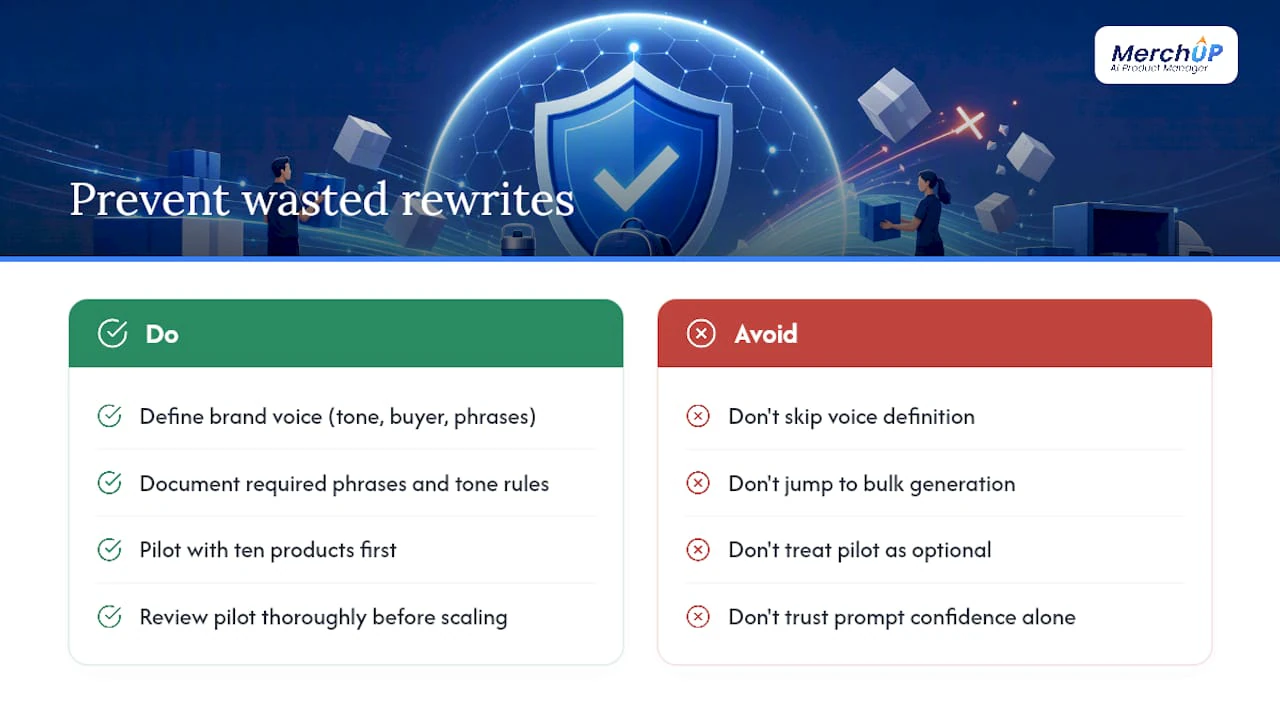
The biggest mistake in supplier description rewrites isn’t a bad prompt or a clumsy template. It’s skipping the brand voice definition and jumping straight to bulk generation. Teams that write down their tone, their target buyer, and a handful of phrases they always want included, before running anything at scale, spend far less time fixing output afterwards than teams that generate first and correct later.
Pilot testing gets treated as optional by managers under deadline pressure, and that’s backwards. The pilot is the cheapest insurance you’ll ever buy against a catalogue-wide mistake. Ten products, checked properly, tells you more about whether a style works than any amount of confidence in your own prompt writing.
— Jamie Moss
MerchUp: how it maps to the playbook above
MerchUp AI is built around exactly this workflow, not a generic AI writer bolted onto your store. It handles the template structure, the bulk rewriting across supplier catalogues, and the safe publish step into Shopify, so you’re not stitching together a spreadsheet, a separate AI tool, and manual CSV uploads to get the same result.

The platform’s Shopify integration supports the metafield mapping and Liquid-based brand-voice wrapper described in the bulk workflow above, along with a visual editor for reviewing output before it goes live. If you want to see how the sample-batch approach plays out in practice, run the MerchUp tutorial on ten products from one supplier feed first, exactly as you would with any pilot, and check the results against your own QA checklist before touching the rest of the catalogue.
Sources
- How to write product descriptions that sell (WooCommerce)
- Crafting a distinct brand voice in an AI-driven world (Skyword)


Comments
No comments yet — be the first to share what you think.