



Shopify metafields do not rank a page on their own. They help SEO when they hold clean, specific product data that your theme then prints on the page, in structured data or in filters. Used that way, they cut duplicate text, keep specs accurate and stop SEO fields from clashing with theme logic. Used carelessly, they sit in the admin and do nothing for Google.
This guide covers what metafields can and can’t do for search, the one built-in SEO metafield worth knowing (seo.hidden), practical uses, the mistakes that make metafields “not work”, and a workflow for doing it across a whole catalogue.
TL;DR
- Metafields are custom data fields. They only influence SEO when your theme, app or schema code outputs them on the page.
seo.hiddenset to 1 hides a product, page or blog post from sitemaps, search engines and store search.- The best SEO uses are structured specs, custom alt text kept apart from theme logic, and filters built on metafield definitions.
- When a metafield “doesn’t show”, the cause is usually the theme’s Liquid conditions or code placement, not the metafield.
- MerchUp AI handles titles, meta descriptions and image alt text for you, with every change reviewed before it goes live.
What metafields are, and why SEO people care
A metafield lets you extend Shopify’s data model with your own custom data on products, customers, orders and more. Shopify gives a product a title, description, type, vendor, tags and a few other fields. It does not give you a field for “fabric weight”, “compatible models” or “card set”. A metafield does.
Search engines reward pages that answer a buyer’s question with specific, consistent information. Metafields are a tidy way to store that information once and reuse it in many places: the product page, a comparison table, structured data and filters.
That last point is the key idea. A metafield is storage. Whether it helps SEO depends on where it is displayed.
Do Shopify metafields affect SEO?
Indirectly, yes. Directly, no. Here is the honest breakdown.
| Use of a metafield | Helps SEO? | Why |
|---|---|---|
| Stored in admin, never displayed | No | Google can’t see what the page never prints |
| Printed as visible specs on the product page | Yes | Adds unique, crawlable, relevant text |
| Output in JSON-LD product markup | Yes | Gives Google clean attributes to read |
| Feeding storefront filters | Yes, indirectly | Better navigation and more useful category pages |
| Used for custom alt text in your theme | Yes | Descriptive image text without breaking theme features |
| Added to store search | Not for Google | Store search and Google results are separate systems |
That last row catches people out. Shopify’s own help pages note that product boosts in Search & Discovery affect searches on your online store and have no effect on rankings in third-party search engines. Tuning your internal search is a conversion job. It is not an SEO job.
The one SEO metafield built into Shopify: seo.hidden
Shopify uses the system metafield seo.hidden, with an integer value of 1, as the standard way to hide products, pages or blog posts from sitemaps, search engines and store search.
That is useful in a few situations:
- Old seasonal products you keep for customers with direct links but don’t want indexed.
- Thin utility pages, such as a hidden gift-wrap product.
- Duplicate or near-duplicate pages that would compete with a main page.
Two details matter. First, it is different from the “Unlisted” status. Unlisted also removes items from collections, recommendations and the Shopify Catalog. Second, if an unlisted product also has seo.hidden set to 1, the unlisted status takes priority for visibility and discovery.
For hiding a single page, Shopify also documents how to hide a page from search engines. Check that guide before you use seo.hidden on important pages. Hiding the wrong product is one of the quickest ways to lose organic traffic, so test on one item and confirm it disappears from your sitemap before you roll it out.
Five practical ways to use metafields for SEO
1. Structured specifications on the product page
Store attributes as separate fields: material, dimensions, compatibility, care instructions, country of origin. Then print them in a specs table on the page.
The benefit is consistency. Every product gets the same attribute labels, so you stop writing specs differently in every description. It also reduces duplicate text, because the description can focus on benefits and the metafields carry the facts.
We cover the mechanics of definitions and types in more detail in our guide to Shopify product metafields.
2. Custom alt text that doesn’t break the theme
This one comes straight from developer practice. In a Shopify developer forum thread, a theme was using the alt attribute for both SEO and variant-image logic. The fix was to have the alt attribute pull from a custom metafield, so the SEO text and the theme’s image-swapping stopped fighting.
The lesson: if your theme relies on alt text to match images to variants (for example, a colour name), don’t overwrite it with keyword-rich descriptions. Keep the theme-critical value where the theme expects it, and store the SEO wording in a metafield your template outputs.
3. Filters built on metafields
In Shopify’s Search & Discovery app, you can build custom filters on product or category metafields. Once a definition exists and is assigned to products, you activate filtering in the definition settings, and customers can refine lists by your custom attributes. Shopify’s page also states a maximum of 50 definitions for filtering.
Filters make large collections easier to browse. The filter setup guide gives the example of a watch store filtering by attributes. The SEO gain is indirect: better navigation, longer visits and a cleaner path to the right product.
4. Attributes that feed structured data
If you store GTIN, brand, material or model in metafields, your schema code can read them and output accurate product markup. That keeps what the page says and what the markup says in step. Our merchant’s guide to Shopify product schema walks through what to include.
5. Pricing and customer-specific data
Developers also use metafields for values that native fields can’t hold in every context. One forum answer suggests storing the retail price in a product or variant metafield and referencing it with Liquid when a B2B catalogue hides the original price. It isn’t an SEO tactic as such, but it shows the pattern: metafields hold data that the standard fields can’t.
How to display a metafield so Google can read it
There are three common routes.
- Theme editor dynamic sources. In an Online Store 2.0 theme, many blocks let you connect a text setting to a metafield. This is the no-code route and fine for specs and short notes.
- Liquid. You can output a value with
product.metafields.namespace.key, or use themetafield_tagfilter, which generates an HTML element to host the data. The element type differs depending on the metafield type. - JSON-LD. Add the value to your product schema block so the same facts appear in markup.
Whichever route you choose, view the page source afterwards. If the value isn’t in the HTML Google receives, it can’t count.
Why your metafield isn’t showing
Most “metafields are broken” reports are theme problems. A developer thread about a metafield not rendering on new products in Dawn is a good example. The metafield looked like it failed on new products but worked on old ones. The real cause was where the code sat inside the product card: it depended on a star rating, and new products have no rating yet.
A short checklist when a value doesn’t appear:
- Is the value actually saved on that product, not just defined?
- Is your Liquid wrapped in a condition (a rating, a variant, a tag) that new products don’t meet?
- Is the code placed inside a block that only renders sometimes?
- Did you test against old products, new products and products with few attributes?
That last test is the cheap one. Always check rendering against a mix of product ages and attribute sets before you assume the data is wrong.
Common mistakes
Treating metafields as a ranking trick. Hidden text for crawlers is not the idea. Print what a buyer would also want to read.
Overwriting theme-critical fields. As the alt text example shows, a native field may be doing a job you can’t see. Change it and the storefront can break.
Hiding the wrong things. seo.hidden removes items from search engines. Apply it to a collection of best sellers by mistake and you will notice in your traffic, not in an error message.
Inconsistent definitions. Free-text fields give you “Cotton”, “cotton” and “100% cotton” across the catalogue. Pick a type, use controlled values where you can and keep naming uniform.
Expecting store search to move Google rankings. Store search tuning helps visitors who are already on your site. It does nothing in Google results.
Our view: metafields are data hygiene, not an SEO shortcut
We build MerchUp AI as an AI product manager for Shopify stores, and the pattern we see is simple. Stores that do well in search are rarely the ones with the cleverest field setup. They are the ones whose product data is complete, consistent and reviewed.
Metafields earn their place when they separate concerns. Theme logic stays with native attributes. SEO wording and structured facts go in dedicated fields. Nothing is overwritten that something else depends on. That separation is also what makes bulk changes safe, because you know what each field is for.
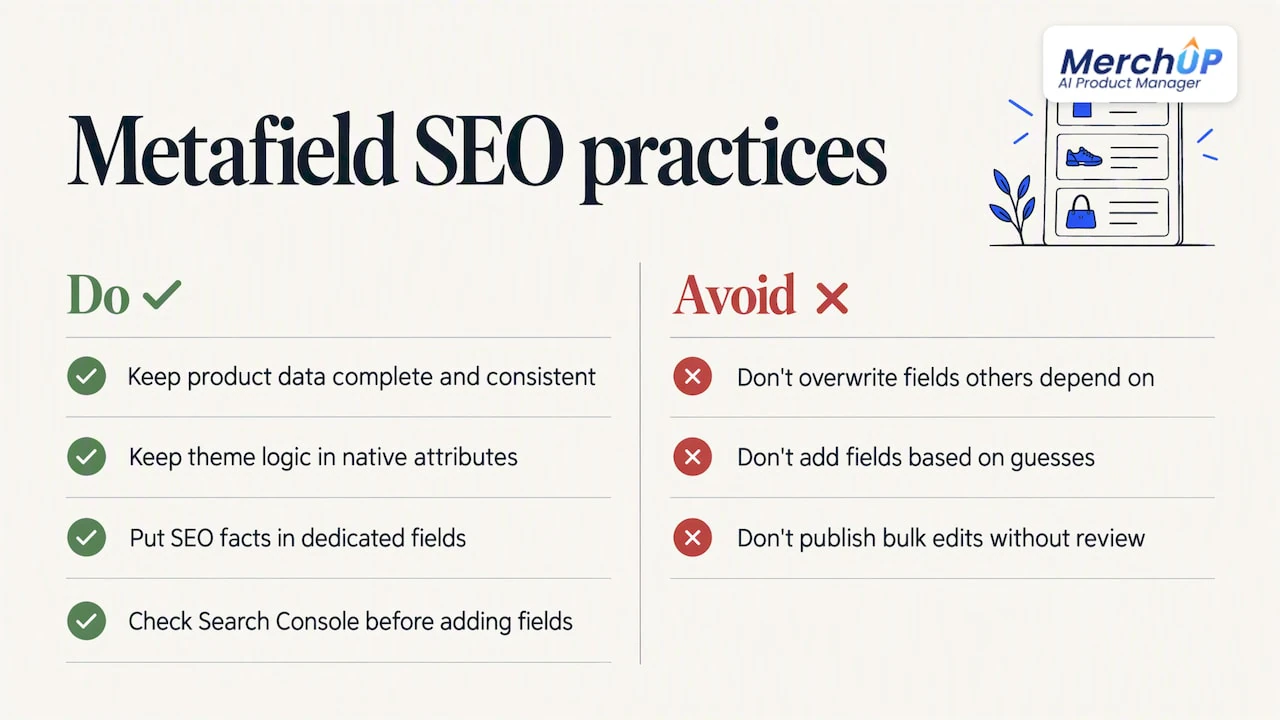
The second thing we’d say is to start from search data, not guesses. Before adding fields, look at what your own pages already show for in Google Search Console, and write for those queries. A metafield for “fabric weight” is worth building if shoppers search for it. If they don’t, you’ve created admin work for no reader.
Third, review before publishing. Bulk edits to SEO fields are where a small error becomes a hundred-page error. That is why every change in MerchUp AI is reviewed before it goes live, with full history and restore.
— Jamie Moss
Doing the SEO side without hand-editing every field
Metafields cover custom data. The standard SEO fields still need attention on every product: the meta title, the meta description and the image alt text. On a store adding new products every week, that is the part that slips.
MerchUp AI does all your SEO in one click. It reads your store’s own Google Search Console data and live Google results, picks keywords, writes meta titles, descriptions and image alt text, checks rankings on live Google and pushes everything to your store. No SEO knowledge is needed, and you review each change before it publishes. You can see how it works on the AI SEO Autopilot page.
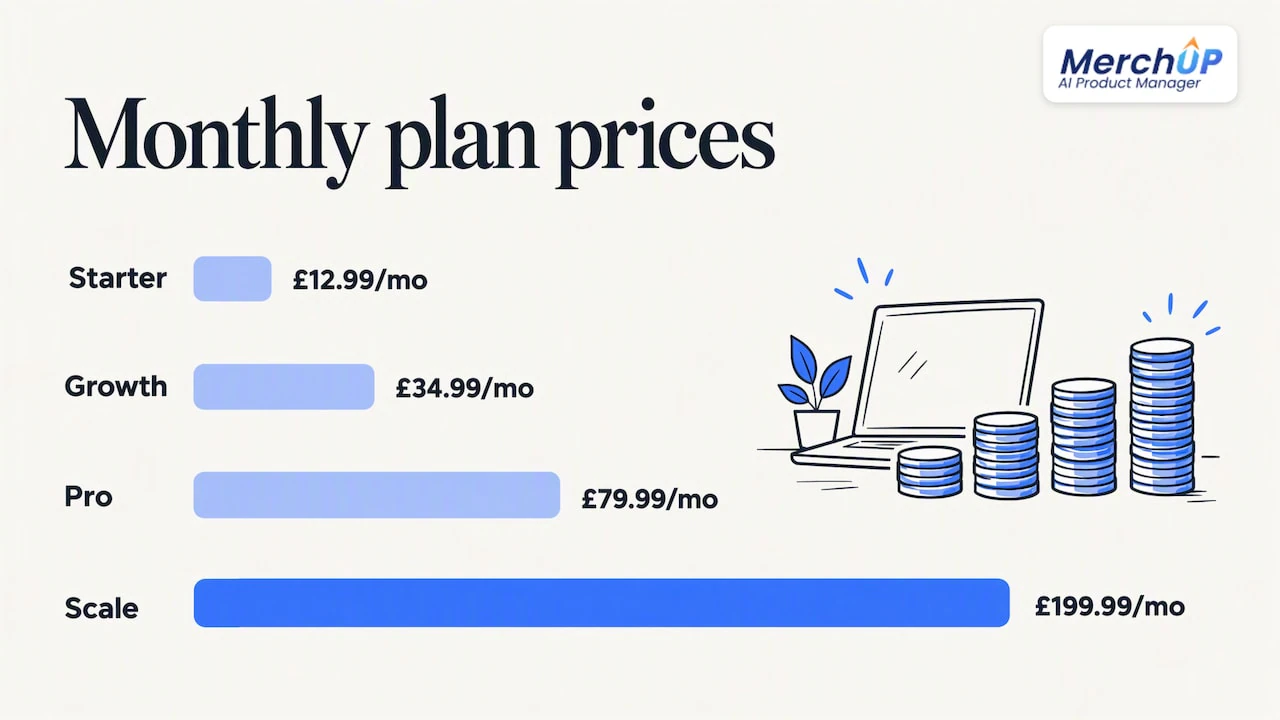
There is a free plan, and paid plans start at £12.99 a month with Starter, then Growth at £34.99, Pro at £79.99 and Scale at £199.99 a month. Details are on the pricing page. It is available now for Shopify.
If you sell trading cards or collectibles, the same product manager scans a card, identifies it against real catalogues, prices it from the market and estimates centering and condition, so the listing starts with accurate data rather than blank fields.
A simple rollout plan for your store
You don’t need to restructure the whole catalogue. Try this order:
- Pick 20 to 50 products. Choose top sellers or products with impressions in Search Console but weak clicks. Our approach to scaling product pages with AI starts the same way.
- Define three to five metafields. Only those you will display: material, size, compatibility, and so on. Set the type and keep values uniform.
- Display them. Add a specs block through dynamic sources or Liquid, then confirm in page source.
- Handle alt text carefully. If your theme depends on alt text for variants, store SEO wording separately.
- Review the standard SEO fields. Meta titles, descriptions and alt text still carry the main on-page signals. Our Shopify SEO checklist lists what to check.
- Check rendering. Test on old products, brand-new products and products with sparse data.
- Measure. Wait for Google to recrawl, then compare impressions, clicks and rankings for those pages against the rest.
If you later sync the work across the catalogue, a small pilot first is the safe route. We describe one in our piece on safe Shopify catalogue sync.
How metafields fit with descriptions
A common question is whether specs belong in the description or in metafields. Our answer: put facts that repeat across products into metafields, and put the persuasive, product-specific copy in the description. That keeps descriptions shorter and less repetitive, and keeps specs consistent. For the writing side, see our notes on product description SEO and formatting descriptions in the Shopify admin.
FAQ
Do Shopify metafields help SEO?
Only when their values are shown on the page, in structured data or in filters. A metafield that stays in the admin gives Google nothing to read. The benefit is cleaner, more consistent product data, not a direct ranking boost.
What does the seo.hidden metafield do?
With a value of 1, it hides a product, page or blog post from sitemaps, search engines and store search. It is separate from the Unlisted status, and if both apply, Unlisted takes priority. Test it on one item first.
Can I add metafields to Shopify store search?
That depends on your search setup, and Shopify’s own Search & Discovery app has its own settings. Whatever you do there affects only searches on your store. It has no effect on how Google ranks your products.
Why isn’t my metafield showing on new products?
Usually the theme code is the cause. A condition such as a star rating can hide the value on products that haven’t gathered that data yet, as one Dawn developer thread showed. Check the placement of the code and test on products of different ages.
Sources
- Shopify Help Center: Metafields
- Shopify Help Center: Managing searchability
- Shopify Help Center: Hiding a page from search engines
- Shopify Help Center: Modifying search with Shopify Search & Discovery
- Shopify Help Center: Filtering products using product metafields
- Shopify Help Center: Adding filters with Shopify Search & Discovery
- Shopify developer docs: metafield_tag
- Shopify Developer Community: custom SEO alt text and variant images
- Shopify Developer Community: retail price in B2B catalogs
- Shopify Developer Community: metafield not rendering on new products


Comments
No comments yet — be the first to share what you think.