


Duplicate product pages happen when the same or very similar content appears under multiple URLs. Run a canonical and redirect audit now, flag your top revenue SKUs for unique copy, and you will have addressed the majority of the damage before the week is out. Google does not issue a formal “duplicate penalty” but it does pick one canonical URL to rank, and if it picks the wrong one, your best pages lose traffic. First improvements typically show in Google Search Console within 4–12 weeks of implementing fixes.
Start here — your 24–72 hour checklist:
- Run a
site:yourdomain.com [product name]check to spot obvious duplicate URLs - Open Google Search Console and filter the Pages report for “Duplicate, Google chose different canonical”
- Apply
rel=canonical, 301 redirects, ornoindexto the top offenders (decision rules below) - Flag your top revenue-contributing SKUs for unique copy rewrites
- Add canonical URLs to your XML sitemap and verify internal links point to the same version
Pro Tip: If you are on Shopify, check your Shopify SEO checklist first — Shopify generates several duplicate paths by default (collections vs. products, trailing slashes) that you can resolve with a single canonical rule.
What does duplicate content actually mean for product pages?
Duplicate content in ecommerce refers to blocks of text that are substantially identical across two or more URLs, whether those URLs live on your own site (internal duplicates) or across different domains (external duplicates). The distinction matters because the fixes differ.
Internal duplicates are the more damaging category for most ecommerce stores. They arise constantly and quietly, often without anyone noticing, and they are entirely within your control to fix. External duplicates, such as manufacturer descriptions syndicated across dozens of resellers, are harder to resolve but still manageable.
The most common scenarios on product pages:
- Faceted navigation and filter parameters:
/shoes?colour=red&size=8and/shoes?size=8&colour=redrender the same page under different URLs - Product variants split into separate pages: a jacket listed separately for each colour, with near-identical copy across all ten pages
- Manufacturer-supplied descriptions: the same 200-word block appearing on your site, the manufacturer’s site, and 40 other resellers
- Paginated category pages:
/category/page/2with near-identical headers, footers, and navigation to page 1 - Internal search result pages:
/search?q=trainersindexed and competing with your actual category page - Protocol and trailing-slash variants:
http://vshttps://,/product/vs/producttreated as separate URLs by crawlers - Session IDs appended to URLs:
/product/123?sessionid=abc456creating thousands of unique-looking URLs
Why does this hurt? For ecommerce stores, the primary harm is canonical confusion, diluted link equity and wasted crawl budget — not a formal penalty. When Google crawls ten near-identical URLs, it must choose one to rank. If it chooses the wrong one (a filtered URL, a session-ID variant), your clean product page loses the backlinks and ranking signals that should have accumulated there. On large catalogues, crawl budget waste is the more immediate problem: Google’s crawlers spend time on parameter-bloated URLs and visit your new or updated pages less frequently.
How does Google actually treat duplicate product descriptions?
The short answer: Google picks a canonical and moves on. John Mueller has confirmed there is no general duplicate-content penalty; instead, Google selects one version of a page to represent in search results and tries to avoid showing identical snippets across multiple results.
The practical implication for merchants is that you are competing for canonical selection, not trying to avoid a penalty. Several signals influence which version Google picks:
- Unique surrounding content: stock status, price, local availability, shipping information, and editorial copy all differentiate your page from a manufacturer’s or a competitor’s
- Internal linking consistency: if your site links to
/product/blue-jacketin some places and/product/jacket?colour=bluein others, you are sending mixed signals about which URL matters - Backlink distribution: links pointing to the wrong URL variant strengthen the wrong canonical candidate
- Page-level signals: structured data, review counts, and breadcrumb markup all contribute to Google’s confidence in a URL
One point worth addressing directly: adding a link back to the original manufacturer does not prevent duplicate-content issues. Google’s canonicalisation is not about attribution; it is about which page best serves the searcher. A reseller can outrank a manufacturer when the reseller’s page has stronger unique signals, better reviews, and clearer local availability. That is the opportunity.
For product schema markup, structured data helps Google understand your page’s context and can improve snippet selection, though it does not override canonical signals.
What causes duplicate content on product pages?
Understanding the source of duplication tells you where to direct your developer’s time. Some causes generate dozens of duplicate URLs; others generate thousands.
Internal causes (you can fix these):
- Faceted navigation: the highest-volume offender on large catalogues. A category with 10 filter options can generate hundreds of parameter combinations, each crawlable. Faceted navigation and filter parameters are the primary source of URL explosions for large ecommerce sites and should be addressed through canonicalisation or parameter handling before anything else.
- Colour and size variants on separate URLs: splitting one product into ten colour-specific pages creates near-identical indexed URLs with minimal content differentiation. Combined listings with per-colour swatches are often the best compromise to preserve UX without multiplying indexed pages.
- CMS-generated path variants: Shopify, WooCommerce, and Magento all create duplicate paths by default. Shopify, for example, generates both
/products/jacketand/collections/coats/products/jacketfor the same item. - Session IDs and tracking parameters: UTM parameters, affiliate tags, and session tokens appended to URLs create unique-looking addresses for identical pages.
- Pagination:
/category/page/2through/category/page/20often share headers, footers, and navigation with minimal unique content. - Internal search pages:
/search?q=running+shoesindexed alongside your actual running shoes category page. - Protocol and www variants:
http://andhttps://,www.and non-www.treated as separate origins.
External causes (harder to control):
- Manufacturer-supplied descriptions: the most common external duplicate. Retailers who publish manufacturer copy without unique framing frequently lose canonical selection to the manufacturer or larger retailers.
- Marketplace listings: the same product description appearing on Amazon, eBay, and your own site simultaneously.
- Syndicated product feeds: price comparison sites and affiliate networks republishing your descriptions verbatim.
The internal causes are where to start. External duplication matters, but you cannot control what a manufacturer publishes. You can control what you publish.
How do you find and prioritise duplicate product pages?
Combine Google Search Console, crawl tools, and content-similarity checks to build a complete picture. The goal is not just to find duplicates but to quantify their impact so you fix the right ones first.
Step-by-step audit workflow:
- Google Search Console Pages report: filter for “Duplicate, Google chose different canonical” and “Duplicate without user-selected canonical.” Export the full list. These are pages where Google has already identified a problem and made its own decision, which may not match yours.
- Site: operator checks: search
site:yourdomain.com "exact product name"for your top 20 SKUs. Multiple results for the same product signal indexation of variant or parameter URLs. - Screaming Frog or Sitebulb crawl: run a full crawl and filter for pages with identical or near-identical title tags, H1s, and meta descriptions. Both tools flag duplicate content at the page level and show you which URLs are self-canonicalising correctly.
- Content-similarity check: for large catalogues, use Screaming Frog’s near-duplicate detection or a fuzzy-match script to identify pages sharing more than 80% of their body text. This catches manufacturer-description duplicates that have different URLs and titles but identical copy.
- Log file analysis: pull server logs for the past 30 days and look for Googlebot hitting parameterised URLs at high frequency. A spike in
/category?sort=price&colour=redvariants is a crawl-budget warning sign. Practical audits should combine GSC coverage reports with crawl tools and server log analysis to track canonical selection and measure crawl-budget effects.
Prioritisation rules:
- Fix pages with the highest organic traffic and revenue first. A duplicate issue on a £50,000/month SKU outranks a clean fix on a £200/month one.
- Pages with clear buyer-intent queries (“buy [product] UK”, “[product] free delivery”) deserve bespoke attention before informational long-tail pages.
- Parameter-generated duplicates affecting entire category trees should be addressed at the template level, not page by page.
- Tag each issue in a spreadsheet: URL, duplicate type, traffic, revenue, fix type (canonical/301/noindex/content), and assigned owner.
Pro Tip: In Screaming Frog, use the “Canonicals” tab to cross-reference which pages declare a canonical versus which URL Google has actually selected in GSC. Mismatches between the two are your highest-priority technical fixes.
Technical fixes: canonicals, redirects, noindex and parameter handling
Pick one of three technical controls depending on the page’s purpose. The decision is straightforward once you know what you want the URL to do.
The three primary options:
| Method | When to use it | What it does |
|---|---|---|
| 301 redirect | The duplicate URL should not exist at all | Permanently redirects users and crawlers; passes link equity to the destination; removes the duplicate from the index |
rel=canonical |
The duplicate must exist for users but only one should rank | Signals to Google which URL is the preferred version; does not remove the page from the index |
noindex |
The page must exist and be accessible but should never appear in search results | Removes the page from the index; does not consolidate link equity |
Implementation rules:
- Place
rel=canonicalin the<head>of every product page, pointing to the clean, preferred URL. Self-referencing canonicals (a page pointing to itself) are correct practice and should be on every page. - Never combine
noindexandrel=canonicalon the same page. They send contradictory signals: one says “ignore this page,” the other says “treat this as the preferred version.” - Ensure internal links throughout the site point to the canonical URL, not to parameter variants or redirect chains. A canonical tag is a hint, not a directive; contradictory internal links weaken it.
- For trailing-slash and protocol variants, implement a 301 redirect at the server level to enforce one canonical form, then add a self-referencing canonical on the destination.
- For colour and size variant URLs that have no distinct search demand, add a
rel=canonicalpointing to the parent product URL. Splitting one product into many colour-specific pages can cause canonical confusion; combined listings with redirects or canonical rules are common fixes depending on whether individual colour searches have meaningful volume.
Parameter handling:
Google Search Console’s URL Parameters tool has been deprecated, so parameter management now relies on server-level canonicalisation. For faceted navigation, the cleanest approach is to add a rel=canonical on every filtered URL pointing to the clean category URL, and to use <meta name="robots" content="noindex, follow"> on filter combinations that have no search demand. For parameters that do have search demand (e.g. /shoes/womens/ as a genuine category), treat them as first-class URLs with their own canonical and unique content.
Blocking filter parameters in robots.txt is a blunter instrument. It prevents crawling but does not consolidate link equity and can cause issues if some parameterised URLs have genuine value. Prefer canonicalisation over blanket blocking for most ecommerce sites.
Sitemaps: include only canonical URLs in your XML sitemap. A sitemap that lists parameter variants contradicts your canonical tags and confuses crawlers about which URLs matter.
How do you create unique product descriptions at catalogue scale?
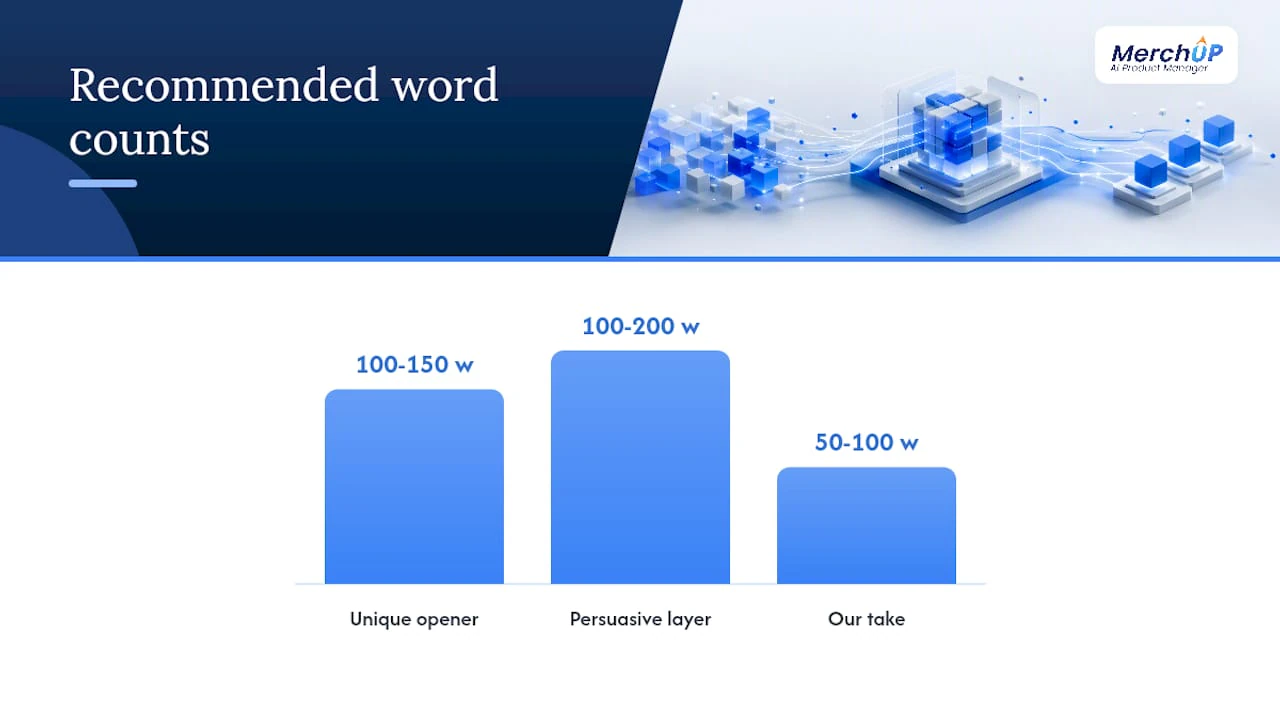
Unique, persuasive copy combined with unique page signals (reviews, stock status, editorial perspective) is the most reliable route to winning canonical selection. The good news is you do not need to rewrite every word. A practical scaling pattern is to rewrite the persuasive layer only, roughly 100–200 words per product page, and retain factual specs; prioritise the top revenue-generating SKUs to get the most leverage.
A repeatable template structure:
- Unique opener (100–150 words): write this from scratch. Cover who the product is for, the primary use case, and one or two benefits the manufacturer copy does not emphasise. This is the section Google uses for snippets.
- Three unique benefit bullets: not feature bullets copied from the spec sheet. Translate features into outcomes: “waterproof to 30 metres” becomes “safe for swimming, snorkelling, and caught-in-the-rain moments.”
- Factual specs table: keep this as-is from the manufacturer. Specs are facts, not creative copy, and rewriting them introduces error risk.
- “Our take” or comparison blurb (50–100 words): a short editorial note on who this product suits best, how it compares to a related product in your catalogue, or a specific use-case recommendation. This is the section that most differentiates you from every other reseller.
- UGC and Q&A placement: reviews and customer questions add unique content automatically over time. Collect them actively.
Scaling workflows:
- Batch rewrites by category, not by individual SKU. Rewriting all 40 running shoes in one session is faster than context-switching between categories.
- Use AI-generated product descriptions to draft unique openers at speed, then editorial-review every output before publishing. AI drafts are starting points, not finished copy.
- Never wholesale-paraphrase manufacturer text using AI. Spun content is detectable and usually worse than keeping factual specs and adding a unique opener. The goal is original framing, not synonym substitution.
- Automate safe fields: meta descriptions and H1 tags can be templated from product attributes (brand + product name + key spec). Copy that makes claims about quality, sizing, or performance must be human-reviewed.
- For the long tail, manufacturer copy plus active UGC collection is a defensible temporary position. The insight from AI-era search is that original product copy now functions as both a ranking signal and a citation signal in AI-generated shopping answers, so the long-term direction is always towards unique content.
For product description templates that map to this structure, there are ready-made frameworks you can adapt to your catalogue.
Which pages should you fix first, and how long will it take?
Fix high-revenue, high-search-volume SKUs with clear buyer intent first. Low-value long-tail SKUs can carry manufacturer copy temporarily, provided they have active UGC collection and a unique opener in the pipeline.
Prioritisation checklist:
- Monthly organic revenue from the product page (highest first)
- Search volume for the primary buyer-intent query (“buy [product] UK”)
- Whether GSC shows “Duplicate, Google chose different canonical” for this URL
- Whether the page has backlinks pointing to a non-canonical variant
- Whether the product has colour/size variants creating additional duplicate URLs
Effort and timeline guide:
| Fix type | Typical effort | Expected timeline |
|---|---|---|
| Apply canonical tags to top 50 SKUs | Developer: 1–2 days | Index changes visible in GSC within 2–4 weeks |
| 301 redirects for deprecated variant URLs | Developer: 1 day | Link equity consolidation within 4–8 weeks |
| Unique copy rewrites for top 20% SKUs | Content team: 2 weeks depending on catalogue size | Ranking improvements within 4–12 weeks |
| Faceted navigation parameter handling | Developer: 3–5 days | Crawl-budget improvement within 4–8 weeks |
| Site-wide templating and UGC collection | Cross-functional: 2–4 months | Sustained improvement over several months |
Roles:
- SEO lead: audit, prioritisation, and brief creation
- Content editors: unique copy for top SKUs, template creation
- Developers: canonical tags, 301 redirects, robots.txt, parameter handling
- Product owners: variant strategy decisions (combined listing vs. separate URLs)
For UK ecommerce teams, a realistic starting budget for a focused canonical and copy audit on a mid-sized catalogue (500–2,000 SKUs) is a few days of developer time plus two to four weeks of content editing. The technical fixes are almost always faster and cheaper than the content work.
How do you monitor for duplicate content regressions?
Fixing duplicates once is not enough. New products, platform updates, and CMS imports regularly reintroduce the same problems. Build monitoring into your regular workflow.
Monthly monitoring checklist:
- Check GSC Pages report for new “Duplicate, Google chose different canonical” entries
- Review indexed page count in GSC; an unexplained spike often signals a parameter explosion or a bulk import that bypassed canonical rules
- Track impressions and clicks for your top 20 SKUs; a sudden drop often precedes a canonical-selection change
- Run a scheduled Screaming Frog crawl on a sample of 200–500 product and category URLs; compare canonical declarations to the previous month’s crawl
- Review server logs for spikes in parameterised URL hits from Googlebot
Prevention controls:
- Add a canonical-tag check to your CMS publishing workflow. No product page should go live without a self-referencing canonical.
- Gate bulk imports: any CSV or API import that creates new product URLs should trigger an automated canonical-assignment step before the URLs are indexed.
- Set up a lightweight alert for sudden increases in indexed pages (GSC’s index coverage report can be monitored via the API or a third-party tool).
- Enforce a content creation policy: manufacturer-only copy should not be publishable without an editorial review step. A simple approval gate in your CMS prevents the most common regression.
- For AI content automation workflows, build a duplicate-check step into the pipeline so AI-generated descriptions are screened for similarity to existing pages before publication.
The pragmatic rule for busy ecommerce teams
Most ecommerce teams face the same constraint: too many SKUs, not enough writers, and a developer queue that stretches for weeks. The conventional advice to “write unique descriptions for every product” is correct in principle and impractical in reality for catalogues above a few hundred SKUs.
The rule that actually works in practice is simpler: canonical clarity first, unique copy where it pays. Fix the technical signals so Google knows which URL to rank, then invest content effort where the revenue justifies it. A product page generating £5,000 a month in organic revenue deserves a bespoke 150-word opener and an “our take” block. A product generating £50 a month can carry manufacturer specs plus a templated opener and a UGC collection prompt while you work through the backlog.
The pattern that consistently produces traffic recovery is the three-fix combination: correct canonical or 301 to consolidate signals, a unique 100–150 word intro replacing the manufacturer opener, and active UGC collection to build differentiation over time. None of these require a full site rebuild.
The mistake most teams make is treating this as a one-off project. Duplicate content is a continuous production problem. Every bulk import, every new product launch, every platform update is a potential regression. The teams that sustain their gains are the ones that build canonical checks and content review into the publishing workflow, not the ones that run a single audit and move on.
Scaling unique product descriptions with Merchup AI
Writing unique openers for hundreds of SKUs is where most ecommerce teams stall. Merchup AI generates SEO-optimised product descriptions in bulk, with customisable templates and a built-in editorial review step so you never publish raw AI output directly to your catalogue.

The workflow maps directly to the guide above: draft unique 100–150 word openers for your top SKUs using AI, review and approve within the platform’s visual editor, then bulk-publish to Shopify in one step. Templates handle the long tail, keeping factual specs intact while generating unique persuasive sections. The activity tracking and real-time catalogue management mean you can monitor which descriptions have been reviewed and which are still carrying manufacturer copy, giving your team a clear remediation backlog at a glance.
For teams ready to move from audit to execution, see Merchup AI’s plans and pricing and start with a trial on your top revenue SKUs.
Sources
Google guidance and authoritative explainers:
- Google on Using Duplicate Manufacturer Product Descriptions — Search Engine Journal
- Duplicate Content and SEO: A 2026 eCommerce Guide | scandiweb
- The Shopify product duplicates problem, solved without breaking SEO - Craftshift
- Why Copying Manufacturer Descriptions Silently Kills Your Shopify SEO — ShopifyRanked
Ecommerce-specific guides:
Audit and monitoring tools:
Merchup AI resources:


Comments
No comments yet — be the first to share what you think.