


A product content approval workflow is the repeatable system that moves a product listing from draft to live while keeping one source of truth. The fastest way to speed it up is deceptively simple: route each asset by risk and give exactly one named person final authority. Everything else in this guide, stages, roles, SLAs, and tooling, exists to make that single rule work at catalog scale.
TL;DR:
- Routing approvals by risk tier prevents wasting time on low-stakes assets and ensures legal review for high-risk claims, typically taking between one and three days.
- Designating a single named approver per asset type and documenting backup approvers eliminate veto points and avoid stalls caused by unresponsive decision-makers.
- Automating escalation rules within approval tools ensures delays trigger automatic review handoffs, maintaining process momentum and meeting SLAs.
- Streamlining consolidation by routing conflicting feedback through a review lead significantly reduces review cycles and stalls caused by contradictory notes.
- Using versioned previews, timestamps, and an audit trail in approval systems improves dispute resolution and tracks progress across multiple staff turnovers.
What is a product content approval workflow?
A content approval process is the defined path a piece of content travels from finished draft to authorised publication, with roles, approval criteria, and an approval record attached at every step. For product content specifically, that means descriptions, images, and metadata that have to survive legal scrutiny, SEO checks, and brand review before they touch a live listing.
The scale problem is real. Adobe’s research found 96% of marketers saw content demand at least double over two years, with 62% reporting a fivefold increase or more. Run that volume through an email thread and you get a review habit, not a workflow. A proper system answers five questions on sight: which version is current, who reviews it, what they’re checking for, when the decision is due, and what happens next.
Core stages, in order:
- Brief and preparation: objective, audience, evidence, and a named decision-maker set before drafting starts.
- Creator self-check: the writer audits their own work against the brief before submitting it.
- Review rounds: editorial, SEO, subject-matter expert, and legal, run only where the asset’s risk demands them.
- Consolidation: a review lead merges conflicting feedback into one revision brief.
- Final approval and publish: the named approver signs off, and the approval record gets attached to the asset permanently.
Skipping the consolidation step is the most common failure point. Creators who get five separate rounds of contradictory notes tend to freeze or guess, which is exactly what turns a two-day review into a two-week one.
Who approves product content, and who just reviews it?
Most teams over-hire reviewers and under-define approvers. A minimal, functioning role set looks like this:
- Content owner: sets the objective and owns the outcome, not the words.
- Creator: drafts against the brief, whether that’s a copywriter or an AI tool with human oversight.
- Reviewers: editorial, SEO, legal, or subject-matter experts, each checking one dimension only.
- Review lead: consolidates all reviewer feedback into a single, coherent revision request.
- Approver of record: the one person with authority to say yes, and whose name goes on the approval record.
- Publisher or DAM manager: pushes the approved version live and archives the record.
The single approver principle matters more than any tool you buy. When two people can both say yes, and both can also say no, you’ve built a workflow with two veto points and zero accountability. Name one approver per asset type, and name their backup up front so a holiday doesn’t stall a launch.
Small teams often collapse review lead and approver into one person, and that’s fine, provided the person drafting the content isn’t also the one approving it. Separation of duties survives even when headcount doesn’t.
Pro Tip: Write the backup approver’s name into the workflow tool itself, not just a shared document. If the primary approver goes quiet, escalation should trigger automatically rather than depend on someone remembering who’s next in line.
How should you route approvals by risk?
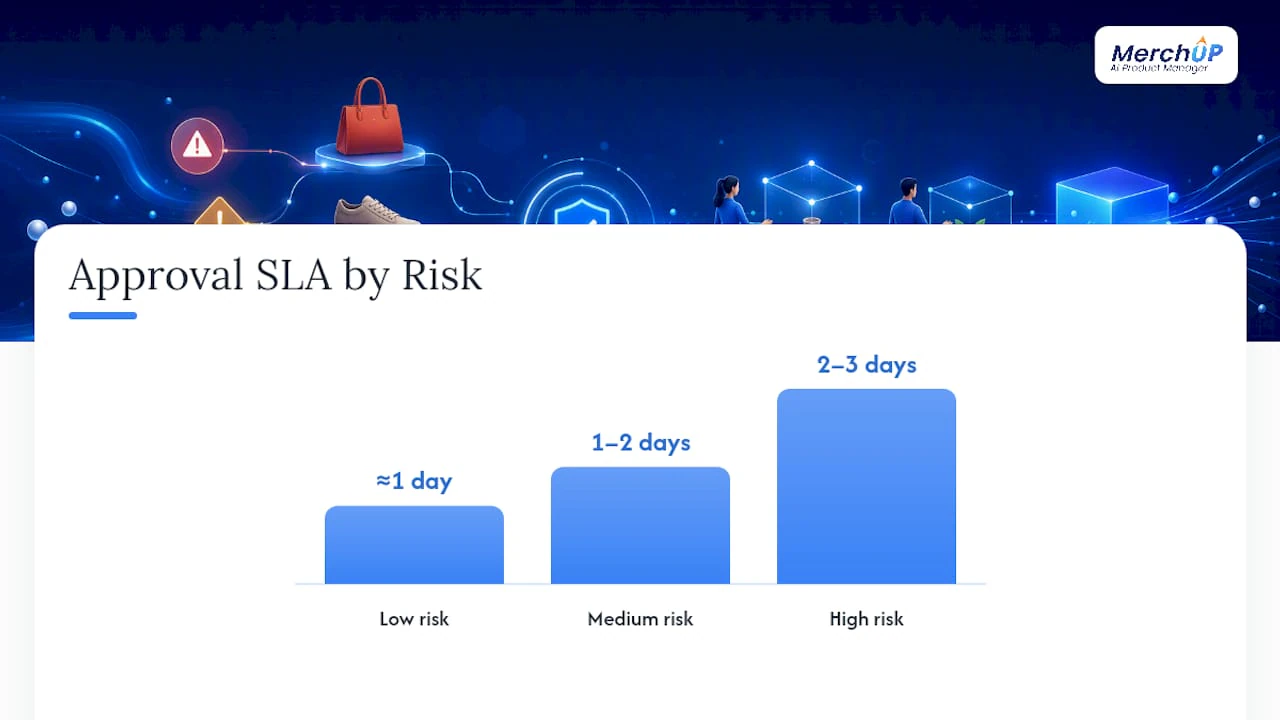
Not every product page carries the same stakes, and treating a £15 phone case description with the same rigour as a supplement label wastes everyone’s time. Sort assets into risk tiers first, then decide who needs to see them and how fast.
Low-risk items, seasonal colour variants, minor copy tweaks, can often skip specialist review entirely and move straight from creator to a single approver. Medium-risk items, new SKUs, updated specifications, benefit from parallel review so editorial and SEO check simultaneously rather than queuing one behind the other. High-risk items, health claims, regulated categories, comparative claims against competitors, need sequential legal review because a legal rejection makes SEO’s earlier sign-off pointless.
| Risk tier | Example assets | Recommended path | Suggested SLA |
|---|---|---|---|
| Low | Colour variants, minor copy edits | Creator → single approver | about one day |
| Medium | New SKU descriptions, spec updates | Parallel: editorial + SEO → approver | between one and two days |
| High | Health/regulatory claims, comparative claims | Sequential: editorial → legal → approver | two to three days |
Silence is not approval. If a reviewer misses their SLA, the item escalates automatically to the named backup rather than sitting in limbo. Build that escalation rule into the tool, not into someone’s memory.
What should your approval system actually do?
The gap between “we have a process” and “our process works” is almost always a tooling gap. A system built for product content at scale needs a specific set of capabilities, not just a shared folder with version numbers in the filenames.
At minimum, it needs versioned, in-format previews so reviewers see the listing as it will actually appear, with comments tied to the specific version they’re viewing rather than floating in a separate document. It needs configurable decision states, approved, conditionally approved, changes requested, rejected, and expired, each timestamped and tied to a named approver’s identity, so disputes six months later have an answer.
- Role-based access so reviewers see only what’s relevant to their check, cutting noise and speeding decisions, a point Flowhaven’s product-approval documentation makes explicitly.
- An audit trail that survives staff turnover and platform migrations.
- Automated reminders and escalation rules tied to your SLA windows.
- Evidence and rights fields for image licensing, claim substantiation, and compliance sign-off.
- Direct integration with your PIM, DAM, or commerce platform so approved content flows into live listings without manual re-entry.
That last point matters more than it sounds. Every manual copy-paste step between “approved” and “published” is a place where the wrong version goes live.
Which practices actually cut cycle time?
- Match the path to the risk, nothing more. A minimal workflow that covers the asset’s real risk and leaves a reliable record beats an elaborate one that adds gates nobody asked for.
- Consolidate before the creator sees anything. Route conflicting feedback through a review lead first; creators who get five sets of contradictory notes at once tend to stall rather than revise.
- Run parallel reviews from one canonical version. Parallel review only saves time when every reviewer starts from the same preview and shares one deadline, with a designated reconciler empowered to resolve contradictions before the creator hears anything.
- Lock acceptance criteria into the brief. Templates, checklists, and mandatory metadata fields cut down on vague, subjective feedback rounds. A clear product description structure baked into the brief removes half the back-and-forth before it starts.
- Change one gate at a time. Pilot adjustments on a single product category before rolling changes across the whole catalog, then measure before touching the next stage.
Pro Tip: If you only fix one thing this quarter, fix consolidation. Most bottlenecks aren’t the writing, they’re the administrative hand-off between reviewers, and a single review lead removes that hand-off almost entirely.
How do you measure whether approvals are actually working?
Published output tells you almost nothing on its own. Measure the queue instead, because stage-level metrics are where bottlenecks actually show up.
- Cycle time: total elapsed time from brief to publish.
- Queue age: how long an item has sat waiting for a specific reviewer.
- Stage wait time: time spent at each individual gate, not the process as a whole.
- First-pass approval rate: the share of items approved without a single revision round.
- Revision count: how many rounds a typical asset needs before sign-off.
- Rework after sign-off: items that needed changes after they’d already been approved, which usually signals a governance gap, not a quality one.
A quick benchmark to work from: if your first-pass approval rate sits well below half, the brief is probably underspecified rather than the reviewers being harsh. Tag every item by risk tier at intake, timestamp each decision state, and a simple dashboard built from those two data points alone will show you exactly where items are stalling within a week.
How do you start or audit a workflow this month?
Building this from scratch, or auditing what you’ve already got, comes down to six moves and a handful of fields you can copy straight into a brief template.
- Define the objective and name a single approver of record for each asset type.
- Tag every asset by risk tier before it enters the queue.
- Set SLA windows per stage and name backup approvers for each one.
- Pick or configure a tool that supports versioned previews, decision states, and an audit trail.
- Build templates covering your recurring content types.
- Pilot for 30 days on one category, measure cycle time and first-pass rate, then adjust.
Brief fields worth locking in now: audience, channel, core message, acceptance criteria, evidence and rights, deadline, and named approver.
| Element | What to capture |
|---|---|
| Objective | What the content must achieve and for whom |
| Risk tag | Low, medium, or high, set before review begins |
| SLA | Time window per stage, with named backup |
| Tooling | Versioned previews, decision states, audit trail |
| Pilot | 30 days, one category, measured before scaling |
What breaks approval workflows in practice, and how to fix it
The stall almost never comes from the writing. It comes from a final approver who goes quiet for four days because nobody built an escalation path, or from a legal reviewer who was given veto rights over tone when they should only have vetoed factual claims. Over-broad authority is the quieter killer: give someone approval rights over everything and they’ll use it on everything, including things well outside their actual expertise.
AI drafting tools have changed the maths here, but not the principle. A draft generated in seconds still needs the same acceptance criteria, the same named approver, and the same audit trail as one written by hand. Treat AI output as a fast first draft that enters the workflow at the creator stage, never as a shortcut that skips review. The workflow doesn’t get simpler because the drafting got faster. It just means your bottleneck moves from writing to reviewing, and that’s where the fixes above actually pay off.
— Jamie Moss
Where MerchUp fits into this workflow
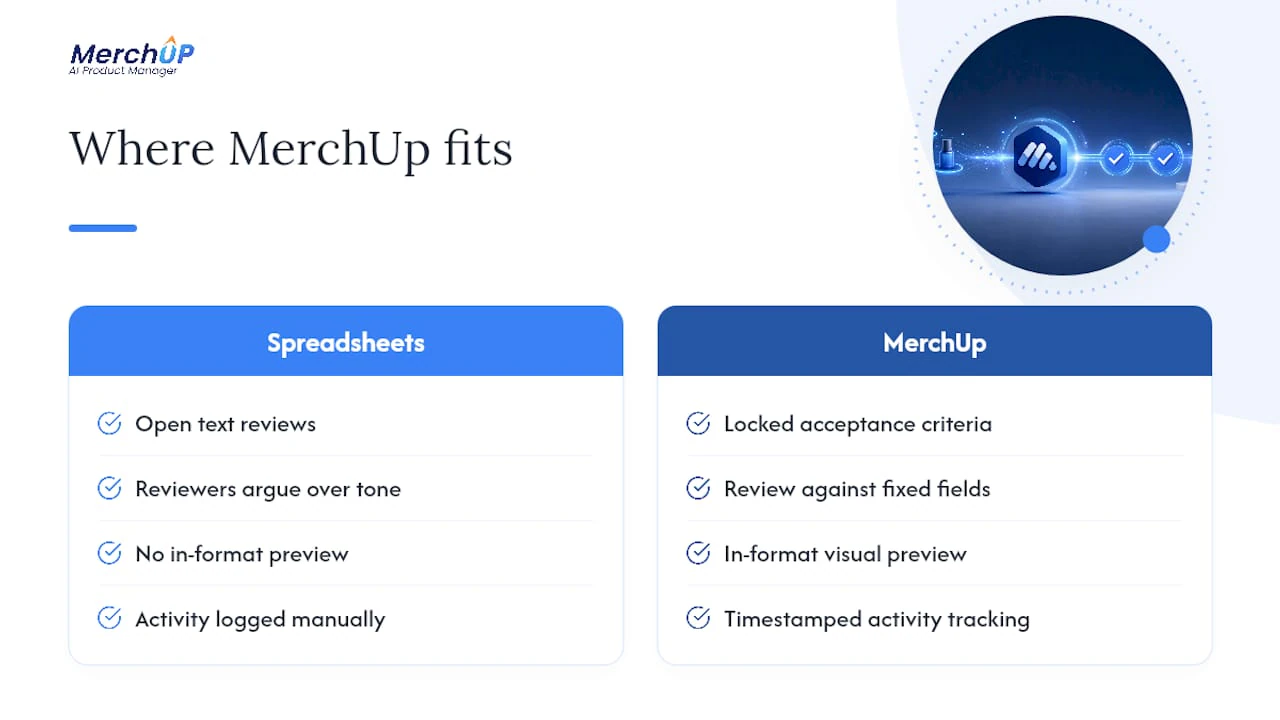
Most of what this guide describes as “must-have” tooling maps directly onto what MerchUp already does for Shopify sellers. Bulk-generating product descriptions is only half the job. Getting them approved and live without losing the audit trail is the other half. That’s the part most teams still run on spreadsheets.

MerchUp’s customisable templates give you the locked acceptance criteria this article argues for, so reviewers check against fixed fields instead of arguing over tone. The visual editor gives approvers an in-format preview rather than a raw text file, and activity tracking gives you the timestamped record you need when a decision gets questioned months later. Because publishing connects directly into Shopify, an approved description goes live without a manual re-entry step, which is exactly where the wrong version tends to slip through in manual processes.
If you’re auditing your own workflow this month, a catalog refresh or a bulk rewrite of underperforming listings is the natural place to pilot it. Run the MerchUp tutorial against one product category, measure your first-pass approval rate before and after, and decide from there.
Sources
For teams building or refining their own process, a few sources are worth bookmarking. The five-stage approval model and free tracker gives a downloadable template for the exact stages covered above. MediaValet’s breakdown of the approval process covers roles and approval criteria in more depth. For SLA design and escalation rules specifically, Spark’s guide to protecting quality is the sharpest practitioner take available. Teams scaling content production more broadly should also look at content marketing automation approaches for how reminders and routing rules apply beyond product pages alone.
- Content Approval Process: Definition, Workflow, Best Practices
- Content approval workflow: 5 stages and free tracker
- Designing a Content Approval Workflow That Protects Quality
- Product Approvals - Flowhaven


Comments
No comments yet — be the first to share what you think.