


Implement a single, server-rendered Product JSON-LD block on every product page. That one step is the fastest route to AI discoverability in 2026. The block must include name, image, offers (with price, priceCurrency as GBP, availability, and url), plus sku or gtin, brand, shippingDetails, hasMerchantReturnPolicy, and priceValidUntil. Add aggregateRating when you have real review data.
Two quick checks to confirm it is working:
-
View-source check: open the product page source and search for
"@type": "Product". You should find exactly one block. -
Rich Results Test: paste the URL into Google’s Rich Results Test and confirm a valid Product result with no critical errors.
Pages with complete, compliant markup are cited 3.1× more frequently in AI search results such as Google AI Overviews and Perplexity compared to pages without it.
What does Google actually require in product schema markup?
Google’s documented minimum for a product snippet is name plus at least one of offers, review, or aggregateRating. In practice, offers is the field that drives commercial value, so treat it as mandatory.

Core fields and their correct formats
| Field | Required? | Format note |
|---|---|---|
name |
Yes | Plain text product name |
image |
Yes | Absolute URL; array of URLs preferred |
offers.price |
Yes | String, e.g. "159.99" — not a number |
offers.priceCurrency |
Yes | Currency code: "GBP" for UK |
offers.availability |
Recommended | Full URI: https://schema.org/InStock |
offers.url |
Recommended | Absolute URL to the product page |
sku or gtin |
Merchant listing | Text; GTIN must be 12 or 13 digits |
brand |
Merchant listing | Nested Brand object with name |
priceValidUntil |
Effectively required 2026 | Date string: "2026-12-31" |
shippingDetails |
Effectively required 2026 | Nested OfferShippingDetails |
hasMerchantReturnPolicy |
Effectively required 2026 | Nested MerchantReturnPolicy |
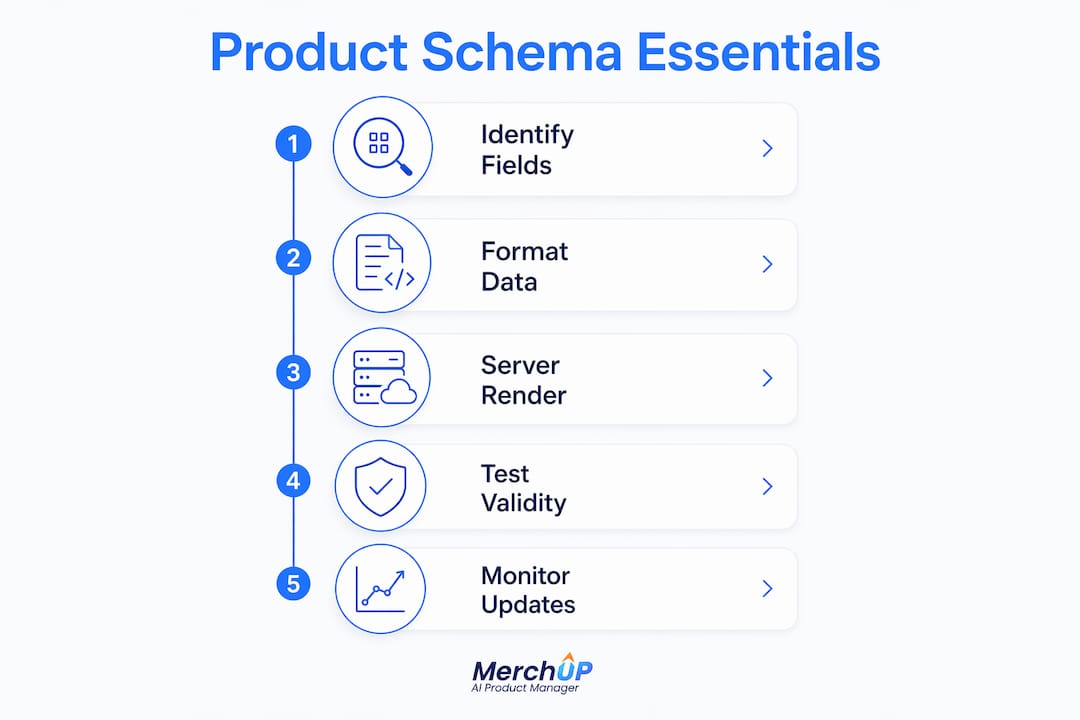
Three fields shifted from recommended to effectively required in 2026: offers.shippingDetails, offers.hasMerchantReturnPolicy, and offers.priceValidUntil. Retail query win rates dropped sharply without them. One common format mistake worth flagging: price values must be rendered as strings in JSON-LD ("159.99", not 159.99). Numeric casting can break Google’s parser silently, causing the offer to be ignored without any visible error.
Availability values must use the full schema.org URI. Writing "InStock" as plain text is technically supported but https://schema.org/InStock is safer and unambiguous. For products sold by multiple sellers or across a price range, use AggregateOffer with lowPrice, highPrice, and offerCount rather than a single Offer.
Why product schema matters for AI discoverability in 2026
Only 12% of Shopify merchants have implemented comprehensive Product schema. That low adoption rate is an opportunity: complete structured data for products puts you ahead of the vast majority of competitors before a single ad is spent.
AI agents — ChatGPT Shopping, Gemini, Perplexity — now treat Product schema as a primary trust layer. Many read JSON-LD before they parse visible HTML. A product without rich machine-readable attributes is frequently excluded from AI recommendations entirely, regardless of how good the page copy is.
The commercial outcomes for merchants who get this right:
-
Higher visibility in AI Overview answers for product and category queries
-
Shopping annotations (price, availability, ratings) displayed directly in search results
-
Eligibility for price-drop enhancements and merchant listing features in Google Shopping
-
Likely CTR and conversion uplifts from richer, more informative search listings
A UK-ready JSON-LD template you can copy and adapt
Below is a complete Product JSON-LD scaffold for a UK merchant. Swap the placeholder values for your own data before deploying.
{
  "@context": "https://schema.org",
  "@type": "Product",
  "@id": "https://yourstore.co.uk/products/your-product-slug",
  "name": "Your Product Name",
  "image": [
    "https://yourstore.co.uk/images/product-front.jpg",
    "https://yourstore.co.uk/images/product-side.jpg"
  ],
  "description": "A clear, accurate description matching the visible page copy.",
  "sku": "YOUR-SKU-001",
  "gtin13": "5901234123457",
  "brand": {
    "@type": "Brand",
    "name": "Your Brand Name"
  },
  "offers": {
    "@type": "Offer",
    "url": "https://yourstore.co.uk/products/your-product-slug",
    "price": "49.99",
    "priceCurrency": "GBP",
    "priceValidUntil": "2026-12-31",
    "availability": "https://schema.org/InStock",
    "itemCondition": "https://schema.org/NewCondition",
    "shippingDetails": {
      "@type": "OfferShippingDetails",
      "shippingRate": {
        "@type": "MonetaryAmount",
        "value": "3.99",
        "currency": "GBP"
      },
      "deliveryTime": {
        "@type": "ShippingDeliveryTime",
        "handlingTime": { "@type": "QuantitativeValue", "minValue": 0, "maxValue": 1 },
        "transitTime": { "@type": "QuantitativeValue", "minValue": 2, "maxValue": 5 }
      }
    },
    "hasMerchantReturnPolicy": {
      "@type": "MerchantReturnPolicy",
      "applicableCountry": "GB",
      "returnPolicyCategory": "https://schema.org/MerchantReturnFiniteReturnWindow",
      "merchantReturnDays": 30,
      "returnMethod": "https://schema.org/ReturnByMail",
      "returnFees": "https://schema.org/FreeReturn"
    }
  },
  "aggregateRating": {
    "@type": "AggregateRating",
    "ratingValue": "4.7",
    "reviewCount": "134",
    "bestRating": "5",
    "worstRating": "1"
  }
}
On Shopify, place this block in sections/main-product.liquid (or product-template.liquid) and replace static values with Liquid variables: {{ product.title }}, {{ variant.price | money_without_currency }}, {{ product.url | prepend: shop.url }}. The @id should reference the canonical URL. Do not add a second top-level Product block that duplicates what the theme already outputs.
The block must be server-rendered. Google and many AI crawlers do not execute JavaScript, so schema injected via JS after page load may never be read.
Pro Tip: Run view-source: on the deployed page and search for "@type": "Product". If you see two matches, you have a duplicate block. Consolidate using the @id pattern to reference the canonical URL — this dedupes the theme-emitted block and your complementary one without breaking validation.
How to automate and scale product schema for large catalogues
For catalogues above a few hundred SKUs, manual JSON-LD editing is not viable. The practical answer is a belt-and-suspenders approach: server-rendered JSON-LD on every product page, backed by a live Google Merchant Center feed that gives Google a stable fallback for price and availability when page data is missing or temporarily invalid.
Shopify implementation pattern:
-
Use a single complementary Product block in the product template; reference theme variables so the block updates automatically when product data changes.
-
For products with variants, output a per-variant
Offerarray or useAggregateOfferwithlowPriceandhighPricewhen the variant count is large. -
Store GTIN and MPN values in Shopify metafields and pull them into the JSON-LD block via Liquid. This keeps identifiers consistent between the page schema and the Merchant Center feed.
Most default Shopify themes output only name, description, image, and basic offers. They routinely omit hasMerchantReturnPolicy, shippingDetails, and priceValidUntil. A lightweight complementary block in the product template resolves those gaps without replacing the theme’s output.
AI content tools fit naturally into this pipeline. Platforms like MerchUp can batch-generate product descriptions and populate structured-field values — short descriptions, bullet features, brand copy — across hundreds of SKUs simultaneously. Those outputs map directly into Shopify metafields or a CSV feed, which then feeds the JSON-LD template and the Merchant Center upload in one workflow.
Pro Tip: Before a wide rollout, deploy the complementary block to 50 representative SKUs across your best-selling variants. Validate each with the Rich Results Test, check the Merchant Center diagnostics for mismatches, then roll out in waves of 200–500 SKUs.
Best practices and common mistakes in product schema
Do:
-
Use a single consolidated Product JSON-LD per page, referenced by
@id. -
Keep identifiers (
sku,gtin,mpn) identical across the page schema and the Merchant Center feed. -
Render all schema server-side; never rely on JavaScript injection.
-
Set a realistic
priceValidUntildate and update it before it expires. -
Use full schema.org URIs for
availabilityanditemCondition.
Avoid:
-
Duplicate Product blocks from theme plus app injection. Consolidate into one using
@id. -
Price mismatches between the visible page and the JSON-LD. Google will flag this and can suppress rich results site-wide.
-
Including
aggregateRatingwithreviewCount: 0. Wait until you have real data. -
Omitting
shippingDetailsorhasMerchantReturnPolicyon retail pages.
| Error | Symptom | Fast fix |
|---|---|---|
| Duplicate Product blocks | Random or no rich result shown | Consolidate via @id; audit with view-source |
| Price mismatch (page vs schema) | Manual action, rich results suppressed | Sync JSON-LD price with visible page price |
Missing shippingDetails |
No shipping annotation in results | Add nested OfferShippingDetails to offers |
priceValidUntil in the past |
Product snippet stops displaying | Update to a future date string |
| JS-only schema | AI agents cannot read markup | Move block to server-rendered template |
| Malformed GTIN | Merchant Center identifier error | Validate digit count and check digit |
How to validate, test, and monitor product schema over time
Tools to use:
-
Google Rich Results Test — confirms eligibility and surfaces field-level warnings before you go live.
-
Schema.org Validator (
validator.schema.org) — checks structural correctness independently of Google’s interpretation. -
Google Search Console Enhancements report — shows aggregate errors and warnings across the whole site over time.
-
Google Merchant Center diagnostics — flags price/availability mismatches between the feed and the page.
-
View-source spot checks — the fastest way to confirm server rendering and catch duplicate blocks.
Monitoring routine:
-
Daily: check Merchant Center feed health; review any new item disapprovals.
-
Weekly: run the Rich Results Test on 5–10 randomly selected product pages; check Search Console for new enhancement errors.
-
Monthly: run a full-catalogue validation pass; compare feed identifiers against page schema identifiers for consistency.
When Merchant Center flags a price mismatch, fix the page schema first if the page is the source of truth, or update the feed if the feed holds the correct price. The two must agree. A mismatch that persists beyond a crawl cycle can cause item disapprovals that remove products from Shopping entirely.
Implementation checklist and realistic timeline for a UK ecommerce store
Stage 1 — Audit (1–2 days for any catalogue size)
-
Run view-source on 10 product pages; note which fields are present and which are missing.
-
Check for duplicate Product blocks (theme + app).
-
Export a sample of 50 SKUs and verify GTIN/MPN values are populated and correct.
Stage 2 — Quick fixes (1 day, no-code)
-
Remove or consolidate duplicate blocks using
@id. -
Update any expired
priceValidUntildates. -
Fix availability URI format if plain text is in use.
Stage 3 — Template deployment
-
Small catalogue (1–500 SKUs): 1–2 developer days to add a complementary Liquid block; validate the pilot 50 SKUs before full deploy.
-
Medium catalogue (500–5,000 SKUs): 3–5 developer days; use metafields for GTIN/MPN; consider a Shopify SEO app to manage field population.
-
Large catalogue (5,000+ SKUs): 1–2 weeks; bulk metafield population via CSV or API; AI content tooling for description and field generation at scale.
Stage 4 — Feed sync and monitoring
-
Connect or update the Google Merchant Center feed to match page identifiers.
-
Set up weekly Search Console and Merchant Center alerts.
Cost drivers: developer hours (£400–£800/day typical UK rate), app licensing if using a schema or feed app, and catalogue cleansing time for missing GTINs.
The part most guides skip
The conventional advice is to implement schema and wait for results. What that advice misses is that schema quality degrades over time. Prices change, stock levels shift, return policies get updated, and priceValidUntil dates expire quietly. A product page that passed validation in January can be suppressed from rich results by March with no obvious warning.
The merchants who maintain a consistent advantage are not the ones who implemented schema once. They are the ones who built a monitoring routine into their weekly workflow: a handful of random Rich Results Test checks, a Merchant Center diagnostic review, and a standing task to refresh priceValidUntil dates before they lapse.
There is also a real trade-off when automating schema at scale. Speed matters, but a bulk deployment with incorrect GTINs or mismatched prices can trigger Merchant Center disapprovals across hundreds of SKUs simultaneously. The pilot approach — 50 representative SKUs, validate, then roll out in waves — is not caution for its own sake. It is the fastest way to catch a systematic error before it affects the whole catalogue. Always have a rollback plan: keep the previous template version in version control so you can revert within minutes if something goes wrong.
MerchUp can cut your schema rollout time significantly
Populating structured-field values across hundreds or thousands of SKUs is where most schema projects stall. Writing accurate descriptions, bullet features, and brand copy at scale is time-consuming, and that content feeds directly into your JSON-LD description field, your Shopify metafields, and your Merchant Center feed.
MerchUp generates, edits, and bulk-publishes SEO-optimised product descriptions across your entire catalogue, then maps those outputs to Shopify metafields ready for your complementary JSON-LD block. The workflow is straightforward: export your catalogue, run a batch generation in MerchUp, review the outputs, map them to the relevant metafields, and deploy the updated schema and feed in waves. One caveat worth stating plainly: always verify field-level accuracy and GTIN values before publishing. AI-generated content is fast, but GTINs must be checked against your supplier data — no tool should be trusted to invent those.
Start your free trial at MerchUp and see how quickly a structured rollout becomes manageable.
Product schema for sales and Black Friday pricing
Sale periods are where product schema earns its keep — and where most of it quietly breaks. When a discount goes live, update the offer’s price and set priceValidUntil to the date the sale actually ends: an expired or missing priceValidUntil is the most common reason Google shows a stale price or drops the price snippet entirely during Black Friday. Google reads the structured price, not the crossed-out text next to it, so the sale price always belongs in offers.price.
Timing matters as much as the markup. Search engines have to recrawl the page before a new price shows in results, so ping updated URLs through IndexNow or refresh your Merchant Center feed the moment prices switch, and spot-check a handful of pages in the Rich Results Test once the sale is live. When the sale ends, reverse the process the same day — leaving sale markup on full-price pages is a fast route to a price-mismatch warning.
Frequently asked questions
How do I get my products to appear in AI shopping results?
AI shopping surfaces assemble answers from structured data first and prose second. The foundations are complete Product JSON-LD on every page (name, image, description, brand and offers with price and availability), a Merchant Center feed that agrees with the page markup, and identifiers such as gtin or mpn so the AI can match your item to the product being asked about. Once those agree, the validation and automation sections above cover the rest.
How do I test and fix product schema markup?
Run the page through Google’s Rich Results Test, then check Search Console’s Merchant listings report for the site-wide view. Fix in this order: missing required fields first, then price or availability mismatches between page and feed, then warnings. Re-test the same URLs after each deploy rather than fresh ones, so you are comparing like for like.
Which schema properties matter for AI product comparisons?
Comparisons are attribute-driven, so the differentiating properties matter most: gtin or mpn for identity, aggregateRating and review for quality signals, and concrete attributes such as material, size, colour and countryOfOrigin. A product carrying only the required fields can still appear in results, but it gives an AI nothing to compare on.
Do I need schema on every product page or just bestsellers?
Every page. Coverage is judged at catalogue level, and AI answers routinely surface long-tail products rather than bestsellers. This is exactly where automation earns its place — hand-maintaining markup on a few hero products leaves the rest of the catalogue invisible.
Useful sources and further reading
-
Schema.org/Product — the canonical type definition; use this as your spec reference for every property and its expected type.
-
Google Search Central: Product structured data — Google’s own requirements for product snippets, offer fields, and AggregateOffer; the authoritative source for what triggers rich results.
-
Google Merchant Center: Supported structured data attributes — maps schema.org properties to Merchant Center feed attributes; essential for keeping page markup and feed in sync.
-
Shopify Product Schema: Fields, Gaps, and Rich Results — practical guide to what Shopify themes output by default and how to extend with a complementary block.
-
Product Schema for AI Search: Shopify JSON-LD Implementation Guide — covers the 2026 AI discoverability angle, duplicate-block risks, and server-rendering requirements.


Comments
No comments yet — be the first to share what you think.