


An ecommerce content workflow is a repeatable pipeline that turns verified product facts into publishable product content with minimal manual rework. Done properly, it means consistent, SEO-ready descriptions across a catalogue of ten items or ten thousand, built on tools like MerchUp for drafting, JSON-LD for machine-readable facts, and Shopify for publishing. Get the pipeline right and content stops being a bottleneck.
TL;DR:
- Confirm source data completeness and flag any missing attributes before starting content enrichment to avoid rework later.
- Use confidence scoring and criticality levels to route reviews efficiently and reduce reviewer workload.
- Attach structured data, including JSON-LD and structured_description, during publishing to ensure compliance with Google Merchant Center and SEO best practices.
- Lock product facts and define clear templates to maintain consistency and quality across large catalogs.
- Store every draft and version with source references to enable quick rollback and transparent audit trails for compliance and customer disputes.
What are the core stages of an ecommerce content workflow?
Every workable ecommerce content workflow breaks into six stages, and skipping one is usually where teams start bleeding hours into rework. Each stage has one job, and mixing them is how a “quick fix” becomes a two-week backlog.
Ingest. Pull raw product data from your source of truth, typically a PIM or supplier feed, and confirm every required attribute is present before anything else happens.
Enrich. Add the details raw data never contains: benefit language, use-case context, sizing notes, and category-specific attributes buyers actually search for.
Draft. Generate the actual copy, whether by hand or with an AI-assisted tool, against a template that locks in approved facts and leaves style flexible.
Review. Route drafts through human checkers, weighted by risk. A £15 phone case needs less scrutiny than a medical device description.
Publish. Push finished content to the storefront and any syndicated channels, with structured data attached at the same time, not bolted on afterwards.
Monitor. Track how the published page performs and feed that signal back into the enrichment stage.
Structured data deserves its own mention here because it’s where most teams lose marks they didn’t need to. Google’s own guidance on structured product descriptions requires that AI-generated copy submitted to Merchant Center use the structured_description attribute, with digital_source_type set to trained_algorithmic_media where it applies. Miss that labelling and your feed can get flagged or your listings suppressed, which defeats the entire point of automating the draft stage.
A workable checklist to paste into a project brief:
- Confirm source data completeness (SKU, attributes, images, compliance flags).
- Enrich with benefit copy and category-specific detail.
- Draft against a locked template.
- Attach JSON-LD Product schema and structured_description fields.
- Route through risk-weighted human review.
- Publish to storefront and syndicated feeds simultaneously.
- Monitor rankings, click-through, and conversion; feed learnings back into enrichment.
Who owns each step and how does review get routed?
Governance breaks down fast when everyone assumes someone else is checking the facts. Four roles cover most catalogues:
- Content owner sets the brief, approves tone and template, and signs off on the final published version.
- Data steward guards the source-of-truth attributes and flags when raw data is incomplete or contradictory.
- Reviewer checks drafts against facts and brand rules, and either approves, edits, or rejects with a reason.
- Publisher pushes approved content live and confirms it renders correctly across channels.
The trick to keeping review queues manageable is exception routing rather than full manual checking of every SKU. Best practice, according to Claro’s guide to human-in-the-loop product data review, is to combine a confidence score from the drafting tool with field criticality. That single rule change often halves reviewer workload without touching quality.
Every decision needs a record. An audit trail showing who approved what, when, and against which source data isn’t bureaucracy, it’s what makes a rejected claim traceable six months later when a customer disputes it.
Pro Tip: Structure your reject reasons as a short, fixed list rather than free text. Recurring rejects become training data you can promote into hard rules, which is exactly what shrinks the review queue over time.
Which tools and integrations does the workflow actually need?
Map each stage to a tool category and the whole pipeline gets easier to reason about. A Product Information Management (PIM) system holds source-of-truth attributes. A Digital Asset Management (DAM) system holds imagery and video. A content orchestration layer, whether that’s MerchUp or a workflow engine, handles drafting, templating, and review routing. A CMS or storefront platform, most often Shopify for the merchants reading this, handles publishing.
The integration requirements matter more than the category labels:
- Webhooks that fire when source data changes, so stale descriptions don’t sit live for weeks.
- A canonical URL structure that survives catalogue reshuffles without breaking inbound links.
- Product feed mapping that keeps Google Merchant Center and any marketplace feeds in sync with the storefront.
- Version-aware APIs so a rollback on one channel doesn’t silently desync another.
Faceted navigation is worth flagging separately because it quietly wrecks crawl budgets. The product-page SEO playbook from Digital Applied recommends checking what share of Googlebot’s crawl hits parameter pages; above 40% signals a genuine problem worth engineering around. The same playbook argues for sequencing fixes by leverage: ship complete structured data and unique copy first, then spend engineering time on Core Web Vitals and facet cleanup. Chasing page speed before your product schema is clean is solving the wrong problem first.
Where should AI actually sit in the workflow, and what guardrails does it need?
Generative AI is genuinely good at some tasks in this pipeline and genuinely risky at others, and the difference matters more than most teams treat it.
Safe uses: extracting attributes from supplier documents, drafting copy against a fixed template, and generating style variations of an already-approved fact set. Risky uses: inventing specifications the source data doesn’t contain, or generating claims about certifications, materials, or health effects with no verified source behind them.
The operational fix is fact-locking: build an approved fact set for each product and let the model only transform those facts into prose, never invent new ones. Pair that with a short set of SOPs:
- A fact-lock list of attributes the model may never alter.
- Source provenance attached to every generated claim, visible to the reviewer.
- A do-not-generate list (medical claims, comparative superlatives, unverifiable origin claims).
- Approval states of PASS, REPAIR, or BLOCK attached to every draft before it reaches a human.
This isn’t theoretical. Research on instruction-tuned LLMs combined with feature discovery (ISEE) found the approach detected product-content issues at 90% precision and 78% recall across 20 categories and 150 product-specific features, in a system built for both production and self-service SOP tuning.
Statistic in context: a recall rate below perfect means some real issues still slip past automated detection, which is why human review remains necessary, which is precisely why human review stays in the loop rather than being replaced by it. Track approve/edit rates and false-claim incidents weekly; a spike in either is your trigger to tighten the fact-lock list or route more fields to manual review.
How do you measure whether the workflow is actually working?
A handful of metrics tell you more than a dashboard full of vanity numbers. Track them weekly, not monthly, or you’ll miss the week something broke.
- Time-to-first-draft: how long from source data landing to a reviewable draft existing.
- Median approval time: how long a draft sits in the review queue before going live.
- Reject-rate by field: which attributes reviewers correct most often, which tells you where your templates or source data are weak.
- SEO visibility: organic impressions and click-through on published product pages, tracked against publish date.
Collect this through audit logs (who touched what, when), UTM tagging on published assets, and structured review outcomes rather than free-text notes. Cutting approval time usually comes down to three levers: tighter templates, focused review queues sorted by risk rather than by date, and pre-validated facts that reduce what reviewers need to check in the first place. Teams using approaches like cutting Shopify approval times to one or two days tend to get there through queue design, not through hiring more reviewers.
What does the evidence say about human-in-the-loop workflows?
The pattern holding up across both academic and vendor research is consistent: exception-first review beats full manual checking. The ISEE study shows automated detection can hit strong precision without demanding a human look at every record, and Claro’s product-data review guide argues routing by confidence and field criticality is what keeps queues clearable at scale.
A safe pilot recipe:
- Pick one stable product category, not your most complex one.
- Require full provenance on every generated claim.
- Set conservative release states (default to REPAIR, not PASS) for the first two weeks.
- Capture every human correction as structured data, then widen auto-accept thresholds only once correction rates drop.
How do you handle version control and rollbacks?
Every published product description needs a version history, not just a live copy. Without one, a bad edit, a wrong price claim, or a compliance issue discovered after publish means guesswork about what the page said last week and who changed it.
The practical setup: store every draft state (ingested, enriched, drafted, reviewed, published) as a separate version, not an overwrite. Tag each version with the reviewer, timestamp, and source data snapshot it was approved against. When source data changes upstream, and it will, that’s a trigger to re-review the dependent content rather than assume it’s still accurate.
Rollback needs to be a one-click operation, not a support ticket. If a syndicated feed picks up a bad description before a human catches it, you need to revert the storefront version and the feed version together, or you end up with two different claims about the same product live in two different places. That desync is more common than most teams admit, particularly when Google Merchant Center caches a feed pull ahead of a storefront fix.

Keep a retention window (many teams settle on 90 days) long enough to cover a compliance review or a customer dispute, but short enough that storage doesn’t become its own problem. And treat rollback drills the way you’d treat a backup restore test: run one occasionally on a low-risk product, before you actually need it under pressure.
How should cross-functional teams collaborate on content?
Content workflows fail less often because of bad copy and more often because marketing, catalogue, legal, and engineering are working from different versions of the truth. The fix is fewer meetings and clearer handoffs, not more Slack channels.
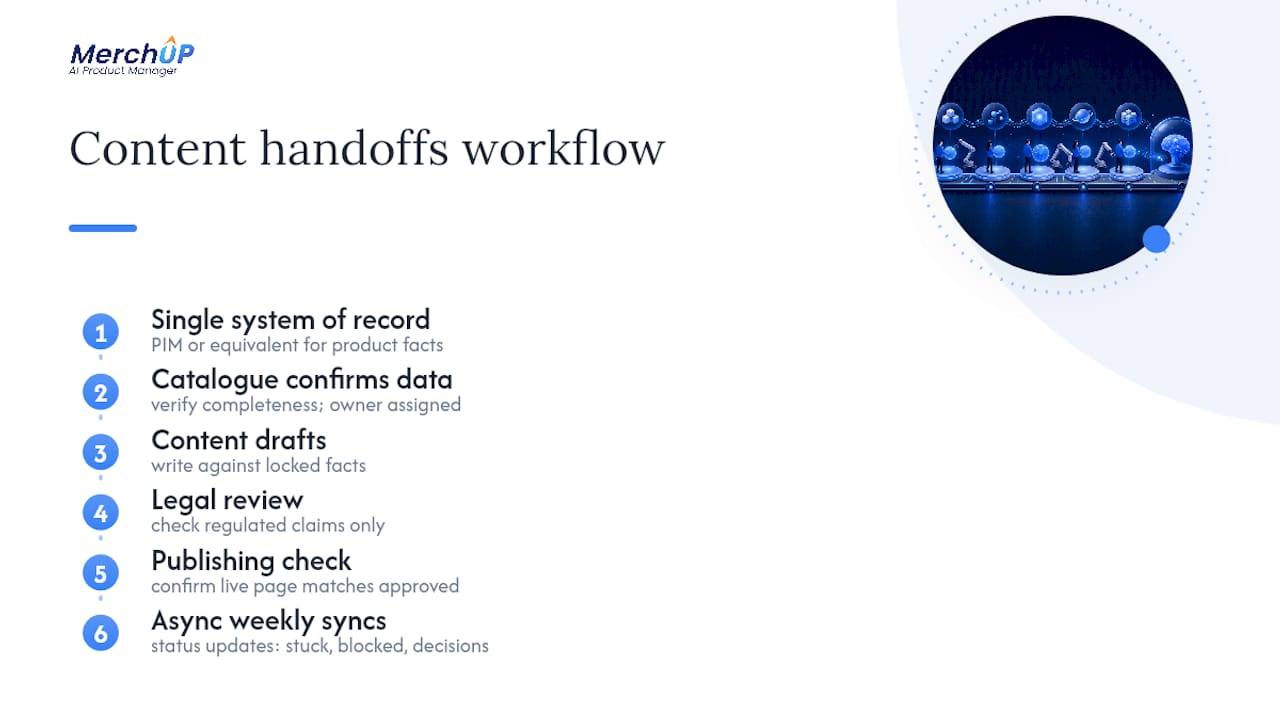
Set a single system of record for product facts, the PIM or equivalent, and make every team point to it rather than maintaining shadow spreadsheets. Marketing shouldn’t be enriching a description from a spec sheet that catalogue management updated an hour ago without telling anyone.
Define handoff points explicitly: catalogue confirms data completeness, content drafts against locked facts, legal reviews anything touching regulated claims, and publishing confirms the live page matches the approved version. Each handoff should have an owner and a maximum turnaround time, published somewhere everyone can see it, not buried in a wiki nobody opens.
Weekly syncs work better as async status updates (what’s stuck, what’s blocked, what needs a decision) than as standing meetings that eat an hour to cover five minutes of actual news. Reserve live discussion for genuine disagreements, like a legal team blocking a claim marketing wants to keep.
The Shopify enterprise team frames product content as part of a full-funnel content strategy, spanning awareness content through to post-purchase messaging. That’s a useful discipline: it stops product-page copy being treated as an isolated task disconnected from campaign timing, and gets marketing and catalogue teams planning against the same calendar.
How do you manage multi-language and localisation workflows?
Translating a product description is the easy part. The harder problem is keeping every language version tied to the same source facts, so a price correction or a compliance change in English doesn’t leave four other markets running stale claims.
Structure localisation as a fan-out from one verified fact set, not as independent drafts per market. Each language version should trace back to the same enriched attributes, with only the tone and idiom varying by locale, not the underlying claims about materials, dimensions, or compliance status.
Build a localisation review step into the pipeline rather than treating translation as a bolt-on after publish. A native reviewer per market catches more than a translation memory tool alone, particularly for category-specific terminology (sizing conventions, unit systems, regulatory phrasing) that differs by country even when the product is identical.
Watch canonical URL and hreflang handling closely. A common failure mode is publishing a localised description under a URL structure that doesn’t map cleanly to hreflang tags, which quietly splits SEO value across duplicate-looking pages instead of consolidating it. When source data changes, trigger a re-review flag on every localised version tied to that SKU, not just the master version, or you’ll ship a correction in one market and miss it in three others.
How do you keep quality consistent across thousands of listings?
Consistency at scale comes from constraint, not from hiring more proofreaders. The single highest-leverage move is a locked template: define which fields are mandatory, which facts can never be altered by a drafting tool, and which stylistic elements (tone, sentence length, calls to action) can flex.
Layer automated checks before human review, not instead of it: a validation pass that flags missing required fields, banned words, or facts that contradict the source PIM record. This is where the do-not-generate list from the AI guardrails stage earns its keep, catching a fabricated claim before a reviewer even opens the draft.
Sample-based auditing works better than trying to check everything. Pull a random 5% of published listings each week and score them against your quality rubric (accuracy, tone, SEO completeness). A drop in that score is an early warning that something upstream, a template change, a new supplier feed format, has degraded quality before it shows up in customer complaints or return rates.
Genuine FAQs paired with Product schema markup do double duty here: they improve AI citability and eligibility for People Also Ask, and writing them forces a useful discipline, stating facts plainly enough to answer a real customer question, which tends to expose vague or unverified claims elsewhere on the page.
How do you scale the workflow across a large catalogue?
What works for 200 SKUs breaks at 20,000, usually at the review stage first. The fix isn’t more reviewers; it’s narrowing what actually needs a human look.
Segment your catalogue by risk and value before you segment it by category. A £2,000 appliance with safety claims needs full review every time. A £12 accessory with no regulated claims can run on a much lighter touch once your fact-lock and validation checks are proven reliable on that product type.
Batch by template family rather than by arrival order. Reviewing fifty variations of the same shirt template back to back is faster and more accurate than reviewing fifty unrelated products, because the reviewer’s eye stays calibrated to one set of rules instead of resetting for every SKU.
Push auto-accept thresholds up gradually as correction rates on a given category drop, using the same confidence-and-criticality routing logic from the governance stage. This is where the gap between a manual process and one built on a platform like MerchUp’s bulk publishing tools becomes obvious. Templates that hold their structure across ten thousand listings are what make batch review possible at all; without them, every SKU is effectively a one-off.
What compliance and legal checks belong in the workflow?
Product content carries legal exposure that a lot of teams don’t price in until something goes wrong. Comparative claims, health or safety statements, country-of-origin labelling, and regulated-category disclosures (electronics, cosmetics, supplements) all need a check that sits before publish, not after a complaint arrives.
Build a do-not-generate list specifically for regulated language, distinct from the general brand-tone list, and route anything that touches it to a named legal or compliance reviewer rather than a general content reviewer. That’s a different skill set and a different risk tolerance.
Keep evidence of compliance decisions in the same audit trail as content approvals; if a regulator or a customer disputes a claim eighteen months later, “we reviewed this and here’s who signed off, against which source” is a very different position from having no record at all.
Structured data has its own compliance angle too: Google’s guidance on the structured_description attribute isn’t optional labelling, it’s a feed requirement, and getting it wrong can mean suppressed listings rather than a warning email. Build that check into the publish stage, not as a manual afterthought someone remembers occasionally.
Author perspective: practical priorities and common pitfalls
Most workflow failures don’t come from bad AI output. They come from teams skipping provenance, letting a draft go live with no traceable source behind its claims, and only discovering the gap when a customer disputes something.
The highest-leverage fixes are unglamorous: lock your facts before drafting, build templates that hold at scale, and measure approval time from week one rather than guessing at it later.
— Jamie Moss
MerchUp: how it fits into the workflow
MerchUp is built to run the drafting, templating, and bulk-publishing stages of this exact pipeline, not to replace the governance around it. The visual editor and customisable templates handle the draft stage directly, activity tracking gives you the audit trail the review stage needs, and live Shopify integration means enriched, reviewed content publishes straight to your storefront without a manual export step.

For catalogues running into the thousands, that structure is what turns a review bottleneck into a manageable queue. MerchUp offers several subscription plans suitable for different operation sizes, all detailed on the MerchUp pricing page. If you want to see the drafting and bulk-publish flow before committing, the 30 second product description tutorial walks through it live. Start there, pick the plan that matches your catalogue size, and connect your Shopify store to see how much of this pipeline you can hand off this week.
Sources
- Ecommerce product-page SEO 2026 optimisation playbook
- Google Merchant Center: guidelines for descriptions and structured_description
- Human in the loop product data review guide — Claro
FAQ
What is an ecommerce content workflow?
It’s a repeatable pipeline, ingest, enrich, draft, review, publish, monitor, that turns verified product facts into publishable content with minimal rework. Tools like MerchUp handle the drafting and publishing stages, while governance rules keep the facts accurate.
How does AI fit into an ecommerce content workflow safely?
AI works best for attribute extraction, drafting against locked templates, and generating style variations from an approved fact set. It shouldn’t be trusted to invent specifications or regulated claims without a verified source, which is why fact-locking and human review stay part of the process, as ISEE’s research on automated issue detection demonstrates achieving high precision and recall rates.
What does MerchUp cost?
MerchUp runs four plans: Starter at £12.99 a month, Growth at £29.99, Pro at £69.99, and Scale at £149.99, each with different template and AI-credit allowances, listed on the MerchUp pricing page.
How long should content approval take?
Median approval time varies by catalogue, but teams that route review by confidence and field criticality, rather than checking every SKU manually, consistently cut approval time, with some Shopify merchants getting drafts reviewed within one to two days. Templates and pre-validated facts are the biggest levers for speeding it up.
Why does structured data matter in a content workflow?
Structured data, including JSON-LD Product schema and the structured_description attribute, makes listings machine-readable for search engines and shopping feeds. Google specifically requires AI-generated descriptions to use the structured_description field with proper labelling, so it belongs in the publish stage, not as an optional extra.


Comments
No comments yet — be the first to share what you think.