


To get notified when a Shopify product changes, subscribe your app to the products/update webhook topic. Shopify then sends an HTTPS request, or a message to a cloud queue, to your endpoint each time an existing product is edited. You verify the signature, reply with a 200 within five seconds, and process the payload afterwards. This guide covers the subscription, the payload, the traps (duplicates, ordering, noisy events) and the reliable pattern for handling all of it.
TL;DR
- Subscribe to
products/updateinshopify.app.toml, then run the deploy command so the change reaches every store in production. - The topic fires on any product change, so trim the payload with
include_fieldsand cut noise with afilter. - Verify
X-Shopify-Hmac-Sha256against the raw body, answer fast, and queue the real work. - Delivery is not guaranteed and not ordered. Deduplicate on
X-Shopify-Webhook-Id, order byupdated_at, and run a reconciliation job. - If you run a store rather than build an app, a tool such as MerchUp AI keeps content changes reviewed and reversible without any webhook code.
What the products/update webhook does
A webhook topic names both a resource and an action. According to Shopify’s webhook subscription documentation, products/update fires when an existing product changes, while products/create fires when a new product is created. There is also a delete topic, which you will want if your system mirrors the catalogue.
Why not just poll the Admin API? Shopify recommends webhooks as a performant alternative to continuous polling and as a way to receive near-real-time data about events on a shop. Polling a large catalogue every few minutes wastes API budget and still leaves a delay. Shopify Engineering makes a related point in its webhook best practices: webhooks also help when data is not easily searchable through the API. Re-requesting the whole catalogue just to look something up by SKU is highly inefficient, so you keep your own copy and let webhooks keep it fresh.
Typical uses of the product update topic:
- Syncing price, title or inventory-related changes to an ERP, a marketplace or a search index.
- Triggering a content review when someone edits a description.
- Writing an audit trail of who changed what and when.
- Invalidating a cache on a headless storefront.
Subscribing to product update webhooks
For an app built with Shopify CLI, the cleanest route is declarative: you describe subscriptions in shopify.app.toml. The api_version field in the [webhooks] section sets the GraphQL Admin API version that serialises payloads for all app-specific subscriptions, and Shopify recommends moving to the latest stable version each quarter.
A minimal subscription looks like this:
[webhooks]
api_version = "2026-10"

[[webhooks.subscriptions]]
topics = ["products/update"]
uri = "/webhooks/products-update"
One practical detail catches many developers. Changes to the file apply automatically during app dev for your chosen development store, but for every store in production you need to run the deploy command. If webhooks work in development and nothing arrives for real merchants, a missing deploy is the first thing to check.
API choice: GraphQL, not REST
The REST Admin API is a legacy API as of 1 October 2024, and from 1 April 2025 all new public apps must be built exclusively with the GraphQL Admin API. Even if an old tutorial shows you a REST call to create a webhook, build new work on the declarative config or GraphQL.
Choosing a delivery method
You can receive webhooks over HTTPS, or through a cloud queue. Shopify recommends Google Pub/Sub as the cloud-based option, with Amazon EventBridge as an alternative. If you prefer your own infrastructure, HTTPS works, but you take on extra considerations: signature checks, fast responses and your own queue. For a small app, HTTPS plus a job queue is perfectly reasonable. For high-volume stores, a managed queue removes a whole class of timeout problems.
What the payload contains
By default, a products/update delivery carries the full resource. Shopify’s delivery structure page lists fields such as id, title, status, vendor, product_type, updated_at, tags and a variants array with each variant’s id, title, price, sku, taxable and updated_at.
Two consequences follow.
- The payload is a snapshot, not a diff. Shopify does not tell you which field changed. If you care about the old value, you must have stored it yourself.
- Some data is simply absent. If you need something the payload does not carry, take the product
idfrom the delivery and fetch the current record with a GraphQL Admin API query. That also guarantees you read the latest state rather than a stale one.
The second point matters most when events arrive late. Treating the webhook as a signal (“product 123 changed”) and the API as the source of truth is the simplest robust design.
Trim the payload with include_fields
The include_fields option narrows the delivery to the fields you list, instead of the full resource. Nested fields use a period, for example variants.price. Smaller payloads are cheaper to parse and store.
[[webhooks.subscriptions]]
topics = ["products/update"]
uri = "/webhooks/products-update"
include_fields = ["id", "title", "updated_at", "variants.price"]
There is a catch. When include_fields reduces the payload to a handful of fields, Shopify debounces deliveries with identical payloads that arrive within a short window and drops the later one. To prevent that, include a field that is always unique, such as updated_at. In the example above, updated_at does that job.
Which changes trigger the webhook
The topic is broad. As Shopify explains in its changelog on next-generation events, products/update fires on all product changes, including title, tags, status and options. An app that only cares about price must still read each payload and decide whether it matters.
That creates three common complaints you will see in developer forums:
- “Too many events.” Bulk edits, app-driven writes and your own integration’s updates all fire the topic. If your app writes to a product, it will receive a webhook about its own write, so you need a way to recognise and ignore those.
- “My field did not trigger an event.” Not every attribute you can see in the admin behaves the way you expect. Do not build logic that depends on a specific field triggering, and back it with reconciliation.
- “The same event arrived twice.” See the section on duplicates below.
Filtering deliveries
The optional filter expression is evaluated against the payload and suppresses delivery when it resolves to false. Filters are available from API version 2024-07. Use them to receive only active products, or only a given vendor, so your endpoint never wakes up for the rest. Filter on payload values you have included, and test the expression on a development store before you deploy.
Next generation events
Shopify is also previewing a newer event system. In the developer preview, triggers pre-qualify which field changes may fire an update delivery (for example, only when product.variants.price or product.variants.compareAtPrice changes), a standard GraphQL Admin API query shapes the payload, and query_filter suppresses deliveries that do not match the current query result. For a price-sync app, that is exactly the precision the classic topic lacks. Because it is a preview, check the changelog for its current status before you rely on it in production.
A reliable endpoint, step by step
Most production problems are not about subscribing. They are about the endpoint. Here is the order of operations that Shopify’s verification guidance points to.
- Read the raw body. Do this before any JSON parsing middleware touches it. The HMAC covers the exact bytes Shopify sent.
- Verify the signature. Compute an HMAC-SHA256 of the raw body using your app’s client secret and compare it with the
X-Shopify-Hmac-Sha256header. If it does not match, return 401 Unauthorized. - Acknowledge quickly. Send a 200 OK straight away. Shopify has a one-second connection timeout and a five-second timeout for the whole request, and any response outside the 200 range, including 3XX redirects, counts as an error.
- Queue the work. Push the payload (or just the product id and event id) onto a queue and process it asynchronously.
- Process idempotently. Running the same job twice must not corrupt anything.
A sketch in Node.js:
import crypto from "node:crypto";

app.post("/webhooks/products-update", express.raw({ type: "*/*" }), (req, res) => {
  const received = req.get("X-Shopify-Hmac-Sha256") || "";
  const digest = crypto
    .createHmac("sha256", process.env.SHOPIFY_CLIENT_SECRET)
    .update(req.body)
    .digest("base64");

  const ok =
    received.length === digest.length &&
    crypto.timingSafeEqual(Buffer.from(received), Buffer.from(digest));
  if (!ok) return res.sendStatus(401);

  queue.add({
    webhookId: req.get("X-Shopify-Webhook-Id"),
    eventId: req.get("X-Shopify-Event-Id"),
    triggeredAt: req.get("X-Shopify-Triggered-At"),
    body: req.body.toString("utf8"),
  });
  res.sendStatus(200);
});
The delivery structure documentation lists the headers an HTTPS delivery includes: X-Shopify-Topic, X-Shopify-Hmac-Sha256, X-Shopify-Shop-Domain, X-Shopify-API-Version, X-Shopify-Webhook-Id, X-Shopify-Triggered-At and X-Shopify-Event-Id, plus X-Shopify-Name in some cases. Treat header names as case-insensitive, because HTTP/2 often lowercases them. Use the shop domain header to route each delivery to the right merchant.
Retries, duplicates and ordering
Webhooks are an at-least-once, best-effort channel. Design for that.
Retries
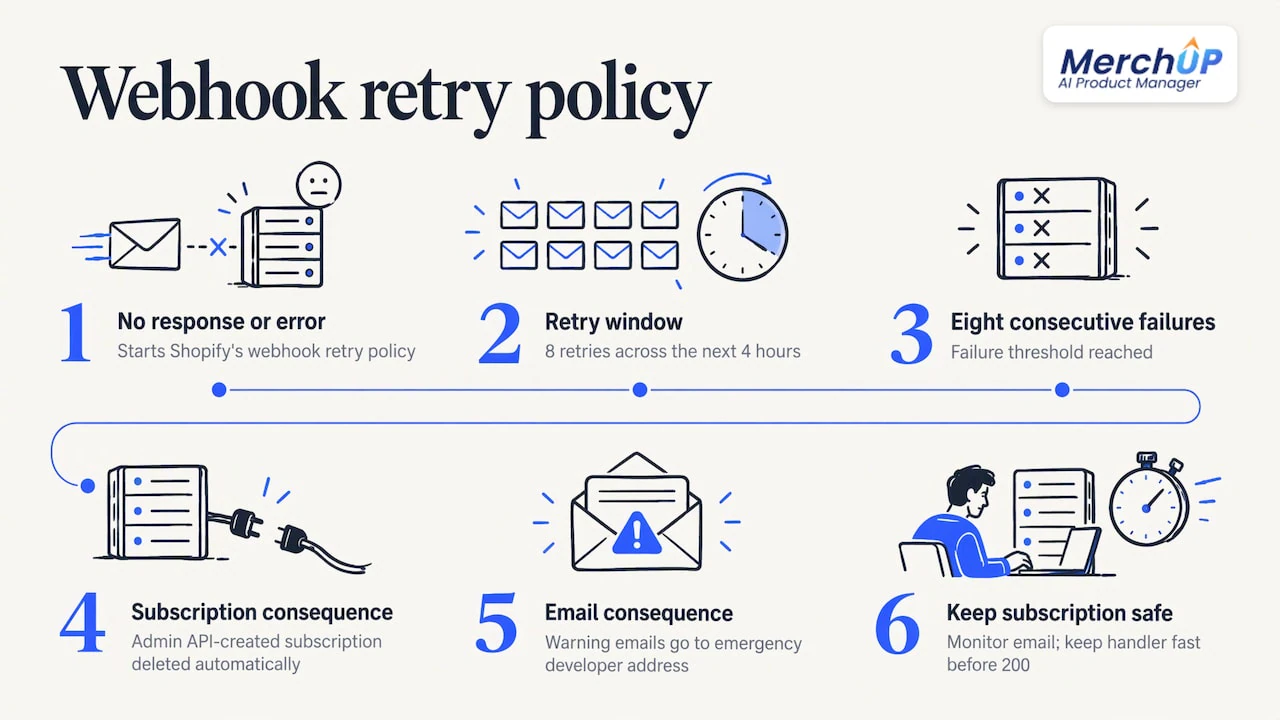
If Shopify receives no response or an error, it retries eight times over the next four hours. After eight consecutive failures, a subscription configured through the Admin API is deleted automatically, and warning emails go to the app’s emergency developer address. So a long outage or a slow endpoint can silently end your subscription. Keep the emergency email monitored, and keep the handler fast by doing nothing heavy before the 200.
Duplicates
Two headers help you here. X-Shopify-Webhook-Id is a unique composite key per delivery, so use it to detect and skip a delivery you have already processed. X-Shopify-Event-Id is shared across all deliveries produced by the same merchant action, which lets you group related notifications. Shopify’s page on ignoring duplicates also recommends queuing, both for traffic bursts and to guarantee the five-second response.
A simple implementation: store each processed webhook id with a short expiry, and check it before the job does its work. Better still, make the job naturally idempotent, for example “set the price in our database to X” rather than “add a price change record”.
Ordering
Shopify does not guarantee ordering within a topic or across topics for the same resource. A products/update can even arrive before the matching products/create. The recommended fix is to use the X-Shopify-Triggered-At header or the payload’s updated_at to decide which message is newer. In practice: before you overwrite a stored product, compare timestamps and discard anything older than what you hold.
Reconciliation
Shopify also recommends reconciliation jobs that periodically fetch data through the APIs, because delivery is not always guaranteed and handlers fail or go down. A nightly job that lists products changed since the last successful run (using updated_at) and compares them with your copy closes the gaps that webhooks leave open. Treat webhooks as the fast path and reconciliation as the safety net.
A short checklist before you go live
| Check | Why it matters |
|---|---|
| Config deployed to production | Dev-store changes do not reach other stores until you deploy |
| API version is current | Payload shape follows the version you set |
updated_at in include_fields |
Stops identical trimmed payloads being debounced |
| HMAC checked on raw bytes | Rejects forged requests |
| 200 returned in well under five seconds | Avoids retries and subscription deletion |
| Webhook id stored | Safe against duplicates |
| Timestamp comparison | Safe against out-of-order delivery |
| Reconciliation job scheduled | Catches missed events |
Our view: content changes need a review step, not only a trigger
Most of the webhook traffic on a busy store is content: titles, descriptions, tags and SEO fields being edited by people, apps and bulk tools. The technical question of how to hear about a change is only half the job. The other half is deciding whether the change should have gone live at all.
That is why we built MerchUp AI as a product manager rather than a text generator. When it writes or updates a listing or SEO fields, every change is reviewed before it goes live, and the store keeps a full history with restore. A webhook can tell you that a product changed. A change history lets you see what changed and put it back.
We would also argue for keeping the number of systems that write to your catalogue small. Each extra writer adds more
products/updateevents, more duplicates and more chances of two tools overwriting each other. One app that handles the listing, the description template, the photos and the SEO work is simply fewer moving parts to reconcile.If you are a merchant rather than a developer, you should not need to read a delivery log to know your catalogue is in good shape.
Jamie Moss
If you run a store, not an integration
Everything above is for people building apps. If you are a Shopify merchant who just wants product content to stay accurate, you rarely need your own endpoint. We have written about the merchant side of this in several places:
- Where to check your Shopify product change log explains how to see who edited what.
- Real-time catalogue sync for avoiding stale prices covers keeping prices current.
- Syncing product descriptions across channels deals with the same text appearing everywhere it should.
- A safe catalogue sync pilot shows how to try changes on 50 to 200 SKUs first.
The common thread is control. Whether a change comes from a webhook-driven integration or from a person, you want it reviewable.
Where MerchUp AI fits
MerchUp AI turns a product photo, barcode or trading-card scan into a complete Shopify listing: title, type, vendor, price, tags and SEO. It writes the description into a designed template, creates AI product photos and publishes. For SEO, it does all your SEO in one click: it reads your store’s own Google Search Console data and live Google results, picks keywords, writes meta titles, descriptions and image alt text, checks rankings on live Google and pushes everything to your store. No SEO knowledge is needed. Every change is reviewed before it goes live, with full history and restore.
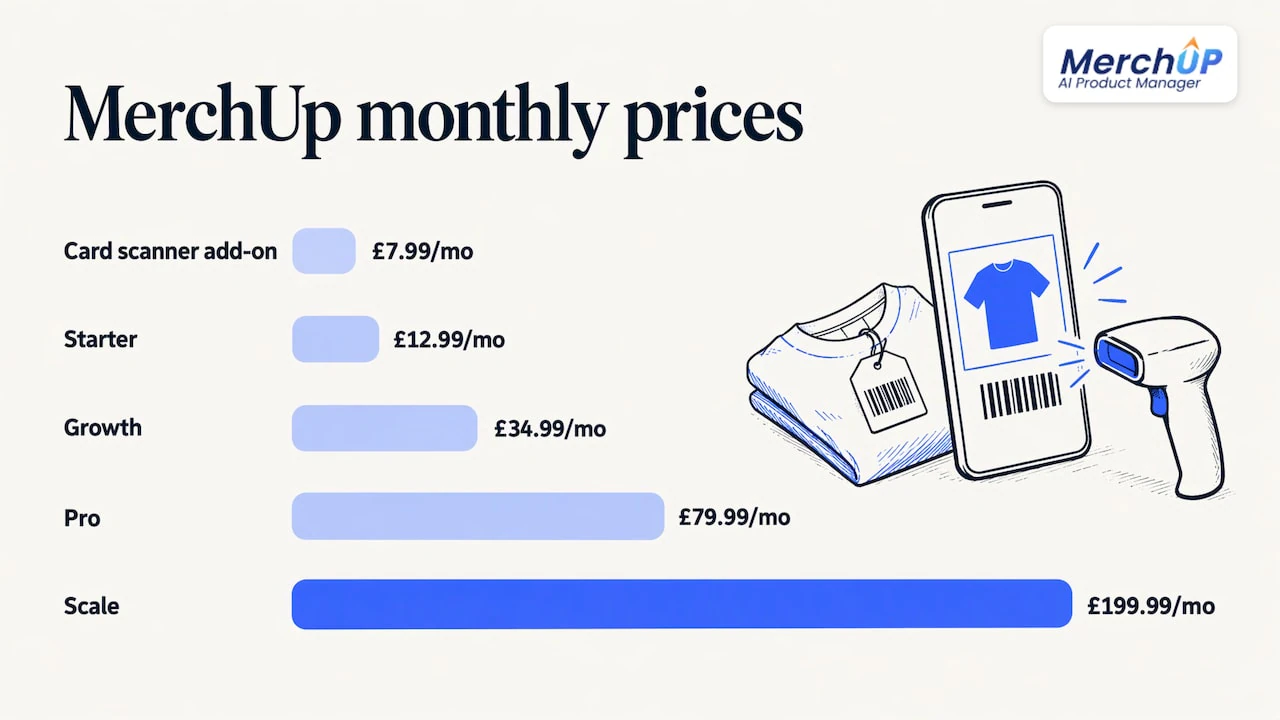
MerchUp AI is available now for Shopify. There is a free plan, and paid plans start at £12.99 a month with Starter, then Growth at £34.99, Pro at £79.99 and Scale at £199.99. See the MerchUp AI plans and pricing to compare them.

If you sell trading cards, the card scanner add-on is available from £7.99 a month, and our trading card scanner identifies and prices cards against real catalogues.
FAQ
Does products/update fire when only the price changes?
Yes. The topic fires on any product change, and a variant price edit is one of them. Because it also fires for titles, tags, status and options, your handler has to read the payload and decide whether the delivery is relevant. A filter, or the next-generation triggers in preview, can reduce that noise.
Why did I get the same products/update webhook twice?
Delivery is at least once, and Shopify retries when it gets no response or an error. Use the X-Shopify-Webhook-Id header to detect a repeat, and make your handler idempotent so a second run changes nothing. Answer with a 200 inside five seconds to avoid needless retries.
How do I get fields that are missing from the payload?
Take the product id from the delivery and request the data with a GraphQL Admin API query. This also gives you the latest state if the webhook arrived late. Remember that include_fields can narrow the payload further, so list every field you need.
What happens if my endpoint is down?
Shopify retries eight times over about four hours. After eight consecutive failures, a subscription created through the Admin API is deleted and warning emails go to your emergency developer address. Run a reconciliation job so any missed changes are picked up once you are back.
Sources
- Manage webhook subscriptions, Shopify developer documentation
- About webhooks, Shopify developer documentation
- Webhook best practices, Shopify Engineering
- App configuration, Shopify developer documentation
- Webhooks delivery structure, Shopify developer documentation
- Next generation events in developer preview, Shopify changelog
- Filter webhook deliveries, Shopify developer documentation
- Verify webhook deliveries, Shopify developer documentation
- Ignore duplicate webhooks, Shopify developer documentation


Comments
No comments yet — be the first to share what you think.