



You can automate Shopify alt text in three ways: accept the suggestions Shopify’s own media editor offers, bulk edit through a CSV file or templates, or use an AI tool that writes alt text from each image and the product around it. The best setup combines the last of these with a review step, so every line is checked before it reaches your storefront and you can undo it later.
This guide shows what Shopify does natively, how to cover both your existing catalogue and every new product, how to control the wording, and which mistakes make automated alt text worse than none.
TL;DR
- Shopify’s media editor can suggest alt text for images that have none, but it works image by image, so large catalogues need CSV editing, templates or an AI tool.
- Good alt text is short (Shopify recommends 125 characters or fewer), describes what is actually in the image, and is left empty for purely decorative images.
- Automate in two passes: a one-off clean-up of existing images, then a rule that covers every image on new products.
- Never publish unreviewed. Check a sample, keep a history, and make sure you can restore the original text.
- MerchUp AI writes image alt text as part of its one-click SEO, reviews every change with you before it goes live, and keeps a full history you can restore.
What Shopify does natively
Shopify already gives you the basics. In the product page, you open a media item, choose Add alt text, type the description and save. Shopify’s help page on alt text also says the media editor might suggest alt text for images where the field is empty, and that accepting the suggestion saves it to the file. The same page notes you can upload alt text in a CSV file.
That covers the mechanics. It does not cover scale. Opening each image of each product is fine for a 30-product store that rarely changes. It breaks down when you add new products every week, run variants with several photos each, or inherit a catalogue of thousands of images with blank fields.
There is also a quality limit. A suggestion for an empty field is a starting point. It does not know your brand’s vocabulary, the colourway name on your variant, or the detail a buyer needs to see, such as scale or finish.
Why it is worth automating at all
Alt text does two jobs. It is read aloud by screen readers, so a shopper who cannot see the photo still learns what it shows. And it helps search engines understand the image. Google’s guidance on image SEO best practices calls alt text the most important attribute for giving an image metadata, and says Google uses it along with computer vision and the page content to understand the image’s subject.
The effort is small per image and large in total, which is exactly the profile of work that should be automated. A store with 400 products and five images each has 2,000 fields to fill. Nobody does that by hand, so most stores leave them blank.
Accessibility is also a design and legal consideration for stores, not only an SEO tactic. Shopify’s own ecommerce design advice describes adding alt text as a low-effort, high-reward step for both accessibility and search.
The three levels of automation
Level 1: templates built from product data
The simplest automation is a pattern that pulls from fields you already have: product title, vendor, colour, material. A template such as “[Vendor] [Product title], [Colour]” fills thousands of fields in minutes.
It is predictable and cheap. It is also blunt. Every image of a product gets the same text, so the front view, the label close-up and the lifestyle shot are all described identically. That is better than blank, but it repeats information and tells a screen reader user nothing about what differs between photos.
Using the product title alone is the most common version of this. It is a reasonable fallback for the main image, and a weak answer for the rest of the gallery.
Level 2: bulk editing through CSV
Shopify’s product export includes an image alt text column. You export, edit in a spreadsheet, and re-import. This gives you complete control and costs nothing, and it suits a one-off clean-up where you can write patterns with spreadsheet formulas.
The drawbacks are practical. You need to be comfortable with spreadsheets, a bad import can overwrite good text, and you must repeat the process for every new batch of products. If you go this route, export a backup file first and test the import on a handful of products. Our guide on bulk editing descriptions in Shopify walks through the same discipline, and it applies equally to alt text.
Level 3: AI that reads the image
The most useful automation looks at the image itself and combines what it sees with the product’s title, type and attributes. Instead of one sentence copied across a gallery, you get text that says what each photo shows: the front of the jacket, the stitching close-up, the model wearing it.
This is where the control question matters most. AI output is fast but fallible. It can misjudge a colour, invent a detail, or stuff in keywords. Shopify’s own guidance on alt text says AI-generated alt text should be reviewed and edited for accuracy, tone and context before publishing. Treat that as a rule of your workflow, not an optional extra.
What good automated alt text looks like
Before you choose a tool, decide what output you want. A few principles hold up across Google, Shopify and marketplace guidance.
Describe what the image adds. Google’s technical writing guidance says useful alt text is a concise, accurate functional equivalent of the image, and it warns against repeating text that already sits next to it. See Google’s advice on writing helpful alt text. Etsy puts the same idea in a buyer’s terms: say what a shopper would lose if the image did not load, including details such as texture and scale, in its guide to text alternatives for listing images.
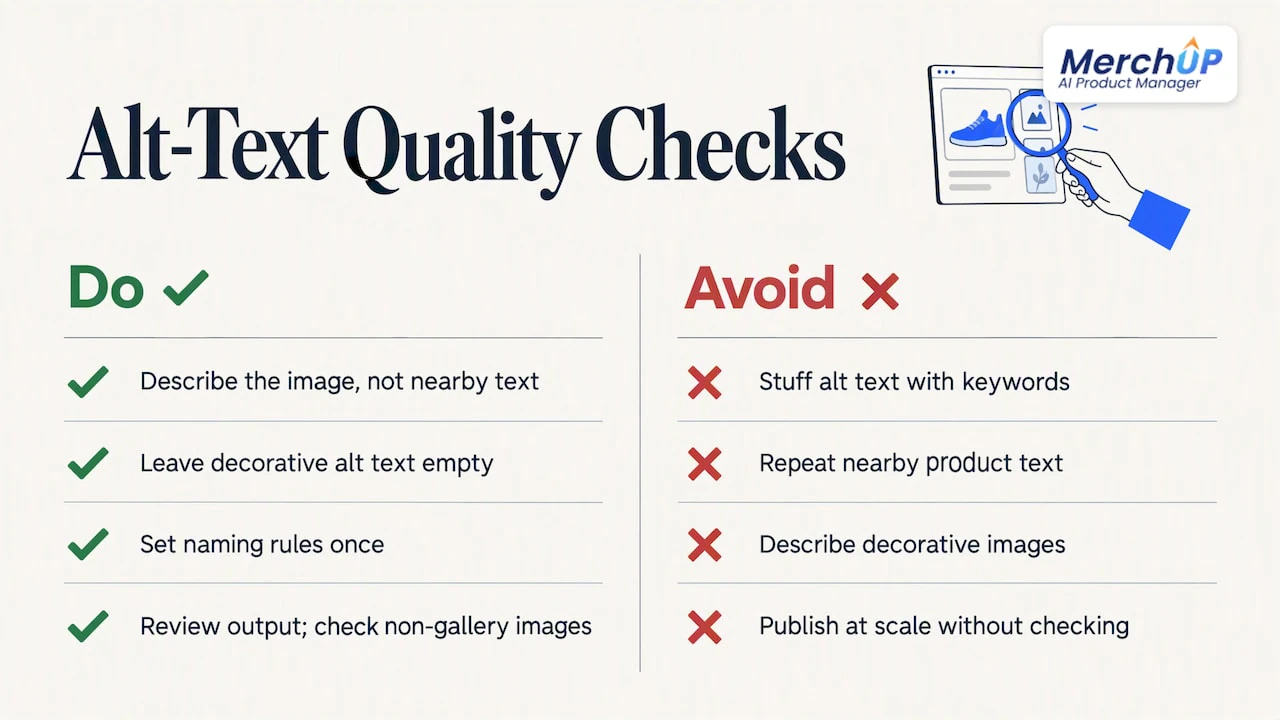
Keep it short. Shopify recommends 125 characters or fewer, with a maximum of 512, according to its alt text guide. Aim for one clear phrase, not a paragraph.
Leave decorative images empty. Purely decorative images, such as a divider or a background texture, should carry an empty alt attribute so screen readers skip them. Google says the same of images that only duplicate information already in the text.
Use keywords naturally. Include the product name and the attribute a buyer would search, such as the material or colour, only where it is true and reads normally.
Here is how that looks in practice for a store selling ceramic mugs.
| Image | Weak automated alt text | Better alt text |
|---|---|---|
| Main shot | mug | Speckled white ceramic mug with a wide handle, 350 ml |
| Detail shot | mug mug coffee mug buy mug online | Close-up of the matte glaze and the rim of the mug |
| Lifestyle | Speckled Mug (same as every image) | Mug on a wooden table beside a notebook and a pot of coffee |
| Divider banner | Decorative line | (empty alt text) |
The weak column is what a careless template or a poorly prompted AI produces. The better column is what you should be able to get automatically, then spot check.
How to set it up for existing images
This is the one-off job. The aim is to take every image with a blank or useless field and give it sensible text.
- Audit what you have. Export your products and filter the alt text column for blanks. Note how many products and images are affected, and which collections matter most for sales.
- Start with your best sellers. Do the top 20 to 50 products first. These have the most traffic, so you see the effect sooner and can judge quality on pages that matter.
- Run the automation on a small batch. Generate text for those products and read it all. Look for wrong colours, invented details and repeated phrases.
- Adjust the rules. If the output is too long, too generic or keyword heavy, fix the instructions or template before running the rest.
- Run the full catalogue. Once a sample looks right, process the rest in batches, and sample each batch again.
- Keep a way back. Make sure the previous values are saved, whether in your export file or in the tool’s change history.
If you are scaling SEO work across many products, the same pilot approach applies. Our piece on scaling Shopify product pages with AI explains why a small first batch beats a store-wide run.
How to set it up for new products
The ongoing job matters more. If every new upload arrives with a blank field, you rebuild the backlog each month.
The cleanest approach is to make alt text part of the listing step, not a separate task. Whatever tool you use, the new-product flow should do three things: generate alt text when the images are added, show it to you with the rest of the listing, and publish it together with the title, description and tags.
That is how MerchUp AI works. It turns a product photo, barcode or trading-card scan into a complete Shopify listing, with title, type, vendor, price, tags and SEO, writes the description into a designed template, can create AI product photos, and publishes the result. The alt text for those images is part of the SEO it writes, so it is there from day one instead of added months later.
Controlling the wording
Sellers often ask whether automated alt text can use the product title or read the image. It can do both, and the choice is yours.
- Product title only. Safe and consistent, but the same on every image. Use it as a fallback.
- Title plus attributes. Adds colour, material or size from product fields. Better, still template driven.
- Image content plus product context. The AI looks at the photo and uses the product data as context, so each image gets its own description.
Whatever you choose, give the system your rules in plain terms: a character limit, whether to include the brand, how to describe variants, and words you never want used. Then test those rules on a sample. A prompt that says “under 125 characters, describe what is visible, no keyword lists” produces noticeably better output than a bare instruction to write alt text.
For variant-heavy stores, make sure the variant attribute, such as the colourway, appears in the alt text of the image that shows it. A shopper using a screen reader cannot tell the blue version from the green one otherwise.
Reviewing, editing and reverting
Automation without review is how a store ends up with 300 images described as “a person holding a phone” when the product was a candle. A sound review process has four parts.
- Preview before publishing. You should see old and new text side by side, not discover it live.
- Edit inline. Fixing a single line should take seconds.
- Spot check by risk. Read everything for high-value products. Sample the rest, looking for patterns of error.
- Restore easily. If a batch is wrong, you should be able to roll it back in one action, not re-import a spreadsheet.
MerchUp AI is built around that loop: every change is reviewed before it goes live, and there is full history with restore. That matters most when you run a bulk pass on an established store, where one bad instruction could otherwise touch thousands of images.
We think of review as part of the product, not a safety net bolted on. If a tool cannot show you what it will change and let you undo it, you are trusting it more than you should.
Mistakes to avoid
Keyword stuffing. Lists of search phrases help nobody. Shopify’s guide lists keyword stuffing among the things to avoid in alt text, and Google asks for keywords used appropriately, in context.
Repeating the surrounding text. If the product title and description already say it, alt text that copies them adds noise for screen reader users. Describe the image instead.
Describing decorative images. Banners, spacers and purely visual flourishes should have empty alt text.
Publishing at scale without checking. Google’s position is that it rewards helpful content and treats low-quality content produced at scale mainly to rank as spam. Shopify’s advice on AI SEO tools makes the same point about reviewing AI output for quality and accuracy.
Ignoring consistency. If half your catalogue says “Women’s linen shirt” and the other half says “linen shirt for ladies”, you lose clarity. Set naming rules once.
Forgetting images outside product galleries. Collection banners and images in your descriptions need text too. Check those separately after the product pass.
Alt text is one part of Shopify SEO
Alt text works best next to the rest of your on-page basics: meta titles, meta descriptions, sensible headings and structured data. If you only fix images, you leave most of the gain on the table. If you want to go further on markup, our guide to Shopify product schema explains what search engines can read about each product, and our step-by-step piece on Shopify alt text covers a writing formula and the admin steps in more detail.
If you are comparing tools in this area, our overview of the best Shopify SEO apps sets out the criteria that matter: output quality, review controls and how changes reach the store.
Where MerchUp AI fits
MerchUp AI is an AI product manager for Shopify stores, so alt text is handled as part of the whole job, not as a stand-alone chore. Its AI does all your SEO in one click. It reads your store’s own Google Search Console data and live Google results, picks keywords, writes meta titles, descriptions and image alt text, checks rankings on live Google and pushes everything to your store. You do not need SEO knowledge, and nothing goes live until you have reviewed it.
For new stock, you can start from a photo, barcode or card scan and get a finished listing. If you sell trading cards, the same flow identifies cards against real catalogues, prices them from the market and estimates centering and condition, and you can buy, sell and trade in person with Shopify POS.
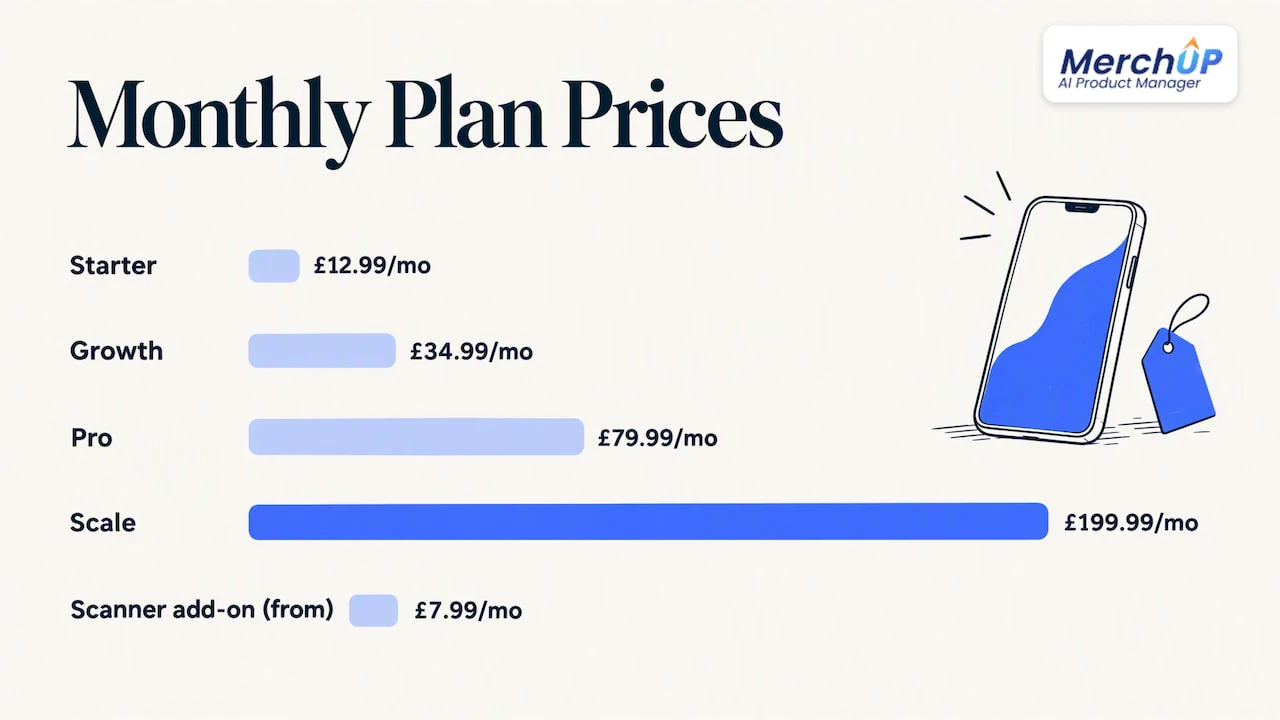
There is a free plan. Paid plans are Starter at £12.99 a month, Growth at £34.99, Pro at £79.99 and Scale at £199.99. The card scanner add-on starts at £7.99 a month. See the MerchUp AI pricing page for what each plan includes, or look at how the tools work together. MerchUp AI is available now for Shopify, with Webflow, Wix and WordPress coming soon.
Our perspective
We build product tools for sellers who add stock every week, and the pattern is the same each time: image text is the first thing skipped. It is not that sellers do not care. It is that alt text is the 14th field on a form they are already tired of filling in.
So we do not think the answer is a separate alt text project. It is making the field fill itself at the moment the product is created, from the image and the product data together, and then putting the result in front of a human before it publishes. Speed is the easy part. Trust is the hard part, which is why we put review, history and restore into the same workflow as generation.
We also think sellers should resist the urge to chase keywords here. The strongest alt text is plain: what is in the picture, which product it belongs to, and the one detail a buyer cares about. Search benefit follows from clarity. Accessibility comes first, and it is the better test of whether a line is any good: would it help someone who cannot see the photo?
— Jamie Moss
FAQ
Can Shopify generate alt text automatically?
Shopify’s media editor might suggest alt text for images where the field is empty, and accepting it saves the text to the file. It works image by image and you still decide each time. For a full catalogue or a steady flow of new products, most sellers add CSV editing or a dedicated tool.
How long should Shopify alt text be?
Shopify recommends 125 characters or fewer, and the maximum is 512 characters. In practice one short, specific phrase works best. Describe what the image shows and any detail a buyer needs, such as colour, material or scale.
Is it safe to publish AI-written alt text without checking it?
No. AI can misread colours, invent details or repeat keywords, and Shopify advises reviewing and editing generated alt text for accuracy and context. Check a sample from every batch, read everything for your best sellers, and use a tool that keeps history so you can restore earlier text.
Should every image have alt text?
Every meaningful image should. Purely decorative images, and images that only duplicate information already in the text, should have an empty alt attribute so screen readers skip them.
Sources
- Shopify Help Center: Adding alt text to media
- Google Search Central: Image SEO best practices
- Google Technical Writing: Write helpful alt text
- Etsy Help: How to add a text alternative to your listing images
- Shopify Blog: Image alt text and how to write it for SEO
- Shopify Blog: Website design tips for ecommerce
- Shopify Blog: Best AI SEO tools for ecommerce


Comments
No comments yet — be the first to share what you think.