


Meta requires plain-text catalogue descriptions of up to 9,999 characters, with no HTML and no links, and the description must differ from the product title. That’s the compliance floor. The rule that actually moves sales is different: lead with the main benefit in the first two sentences, keep sentence case, and close with a clear call to action rather than a spec dump.
TL;DR:
- Descriptions must be plain text, differ from the product title, and be free of HTML, links, or formatting to avoid rejection during feed uploads.
- Leading with the main benefit in the first sentence and ending with a soft call to action improves conversion, especially on mobile where descriptions are truncated.
- Bulk feed preparation requires removing HTML tags, ensuring proper character encoding, and verifying that descriptions are updated and active in Commerce Manager.
- Using AI-generated variants and templates can streamline creating multiple compliant, benefit-focused descriptions at scale.
- Prioritize rewriting high-traffic SKUs first and monitor click-through and add-to-cart rates to measure the impact before expanding.
What are Meta’s official product description specifications?
Meta’s product description specifications for catalogs set a hard ceiling of 9,999 characters, and the field must contain plain text only. That means no bold tags, no bullet markup, no embedded links, and no tracking parameters. Anything that looks like code gets stripped or rejected during catalogue ingestion, so if you’re pulling copy from a CMS that injects HTML automatically, you’ll want to clean it before it reaches Facebook.
The description also has to differ from the product title. Meta treats these as two separate jobs: the title identifies the item, the description sells it. Submitting the same string in both fields, or a lightly reworded version, weakens how the catalogue reads to both shoppers and Meta’s own ranking systems.
Meta’s attribute guidance for descriptions adds a few specifics worth building into a style checklist:
- Include concrete features such as material, colour, or size where relevant, rather than vague adjectives.
- Write in plain text with standard punctuation, no HTML formatting.
- Avoid ALL CAPS for emphasis. Meta reads it as shouting, and it can flag listings for review.
- Never insert links, whether to your own site, a promotion page, or a third-party review.
- Keep the description distinct from both the title and any other product-level text field.
A description that reads “Soft organic cotton crew-neck tee in charcoal grey, pre-shrunk and machine-washable” satisfies every one of those points. A description that reads "AMAZING TEE!!!
Formatting rules that stop feed rejections
Most description problems trace back to formatting, not content. Feed uploads carry invisible baggage from source systems, whether that’s a Shopify export, a custom XML feed, or a spreadsheet someone edited in Excel.
Follow this sequence when preparing a feed for upload or refresh:
- Strip HTML tags from the description field before export. Rich-text editors in most ecommerce platforms wrap copy in
<p>,<strong>, or<br>tags automatically, and these need removing at the feed level, not left for Meta to interpret. - Check character encoding. Feeds saved with the wrong encoding (typically not UTF-8) turn apostrophes and accented characters into broken symbols, which reads as sloppy even when the underlying copy is fine.
- Confirm the description differs from the title row by row, especially on bulk uploads where a spreadsheet formula might have copied one field into the other.
- Test on a small batch first. Upload 10 to 20 SKUs, check how they render in Commerce Manager, then push the full catalogue.
If you need a description on Facebook that differs from what shows on your own storefront, Meta supports Facebook-only attributes through supplementary feeds. This lets you run a shorter, more platform-specific description on Facebook without touching your primary product data.
Pro Tip: Before a bulk feed refresh, export five SKUs from each product category and paste them into a plain-text editor. If any hidden formatting characters show up, your whole feed probably has the same issue.
Why catalogue descriptions matter more than ad copy
The ad-level description field caps out at roughly 30 characters of visible text in most placements, which is barely enough for a single phrase. Your catalogue description, with its 9,999-character allowance, is where the real selling has to happen. Treating the two as interchangeable is one of the more common mistakes ecommerce teams make when they first connect a catalogue to dynamic ads.
Meta’s dynamic and Advantage+ systems pull directly from catalogue data to decide which products to show, to whom, and how to phrase the surrounding creative. A thin or generic description gives the matching algorithm less to work with, which can dull how relevant your ads look to the audiences Meta is trying to reach.
The gap in practice:
- Ad-level description: roughly 30 characters, visible in the ad unit itself.
- Catalogue description: up to 9,999 characters, feeding product detail pages, Shops listings, and dynamic ad matching simultaneously.
- Only the catalogue field carries enough detail for search-style discovery within Shops.
This is also why the catalogue description has to do double duty as a landing-page bridge. Shops no longer support native checkout as of September 2025, and shoppers get sent to your own site to complete a purchase. A catalogue description that sets accurate expectations, and links conceptually (not literally, since links aren’t allowed) to what the landing page will show, reduces the drop-off that happens when a product looks different once someone clicks through. Sprout Social’s analysis of Facebook Shops makes the same point: richer catalogue descriptions improve both browsing within Shops and how ads perform once they’re served.
Keep promotional or time-limited messaging, like a flash sale percentage, in the ad creative itself. Keep durable product facts, materials, fit, use case, in the catalogue.
How to write catalogue descriptions that actually convert
The first sentence carries the most weight, because mobile surfaces truncate descriptions aggressively. If your opening line reads “This versatile item is perfect for many occasions,” you’ve burned the one sentence a scrolling shopper will actually read on a phone screen.
Lead with the single strongest benefit, stated plainly, then use the next sentence or two to convert features into outcomes:
- Feature: 100% merino wool. Benefit-led line: “Stays warm even when damp, so it works for unpredictable weather without extra layers.”
- Feature: 12-hour battery. Benefit-led line: “Runs a full workday and the commute home without needing a midday charge.”
- Feature: Adjustable strap. Benefit-led line: “Fits comfortably across body types from petite to plus, with no separate sizing needed.”
Close with a low-friction call to action. It doesn’t need to be aggressive: “Ideal for daily wear or gifting” does more work than “Buy now,” because it gives the shopper a reason rather than a command.
Generating a few description variants for the same SKU, one benefit-focused, one story-driven, one problem-solution, gives Advantage+ campaigns fresher material to test against different audience segments, and it stops your catalogue looking identical to every competitor pulling from the same manufacturer spec sheet. Tools built for this, including AI-generated product description variants, can produce several angles from a single set of specs far faster than writing each by hand.
| Writing element | What to do | Why it matters |
|---|---|---|
| First sentence | State the main benefit outright | Mobile truncation cuts descriptions short |
| Feature translation | Convert specs into outcomes | Shoppers buy results, not materials |
| Call to action | End with a soft, specific prompt | Guides intent without sounding pushy |
| Variant testing | Write 2 to 3 angles per SKU | Keeps dynamic ad creative from stalling |
For a deeper structural breakdown of how to sequence features, benefits, and social proof within a single description, a product description structure guide is worth keeping open while you draft.
Templates and before/after examples worth copying
Three templates cover most catalogue situations without forcing every SKU into the same mould.
Benefit-led template (best for functional or everyday products): Open with the core benefit, follow with one supporting feature, close with a use-case CTA. Example: “Keeps your coffee hot for six hours without a second thermos. Double-walled stainless steel, leak-proof lid. Great for long commutes or the office desk.”
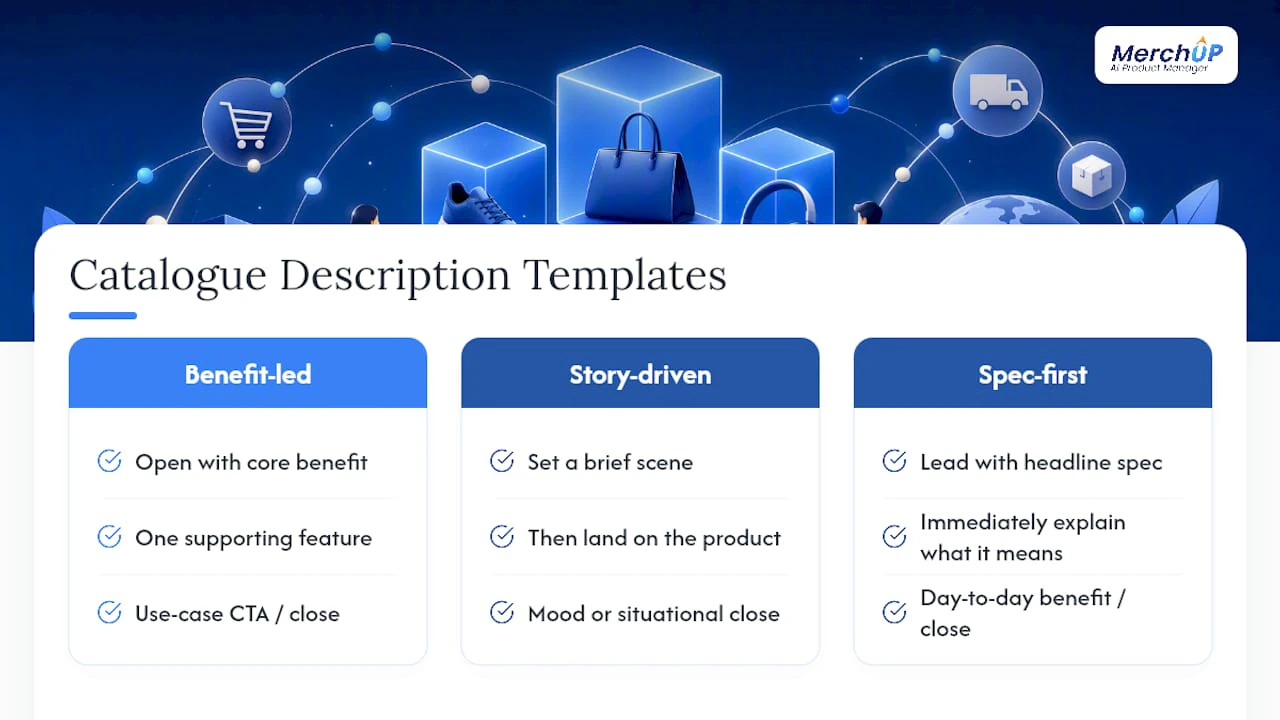
Story-driven template (best for lifestyle, apparel, or gift items): Set a brief scene, then land on the product. Example: “Sunday mornings deserve something soft. This brushed-cotton robe is lightweight enough for spring, warm enough for winter, and finished with deep side pockets for your phone and a mug.”
Spec-first-with-benefit template (best for electronics or technical goods, where buyers expect numbers but still need translation): Lead with the headline spec, immediately explain what it means day to day. Example: “2,000mAh battery delivers up to 14 hours of continuous use, so a single overnight charge covers two full days of normal listening.”
A quick before/after on a real category:
Before: “Blue backpack with multiple compartments. Made of durable material. Suitable for travel or daily use.”
After: “This water-resistant backpack keeps a 15-inch laptop protected in its padded sleeve while three outer pockets separate cables, snacks, and passport for quick access at security. Built for daily commutes or weekend trips.”
The rewrite is longer, but the first two sentences carry everything the mobile-truncated preview will show, so nothing critical gets cut off. When batch-producing variants across a category, rotate the opening verb and sentence structure between SKUs, “keeps,” “delivers,” “fits,” “protects”, so twenty product pages don’t all read like they came from the same fill-in-the-blank form. A set of ready-to-use description templates can speed this up considerably when you’re working through a large catalogue in one sitting.
Keeping catalogue descriptions synced and up to date
Feeds refresh on a schedule, typically every few hours to once a day depending on how your catalogue connects to Commerce Manager, but that schedule isn’t instant, and edits made directly in a source spreadsheet or ecommerce platform can sit in a queue longer than expected.
When a description change doesn’t appear where you expect it, work through this order:
- Check the feed timestamp in Commerce Manager to confirm when the last successful pull happened.
- Trigger a manual sync. Commerce Manager and most platform integrations, including Ecwid’s Facebook Shop setup, offer a force catalog sync option that pulls fresh data outside the scheduled window.
- Confirm the SKU is active, not archived or hidden, since archived items can retain old cached descriptions in some ad placements even after a sync.
- Cross-check active ad sets. A dynamic ad already running can display cached product data briefly after a catalogue update, before it refreshes on its next serving cycle.
If you want a description on Facebook that never matches your website copy exactly, set that up through Facebook-only name and description attributes rather than editing your primary feed. This keeps one clean source of truth for your storefront while giving Facebook its own tailored version. Meta’s own guidance on building a high-quality catalog covers the underlying setup steps in more detail.
Pro Tip: If a description edit still hasn’t appeared after 24 hours and a manual sync, check for a validation error on that specific SKU. Meta will hold the old approved version live rather than showing a broken update.
Who wrote this and how MerchUp fits the workflow
This guide was written by Jamie Moss, drawing on Meta’s published catalogue specifications and hands-on experience helping ecommerce teams restructure product content for compliance and conversion. The recommendations above reflect what Meta’s documentation states directly, not general marketing advice repackaged as platform rules.
Several of the practices covered map directly onto features built into MerchUp:
- AI-generated variants for benefit-led, story-driven, and spec-first descriptions, so testing multiple angles per SKU doesn’t mean writing each one from scratch.
- Customisable templates that enforce sentence case, character limits, and title-versus-description uniqueness automatically.
- Bulk publishing for catalogues running into the thousands of SKUs, where manual editing isn’t realistic.
- Live Shopify integration, so updated descriptions sync into the feed Facebook pulls from, reducing the lag between writing a change and seeing it live.
A sensible pilot workflow: audit your highest-traffic SKUs first, build one template per product category, generate descriptions in batch, publish, then measure click-through and conversion before rolling out to the rest of the catalogue.
Where teams should actually start
Most catalogues don’t need every description rewritten at once, and treating this as an all-or-nothing project is how these initiatives stall. Start with your highest-traffic SKUs and anything tied to a seasonal push. That’s where a benefit-led rewrite pays back fastest, and it gives you real performance data before you commit to rewriting a catalogue of several thousand items.
Governance matters more than people expect. Without a shared template and a naming convention for description variants, you end up with five people writing in five different voices, and no clean way to tell which version is live on which SKU. Set a short review cycle, even quarterly, to catch descriptions that have drifted out of date as products change.
For measurement, don’t wait for a full sales report. Watch click-through rate on the product detail page and add-to-cart rate in the days immediately after a description change goes live. Those two numbers move faster than revenue and tell you whether the rewrite is working before a slower metric catches up.
— Jamie Moss
Scale this without rewriting every SKU by hand
Rewriting a few hundred catalogue descriptions by hand is manageable. Rewriting several thousand, with variants for testing, formatting checks against Meta’s spec, and a Shopify feed that needs to sync cleanly, is a different job entirely. AI tools can generate benefit-led, compliant descriptions in bulk, apply template rules across catalogues, and publish directly into connected Shopify stores without manual CSV handling.

The workflow mirrors what’s outlined above: pick a template, generate variants for testing, publish, then move to the next category. Plans run from Starter at £12.99 a month up to Scale at £149.99 a month, depending on catalogue size and how much AI generation you need. If you want to see the generation and publishing flow before committing to a plan, the 30-second tutorial walks through a real SKU from spec sheet to published listing.
Sources
The specifications and practices covered here draw directly from Meta’s own documentation and a small set of practitioner resources worth bookmarking:
- Product description specifications for catalogs
- Facebook Shops: Drive More Social Sales (2026) | Sprout Social
- Attribute: description | Meta catalog
FAQ
What should you write in a Facebook Marketplace description?
Focus on condition, key specifications, and pickup or shipping details, since Marketplace buyers are usually evaluating a single item quickly. Keep it factual and specific rather than promotional, and mention any flaws upfront to avoid disputes after a sale.
How do you create a Facebook catalogue?
Set up a catalogue in Commerce Manager, either by connecting an ecommerce platform like Shopify or by uploading a product feed manually. Each listing needs accurate product data, including a compliant description of up to 9,999 characters, before it can sync into Shops and dynamic ads.
What should a general Facebook product description include?
Lead with the main benefit, translate key features into outcomes the shopper cares about, and close with a soft call to action. Keep it in plain text with no HTML, links, or ALL CAPS, and make sure it reads differently from the product title.
Why can’t you see the description on Facebook Marketplace?
Descriptions sometimes fail to display because of a pending feed sync, a formatting error such as leftover HTML, or because the listing hasn’t finished processing after upload. Checking the feed timestamp in Commerce Manager or triggering a manual sync usually resolves it.
Can MerchUp help write catalogue-compliant descriptions faster?
Yes. MerchUp generates benefit-led description variants that follow sentence-case and plain-text formatting, then publishes them in bulk to a connected Shopify catalogue. Pricing runs from Starter at £12.99 a month depending on the plan and catalogue size.


Comments
No comments yet — be the first to share what you think.