


Good preorder product messaging answers four questions before the customer has to ask them: what am I buying, what do I pay now, when will it ship, and what happens if that changes? Put those answers on the product page, repeat them in the cart, checkout and confirmation email, and update customers the moment a date moves. This guide gives you the wording, the placement and the US rules behind it, for Shopify stores.
TL;DR
- Label the item as a preorder, then state the price, the amount charged today, any balance and when it is charged.
- Give a specific ship window, and say whether it is a release, dispatch or arrival estimate. Never write “coming soon” alone.
- Repeat the same wording at the button, cart, checkout and confirmation email so nothing contradicts anything else.
- If a date slips, tell customers the new window, the reason and their right to cancel. US rules set a floor for this.
- Judge your messaging by preorder rate, conversion, cancellations and refunds, not by gut feel.
What preorder messaging has to do
Shopify defines a preorder as an order placed before a product is released or restocked. That gap between paying and receiving is the whole messaging problem. Your copy has to explain that fulfilment happens later, give the expected ship date and payment terms, and name any early-access perk or benefit.
Shopify’s developer team treats this as a question of trust. Customers are more likely to choose a preorder option when the choice, the money and the timeline are explicit at the relevant shopping step. So the job is less about persuasion and more about removing doubt at each point where a shopper might hesitate.
In practice preorder messaging lives in six places:
- The button
- The line of text beside it
- The purchase-option label (for example, “Preorder” versus “Buy now”)
- The cart line
- Checkout
- The confirmation email
The jobs are the same everywhere: reassure the buyer about when they will be charged, state the ship-date promise, explain the payment deal, and be honest about scarcity. Commonly used message jobs like these are a useful checklist when you review each placement.
The product page: what to include
Shopify’s guidelines recommend a clear preorder label, the full product price, the amount due at checkout, any remaining balance with its charge timing, and an exact delivery date or range where possible. Purchase options and preorder details should follow the selected variant and carry through to the cart.
PayPal’s US guidance adds the basics of any preorder listing: product features, pricing and release information, plus an order confirmation with an estimated shipping or release date when you have one.
Say what is paid now and later
Avoid an unexplained percentage or the bare word “deposit”. A clearer pattern is total price, amount collected now, amount collected later. For example:
Total: $120. Pay $40 today. We charge the remaining $80 on the day we ship, and email you 3 days before.
If you take full payment up front, say that in one line: “You are charged in full today. Nothing more to pay.”
Say which date you mean
Release, dispatch and arrival are three different events. A dispatch estimate does not promise a particular arrival date, so name which one your date represents. “Ships by 15 December” and “Arrives by 15 December” are different promises, and customers read them as the second one unless you say otherwise.
Put the details near the call to action
Near the button, state the delivery window, what is included and what makes the preorder offer different. A specific line such as “Estimated shipping: 6 to 8 weeks after ordering” beats “Coming soon” every time. The same guidance recommends a hero that says what the product is, who it is for, the outcome and the timing, in a pattern like “Reserve [product] built for [audience], shipping [time].”
A quick checklist for the page:
| Element | Weak version | Better version |
|---|---|---|
| Label | Coming soon | Preorder: ships in 6 to 8 weeks |
| Button | Buy | Preorder now |
| Payment | 30% deposit | $36 today, $84 when it ships |
| Date | Soon | Ships by 14 February, arrives in 3 to 5 business days after |
| Policy | Terms apply | Cancel any time before it ships: link to policy |
If your layout needs work to fit all this, our guide to a conversion-first product page layout and the product page sections and templates we use show where each line belongs. If your preorder has size or colour options with different dates, variant descriptions let you give each one its own ship window.
Writing the copy without overpromising
Copy cannot manufacture a reliable fulfilment promise. The seller has to settle the operational estimate first, then explain which event the date describes. Only after that does wording matter.
Match the wording to your certainty
Use an exact date when timing is firm, a range when supplier timing moves, and a month-based window only when certainty is lower. Honest certainty converts better than silence, and false precision turns into support tickets.
| Your situation | Wording that fits |
|---|---|
| Stock is at the warehouse, shipping is scheduled | Ships 12 November |
| Supplier confirmed a production window | Ships between 12 and 26 November |
| Production not yet locked | Expected to ship in December. We will email you if that changes |
Build the page in three layers
A useful structure is promise, proof and process. The promise states the customer benefit. The proof makes it believable: specifications, photos, renderings, reviews from earlier drops. The process says what happens after ordering: confirmation, progress update, shipping notice.
Keep claims you can back up
For features and performance that are not final, use qualifying words such as “anticipated”, “estimated” or “subject to change” and review the claims as the product develops. Avoid absolute statements, and avoid health-sounding promises unless you can substantiate them, as preorder page guidance on unproven claims puts it.
One call to action, honest urgency
Use one dominant button that matches the offer: “Preorder now”, “Reserve yours” or “Join early access”. Shopify recommends only specific, accurate scarcity, such as a real quantity cap or a genuine closing date. A countdown that resets every day will cost you more trust than it earns in sales.
The messaging sequence from announcement to delivery
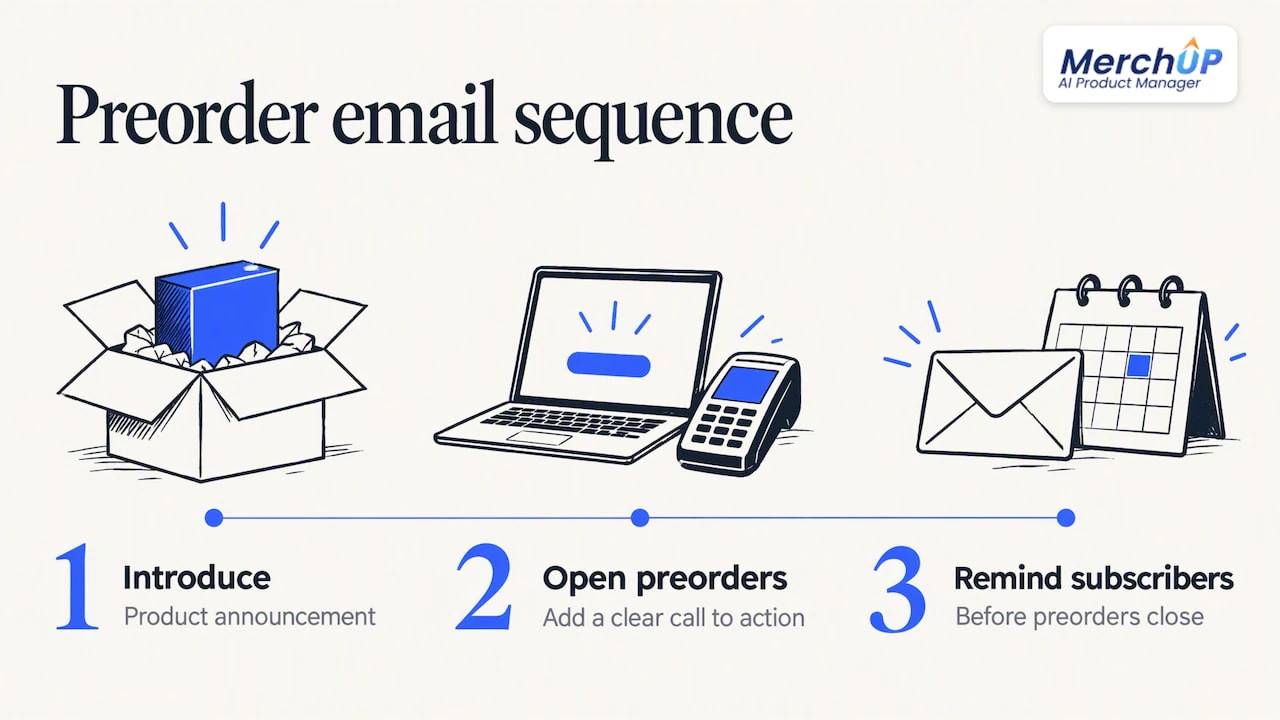
Shopify suggests a three-email sequence: introduce the product, open preorders with a clear call to action, and remind subscribers before preorders close. On social, share previews, work with creators and send targeted ads to the preorder page.
Before going wide, consider a soft launch. A soft launch to subscribers, VIP customers or a private community shows you which lines confuse people while the audience is still small.
Three dates to define
Decide your opening date, cutoff date and expected ship date before writing anything. Then show the expected ship date on the product page and in the confirmation email.
Repeat the same line everywhere
Place the timeline near the title or price, the button and the variant selector, then repeat identical wording in cart, checkout and the confirmation email. Shopify also lists announcement bars as a place for the date, and recommends reminding pay-later customers before you charge them.
Example messages
Button and helper text
Preorder now. Ships by 14 February. You are charged $40 today and $80 when your order ships.
Confirmation email subject and opening
Subject: Your preorder is confirmed: ships by 14 February
Thanks for preordering the Alder Jacket. This is a preorder, so we will ship it in the week of 10 February. We will email you with progress along the way and send tracking the day it leaves us.
The confirmation should say explicitly that it is a preorder and give the ship timing. If fulfilment takes more than a few days, a mid-period progress update and a final shipping email with tracking cut down “where is my order?” messages.
Mid-wait update
Quick update on your preorder: production is on track and your order is still scheduled to ship by 14 February. Nothing for you to do.
When the date changes
This is where messaging turns into a legal matter in the US. The FTC’s Mail, Internet, or Telephone Order Merchandise Rule requires sellers to have a reasonable basis for the shipping time they advertise, or, if no time is stated, a reasonable basis to expect shipment within 30 days. Shopify’s help centre summarises the same duty: if you cannot ship in time, give a revised date and explain the customer’s right to cancel and get a refund.
The FTC’s business guide adds a sharper point: if the new date is more than 30 days out, or you cannot give one, you must tell customers the order will be cancelled automatically if they do not respond. Read the guide itself, or speak to a lawyer, before setting your policy, because the details depend on how many times a date has moved and how you took payment.
A delay message that works has three parts: the new window, the reason in plain words, and the choice to keep or cancel.
Subject: A change to your preorder date
Your Alder Jacket will now ship between 3 and 17 March, not 14 February. A fabric shipment arrived late. You can keep your order, or cancel for a full refund by replying to this email or using the link below. We will not charge your remaining balance until the day we ship.
The same logic applies to products that sell out before they ship. Our guide to out of stock messaging covers page copy and email subject lines for that case.
Measuring whether your messaging works
Shopify points to four numbers: preorder rate, time to sell out, preorder conversion, and refund or cancellation rates. Add a short survey to learn why people commit or cancel.
Change one thing at a time. If you rewrite the ship-date line and the button together, you will not know which one moved the numbers. A rising cancellation rate usually points to a date promise that is too tight or a payment line that surprised people at checkout.
Our perspective
Most preorder problems we see are not copy problems. They are consistency problems. The product page says one thing, the cart says another and the confirmation email says nothing, so the customer has to guess.
Preorder messaging is product content, and it needs the same discipline as any other part of a listing: one source of truth, written once, shown everywhere. That is why we built MerchUp AI as an AI product manager rather than only a description writer. It turns a photo or barcode into a complete Shopify listing, writes the description into a designed template, and lets you review every change before it goes live, with full history and restore.
When a ship window moves, you should be able to update it across your catalogue in one pass and roll it back if you get it wrong. We designed our workflow around that kind of safe, reviewable editing, so a preorder line never sits out of date on one forgotten product.
Jamie Moss
Keeping preorder copy consistent across your catalogue
If you run preorders on more than a handful of products, the hard part is keeping dates, payment lines and policy links identical on every page. MerchUp AI is built for Shopify. It generates full listings, writes descriptions into a designed template, creates AI product photos and publishes, with each change reviewed before it goes live. You can schedule description updates to line up with a release, and use the AI description generator to draft preorder copy from your own template.
There is a free plan, and paid plans start at £12.99 a month with Starter. See the plans and pricing to pick one.
Selling trading cards? You can also scan, identify and price cards, then sell them online or in person with Shopify POS, using our trading card scanner.
FAQ
Is “preorder” one word or two?
Both are used. Shopify’s own guide writes it as one word, “preorder”, while payment companies often hyphenate it as “pre-order”. Pick one spelling and use it everywhere on your store, including the button, emails and policy pages.
What should a preorder button say?
Use wording that matches the offer, such as “Preorder now”, “Reserve yours” or “Join early access”, and add a line beneath it saying what happens next. Avoid “Buy now” on an item that will not ship immediately. The button, helper text and cart label should all use the same word.
How specific should my ship date be?
As specific as your supplier certainty allows. Use an exact date when timing is firm, a range when it moves, and a month-based window only when you are unsure. A vague “coming soon” gives the buyer nothing to rely on, and US rules expect you to have a reasonable basis for any date you state.
What if I cannot ship by the date I promised?
Tell the customer promptly with a revised date, and give them the option to cancel for a refund. The FTC’s business guide explains extra steps when the new date is more than 30 days away or unknown. Check it before you write your delay email.
Should I charge the full amount at checkout?
That is your decision, and either works if you state it clearly. Show the total price, the amount charged now and the amount charged later with its timing. Shopify’s guidelines recommend showing these in the cart as well as on the product page.
Sources
- Preorders: Definition and How To Boost Sales in 2026
- Pre-orders and Try Before You Buy UX guidelines
- Shopify Help Center: Setting up pre-orders
- FTC Mail, Internet, or Telephone Order Merchandise Rule
- FTC Business Guide to the Mail, Internet, or Telephone Order Merchandise Rule
- How do pre-orders work in e-commerce? (PayPal US)
- Pre-order pages: explain what buyers pay now and what comes later
- High-Converting Preorder Page Anatomy & Templates
- Avoid Placebo Tech Claims on Preorder Pages
- Common Preorder Terms of Service Mistakes
- Pre-order Message Examples & Templates
- Communicate Preorder Shipping Timelines Clearly
- Shopify preorder strategy for new product launches
- A Pre-Shipment Communication Playbook for Shopify Stores


Comments
No comments yet — be the first to share what you think.