


A headless product description is copy stored as structured data, separate from any page design, and delivered by API to whatever front end shows it: a custom storefront, an app, a kiosk or a marketplace feed. On Shopify, that usually means the description lives in the platform and your own front end pulls it through the Storefront API. The hard part is not the technology. It is deciding what a description is made of, who owns each field and how you keep thousands of them consistent.
TL;DR
- Headless means the storefront and the commerce back end are separate, joined by APIs. Your descriptions become data, not finished web pages.
- Write descriptions in structured parts (short summary, details, specifications, what is included) so any front end can lay them out its own way.
- Pick one source of truth for every field and say who edits it. Most headless content problems are ownership problems.
- SEO does not come free: your front end must output titles, meta descriptions, canonical URLs and product schema from the same data.
- Headless costs more to build and maintain than a theme. Many stores get most of the benefit from structured content on a standard Shopify theme.
What headless product descriptions actually are
In a conventional Shopify theme, you type a description into the product editor and the theme prints it on the page, wrapped in the theme’s design. In a headless build, the description is just content in a system. Shopify’s own documentation defines headless commerce as separating the storefront front end from the commerce back end: you build the front end independently, and Shopify’s APIs supply products, collections, customers, cart, checkout and pricing.
The content side follows the same logic. Salesforce describes headless product content as structured data stored independently of presentation and delivered by API to websites, mobile apps, voice assistants or kiosks. The description no longer knows what it will look like. It only knows what it says.
That changes how you write. A paragraph with inline bold text, a hand-built table and a banner image pasted in the middle works on one page. It breaks on a mobile app or a product feed. Descriptions built for headless are broken into pieces that can be recombined.
Product information versus product content
It helps to split two things that often get lumped together. Saleor draws the line this way: product information is technical and factual, such as weight, materials and ingredients, while product content is editorial, such as SEO descriptions, unique selling points and inspiration galleries. Saleor also argues that treating all of it as interchangeable content creates architectural confusion, and that factual data and promotional copy should live in distinct places.
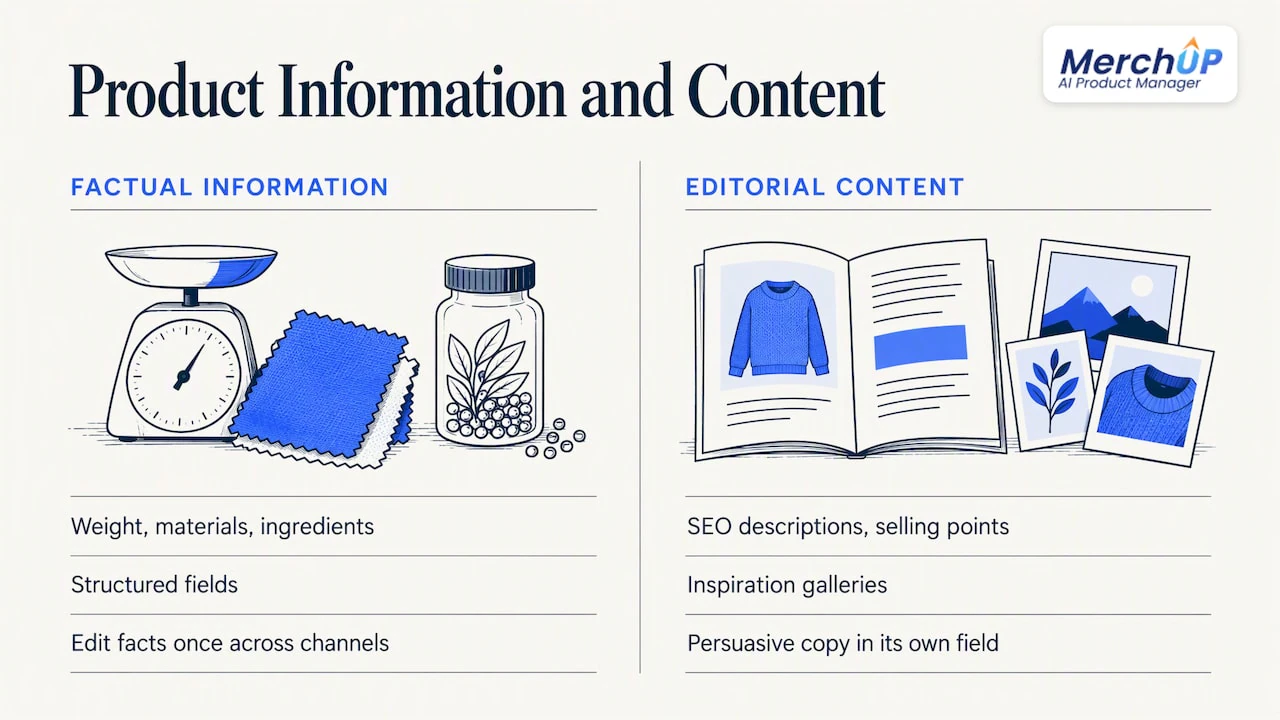
You do not have to run two systems to use that idea. Even inside Shopify, you can keep a clean boundary: factual attributes in structured fields, persuasive copy in its own field. When a material changes, you edit one fact and every channel updates. When you rewrite the pitch, the specs stay untouched.
How a headless Shopify storefront treats descriptions differently
On a standard theme, the description field renders as one block of formatted text inside a template you can see in the theme editor. On a headless storefront, Shopify stays the commerce system while you choose the front-end framework, the hosting and any connected CMS, CRM, ERP or PIM, as Shopify’s headless overview lays out.
In practice that means four differences:
- Nothing renders until you build it. Your developers query the product and decide how the description appears, including headings, spacing and where specs sit.
- Extra content comes through fields you define. Shopify lets you expose metafields to the Storefront API, but you cannot create, update or delete metafields through the Storefront API itself. Writing happens through the Admin API, and reading requires a metafield definition with public read access for the storefront.
- SEO output is your job. A theme prints titles and schema for you. A custom front end only prints what you tell it to.
- Preview needs its own setup. Editors cannot see the live design in the product editor, so you need a preview environment to check drafts.
The trade-off is stated plainly in Shopify’s documentation: headless gives you freedom over the front-end stack and what you connect to it, but it costs more to build and run than a theme, adds complexity and needs developers to maintain the storefront after launch.
Structure a description so any front end can use it
The most useful habit is to stop thinking of a description as one block. AB Commerce’s product-content guide says descriptions go beyond title and price, support selling and SEO, and can be organised into a short description plus sections such as details, usage, ingredients, specifications, dimensions and what is included.
That list is a ready-made content model. A practical version for most Shopify catalogues:
| Field | What goes in it | Where it is used |
|---|---|---|
| Short description | One or two sentences, plain text | Collection cards, search results, feeds |
| Main description | The sales copy, light formatting only | Product page body |
| Key features | A list of short benefit statements | Product page, comparison views, marketplaces |
| Specifications | Structured attributes (size, material, weight) | Filters, spec tables, feeds |
| What is included | Plain list | Product page, packing slips |
| SEO title and meta description | Written for search, within display limits | Search results, social sharing |
| Image alt text | One per image, describing what is shown | Accessibility, image search |
Two rules keep this table useful. First, keep presentation out of the content: no colour spans, no layout tables inside the copy, no hard-coded line breaks for design. Second, standardise attribute values. Shopify’s product-content guidance notes that consistent attribute values stop products being filtered, grouped or submitted inconsistently across storefront search, marketplaces and paid shopping feeds. “Navy”, “navy blue” and “Navy Blue” are three values to a machine.
Write for reuse, not for one page
TechTarget’s ecommerce-content guidance describes a headless CMS as storing structured content centrally and distributing it through APIs to websites, partners, social platforms or print workflows. The value is reuse: one structured source supports many channels, instead of separate descriptions maintained by hand for each one. Salesforce makes the same point, noting that entries are structured, portable objects you can repurpose without re-authoring.
This has a writing consequence. Each sentence should survive being lifted out of context. “It fits the 15-inch model” fails on a collection card. “Fits 15-inch laptops” works anywhere.
Decide the source of truth before you write a word
The most common headless failure is two systems that both think they own the description. Someone edits it in Shopify, someone else edits the CMS version, and the front end shows whichever it fetched last.
Build Build Studio’s content-model checklist recommends naming a single source of truth for every data type across all systems, defining who owns each field, and setting rules for resolving conflicts when data can be edited in more than one place. Its stance is that ownership workflows matter more than choosing fields.
A simple way to do it is a one-page table:
| Data | Owner | System of record | If edited elsewhere |
|---|---|---|---|
| Title, price, inventory | Merchandising | Shopify | Overwritten on next sync |
| Specifications | Product team | Shopify metafields | Overwritten on next sync |
| Sales description | Content team | Shopify description field | Flagged for review |
| SEO title, meta description | SEO owner | Shopify SEO fields | Flagged for review |
| Campaign banners and editorial | Marketing | Headless CMS | Not stored in Shopify |
Notice that the product description stays where the products are. For most Shopify merchants, keeping descriptions in Shopify and using a separate CMS only for editorial pages is the least confusing split. If you need the longer story on running content through stages and checks, our six-stage ecommerce content workflow covers it, and the operations-first product content workflow covers how to keep the catalogue maintainable as it grows.
Search visibility: what the front end must output
Headless does not hurt SEO by itself, but it removes the safety net. Several things your theme used to do now need code.
Titles and meta descriptions. Shopify’s Hydrogen documentation shows product routes using product-specific SEO titles and descriptions, where the most specific nested-route data overrides broader store-level data. In other words, the SEO fields you write per product must be passed through to the page head. If they are not, every product page falls back to a generic store title.
Rich product data. Google’s Shopping documentation says rich product data includes product features and benefits, variants and images, and that richer descriptions can improve discovery, customer trust and conversion. The structured fields in the table above are exactly what feeds this.
Schema markup. Product structured data has to be generated from the same API data your page shows. If the schema says one price and the page says another, you have a problem. Our guide to product schema markup for ecommerce walks through what to include, and the broader product description SEO guide covers the copy itself.
Duplicate content. When one product is reachable at several URLs, or the same copy is reused across variants and stores, you need canonical URLs and distinct copy where it counts. See duplicate content on product pages for quick fixes, and syncing copy and schema for keeping pages helpful.
A short pre-launch check for any headless product page:
- The rendered HTML (not just the browser view) contains the description text.
- Each product has its own title and meta description, not a store default.
- One canonical URL per product.
- Product schema matches the visible price, availability and name.
- Every image has descriptive alt text.
Performance and preview: the editor’s side of headless
Editors lose the “what you see is what you get” screen. Build Build Studio calls preview environments critical, because they let editors safely view draft content with real routes, pricing and localisation before publishing. Ask for this in the build brief. Without it, people publish to find out how copy looks, which is how typos reach customers.
On the delivery side, a CDN caches and serves content closer to shoppers, which helps during high-demand moments such as launches and campaign drops. That is a real advantage of a custom front end, but it only matters if your catalogue and traffic justify the engineering.
Who actually needs headless descriptions
Be honest about the cost. Headless suits stores with several front ends (web, app, in-store screens), unusual design needs or a content team already working in a dedicated CMS. It is a poor fit for a store with a few hundred products, one website and no developer on hand.
For the second group, the useful ideas still apply without a rebuild: structured fields, one source of truth, consistent attributes and SEO fields written per product. You get most of the discipline of headless on a standard theme, with none of the maintenance burden. Our Shopify Hydrogen product content guide goes deeper if you are on, or heading towards, Shopify’s own headless framework.
Where MerchUp AI fits
Headless or not, someone has to produce the content that fills those fields, for every product, in a consistent shape. That is the slow part, and it is where we work.
MerchUp AI is an AI product manager built for Shopify. It turns a product photo or barcode into a complete listing, including title, type, vendor, price, tags and SEO, writes the description into a designed template so every product follows the same structure, creates AI product photos and publishes to your store. Because the output lands in your Shopify product fields, a headless front end reading the Storefront API picks it up like any other product data. Every change is reviewed before it goes live, with full history and restore, which suits the ownership rules above.
If you sell trading cards, the card scanner identifies cards against real catalogues, prices them from the market and estimates centering and condition. See how the tools work together.
There is a free plan. Paid plans run from Starter at £12.99 a month, then Growth at £34.99, Pro at £79.99 and Scale at £199.99 a month. The card scanner add-on starts at £7.99 a month. Details are on the pricing page, and the tutorial shows a description being generated in about 30 seconds.
If you add products every week, our guide to bulk product descriptions with AI templates shows how templates keep a large batch consistent.
Our perspective: structure first, stack second
We talk to a lot of Shopify sellers, and the ones who ask about headless often have a content problem they believe is an architecture problem. Descriptions are inconsistent, half the products have no meta description, specs live in the copy instead of in fields. A new front end does not fix that. It exposes it, because a custom storefront shows exactly what your data contains and nothing more.
So we suggest an order. Fix the content model first: short description, main copy, features, specifications, SEO fields, alt text. Make every product follow it, using templates so the shape is the same on item one and item one thousand. Then decide whether you need a custom front end at all. Many stores find they do not. The ones that do are in a far better position, because their data is already clean and ready to be read by any front end.
On SEO, we think it should not require specialist knowledge. MerchUp AI does all your SEO in one click: it reads your store’s own Google Search Console data and live Google results, picks keywords, writes meta titles, descriptions and image alt text, checks rankings on live Google and pushes everything to your store. Nothing goes live without your review. For a headless build, that means the fields your front end passes into the page head are already filled in, properly.
— Jamie Moss
A practical rollout for a headless Shopify catalogue
- Audit what you have. Export products and check which fields are empty or inconsistent. Count products without meta descriptions or alt text.
- Define the content model. Use the field table above. Add metafield definitions for specifications and expose them to the storefront with public read access.
- Assign owners. One person or team per field, with a conflict rule written down.
- Generate and review in bulk. Use templates so structure is uniform, and review changes before publishing.
- Build the front end against real data. Developers should render title, short description, main copy, features and specs from the API, and output SEO tags and schema from the same data.
- Preview, then launch. Check rendered HTML, canonical URLs, schema and alt text on a sample of products from each collection.
- Monitor. Check rankings and fix pages that lose visibility after launch.
If you also run several stores, the four-step multi-store descriptions workflow shows how to avoid copying identical text across them.
FAQ
What is the difference between headless product descriptions and normal ones?
A normal description is typed into a product page and printed inside a theme’s design. A headless one is stored as structured content and fetched by API, so your front end decides how it looks. The words can be identical, but headless copy needs to be modular so it works in several places.
Do I need a separate headless CMS to manage product descriptions on Shopify?
Not necessarily. Shopify can stay the commerce system and hold the description, with a CMS connected for editorial content if you want one. Shopify’s documentation lists CMS, CRM, ERP and PIM as optional connections. Add a separate CMS only when your content team needs workflows Shopify’s fields do not offer.
Can I use metafields for headless product content?
Yes, with a condition. To read a metafield through the Storefront API, its definition must allow public storefront read access. Creating or changing metafields has to be done through the Admin API, not the Storefront API.
Is headless worth it for a small store?
Usually not. Shopify’s documentation says headless costs more to build and run than a theme and needs developers to maintain it. A small store with one website gets more from clean structured content and good SEO fields on a standard theme.
How do I keep SEO working on a headless storefront?
Make sure your front end outputs each product’s SEO title, meta description, canonical URL and product schema from the API data. Then check the rendered HTML, not only what appears in the browser. MerchUp AI can write and push the SEO fields to your store so there is always something correct to render.
Sources
- About headless commerce, Shopify developer documentation
- Retrieve metafields with the Storefront API, Shopify developer documentation
- Search Engine Optimization for Hydrogen, Shopify developer documentation
- What Is a Headless CMS? Architecture, Benefits and Use Cases, Salesforce
- Product information is not content, Saleor
- Product Content: An Overview, AB Commerce Online Help
- Product Content Management in Ecommerce, Shopify
- Headless CMS for Shopify: How It Works, Shopify
- Headless Commerce Content Model Checklist, Build Build Studio
- How to create an e-commerce content strategy, TechTarget
- Rich product data for product description pages, Google for Developers


Comments
No comments yet — be the first to share what you think.