


Use emojis in product descriptions sparingly: one or two that add to a sentence, placed at the end of it, never in place of words. The evidence says they are a small styling choice rather than a growth lever, so the real work is keeping the facts clear and the copy consistent across hundreds of listings. That is the part we built MerchUp AI to handle, by writing each description into a designed template so your store reads the same way from product to product.
Below, we cover what the research says about sales, where emojis help and hurt, how to choose them for your audience, what they do for screen-reader users, and a routine you can apply on Shopify.
TL;DR
- Emojis are optional. Almost none of the best-selling Amazon products use them in descriptions, so you do not need them to compete.
- When they help, they add to a sentence (one supplementary emoji) rather than replace words.
- Google says emojis neither help nor hurt rankings, so treat them as a click-appeal choice and not an SEO tactic.
- Screen readers read every emoji aloud by name, so keep them few, put them at the end of sentences and never let them carry a fact.
- Marketplaces such as Amazon restrict emojis in some fields, so check each channel’s rules before you copy a description across.
What the research says about emojis and sales
Start with what sellers actually do. A Sortlist analysis of 11,000 best-selling Amazon.com products found that almost none had emojis in their descriptions, although a group using about six emojis correlated with higher sales. The same report warns that too many emojis can make a description look cluttered or less serious. That is a correlation in one marketplace, so read it as a hint and not a recipe.
The academic work is more useful, because it separates two ways of using an emoji:
- Supplementary emojis sit next to words that already say the thing. A peer-reviewed study of Airbnb listings found that for regular sellers, one complementary emoji raised word-of-mouth volume by 26.3% on average, and several complementary emojis raised it by 35.6%. Premium sellers did best with just one (+17.3%).
- Substitutive emojis stand in for words. In the same study, replacing multiple words with emojis cut word-of-mouth volume by 27.4% compared with plain text.
A separate study in the Journal of the Academy of Marketing Science points the same way. It found that facial emojis repeating a verbal expression increase persuasion because they reduce ambiguity, while emojis that replace words add ambiguity and reduce persuasion. In one experiment, digital ads with reinforcing emojis cost over 20% less per click than text-only ads.
The practical rule is simple. Write the sentence in full, then, if it suits your brand, add one emoji that echoes it. Never write “Ships in 📦” or “Made from 🐑 wool”.
Where emojis belong on a product page
A Shopify product page has several text fields, and emojis behave differently in each.
In the description body
This is the safest place for a light touch. Put an emoji at the end of a sentence or at the end of a short benefit line, not at the start of every bullet. Decorative emojis as bullet markers are the habit most likely to look cluttered, and they are the pattern accessibility guidance warns about most.
In the product title
Keep titles plain. Titles feed your product feeds, your collection pages, your search results and your browser tab, and an emoji in any of those can render badly or be stripped. A clean title with the product name, key attribute and variant does more work.
In meta titles and meta descriptions
This is where sellers are most tempted, because an emoji can make a search result stand out. Google’s John Mueller has said emojis in titles and descriptions neither help nor hurt SEO, and that Google may not show them if they look disruptive or misleading. The only potential gain is a higher click-through rate, so if you add one, you are making a bet on clicks and should treat it as a test.
In marketplace listings
If you also sell on Amazon, the rules are stricter. Amazon’s updated bullet-point requirements, effective 15 August 2024, prohibit special characters and emojis in bullet points, and Amazon says it will use AI to remove non-compliant content and generate compliant replacements. A description that works on your Shopify store may therefore need a plain-text version for a marketplace. Keep an emoji-free master copy and add emojis only on the channels that welcome them.
Choose emojis that fit the product and the buyer
The research on fit is consistent: emojis work when they match the product, the brand and the person reading.
A systematic review of emoji marketing research found emojis work particularly well for hedonic and experiential products such as travel and food, give less benefit to premium sellers, and depend on how well the emoji fits the brand, the campaign goal and the content. The authors recommend an experimental mindset and caution in serious contexts.
In practice, for a typical Shopify catalogue that means:
| Product type | Emoji approach |
|---|---|
| Gifts, snacks, party goods, hobby items | One light emoji at the end of a benefit line is usually natural |
| Trading cards and collectibles | Keep condition, set, edition and grade in plain words; at most one emoji in the intro line |
| Premium or luxury goods | Skip them or use a single one; the evidence points to smaller gains and a risk of undercutting the positioning |
| Health, wellness, safety items | Plain text; serious claims need a serious tone |
| B2B and high-trust products | Plain text |
Meaning also shifts with the reader. A SEOLAB report notes that meanings vary by generation and culture: younger shoppers may use some emojis ironically, and a thumbs-up that reads as positive in the West is offensive in parts of the Middle East. If you sell internationally, pick the most literal emoji available.
Do not let an emoji make a promise
A tick, a parcel or a lock can imply things you have not stated. Before you publish, match each emoji to the claim it could suggest. A ✅ next to “In stock” implies a stock level, a 📦 near shipping implies a delivery window, and a 🔒 implies security. If the plain-text sentence does not already state that fact, the emoji should not be there. Then read the copy again with every emoji removed: if prices, quantities and conditions still make complete sense, the description is sound.
This matters most for collectors. A buyer of a graded or raw card wants set, number, condition and centering stated clearly, and a decorative symbol should never sit where that information belongs.
Accessibility: what screen readers do with emojis
This is the part many store owners miss. Emojis are not invisible to people using assistive technology. They are read aloud.
The W3C explains that emojis have pre-defined Unicode names that may not match what the author intended. Its technique recommends giving meaningful emojis an accessible name, or using words instead. A star may be announced as “white medium star” in the middle of your sentence, and a row of three emojis becomes a string of names.
Wayne State University’s accessibility guidance gives the working rules: use emojis sparingly, not as a replacement for text, and at the end of sentences, because a large number adds extra speech and interrupts the experience. The accessibility consultancy Boia suggests a maximum of three emojis per post, checking each emoji’s Unicode description, avoiding repeats and placing them near the end so listeners can skip them.
There is a commercial side too. UsableNet’s 2026 guide says US retailers must make sure customers with disabilities can browse, add to cart and check out independently, that courts and the Department of Justice regularly cite WCAG 2.1 Level AA, and that vague product descriptions and missing alt text are common product-page failures. A clear description with a modest emoji count supports all of that. This is general information, not legal advice; if you have a specific compliance question, speak to an accessibility specialist or a lawyer.
The working rules for accessible product copy:
- Say everything important in words.
- Use zero to two emojis per description, at the end of a sentence.
- Never put an emoji at the start of every bullet.
- Never repeat the same emoji.
- Write good image alt text. That does far more for shoppers using screen readers than any emoji does.
Do emojis help SEO or conversion?
The tests are inconclusive, which is itself useful. Here is what is on record:
- Google says emojis are not a ranking factor either way.
- Published split tests on meta descriptions are mixed: one test across roughly 1,000 category pages was inconclusive at 95% confidence after 21 days, and a cocktail emoji in recipe titles was reported to lift organic clicks in a different test.
- Amazon’s own tooling lets sellers settle the question for their listing: Manage Your Experiments lets you A/B test product descriptions by splitting visitors between two versions and comparing sales and conversion.
The lesson is that an emoji is not why a product page ranks or sells. Rankings come from the words shoppers actually search for, matched to what the page delivers. If SEO is the goal, our guide to product description SEO covers where the effort pays off, and the product description structure guide shows how to lay the page out so it reads well with or without any emoji.
A simple routine for adding emojis to a catalogue
If you add products every week, you need a rule, not a judgement call per listing.
- Write the plain version first. Title, benefits, specifications and conditions, all in words.
- Decide your house style once. For example: no emojis in titles or meta fields, a maximum of one per description, always at the end of a sentence, from a short approved list.
- Check each emoji against its claim. If it implies stock, shipping, safety or authenticity, the sentence must already say so.
- Read it with the emojis stripped. Nothing should be lost.
- Keep a plain master copy for marketplaces and feeds that restrict special characters.
- Test one change at a time. If you want to know whether an emoji lifts clicks, change one field on a group of products and compare against similar products without it, for a few weeks and away from peak sales periods.
The weak point in this routine is consistency. Applying it by hand to hundreds of listings is slow, and a style rule that lives in someone’s head drifts over time. Our product description templates guide shows how to turn a style into a repeatable structure.
How MerchUp AI fits in
MerchUp AI is an AI product manager for Shopify stores. You can start from a product photo, barcode or trading-card scan, and it builds a complete listing (title, type, vendor, price, tags and SEO), then writes the description into a designed template and publishes it. Because every description follows the template, your house style on emojis, headings and spacing stays the same from the first product to the five-hundredth.
For search, MerchUp AI does all your SEO in one click. It reads your store’s own Google Search Console data and live Google results, picks keywords, writes meta titles, descriptions and image alt text, checks rankings on live Google and pushes everything to your store. No SEO knowledge is needed. Every change is reviewed before it goes live, with full history and restore, so you can try a different approach to a meta description and go back if you prefer the old one.
Trading-card and collectibles sellers get card identification against real catalogues, market pricing, and AI centering and condition estimates, so the facts that matter to collectors are in the listing as words, with AI product photos to match. You can also buy, sell and trade stock in person with Shopify POS.
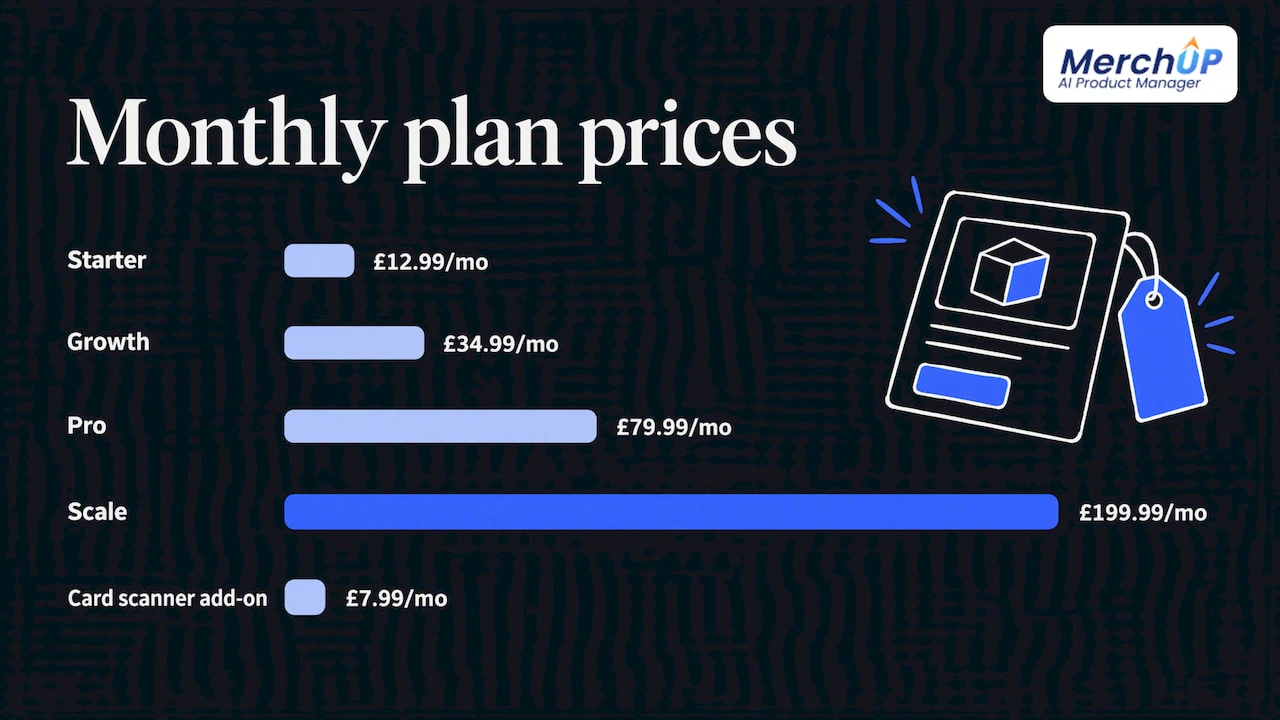
There is a free plan, and paid plans start with Starter at £12.99 a month, with Growth at £34.99, Pro at £79.99 and Scale at £199.99. The card scanner add-on starts from £7.99 a month. See the MerchUp AI plans for details, or watch the 30-second tutorial first.

Our view on emojis in product copy
We think of emojis as seasoning. A good product description has already done its job before any emoji appears: the shopper knows what the item is, what it is made of, what condition it is in and what it costs.
What we see as the real risk is inconsistency, not emojis themselves. A store with 300 listings written by three people on different days ends up with different tones, different emoji habits and different structures. Shoppers read that as a lack of care, and it is hard to fix one listing at a time.
That is why MerchUp AI writes descriptions into a designed template, builds the listing from a photo, barcode or card scan, and handles the SEO fields from your own Search Console data. Your style is set once and applied everywhere, and every change is reviewed before it goes live, with history and restore if you change your mind.
If you want an emoji in your descriptions, put it in the template and keep it to one. If you want rankings, put your effort into the keywords, meta titles and alt text that Google actually reads.
Jamie Moss
FAQ
Are emojis good in product descriptions?
They can be, in small amounts. Research on marketplace listings found one supplementary emoji next to words that already carry the message performed better than plain text for regular sellers, while emojis that replaced words performed worse. One or two, at the end of a sentence, is a safe ceiling.
How many emojis should a product description have?
Start with zero to two. Accessibility guidance suggests keeping the number low and placing emojis at the end of sentences so screen-reader users can skip them. One Amazon best-seller analysis saw a correlation with sales at around six, but that is a single marketplace and a correlation, so do not treat it as a target.
Do emojis help with Google rankings?
No. Google’s John Mueller has said emojis neither help nor hurt SEO, though Google may choose not to display them in results if they look misleading. If you add one to a meta description, treat it as a click-through test and measure it.
Can I use emojis in Amazon listings?
Not freely. Amazon’s bullet-point requirements prohibit emojis and special characters, and it may remove non-compliant content automatically. Keep a plain-text version of each description for marketplaces, and add emojis only on your own Shopify store if they suit your brand.
Do emojis cause problems for screen readers?
Yes, if overused. Screen readers announce each emoji by its Unicode name, so a row of decorative emojis becomes a string of spoken names. Use them sparingly, end sentences with them, and keep every important fact in plain words.
Sources
- Sortlist: The Words that Sell the Most, an analysis of 11,000 best-selling products
- Amazon Seller Central: updated bullet point requirements
- PMC: Non-face emojis in digital marketing
- Journal of the Academy of Marketing Science: Let’s face it, when and how facial emojis increase persuasion
- PMC: Emojis in Marketing and Advertising, a systematic review
- SEOLAB: Emoji impact report for product descriptions
- W3C: H86, providing text alternatives for emojis
- Wayne State University: Guiding principles for using emojis
- Boia: Emojis and web accessibility best practices
- UsableNet: Ecommerce website accessibility guide
- Search Engine Journal: Google says emojis won’t hurt or help SEO
- Amazon: Optimize product content with A/B testing
- Entertool: SEO split test of emojis in meta descriptions


Comments
No comments yet — be the first to share what you think.