


You can get a usable product description from a photo in under a minute, but only if the tool does more than caption the picture. The reliable route is to let AI read the image, fill in the product data around it (title, type, vendor, price, tags), write the copy into a fixed template and give you a draft to approve before it goes live. That is how MerchUp AI works on Shopify: you snap a photo or scan a barcode, and it builds the whole listing, not just a paragraph of text.
This guide shows what an image can and cannot tell an AI, a workflow you can follow for every new product, and the checks that keep a fast draft accurate.
TL;DR
- A photo gives AI the look of a product: type, colour, style, visible text. It does not reliably give exact materials, sizes, model codes or certifications, so you supply those.
- The best workflow is photo, then product data, then description in a template, then a quick review, then publish.
- Alt text and product descriptions do different jobs. Alt text says what is visible; the description sells and informs.
- Marketplaces such as Walmart expect AI-written content to be accurate and reviewed by the seller before it is published.
- MerchUp AI turns a photo or barcode into a complete Shopify listing, with every change reviewed before it goes live.
What actually happens when AI describes a photo
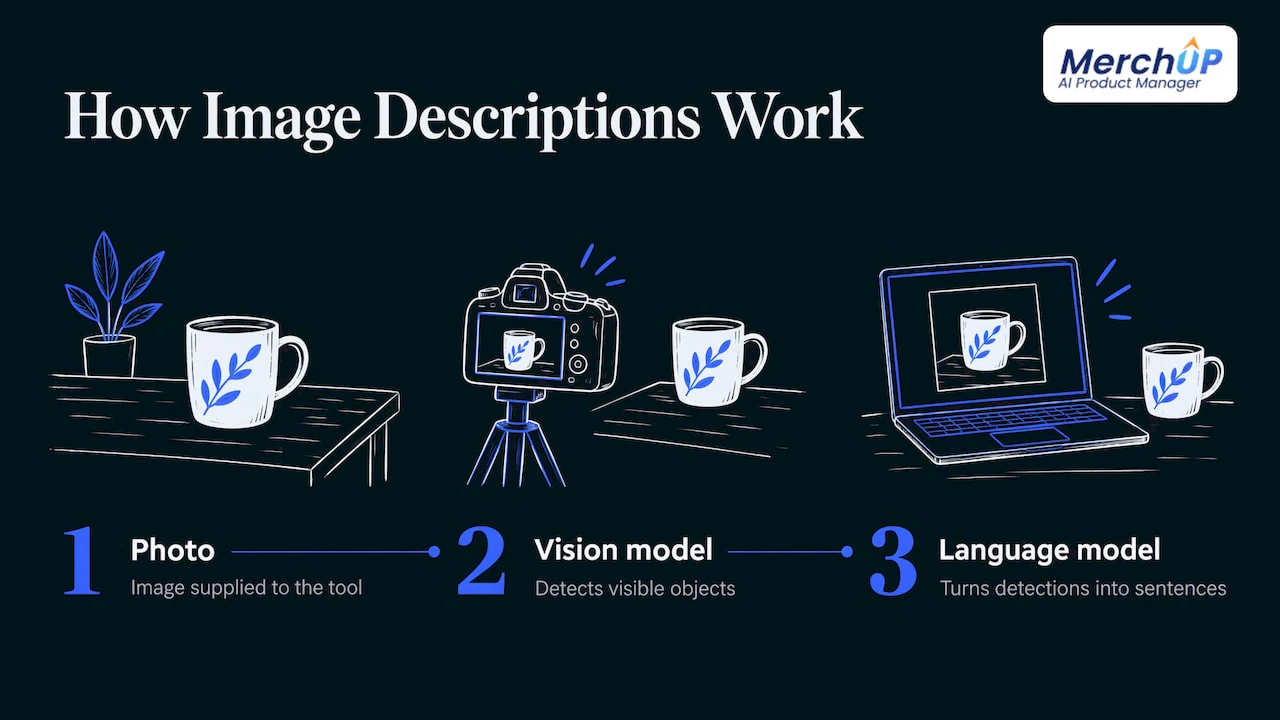
Most image-to-description tools work in two stages. First a vision model looks at the picture and pulls out what it can see. Then a language model turns that into sentences.
AWS describes this pattern in its guidance for generating product descriptions with Amazon Bedrock: for image inputs, a function calls an image-recognition service to detect the objects in the picture, and those detected descriptions feed the later steps that write the product description. The photo is the starting point, and the copy is built from what was recognised.
That matters for how you use it. The quality of the description is capped by the quality of what the model recognised, and by what you add on top. A sharp photo on a plain background, shot from the front with any label visible, gives the model far more to work with than a dark phone snap of a shelf.
For a Shopify seller adding new products every week, the practical gain is that you stop typing the first draft. You still decide what is true about the product.
What a photo can tell AI, and what you need to add
Think of the image as strong on appearance and weaker on specification.
What AI usually reads well from a photo
- The product category (a mug, a hoodie, a trading card, a lamp)
- Colour, pattern, shape and general style
- Printed text on packaging and labels
- Visible features such as handles, zips, pockets or a carrying loop
AWS notes that generative AI applied to product images can help infer attributes such as dimensions, materials and styles to streamline catalogue work. Inference is the key word: the model is making an informed guess from what it sees.
Where the product has a barcode, the guess can be replaced with a lookup. Google Cloud’s Product Recognizer identifies products at the GTIN or UPC level (the barcode number that identifies one exact retail product) using visual matching, text reading and a product database. This is why scanning a barcode beats describing a photo for anything packaged and branded.
What you should supply yourself
- Exact material and fabric content
- Dimensions, weight, capacity, compatibility
- Model numbers and variant details (storage size, regional version)
- Certifications, origin claims, safety or age suitability
- Anything legal or regulated, such as ingredients or warnings
A brushed cotton and a polyester can look identical on screen. A model will describe what it thinks it sees with total confidence, so treat the material line as your input, not its output.
A five-step workflow for every new product
This is the routine we would hand any Shopify seller. It works the same for one product or a hundred.
1. Shoot the photo for the model, not only the customer
Take one clean front shot with even light and a plain background. Include any label, tag or printed model code in frame. If the product has a barcode, photograph or scan it as well. You can always add lifestyle shots later, and MerchUp AI can create AI product photos once the listing exists.
Where it goes wrong: cropped labels, reflections on glossy packaging and several products in one frame. The model has to guess which one you mean.
2. Get the product data, not just the words
A description is the last thing on a listing, not the first. Before any copy, you need a title, product type, vendor, price and tags. With MerchUp AI’s AI product scanner, a photo or barcode becomes a complete Shopify listing with those fields filled in, so the description is written against real product data and not a blank page.
Doing this by hand means opening the admin, filling in six or seven fields and rewriting the same details again in the description. That is where most of the time goes, and where inconsistencies creep in: the title says one thing, the tags another.
3. Write the description into a template
A template keeps every product page structured the same way: a lead sentence, short bullets, a specifications block. MerchUp AI writes the description into a designed template, so your catalogue looks consistent whoever added the product and whenever.
What a good template should hold, based on guidance from WooCommerce’s product description SEO guide:
- A first sentence that states the product type, the most important differentiating attribute and one or two key specs
- Bullets that carry one idea each: materials, dimensions, compatibility, care, what is in the box
- A unique meta description for each product, at roughly 160 characters
Shopify’s own advice on ecommerce product page SEO points the same way: write unique descriptions for each listing, including variants, to avoid duplicate content, work in long-tail keywords and use sub-headings and skimmable formatting. Google’s ranking systems favour helpful information written for people.
4. Review before anything is live
Read the draft against the product in your hand. Check the numbers, the material, the compatibility and anything that sounds like a promise. In MerchUp AI, changes are reviewed before they go live, with full history and a restore option, so a wrong line is never stuck on your store.
A useful rule: every factual claim should trace back to a source you can point to (the supplier sheet, the label, the manufacturer’s page), and every paragraph should answer a question a buyer would actually ask. If a sentence does neither, cut it.
5. Publish, then let the rest follow
Once approved, the listing publishes to Shopify. From there you can sell online or, with Shopify POS, in person. For stores adding stock in bulk, our guide to governed templates for bulk generation covers how to keep a 50-plus product batch consistent.
The first line that does the work
Most AI drafts fail in the first sentence, because it is generic. Compare:
- Weak: “Discover our beautiful mug, perfect for any occasion.”
- Strong: “12 oz cobalt blue ceramic pour-over mug with a wide handle, dishwasher safe.”
The second names the type, the key attribute and the specs, which is the pattern the WooCommerce guide recommends. It is also the sentence a buyer sees in search results and the one AI search tools are most likely to lift.
From a photo, the model can usually get the type and colour. You add “12 oz” and “dishwasher safe”. That division of labour, eyes from the AI and facts from you, is the whole method.
Prompting for accuracy and brand voice
If you are writing prompts yourself, keep them short and strict:
- Give the model the attribute list first (material, size, model, care), then the photo as context.
- Tell it which claims it must not make: certifications, origin, performance guarantees, suitability for children.
- Set the voice in a sentence or two, with one example line you like.
- Ask for a fixed structure: lead sentence, five bullets, a short closing paragraph.
- Keep units consistent (inches or centimetres, not both).
A template does most of this for you permanently. With a template, voice and structure are set once and every product follows them, which is easier than rewriting a prompt for each item. Our AI product descriptions guide goes deeper on tone, and the Shopify product description editor workflow shows how to polish a draft.
Descriptions and alt text are different jobs
An image-led tool often produces both, and they should not be reviewed the same way.
| Product description | Image alt text | |
|---|---|---|
| Purpose | Inform and persuade the buyer | Describe what is visible for people who cannot see the image |
| Built from | Approved product attributes | The image itself |
| Length | Several short paragraphs or bullets | A short line, ideally under about 125 characters |
| Example | “Insulated steel bottle, 750 ml, keeps drinks cold for hours” | “Navy insulated bottle shown from the front” |
| Main risk | Claims that are not true | Missing or vague text |
Shopify advises adding descriptive alt text to each product image to help visually impaired shoppers and to surface products in image search. Be specific: “12 oz cobalt blue ceramic pour-over mug with handle” says more than “Blue ceramic mug”, and the WooCommerce guide adds that AI-generated alt text should be read before publishing because AI sometimes invents details.
MerchUp AI writes image alt text as part of its SEO pass, and we explain how to keep control of it in how to automate Shopify alt text.
Search visibility: let the store’s own data pick the keywords
A description written from a photo is a good start, but it has to be found. That means keywords, meta titles, meta descriptions and alt text that match what shoppers type.
MerchUp AI does all your SEO in one click. It reads your store’s own Google Search Console data and live Google results, picks the keywords, writes meta titles, descriptions and image alt text, checks rankings on live Google and pushes everything straight to your store. You do not need SEO knowledge, and every change is reviewed before it goes live.
If you want to see how this fits into a wider search plan, this overview of Shopify SEO automation covers keyword discovery and content planning for the store as a whole. For app comparisons by type, see our guide to Shopify SEO apps for product descriptions.
Check the rules where you sell
If you also list on a marketplace, read its content policy. Walmart’s US product detail page guidance says AI-generated content must be truthful, accurate and not misleading, and that sellers must review and substantiate it before publishing. Descriptions generally need at least one paragraph of 150 words, though requirements vary by category, and authenticity claims need approval except for food products.
The takeaway is the same on your own store: a person is responsible for what the listing says. Having a documented review step, and a clear idea of who signs off, is good practice. This piece on AI content governance and brand judgment is a useful frame for deciding what a draft must be checked against before it is approved.
Trading cards and collectibles
Cards are the hardest case for a generic image tool, because two cards that look alike can be worth very different amounts. MerchUp AI handles this with a dedicated route. The trading card scanner identifies cards against real catalogues, prices them from the market and builds the listing, while AI card grading estimates centering and condition. You can then buy, sell and trade in person with Shopify POS, using the buy, sell and trade tools.
The card scanner is an add-on from £7.99 a month for 1,000 scans, with 5,000 scans at £19.99 and unlimited scans at £39.99.
Putting it to work with MerchUp AI
MerchUp AI is an AI product manager for Shopify. One photo, barcode or card scan becomes a complete listing with title, type, vendor, price, tags and SEO, a description in a designed template, and AI product photos, then it publishes to your store. The AI description generator is the part that writes the copy, and the tutorial shows it end to end.
There is a free plan. Paid plans are Starter at £12.99 a month, Growth at £34.99, Pro at £79.99 and Scale at £199.99. Full details are on the pricing page.

If you are launching a batch rather than a single product, start with a small pilot, as set out in our guide to piloting 50 to 200 SKUs.
Our view on image-led listings
Sellers tend to treat the description as the job. We think the listing is the job. A paragraph of nice words attached to a thin product record does little for a shopper or for search.
That is why MerchUp AI starts from the product itself. A photo, a barcode or a card scan becomes title, type, vendor, price, tags and SEO, then a description in a template you have designed, then photos, then a sale online or at the counter with POS. The description is better because the record around it is complete.
We also believe a draft should never reach your store unseen. Everything MerchUp AI changes is reviewed before it goes live, with full history and restore, so speed does not cost you control. And for SEO, we think the store’s own Google Search Console data and live Google results are a better guide than guesswork, which is why our one-click SEO starts there.
The sellers who get the most from this are the ones who add products every week. Remove the repetitive typing and the same hour goes into better photos, better stock and better service.
Jamie Moss
FAQ
Can AI really write a product description from a photo alone?
It can write a draft that covers what is visible: type, colour, style and any readable text. Details that cannot be seen, such as material content, exact size or model code, should come from you or from a barcode scan. Review the draft before publishing.
How do I find a product from an image?
For packaged goods, the most dependable method is the barcode, because it points to one exact product. Visual recognition of the product itself also works for common items. MerchUp AI’s scanner accepts a photo or barcode and builds the Shopify listing from it.
Is there a free way to try this?
MerchUp AI has a free plan, and paid plans start at £12.99 a month. Free image-description tools generally describe a picture in general terms, so they suit alt text better than a full listing with price, tags and SEO.
What should I check before publishing an AI description?
Check every number, material, compatibility claim and any mention of certification, origin or suitability for children against your supplier sheet or the label. Make sure the first sentence names the product type and its key attribute, and that the alt text describes what is in the picture. On marketplaces, follow the platform’s content rules, such as Walmart’s review requirement.
Does the description need to be different for each variant?
Yes, where the variants differ in ways a buyer cares about. Shopify’s SEO guidance recommends unique descriptions for each listing, including variants, to reduce duplicate content.
Sources
- AWS: Guidance for generating product descriptions with Amazon Bedrock
- AWS for Industries: Unlock new capabilities from product images using generative AI
- Google Cloud: Product Recognizer guide
- WooCommerce: How to write product descriptions that rank in AI and Search
- Shopify: Ecommerce Product Page SEO
- Walmart Marketplace Learn: Product detail page overview
- Shopify SEO automation
- Why AI content governance must begin with brand judgment


Comments
No comments yet — be the first to share what you think.