


Good backorder messaging does four things at every step: it says plainly that the item is on backorder, gives a ship date, explains when the customer is charged, and offers a way out. Put that on the product page, repeat it in the cart and checkout, restate it in the confirmation email, and send an update before the promised date passes. In the US, the FTC’s shipping rule makes parts of this a legal duty, not just good manners.
This guide gives you the copy, the order of messages and the rules, written for Shopify sellers who add or restock products every week.
TL;DR
- Label the item “Backorder” next to the title and the Add to Cart button, with a ship-by date, not a vague promise.
- State the payment rule, cancellation option and partial-shipment rule before the customer pays, and reuse the same facts in every later message.
- Send a confirmation straight away and a delay update before the promised date passes, leading with the new date and offering cancellation.
- Under the FTC’s Mail, Internet, or Telephone Order Merchandise Rule, you need a reasonable basis for your ship date, and a delay triggers a consent-or-cancel offer.
- Keep copy consistent across the whole catalogue by managing it in one place, then review changes before they go live.
Backorder, out of stock and backlog: use the right word
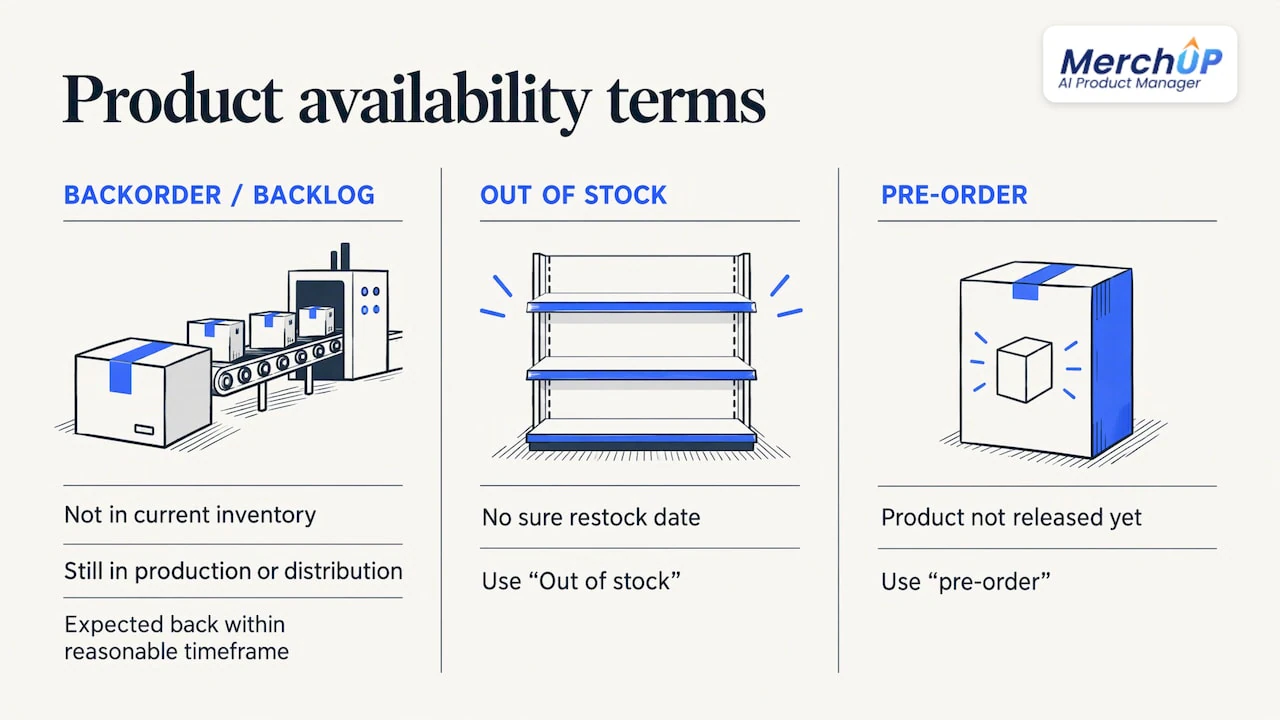
A backorder is an order you cannot fulfil at the moment of purchase because the item is not in current inventory, although it is still in production or available from a distributor. NetSuite’s definition also uses the word backlog for this, and separates it from out of stock: an out-of-stock item has no sure restock date, while a backordered item is expected back within a reasonable timeframe. Investopedia describes it the same way, as a temporary shortage on an item that is still being produced.
That difference should shape your wording. If you have a supplier date, you can sell on backorder. If you do not, the honest label is “Out of stock”, with a way to be notified. We cover that case in our guide to out of stock messaging. If the product has not been released yet, you want preorder product messaging instead, because the customer expectation is different.
Shopify’s own UX guidance for pre-order and back-order options says to use the plain terms “pre-order” or “back-order” rather than ambiguous ones. Avoid “coming soon”, “limited availability” or “ships soon”. Shoppers read those as in stock.
What the product page must tell customers
The product page is where the customer decides, so every fact that could change that decision belongs there, close to the buying controls. Shopify’s guidelines ask sellers to be clear and up front about money (how much the customer pays and when they are charged) and to be as precise as possible about delivery timelines, either an exact date or a range.
A complete product-page backorder message covers five things:
- Status. The word “Backorder” beside the title or button, not buried in a tab.
- Ship date. A specific date or a lead time.
- Payment timing. Charged now, or charged when it ships.
- Cancellation. How the customer can cancel or get a refund if the date moves.
- Partial shipments. Whether in-stock items in the same order ship straight away.
Put the date where the decision happens
Show the date directly above or next to Add to Cart. Write it as a person would say it: “Ships by 14 December” reads better than “Fulfilment lead time: 3 to 4 weeks”. If you sell variants, the message has to change when the shopper switches size or colour, because one variant may be in stock while another is not. Our guide to Shopify variant descriptions shows how to add and display variant-level content.
Date or range?
A date reads as a commitment, and a range reads as less definite. Use a date when you hold a confirmed supplier arrival. Use a range when you do not, and be honest about why. A line like “Estimated ship date, based on our supplier’s current schedule” tells the shopper the date depends on someone else, which is true and sets the right expectation.
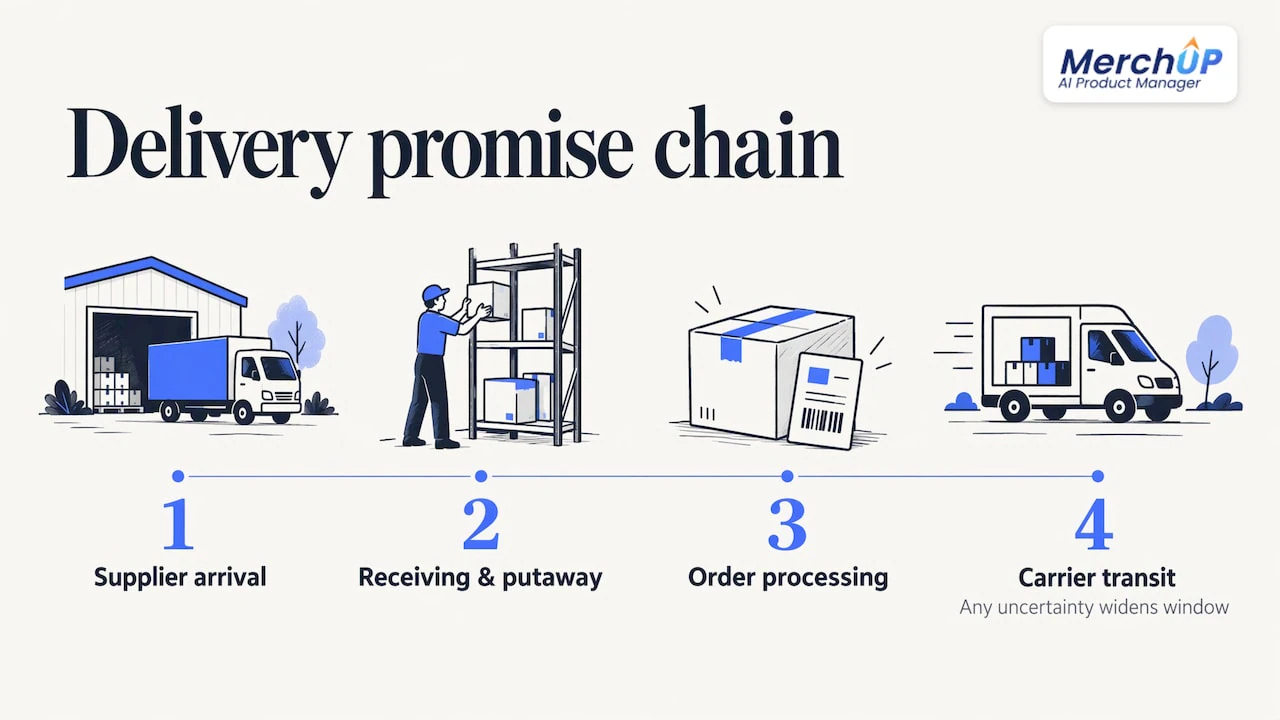
How far out should you go? Shopify states that back orders can typically take anywhere from a couple of weeks to a couple of months. That is a wide spread, so your message should reflect your own supplier’s real lead time, not the industry average. Build the promise from the whole chain: supplier arrival, receiving and putaway, order processing and carrier transit. If any link is uncertain, widen the window rather than narrow it. A date you beat feels like service. A date you miss feels like a broken promise.
Example copy you can adapt
Short and scannable beats clever. These are templates, so replace the bracketed parts with your own facts.
| Where | Weak version | Clear version |
|---|---|---|
| Button label | Add to Cart | Order on backorder |
| Under the title | Ships soon | Backorder: ships by [date] |
| Near the button | Lead time applies | You are charged [today / when it ships]. Cancel any time before it ships for a full refund. |
| Variant switch | (no change) | Size M: in stock, ships tomorrow. Size L: backorder, ships by [date]. |
| Cart note | Some items delayed | Your in-stock items ship today. The backordered item follows by [date], with no extra shipping charge. |
Only promise what you actually do. If you charge extra for a second shipment, say so. If you hold the full order until everything is ready, say that instead.
Cart and checkout messaging
The cart is where a shopper who skimmed the product page finds out what they actually agreed to. Restate the backordered item, its ship date and what it means for the rest of the basket. If the order contains in-stock and backordered items, say whether they ship together or separately, and if you can, let customers choose between shipping the available items now or waiting for the full order.
At the place-order button, state the payment rule. If you charge at the time of order, say so. If you charge on shipment, say that. If shipping starts after fulfilment, mention the normal transit time too, so the customer can work out the arrival date.
Payment timing is not only a copy decision: how and when the card is authorised or captured depends on your ecommerce payment processing setup, so check that what you write at checkout matches what your system does.
One rule runs through every step: the message should reuse the same facts everywhere. If the product page says “ships by 14 December”, the cart, checkout, confirmation and later emails should say exactly that until the date genuinely changes. Contradictory wording is the fastest way to trigger a “where is my order?” email.
The confirmation email
Send it within minutes of checkout. A backorder confirmation is not the standard confirmation with a tweaked subject line. It should:
- state clearly that the item is on backorder
- give the current best estimate of the ship date
- explain how the customer can cancel and get a refund
- give a direct contact for questions
- say that tracking will follow when the order ships
A short version you can adapt:
Subject: Your order is confirmed: backordered item ships by [date]
Thanks for your order. Your [product] is on backorder and we expect to ship it by [date]. You have been charged [now / will be charged when it ships]. If you would rather cancel, reply to this email or use [link] before it ships and we will refund your original payment method. We will send tracking the moment it leaves us.
Many teams add a status email every one to two weeks while the order waits. That is a judgement call, not a rule, but silence is the thing to avoid: customers forgive delays they are told about far more readily than delays they discover on their own.
The delay update
Dates slip. What matters is when and how you say so. Send the update when you learn you cannot meet the promised time, which must be before the date passes, never after the customer complains.
A good delay email:
- Leads with the new date. If you have no date you trust, say so and explain why.
- Takes responsibility briefly. One sentence, no excuses.
- Offers a choice. Wait for the new date, or cancel for a refund.
- Makes cancelling easy. A link or a one-line reply, not a phone-only process.
L.B.Bean shows the pattern in practice: its order status page displays up-to-date backorder status and estimated ship dates where possible, and gives customers a backorder-specific cancel button. It also says that, for backordered items shipped to the US, delivery is expected 2 to 5 business days after the item becomes available, which is a good example of stating transit time separately from the restock date.
If you want to offer a small goodwill gesture, such as free shipping on a next order, send it with the delay notice, not months later. It should come as an addition to the refund option, never a replacement for it.
The US rules behind your wording
In the United States, the FTC’s Mail, Internet, or Telephone Order Merchandise Rule (16 CFR Part 435) applies to online orders. The key points, from the current eCFR text:
- You must not solicit orders unless you have a reasonable basis to ship within the time you clearly state. If you state no time, the default is 30 days after you receive a properly completed order (50 days when the buyer applies for credit to pay).
- If you cannot ship in time, you must offer the buyer, clearly and conspicuously and without being asked, the choice of consenting to a delay or cancelling for a prompt refund. The text of 16 CFR 435.2 says this offer must come within a reasonable time after you first know you cannot ship, and no later than the applicable shipping deadline.
- Silence counts as consent only in a narrow case. The official 2025 edition of Part 435 sets the limit: a revised date no more than 30 days later than the original. Beyond that, or where no date can be given, the buyer must agree expressly.
What this means in practice: write your product-page date only if you can stand behind it, build your delay email so it contains the consent-or-cancel offer, and make sure a cancellation refunds the original payment method. The rule is detailed, and your circumstances, such as credit offers or multiple delays, may change what applies, so confirm your own process with the official text or a qualified US attorney.
Our perspective
Backorder messaging fails when it lives in too many places. The product page says one thing, the checkout app says another, and the email template was written two years ago. The customer sees the gap, not your intentions.
At MerchUp AI we think of the product page as a managed asset, not a one-off piece of copy. Our AI product manager turns a photo or barcode into a full Shopify listing, writes the description into a designed template, and publishes it, with every change reviewed before it goes live and a full history you can restore. That matters for backorders because the message has to change twice: when stock runs out, and again when it returns. A template-based description makes that edit one controlled change rather than a hunt through dozens of pages.
Our advice is simple. Decide your backorder wording once, apply it consistently across the catalogue, and treat every date as a promise you intend to keep.
Jamie Moss
Keeping backorder copy consistent across your catalogue
The harder problem is rarely writing one good message. It is applying it to 50 or 200 products, then removing it accurately when stock lands. A few habits help:
- One owner for dates. Assign one person or role to publish and approve backorder availability dates, so the page never shows two different promises.
- One template. Keep the backorder block in a consistent position in your description template, so shoppers learn where to look.
- Scheduled changes. If a restock date is known, you can schedule product description updates so the “Backorder” wording comes off when the stock does.
- Version history. Keep a record of what each page said and when, which helps if a customer disputes the promise. See our five steps to product description version control.
- Live stock and prices. Stale data causes more backorder complaints than bad wording, which is why real-time catalogue sync matters.
If you are preparing a larger catalogue at once, our guide to ecommerce content automation walks through getting 50 to 200 SKUs ready, and the product content workflow article covers the operations side.
Do the messaging work once with MerchUp AI
MerchUp AI is an AI product manager for Shopify stores. It turns a product photo or barcode into a complete listing (title, type, vendor, price, tags and SEO), writes the description into a designed template, creates AI product photos and publishes it. Its AI also handles SEO in one click: it reads your store’s own Google Search Console data and live Google results, picks keywords, writes meta titles, descriptions and image alt text, checks rankings and pushes everything to your store, with no SEO knowledge needed. Every change is reviewed before it goes live.
There is a free plan, and paid plans start at £12.99 a month with Starter. See the plans on the pricing page, or look at how the tools work together.
FAQ
What should a backorder message say?
It should state that the item is on backorder, give a ship date or lead time, explain when the customer is charged, and say how to cancel or get a refund. It should also say whether in-stock items in the same order ship separately. Place it next to the title and the Add to Cart button, not in a tab.
How long do backordered items usually take?
Shopify says back orders can typically take anywhere from a couple of weeks to a couple of months. Your own figure should come from your supplier’s confirmed arrival plus your receiving, processing and transit time. If any part is uncertain, widen the window.
Do I have to offer a refund if a backorder is delayed?
Under the FTC rule, if you cannot ship within the stated time, or 30 days if none is stated, you must offer the buyer the choice to consent to the delay or cancel for a prompt refund. The eCFR text of Part 435 sets out the conditions, including when silence counts as consent.
What is the difference between a backorder and a backlog?
In everyday retail use they mean the same thing: orders waiting on stock. NetSuite uses backlog as another name for a backorder. Neither is the same as out of stock, where no restock date is certain.
Sources
- Pre-orders and Try Before You Buy UX guidelines, Shopify developer documentation
- What Is Back Order? Meaning, Causes, and Tips, Shopify
- Backorder: Definition, How to Manage, and vs. Out-of-Stock, NetSuite
- Understanding Backorders: Definition, Causes, Examples, Investopedia
- Order Status, L.L.Bean
- 16 CFR Part 435, eCFR
- 16 CFR 435.2, Legal Information Institute
- Part 435 Mail, Internet, or Telephone Order Merchandise, 2025 edition, GovInfo
- Ecommerce Payment Processing for Online Stores


Comments
No comments yet — be the first to share what you think.