


Bulk translation for ecommerce means translating your whole product catalogue (titles, descriptions, SEO fields, tags, image alt text) into one or more languages in a single pass, instead of listing by listing. It only works well when the English source is clean and consistent first, because every flaw in the original is copied into every language. So the order is: fix and standardise the source listings in bulk, translate with the method that fits your catalogue size, localise what actually differs by market, then check a sample before anything goes live. MerchUp AI handles the first step: it builds complete, consistently structured Shopify listings and lets you review every change before it is published, with full history and restore.
TL;DR
- Bulk translation multiplies whatever is in your source listings, good or bad, so standardise titles, descriptions and SEO fields before you translate.
- Shopify gives you three native routes: one resource at a time, AI translation in Translate & Adapt, or a CSV export and import. Choose by catalogue size and how often you add products.
- Translate meaning for each market, not only words: units, sizing, currency, search terms and legal wording all change.
- Spot-check a sample per language and per product type before publishing, then watch search and conversion data by market.
- New products keep arriving, so build the routine around a steady flow of listings, not a one-off project.
What bulk translation means for a product catalogue
A product page is not one block of text. In Shopify, each product carries a title, a description, a URL handle, an SEO title, a meta description, option names and values, image alt text, tags and metafields. Each of those is a separate translatable field. A catalogue of 400 products translated into three languages is therefore thousands of separate strings, not 1,200 pages.
Bulk translation is the practice of handling those strings in volume and keeping them linked to their source. Shopify’s developer documentation describes the mechanism: apps read each translatable entry through the translatableResources query, which returns a key, the value, a digest and the locale, and write translations back with the translationsRegister mutation, which requires the digest. The digest is a fingerprint of the source text at the moment it was read. In plain terms, Shopify knows which translation belongs to which version of the source, so a translation can be flagged as outdated when you change the original.
That last point matters more than it seems. If you rewrite 200 English descriptions next month, every translation of those descriptions is now out of step with the source. A bulk process has to expect change, not just a one-time run.
Why shoppers expect their own language
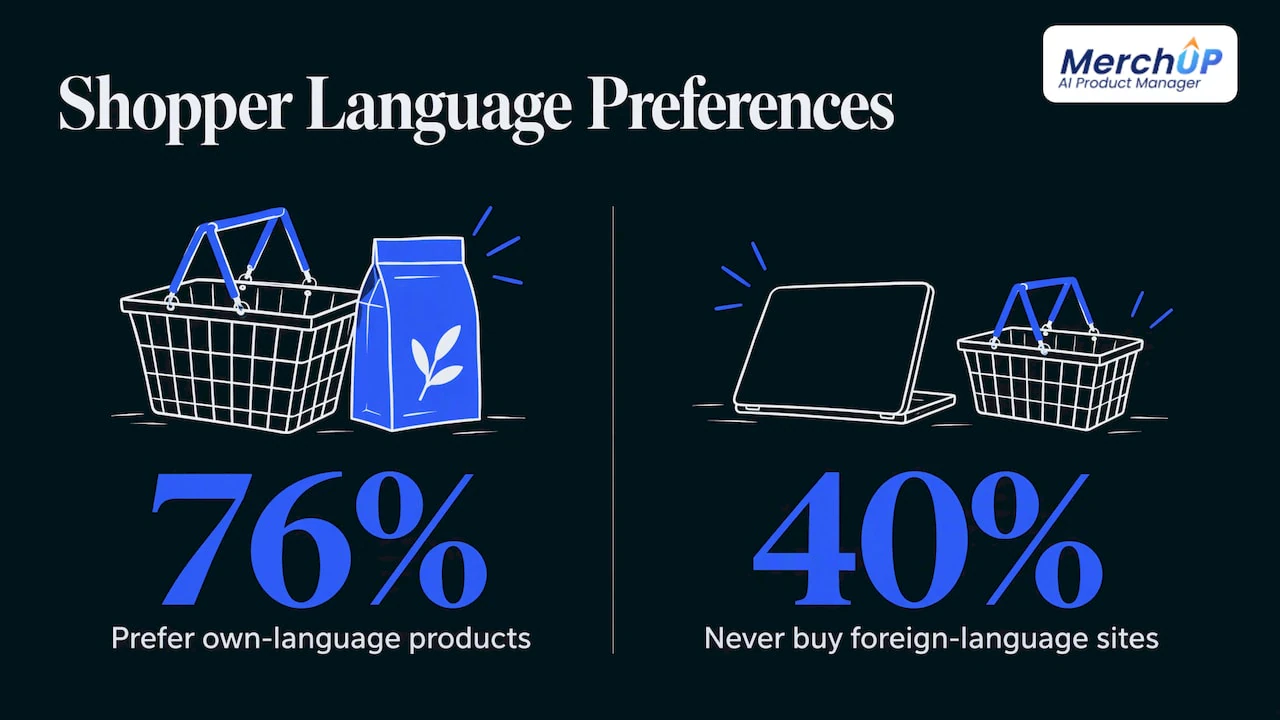
The business case is well documented. The CSA Research study “Can’t Read, Won’t Buy”, covering 8,709 consumers in 29 countries, found that 76% of online shoppers prefer to buy products with information in their own language, and 40% will never buy from websites in other languages. That is a survey of shoppers worldwide, not a promise for any one store, but it explains why product copy is the first thing to translate: it is the text a shopper reads when deciding whether to buy.
For a US-based seller, the practical question is usually which markets to start with. Spanish for US shoppers, French for Canada, and English variants for the UK and Australia are common first steps, and each of those is a different localisation task. Start where you already see traffic or orders from.
Step 1: prepare your source listings
Most translation problems start in the original language. Before you translate anything in bulk, work through this list.
- Standardise the structure. If half your descriptions open with a feature list and half with a story, translators and AI tools will reproduce the inconsistency in every language. Pick one layout and apply it to every product.
- Use consistent terms. Decide whether it is “tee”, “t-shirt” or “shirt”, and whether sizes are written “XL” or “Extra Large”. Run a find and replace across the catalogue so the source uses one term. Our guide to finding and replacing text safely in Shopify shows how to do that without a bad match going live.
- Remove what should not be translated. Brand names, model numbers, SKUs and trademarked product lines should stay as they are. Mark them in a glossary.
- Fill the gaps. Empty SEO titles, missing alt text and thin descriptions translate into empty or thin fields. Fix them in the source.
- Write short, literal sentences. Idioms and wordplay are the first things to fail in translation. Plain statements about what the product is, what it is made of and who it suits translate cleanly.
This is the step where a tool that builds listings in bulk pays for itself. MerchUp AI turns a product photo or barcode into a complete Shopify listing (title, type, vendor, price, tags and SEO), writes the description into a designed template and can create AI product photos, so every product starts from the same structure. If you are adding products every week, that consistency is what makes a later translation pass predictable. The related guides on bulk product descriptions with AI templates and bulk generating descriptions for 50+ SKUs cover the mechanics.
Step 2: choose the translation method
There are four broad ways to translate a Shopify catalogue. Which one fits depends on how many products you have, how many languages you need and how much the wording matters.
| Method | Best for | Watch out for |
|---|---|---|
| Manual edit in the admin or Translate & Adapt | A handful of hero products, or wording you want to control exactly | One resource and one language at a time, so it does not scale |
| AI translation in Translate & Adapt | Fast first pass across a whole catalogue | Needs review; availability and Auto-sync vary by country |
| CSV export and import | Teams who want to edit offline or send files to a linguist | Easy to overwrite or misalign rows; fields are many |
| Professional human translation | Premium, legal or highly technical products | Slowest and most expensive per word |
Shopify’s own help centre explains that Translate & Adapt is installed automatically when you add a language, that you can translate products, collections, blog posts, policies and pages, and that AI translations are available, with weekly Auto-sync in some countries. Check that page for what applies to your store and region, because availability changes.
For most small and mid-size Shopify stores, the sensible pattern is a hybrid: machine translation for the long tail, human review for the products that earn the most.
How good is machine translation for product copy?
Research on this is limited but instructive. A 2016 controlled experiment by Zeng and Richardson had 57 Australian university students rate English-to-Simplified-Chinese product descriptions. In that sample, crowdsourced translations scored higher than machine translations on expert ratings, understandability and smoothness. It is a small, older study on one language pair, and machine translation has moved on since, so read it as a reason to review, not a verdict. The takeaway for a store: assign human eyes to the pages where wording drives revenue, and make the source text easy for any translator, human or machine, to handle.
Step 3: localise, not just translate
Translation changes the language. Localisation changes the page so it fits the market. Check each of these per target market.
- Titles. Shoppers search with different words in different places. A literal translation of your English title may not match anything people type. Use search data from the target market where you can.
- Descriptions. Measurements (inches or centimetres), sizing charts, care instructions, materials and compliance wording differ by country. Spelling differs too: a US shopper and a UK shopper read “color” and “colour” differently.
- SEO fields. Meta titles and descriptions have length limits, and translated text is often longer than English. German and French strings tend to run long, so check they are not cut off in search results.
- URL handles and alt text. These are small fields with real search value. Translate them rather than leaving English handles on a Spanish page.
- Prices and currency. Shopify Markets can present local currency, but the copy must not contradict it, for example free shipping thresholds written in dollars on a euro page.
- Tone. Formal or informal address, humour and cultural references all vary. Keep to the plain, literal style from step 1.
We go deeper on this in why Shopify localisation is data and SEO, not just translation and in the guide to shipping product description localisation in days. For a catalogue-first approach to multilingual copy, see multilingual product descriptions.
Step 4: keep translations accurate when the source changes
The hardest part of bulk translation is not the first run. It is month three, when you have changed prices, rewritten descriptions and added 60 new products.
Three habits keep a multilingual store consistent:
- One source of truth. Edit the original listing, never the translation, when a fact changes. Shopify’s digest mechanism described above exists precisely to link each translation to a specific version of the source.
- A change log. Know what changed, when and by whom, so you can tell which languages need refreshing. MerchUp AI keeps full history with restore on every change it makes to your store, which makes a bulk edit reversible rather than final.
- Batch changes. Rewrite, review and publish in batches, then translate the batch. Translating one product at a time as you edit invites drift. For the rewriting stage, see how to bulk rewrite descriptions without wrecking your SEO and the practical guide to bulk editing descriptions in Shopify.
If you sell on more than one channel, also read how to sync product descriptions across every sales channel, so a corrected description reaches all of them.
Step 5: check before you publish
You cannot read every translation, so sample deliberately.
- Pick a sample per language and per product type. Ten products across your categories tells you more than fifty from one category.
- Read for facts first. Sizes, materials, compatibility, quantities and warnings must match the source exactly. A fluent sentence with a wrong number is the costly error.
- Check the glossary terms. Brand names and model numbers should be untouched, and key terms consistent.
- Check length and layout. Look at the product page on mobile. Long words can break buttons, tabs and tables.
- Check the SEO fields. Confirm the meta title and description are translated, not left in English.
- Publish in stages. Release one language or one collection first, then widen.
After launch, measure by market: organic impressions and clicks in Google Search Console filtered by country, conversion rate by language and returns tied to “not as described” reasons. A language that gets traffic but does not convert usually has a wording or localisation problem, not a demand problem.
Trading cards and collectibles
If you sell trading cards or collectibles, the source data matters even more. Card names, set names, rarity and grade terms are often best left in their original form, while condition notes and shipping text are translated. MerchUp AI identifies cards against real catalogues, prices them from the market and estimates centering and condition, so each card listing starts with accurate, structured data. A glossary of fixed terms then keeps translation from rewording something a collector searches for exactly.
What bulk translation costs and how to budget
Three cost lines matter: the translation itself (free or low cost for machine translation, priced per word for human work), the review time and the ongoing maintenance as products change. The honest budget for most stores is not the first translation run but the review and upkeep. Reduce both by making the source consistent, which cuts the number of things a reviewer has to fix.
Our view on translating a catalogue
Most of the stores we see think of translation as a separate project that starts after the catalogue is finished. We think that is backwards. The catalogue is never finished: you add products every week, change prices, fix typos and tune descriptions for search.
That is why we build MerchUp AI as an AI product manager rather than a one-off writer. It turns a photo, barcode or card scan into a complete Shopify listing, writes the description into a designed template, creates product photos and publishes. Every product arrives with the same structure, which is exactly what a bulk translation process needs.
The same goes for search. Our AI does the SEO in one click from your own Google Search Console data and live Google results: it picks keywords, writes meta titles, descriptions and image alt text, checks rankings and pushes the result to your store, with no SEO knowledge needed. Every change is reviewed before it goes live, with full history and restore.
Our advice: get the source right, keep it consistent, and treat every other language as a downstream copy of a clean original.
Jamie Moss
Build the source catalogue with MerchUp AI
If your listings are inconsistent, thin or still being created one at a time, fix that first. MerchUp AI is available now for Shopify. It creates the full listing from a photo, barcode or card scan, writes descriptions into templates, generates AI product photos and handles SEO for the whole store, with every change reviewed before it goes live. There is a free plan, and paid plans start with Starter at £12.99 a month; Growth is £34.99, Pro £79.99 and Scale £199.99 a month. The card scanner add-on starts at £7.99 a month. See the plans and pricing, or explore the AI product description generator.

Sellers with a steady flow of new stock can also look at the AI product scanner, which turns a product photo into a listing you can review and publish.
FAQ
Can Shopify translate my products automatically?
Yes. Translate & Adapt can translate products, collections, pages and more using AI translations from Shopify, and in some countries it can keep them updated weekly with Auto-sync. Availability depends on your region, so check Shopify’s help page. Review a sample before publishing.
How many languages should I start with?
Start with one or two markets where you already get visitors or orders. A smaller launch lets you test your glossary, review process and SEO fields before you scale to the whole catalogue.
Is machine translation good enough for product descriptions?
For straightforward descriptions with short, literal sentences, it is a practical first pass. A 2016 controlled study found human-based translations rated smoother and more understandable in one sample, so put human review on your best-selling and highest-value products.
What should I never translate?
Brand names, SKUs, model numbers and trademarked product lines, plus set or card names for collectibles where buyers search the original term. Put them in a glossary so every pass treats them the same.
What happens to translations when I change a description?
The translation no longer matches the source. Shopify’s translation system uses a digest of the source text to link them, as its developer documentation explains, so outdated translations can be identified and refreshed after you edit the original.
Sources
- Shopify developer documentation: Manage translated content
- Shopify Help Center: Add language translations using the Translate & Adapt app
- Cross-border e-commerce for translators (CSA Research “Can’t Read, Won’t Buy” findings)
- Zeng and Richardson (2016): Lost in Translation, the influence of translated product descriptions


Comments
No comments yet — be the first to share what you think.