


Product data normalization means making every product record in your store follow the same rules: the same title pattern, the same units, the same spelling of colours and materials, and one record per real product. For a Shopify seller adding new items every week, it is the difference between a catalogue that search engines and shoppers can read and one that quietly loses visibility. The most reliable way to get it is to fix the structure at the moment a listing is created, which is how we build MerchUp AI: a product photo, barcode or card scan becomes a complete Shopify listing with title, type, vendor, price, tags and SEO in one pass, and you review it before it goes live.
This guide is about your catalogue, not about database theory. If you searched the term and found articles on first, second and third normal forms, those describe how engineers split tables to avoid duplication. Here we cover the retail meaning, and what to do about it in a store.
TL;DR
- Product data normalization is turning inconsistent product values (sizes, colours, units, titles, categories) into one agreed format, and merging duplicates into one record per product.
- Messy data costs visibility: Google Merchant Center says wrong or missing attributes can cause disapprovals and stop listings from showing.
- Decide the standard first, then clean the existing catalogue, then enforce the standard on every new listing.
- Check a sample of products every month across your store and sales channels to catch drift early.
- MerchUp AI builds each new Shopify listing from a photo, barcode or card scan, and every change is reviewed before it goes live, with full history and restore.
What product data normalization means in a store
Imagine three products from three suppliers. One says “Stainless Steel”, another “SS304”, the third “Stainless 304”. One lists a length as “0.5 m”, another as “500mm”, another as “50 cm”. To a person these are obviously the same thing. To a filter, a feed or a search engine, they are six different values.
Normalization is the clean-up that maps all of these to one canonical value. In practice it covers:
- Units: one unit per measurement (centimetres or inches, grams or ounces), written one way.
- Casing and punctuation: “Navy Blue”, “navy blue” and “NAVY-BLUE” become one value.
- Controlled values: a fixed list for colour, material, size and similar fields, rather than free text.
- Formats: dates, currencies and numbers written consistently.
- Names: supplier column names mapped to your own field names.
- Duplicates: two records for the same product merged into one.
It helps to separate two jobs. Standardization is deciding the rules: your approved names, units and formats. Normalization is transforming incoming data so it obeys those rules. Without the rules, you have nothing to normalise towards. Without the transformation, supplier data stays messy even when the rules exist.
How this differs from database normalization
Database normalization organises tables so a fact is stored once. Product data normalization works on the values inside your catalogue so that equivalent things look identical. You can run a perfectly designed database and still have “XL”, “X-Large” and “Extra Large” in the size field.
Why it matters for a small online retailer
There are two reasons: being found and being accepted.
Being found. Shopify’s guide on product data enrichment explains that thin titles and generic descriptions hurt search visibility, because products without specific attributes do not appear for matching queries. It cites Salsify’s 2025 research that 65% of shoppers research through search engines and 54% through marketplaces, often with queries naming fabric type, dimensions or compatibility. If your fabric is typed three different ways, none of those searches and filters can group your products properly.
Being accepted. Google’s product data specification states that incorrect or missing data, such as a wrong product category or GTIN (the barcode number), missing variant attributes like colour or size, low-quality images or conflicting data, can cause disapprovals and limit eligibility, and can stop ads and free listings from showing on Google. If you sell through Google Shopping, normalised data is a requirement, not polish. Our guide to Google Shopping descriptions for large catalogues goes deeper on that channel.
There is a quieter third reason: speed. Once your rules are fixed, a new listing takes minutes because there is nothing to decide.
Which fields to standardise first
You do not need to normalise everything on day one. Start with the fields that shoppers filter by and channels require. GS1 US, the standards body behind barcodes in the United States, lists common attributes across most merchandise categories: product name, product description, GTIN, colour description, size description, plus e-commerce attributes such as brand name, country of origin, fabric or material and item dimensions.
Shopify’s guide to product master data lists what an authoritative record holds: title, SKU, price, dimensions, variants, images, attributes, taxonomy, inventory references, compliance data and channel-specific content. Its governance advice includes standardised category assignment, validation rules on metafields (Shopify’s custom fields), naming conventions and bulk editing.
Here is a practical starting set for a Shopify store:
| Field | Rule to set | Example of a rule |
|---|---|---|
| Title | One pattern for the whole store | Brand, product name, key attribute, size, colour |
| Vendor | One spelling per brand | “Nike”, never “NIKE” or “Nike Inc.” |
| Product type | A short, fixed list | Chosen from your own taxonomy |
| Colour | A controlled list | “Navy”, not “navy blue” or “dark blue” |
| Size | One scale, one format | “XL”, not “X-Large” |
| Material | A controlled list | “Stainless steel” |
| Dimensions | One unit and one format | Centimetres, length by width by height |
| Barcode (GTIN/UPC) | Digits only, validated | No spaces or dashes |
| SKU | A fixed scheme | Same structure every time |
| Tags | A defined vocabulary | Lower case, no near-duplicates |
| Image alt text | One approach | Describes the product and key attribute |
Title patterns are worth a closer look
Marketplaces already prescribe them. Amazon’s clothing style guide sets the pattern for stand-alone and child products as brand, department, product name, size, then colour. Its Sports & Outdoors guide says shoppers should be able to decide to buy from the title alone. You do not have to copy Amazon, but borrowing the idea of a fixed order means every title in your store reads the same way, and your own rule is easy to apply and to check.
How to normalise your product data, step by step
1. Audit what you have
Export your products from Shopify as a CSV and open it in a spreadsheet. Sort each key column (vendor, type, colour, size, material) and read down the unique values. You will see the variants of the same value at once: three spellings of one brand, five ways of writing one colour. Count empty cells in required fields too. This takes an hour for a few hundred products and tells you where the mess is.
Where it goes wrong: auditing everything equally. Focus on the fields that filters, feeds and search use.
2. Write the standard
For each field, write down the allowed values, the unit, the casing and the title pattern. Keep it to one page. Shopify’s catalogue guidance recommends a single source of truth: define the approved structure each channel works from and give each field an owner, so other systems receive approved information rather than rewriting it. In a small business the owner is usually you, but write it down anyway, because it settles arguments when a second person starts adding products.
3. Map and clean existing values
Build a two-column table: every messy value on the left, its canonical value on the right. Apply it with find and replace, or a spreadsheet lookup. Do units next, converting everything to one unit and keeping the number format identical. Then check barcodes: GTINs should be digits only and the right length for the type of code.
Where it goes wrong: replacing values blindly. “Light blue” and “navy” may be genuinely different colours that you want to keep as separate values. Normalization merges equivalents, not distinct things.
4. Handle duplicates and variants
See the next section: this is where most real damage hides.
5. Fill the gaps you can fill
Missing material, dimensions or colour should be completed from the product itself or the supplier sheet. If a fact is unknown, leave it empty rather than guessing, because a wrong value is worse than a blank one. In Google’s terms, wrong data can lead to disapproval, while a missing optional value usually just limits reach.
6. Re-import in a small batch first
Import a batch of 20 to 50 products, check them in the admin and on the storefront, then do the rest. Keep your original export so you can roll back.
7. Stop the mess at the source
Cleaning an existing catalogue once only works if new products arrive clean. This is where we think the biggest saving sits. With MerchUp AI, a photo, barcode or trading-card scan becomes a complete Shopify listing with title, type, vendor, price, tags and SEO, and the description is written into a designed template, so each product comes out with the same structure. Every change is reviewed before it goes live, and the full history can be restored if something needs to go back. You can see the flow on the AI product scanner page.
Handling duplicates, missing data and variants
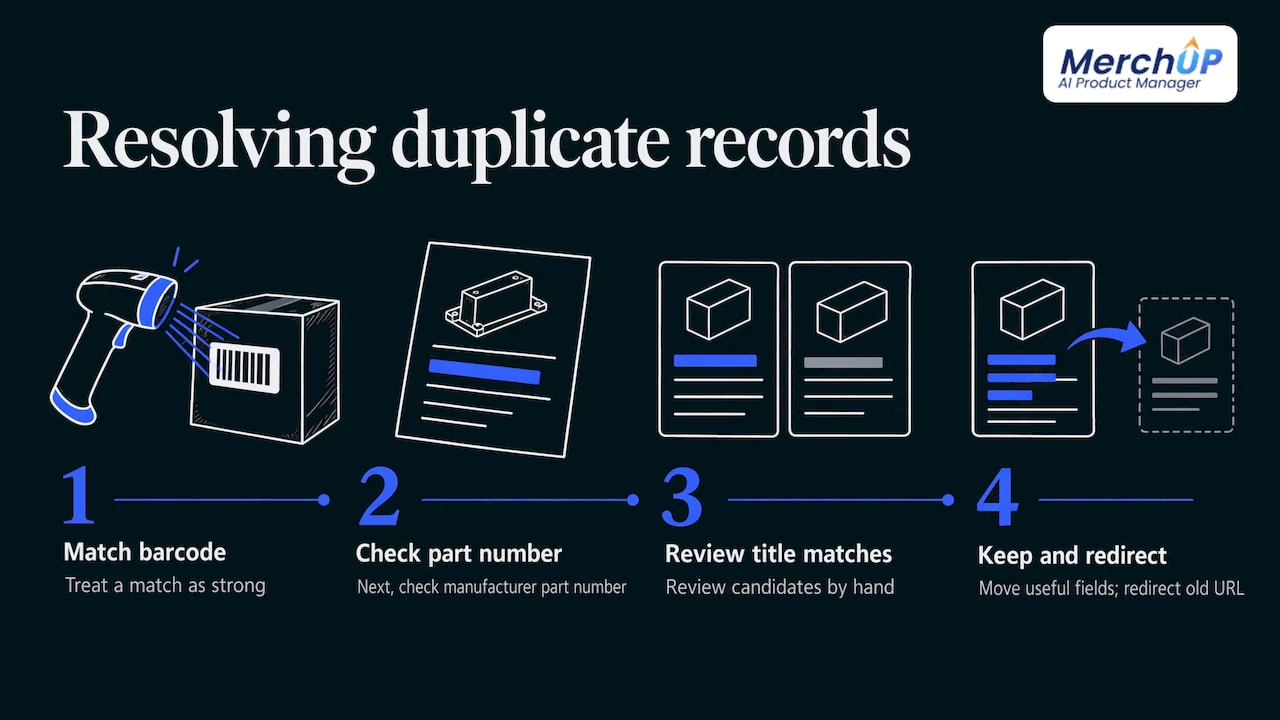
Duplicates. Two records for one product split your reviews, stock counts and search signals, and often produce near-identical pages. Look for matches on barcode first, then manufacturer part number, then title and attribute combinations. Treat a barcode match as strong and a title match as a candidate to review by hand. Keep the more complete record, move any useful fields from the other, and redirect the old URL. Our piece on duplicate content on product pages covers the page-level side.
Missing data. Decide which fields are required for a listing to be published: title, price, at least one image, vendor, type, and barcode where one exists. Anything missing goes onto a list to complete rather than being published half-finished.
Conflicting data. If your supplier sheet says 500 g and the box says 0.5 kg, that is consistent after unit normalization. If it says 500 g and 750 g, that is a contradiction, and a person has to check the product. Decide in advance which source wins for each field: supplier sheet for specifications, your own price list for prices.
Variants. Each variant of a product (a size or a colour) should differ only in the variant attribute. Colour should differ between colour variants, while brand and material usually stay the same across all variants of one product. Also make sure every variant sits under the right parent product and the right image is attached to each. Google specifically lists missing variant attributes among the causes of limited eligibility.
Identifiers. Keep your internal SKU as your working identifier and store the barcode in the barcode field as a separate, validated value. If a supplier changes its barcode, your internal records should not break.
Trading cards and collectibles: normalization with a twist
Card shops have an unusual version of this problem. The same card exists across sets, editions, languages, finishes and conditions, and sellers type those in endlessly different ways: “1st Ed”, “First Edition”, “1st edition holo”. Set, number, language, finish and condition should each be a fixed field with a fixed list of values.
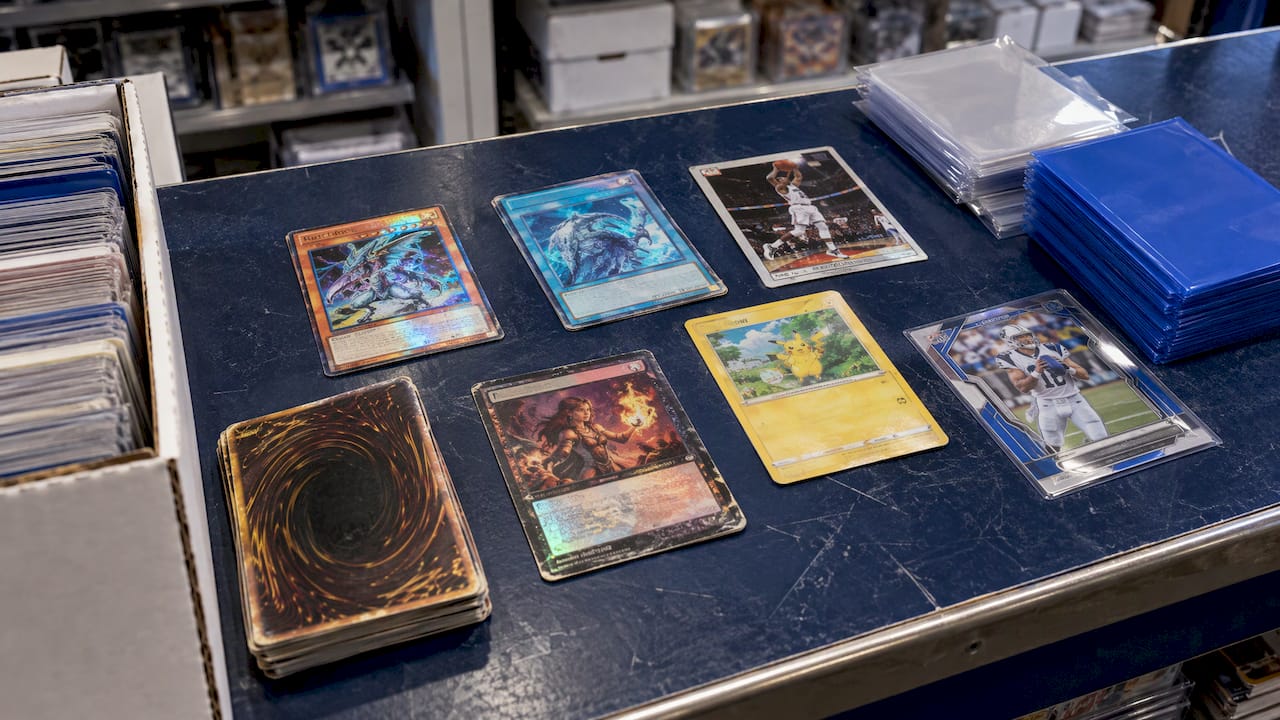
Our trading card scanner identifies cards against real catalogues, prices them from the market and, with AI card grading, estimates centering and condition. Because identification comes from a catalogue rather than from typing, the card’s details start from the same source each time. Sellers can then buy, sell and trade stock in person with Shopify POS, so in-store and online inventory share the same records.
Keeping data consistent as you grow
A catalogue drifts. A new team member invents a colour name, a supplier changes a column, a bulk edit overwrites a field. Three habits keep it stable.
One master, many channels. Shopify’s guidance says to map channel-specific formats, such as different title lengths or category labels, back to the same underlying product rather than editing each channel separately. Edit once at the source and let channels receive it. We wrote about this approach in cross-channel product copy, and about where a product information system fits in PIM vs CMS.
Templates for content. Structured content follows from structured data. If descriptions are built from attributes in a fixed layout, a changed attribute changes every description that uses it. See our guide to product description templates and the approach to attribute-based descriptions for large catalogues.
Version control. Keep a record of who changed what and be able to go back. Shopify’s PIM guidance lists approval workflows, validation rules, version control and completeness scores among the tools that prevent quality problems before content is published. Our five steps to description version control show a lightweight way to do it. In MerchUp AI, changes are reviewed before they go live and history can be restored.
Checking whether your data is clean
Set a monthly check of about an hour for a small store. Use these measures:
- Completeness: the share of products with every required field filled. Aim for a figure you track month to month, and look at the trend.
- Consistency: the number of unique values in colour, size, material and vendor. If the count creeps up, someone is typing free text.
- Duplicates: products sharing a barcode or near-identical titles.
- Channel health: product diagnostics in Google Merchant Center, which show disapproved or limited items and the reason. Trace each reason back to the product data.
- Spot check: open ten random products on your storefront and each connected channel and compare them. Shopify recommends this kind of sample check after major updates, integrations or launches.
Not every gap is equal. A missing compatibility value or a wrong barcode can do more harm than several missing descriptive fields, so fix the identity and filter fields first.
On the visibility side, clean attributes are only half of it. Titles, meta descriptions and image alt text need to match what shoppers actually search. MerchUp AI does all your SEO in one click: it reads your store’s own Google Search Console data and live Google results, picks keywords, writes meta titles, descriptions and image alt text, checks rankings on live Google and pushes everything to your store. No SEO knowledge is needed, and each change is reviewed first.
Normalize at the point of creation with MerchUp AI
If you add products every week, a one-off clean-up will not hold. MerchUp AI is an AI product manager for Shopify: you scan or photograph a product, get a full listing with title, type, vendor, price, tags and SEO, a description in a designed template and AI product photos, then publish it online or sell it in person with POS. See how the tools work together, or try the free plan. Paid plans start at £12.99 a month for Starter, with Growth at £34.99, Pro at £79.99 and Scale at £199.99 a month, all on the pricing page.

The card scanner add-on is £7.99 a month for 1,000 scans, £19.99 for 5,000 scans or £39.99 for unlimited scans.
Our view: fix the process, not just the spreadsheet
Most sellers treat data normalization as a clean-up project. They export, fix, re-import, and feel good for a month. Then the next supplier sheet arrives and the mess is back.
We think the better question is where each listing begins. If a product starts as a photo, a barcode or a card scan, and the listing is built from it in one pass with the same fields and the same template every time, there is far less to normalise afterwards. That is why MerchUp AI works as a product manager rather than only a description writer: it covers the listing, the description, the photos, the SEO and the in-person sale.
Review matters as much as automation. Every change in MerchUp AI is checked by you before it goes live, with full history and restore, so speed does not cost you control.
Jamie Moss
FAQ
What is product data normalization in simple terms?
It is making equivalent product values identical across your catalogue, so “SS304” and “Stainless 304” become one material and “50 cm” and “500mm” become one length. It also means merging duplicate records into one product. The goal is that filters, search and sales channels read your data correctly.
Is data normalization the same as standardization?
No, though they work together. Standardization is deciding the rules, such as approved colour names, units and title patterns. Normalization is applying those rules to incoming and existing data. You need the rules first, otherwise there is no target to normalise towards.
How often should I check my product data?
A short monthly check suits most small stores, plus a spot check after any bulk edit, supplier import or new sales channel. Look at completeness of required fields, the number of unique values in key fields and any warnings in your Google Merchant Center diagnostics.
Do I need a product information management system to do this?
Not at first. A spreadsheet, a written standard and a monthly check handle a few hundred products. As the catalogue and channels grow, you need a way to enforce the standard on every new listing. Building listings from a scan or photo with a fixed template, as MerchUp AI does for Shopify, is one way to get that without extra systems.
Sources
- Product data specification, Google Merchant Center Help
- Product Data Enrichment for Ecommerce, Shopify
- GS1 US guideline on common product attributes
- Amazon Clothing style guide
- Amazon Sports & Outdoors category style guide
- What Is Product Master Data Management?, Shopify
- Your Ecommerce Catalog Management Guide, Shopify


Comments
No comments yet — be the first to share what you think.