



A product description audit is a structured review of the copy on your live product pages. You check each description for accuracy, clarity, search visibility and trust, then rank the problems and fix the ones that cost you the most sales first. For a small store it takes an afternoon if you start with your best-selling and highest-traffic pages, not the whole catalogue.
This guide gives you the process we would follow ourselves: what to collect, what to score, how to check the search and legal side for a US store, and how to turn the findings into edits.
TL;DR
- Audit your highest-impact pages first, using traffic, conversion and business goals to choose them, not the whole catalogue at once.
- Score every description on four things: accuracy, clarity, search visibility and trust. Use the same scorecard each time.
- For US sellers, check that every claim is truthful and substantiated, and that any qualifying detail sits right next to the claim.
- Sort findings into rewrite, reorganise or delete, then fix in batches and measure.
- Repeat the audit quarterly or twice a year, and sooner after a big catalogue change.
What a product description audit is for
The point is not to produce a spreadsheet. It is to find the pages where weak copy is losing you shoppers or hiding your products from Google, and to fix those pages in a sensible order.
A good audit answers five questions about each product:
- Is everything in the description true, and can you prove it?
- Does it give the shopper what they need to decide (size, colour, material, what is in the box)?
- Is it written and formatted consistently with the rest of your catalogue?
- Can search engines understand it, from the title to the image alt text?
- Does it help the shopper trust you enough to add to cart?
This is narrower than a full website audit, which also covers site speed, security and backlinks. Those matter, but they are separate jobs. Here we stay on the words, the data around them and the images that carry them.
Step 1: Build the list and choose where to start
Begin with a complete list of your live product URLs. In Shopify you can export your products from the admin as a CSV and work from that. Then pick what to audit first. Semrush’s ecommerce guidance suggests using business goals, conversion information and traffic data to select the pages with the most room to improve, instead of trying to optimise everything at once.
A practical shortlist for a small store:
- Your top 20 products by revenue.
- Products with plenty of visits but few add-to-carts.
- Products with lots of Google impressions but few clicks (your Search Console performance report shows this).
- New products you listed in a hurry.
- Products with a high return rate, since the description may be setting the wrong expectation.
If you have thousands of products, pull a random sample of 30 to 50 as well. It shows you how bad the rest of the catalogue is, and therefore whether you need a one-off clean-up or a system that stops the problem coming back.
For a deeper look at ranking your top SKUs by performance, see our guide to a Top 20 SKU audit using product description analytics.
Step 2: Set up a simple scorecard
A scorecard keeps you consistent when you are on product 40 and tired. Make one row per product and score each column from 0 to 2 (0 is a problem, 1 is acceptable, 2 is good).
| Column | What a 2 looks like |
|---|---|
| Accuracy | Every spec, claim and image matches the actual product |
| Completeness | Size, colour, material, compatibility and what is included are all stated |
| Structure | Key benefits are easy to spot in seconds, not buried in a block of text |
| Consistency | Same tone, format and naming as the rest of the catalogue |
| Search | Unique title, meta title and description, relevant keywords without stuffing, alt text on images |
| Trust | Claims substantiated, disclosures placed next to the claims they qualify |
| Images | Show the product accurately and support the copy |
Add two more columns that are not scores: the action (rewrite, reorganise, delete or leave) and the estimated effort. You will use them in Step 6.
Step 3: Check accuracy, clarity and usefulness
Open each product page next to the product itself, or next to the supplier’s data sheet. Check:
- Specifications. Dimensions, weight, colour, material, capacity and compatibility. A wrong measurement is one of the quickest routes to a return.
- Image match. The photos should show the colour, version and contents the description promises.
- Variants. Each size or colour option should have details that are right for that option. If your variant copy is thin, our guide to Shopify variant descriptions shows how to add and display them.
- Naming consistency. If one product says “Navy”, another “Navy Blue” and a third “navy”, your filters can break and shoppers see duplicate options. Pick one name for each attribute value and use it everywhere.
- Feature dumps. Does the copy list everything with equal weight, or does it make the important points obvious?
On that last point, Baymard’s research found that plain text blocks and bullets can lead shoppers to miss persuasive features, while highlight-style structures encouraged deeper exploration. Their suggestion for priority products is to build the description around two to six core features, each with a short headline and an explanatory paragraph, optionally with an image or icon. That is best for complex or important products, not every item in a large catalogue, so use it on your shortlist from Step 1.
If you want a layout to compare against, we cover it in product description structure for ecommerce sellers.
A quick read-aloud test
Read the description as if you were a stranger who has never heard of the product. Mark every sentence that could be copied onto a competitor’s page unchanged. Those are the sentences to replace with something specific: a measurement, a use case, a material, a detail only your product has.
Step 4: Audit search visibility
Your description is only useful if the right people find it. For each product on the shortlist, check:
- Product title. Does it include the words a shopper would actually type, in a natural order?
- Meta title and meta description. Are they present, unique and written for the search result, not copied from the first line of the body?
- Keywords. Relevant terms appear naturally. Repeating the same phrase over and over is a problem, not a tactic.
- Image alt text. Each informative image should have a short, accurate description. Include a relevant keyword only where it truly describes the image.
- Duplicate copy. Manufacturer text pasted across many stores, or the same paragraph on every variant, makes your page look like everyone else’s. Our piece on duplicate content on product pages has quick fixes.
Structured data
Google recommends adding Product structured data to product pages. It can make a page eligible for product snippets or merchant listings, which may show details such as price and availability in search results. Check that your theme outputs it and that the price and availability it reports match what is on the page.
If you sell products in several sizes or colours, Google also advises using the ProductGroup class and its properties so it can tell which products are variations of the same parent product.
For the wider picture on writing for search, see our product description SEO guide. If you also feed Google Merchant Center, check the Google Shopping description tips for large catalogues, since feed requirements differ from page copy.
Step 5: Audit trust and claims (US stores)
This is the step most audit checklists skip, and for a store selling in the United States it matters.
The FTC’s rules of the road for online advertising state that advertising must be truthful and not misleading, and that claims must be substantiated, especially those about health, safety or performance. The same guidance says that a connection between an endorser and a company that a customer would not expect must be disclosed.
In practice, flag any description that contains:
- Performance claims (“lasts 10 years”, “waterproof”, “fastest”) with nothing on file to back them up.
- Health or safety language you cannot support.
- Reviews or testimonials from people who received free product or payment, with no disclosure.
- “Free”, “guaranteed” or “sale” wording where the conditions are missing.
The FTC’s .com Disclosures guidance adds two points worth building into your checklist. Express and implied claims must both be truthful and substantiated, and a disclosure cannot cure a false claim. Qualifying information should be clear and conspicuous, placed as close as possible to the claim it qualifies, because shoppers may not read the whole page and scrolling makes a missed disclosure more likely.
The agency has also taken action over overstated promises about a product. In one case, it said a software provider advertised a plug-in as making websites WCAG-compliant when it did not work as promised. The lesson for descriptions is simple: do not promise what you cannot show.
This is a checklist for spotting risk, not legal advice. If a claim touches health, safety or regulated categories, have a lawyer who handles advertising law review it before you publish.
Step 6: Check images and accessibility
Descriptions and images work as a pair, so audit them together.
- Alt text. Under the WCAG requirements as set out in the US Access Board’s web baseline for images, informative images need meaningful alternative text, while purely decorative images should be hidden from assistive technology with a null alt attribute so screen readers are not cluttered.
- Contrast. Text and images of text should have a contrast ratio of at least 4.5:1, with 3:1 allowed for large text, according to the Access Board’s WCAG contrast baseline. Check pale grey spec text on white and text placed over photos.
- Consistency. Look for mixed image sizes and aspect ratios across the catalogue, and for very heavy files that slow pages down.
- Mobile. Open each shortlisted page on a phone. Check that variant selectors work and that price and availability are right.
Step 7: Prioritise findings and fix them
Now turn the scorecard into work. For each product choose one of three actions: rewrite (the copy is wrong, thin or generic), reorganise (the facts are fine but buried) or delete (the product, or a duplicate page, should not be live).
Then rank by impact and effort:
| Priority | What it covers | Typical action |
|---|---|---|
| 1 | Wrong specs, unsupported claims, missing disclosures | Fix immediately |
| 2 | Best sellers with weak or generic copy | Rewrite and restructure |
| 3 | Missing meta titles, descriptions or alt text | Batch fix |
| 4 | Inconsistent attribute naming and tone | Standardise across the catalogue |
| 5 | Low-traffic long tail | Template-based updates |
Work in batches of 10 to 20 products so you can see what changed. If your catalogue is big, build descriptions from structured product data, as in our guide to attribute-based descriptions at 10,000 SKUs, so the fix scales.
Measure and repeat
Before you edit, note the baseline for each batch: product-page bounce rate, session duration, add-to-carts and clicks and impressions in Search Console. After a few weeks compare them. Because search data moves slowly, judge changes over a reasonable window and avoid editing the same page again in the middle of it.
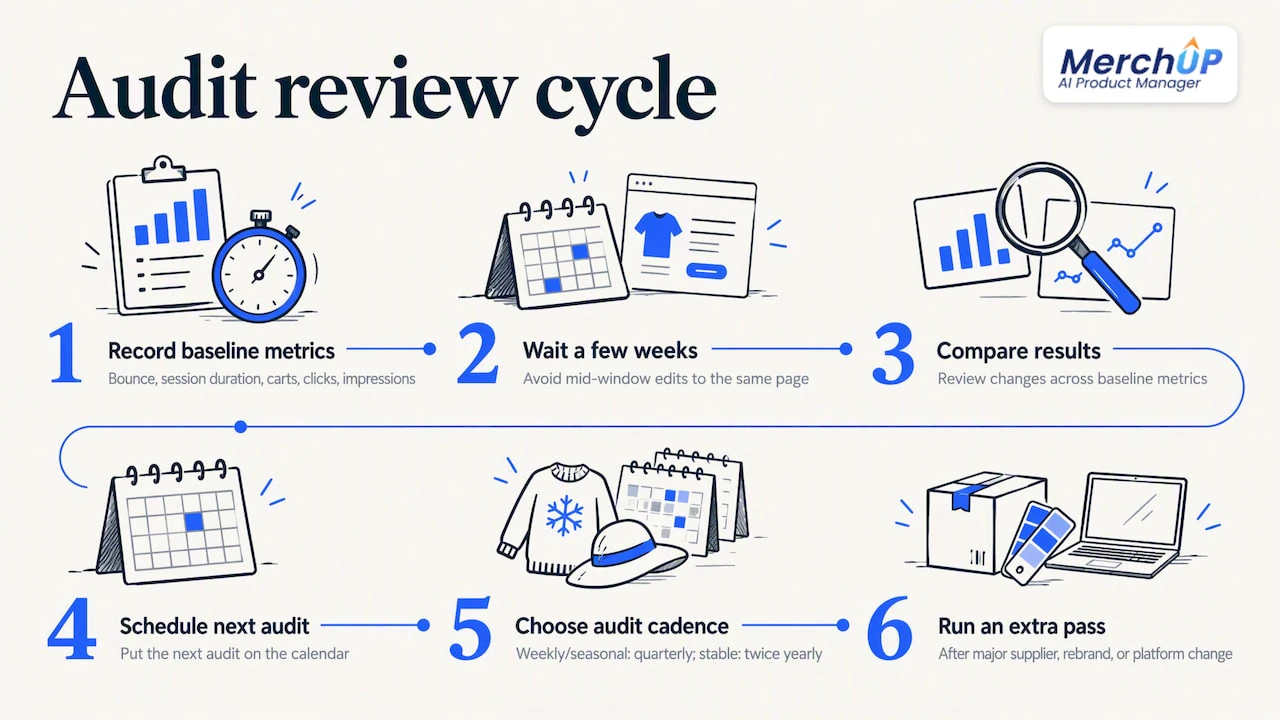
Then put the next audit in the calendar. Quarterly suits a store that adds products every week or sells seasonally. Twice a year is enough for a stable catalogue. Run an extra pass after a big supplier change, rebrand or platform move.
Our perspective: audits fail when they stay in a spreadsheet
Most stores that audit their descriptions do the finding well and the fixing badly. The spreadsheet gets built, 300 problems are listed, and a month later 20 are fixed. We think of a product page as a small piece of product management: the title, type, vendor, price, tags, description, photos and SEO all belong to one record, and they should be reviewed and corrected together.
That is why we built MerchUp AI as an AI product manager for Shopify, not just a description writer. A weak page is rarely only a copy problem. Often the photo is poor, the tags are missing and the meta description was never written. Fixing one without the others leaves the page half done.
Two habits make audits stick. First, review every change before it goes live and keep a history you can restore, so nobody is afraid to improve a best-selling page. Second, ground your search work in your own data, meaning what Google Search Console says shoppers already type, not guesses. Do those two things and an audit becomes a routine instead of a project.
— Jamie Moss
Doing the fixes faster with MerchUp AI
Once your audit shows what needs changing, MerchUp AI can do much of the work inside Shopify. It writes descriptions into a designed template, creates AI product photos, and does your SEO in one click: it reads your own Google Search Console data and live Google results, picks keywords, writes meta titles, descriptions and image alt text, checks rankings and pushes everything to your store. No SEO knowledge is needed, and every change is reviewed before it goes live, with full history and restore.
There is a free plan, and paid plans start with Starter at £12.99 a month. See the plans and pricing or look at the AI description generator to see how it fits your audit.
FAQ
What is a product description audit?
It is a review of the copy, metadata and images on your product pages. You check each one for accuracy, clarity, search visibility and trust, then decide what to rewrite, reorganise or delete. The aim is to fix the pages that matter most to sales first.
How many products should I audit first?
Start with the pages that have the most impact: top sellers, high-traffic pages that do not convert, and products with many Google impressions but few clicks. Add a random sample of the rest to gauge how widespread the problems are. A store with a few hundred products can often cover its shortlist in a day.
How often should I repeat the audit?
Quarterly is a good rhythm if you add products every week or sell seasonal stock, and twice a year suits a steadier catalogue. Run an additional pass after major catalogue, supplier or platform changes.
Do I need to worry about legal claims in descriptions?
Yes, if you sell to US customers. The FTC expects advertising claims to be truthful and substantiated, and says disclosures should sit close to the claim they qualify. For claims about health, safety or performance, keep your evidence on file and have an advertising lawyer review anything risky.
Sources
- Semrush: ecommerce product page SEO
- Baymard: structuring product descriptions by highlights
- Google: Product structured data
- Google: Product variant structured data
- FTC: Advertising and Marketing on the Internet, Rules of the Road
- FTC: .com Disclosures
- FTC business blog: the accessiBe settlement
- US Access Board: web baseline for images
- US Access Board: document baseline for contrast


Comments
No comments yet — be the first to share what you think.