


Good size guide copy does one job: it lets a shopper pick a size without guessing. That takes four things on the page: a chart with real measurements and units, plain instructions for taking them, a fit note that says how the style runs, and a model line. Put them beside the size selector, not buried in a pop-up. This guide shows how to write each one, how to format them for phones, and how to keep them accurate across a growing catalogue.
TL;DR
- Write for the decision, not the chart. Pair measurements with a one-line fit note such as “between sizes? size up for a looser fit”.
- Give every measurement a unit, in both inches and centimetres, and say whether it is a body or a garment measurement.
- Use a real text table that scrolls sideways on a phone, opened from a link next to the size buttons.
- Make each chart specific to the brand and product type, and update it when a supplier or cut changes.
- AI can draft the copy and fill the fields, but a person checks every number against the actual garment before it goes live.
What a size guide needs to say
The most useful checklist comes from Baymard’s research on apparel sizing. Baymard lists ten components: conventional and numeric sizing, measurements in inches and centimetres, international conversions, instructions for taking accurate measurements, sizing information matched to the product type, a size-guide link near the size selectors, Back-button support, a customer-service link, and model measurements.
You do not need all ten on day one. Start with the ones that change a shopper’s decision most:
- The chart itself, with units.
- How to measure.
- A fit note.
- The model’s height and the size worn.
- A route to help if they are still unsure.
A second way to think about it comes from Sutton Commerce, which describes three layers of a useful guide: body measurements with a diagram, garment measurements, and fit context such as model stats and photography guidance. Each layer answers a different worry. Body measurements answer “what size am I?”. Garment measurements answer “will this fit the way I want?”. Fit context answers “how does it actually wear?”.
Body measurements and garment measurements: say which is which
Shoppers get confused when a table does not say what it measures. Shopify explains the difference: body charts match each size to key body dimensions, while garment charts list the finished item’s specifications. Many brands show both, body measurements first and garment measurements below.
The label is the copywriting. Compare these two column headings:
| Weak label | Better label |
|---|---|
| Bust circ. | Chest (product measurements) |
| Size M | M (US 8–10) |
| 36 | 36 in / 91 cm |
| Length | Body length, shoulder to hem |
Plain labels like “Chest (product measurements)” instead of abbreviations are among the accessibility fixes Ecom Design Pro recommends, and they help every shopper, not only those using screen readers.
Which measurements to list
The right columns depend on the product. Shopify’s guidance gives a sensible minimum for each type:
| Product type | Minimum measurements |
|---|---|
| T-shirts and knit tops | Chest or bust width, shoulder width, body length, sleeve length |
| Dresses | Bust, waist, hip, garment length, sleeve length |
| Pants and jeans | Natural waist, high hip, low hip, front rise, thigh circumference, inseam, leg opening |
These come from Shopify’s size chart guide. Resist adding columns that do not predict fit for that product. Ecom Design Pro advises including only the measurements that predict fit for the product type, which keeps the table readable on a small screen.
Inches and centimetres
Show both. Baymard notes that users who prefer one system are unlikely to know their equivalent in the other off the top of their head. For a US store, lead with inches and put centimetres beside them or behind a unit toggle, so a visitor from abroad is not forced to convert.
Write the measuring instructions like a person would say them
A chart is useless if the shopper measures the wrong place. Baymard recommends text instructions plus, ideally, a human model image showing where each measurement is taken.
Keep each instruction to one sentence and one body part:
- Chest: Measure around the fullest part of your chest, keeping the tape level under your arms.
- Waist: Measure around your natural waistline, the narrowest part of your torso.
- Hip: Measure around the fullest part of your hips, feet together.
- Inseam: Measure from the crotch seam to the bottom of the leg.
Then tell them what to do with the numbers. Huckberry’s support page suggests comparing the chart with a similar item you already own and like, and points out that for many brands the actual waist circumference is not equal to the garment size and is usually larger. That is a useful line for your own copy: “Your waist size and your jeans size may not match. Go by the chart.”
Ecom Design Pro suggests a “How to measure” panel with clear diagrams and short steps, plus a toggle between garment and body measurements. If your platform allows, keep it inside the same window as the chart so shoppers do not lose their place.
Fit notes: the lines that actually settle the decision
A fit note is the sentence a good shop assistant would say out loud. ConvertCart argues that notes like “runs small” or “relaxed through the hip” are what a sales assistant would volunteer, and that real measurements turn a guess into a decision.
Good fit notes are specific, comparative and actionable:
- “Runs small. Size up if you are between sizes.”
- “Relaxed through the hip, slim through the leg.”
- “Cut for a boxy fit. Take your usual size for a loose look, one size down for a closer one.”
- “Stretch fabric, so it softens after a few wears.”
The between-sizes line matters most. One guide on size charts says a single line such as “between sizes? size up for a looser fit” prevents a large share of uncertainty returns. Write it for every product, not just the ones that run small.
Where fit notes come from
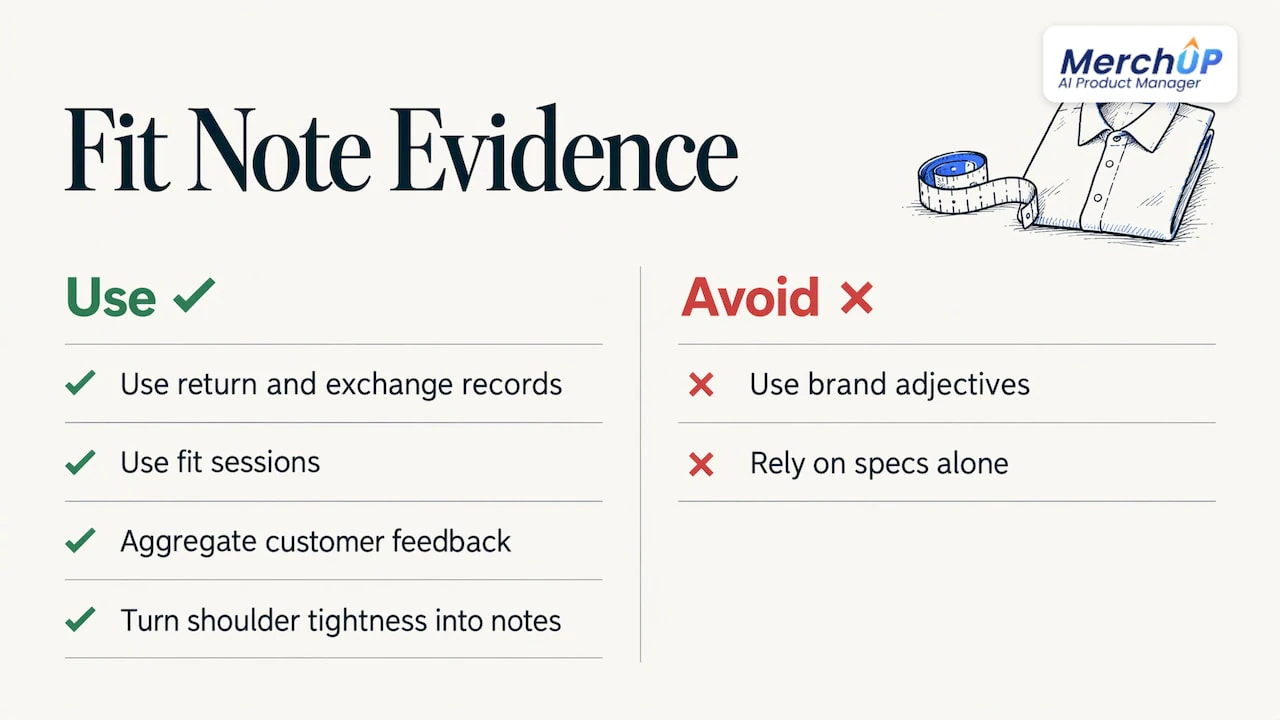
Avoid adjectives like “flattering” or “comfortable”. HudsonSouth argues that fit notes should come from return reasons, exchange records and fit sessions rather than from brand adjectives. If a style gets returned as “too tight in the shoulders”, that is your next fit note.
HiAgency adds that aggregated customer feedback gives more reliable guidance than manufacturer specifications alone, and suggests a review prompt asking whether the item runs small, true or large, along with the size purchased.
The model line
Shoppers compare themselves with people, not tables. ConvertCart says a line like “Model is 5’9", 130 lbs, wearing a size S” does more to help a shopper size themselves than a full measurement grid. Always include height and the size worn. Add chest and waist if you have them, and keep the format identical on every product.
Format it for a phone
Most size guides are opened on a phone, so the layout is part of the copy. The checklist below pulls together what the sources agree on.
- Real text, not a screenshot. Juncie advises using real text and a table rather than a picture of a spreadsheet, giving every measurement a unit, and testing on a narrow phone with larger text.
- A table that scrolls sideways. Altwise recommends an HTML table with a caption and header cells, wrapped so it scrolls sideways instead of making the whole page scroll.
- A modal, not a new page. Pixeltree recommends opening the size chart in a modal, using buttons rather than dropdowns for variants, and tap targets of at least 48px.
- A link next to the selector. StoreBuilt says the trigger should sit close to the size selector and add-to-cart path.
- Clear headings and short paragraphs. Shopify Text Academy advises one main idea per paragraph, lists for parallel facts and no manual line breaks to force a desktop look.
On accessibility, Ecom Design Pro suggests real table headers so screen readers announce row and column context, and not relying on colour alone to show the recommended size. For the wider layout of the page around the guide, see our conversion-first Shopify product page layout and our guide to product description structure.
Keep every chart accurate across products and brands
A single store-wide chart is the quickest way to publish wrong numbers. One returns guide recommends brand- and product-specific charts and updating them when a supplier or cut changes.
NN/g’s research on international sites adds three rules worth copying:
- Users on a localised site expect local sizes as the default and do not want to open a pop-up to decide.
- If you include product measurements, include them for all sizes, and explain how they were taken, because shoppers will not know how measurements change across sizes if only some are shown.
- Product measurements are most helpful when shoppers want a fit different from the model, have atypical body measurements or want to double-check a size conversion.
A simple maintenance routine for a store adding products every week:
- Keep one chart template per brand and product type, not per product.
- Record the source of each chart (supplier spec sheet, your own measurement of a sample).
- Re-check the chart whenever a supplier changes a cut, fabric or factory.
- Review returns monthly and turn repeated reasons into fit notes.
- Make sure the sizes in your product data match the sizes in the chart, so every version of the product agrees. HudsonSouth makes this point about feeds and markup.
If you run a large catalogue, the same discipline applies to all product copy. Our guide to a quality system for large catalogue copy covers it in more depth.
Why size guide copy also helps SEO and returns
Sizing words do two jobs: they help shoppers and they give search engines concrete facts. HiAgency says size-guide SEO can target “how to measure”, brand sizing, comparison, fit, size conversion and product-specific queries, using keywords in H2 and H3 headings, descriptive paragraphs, internal links and FAQ schema.
The returns numbers vary by source, so treat them as a range rather than a promise:
| Claim | Source |
|---|---|
| Proper sizing decreases returns by 20–30% | HiAgency |
| Adding a size guide reduces return rates by 18% on average | EasyApps |
| Fit and sizing drive 53–70% of apparel returns | YourSizer |
One practical rule follows from this. HudsonSouth advises placing the fit note beside the size selector in plain text, not only inside a pop-up or image, repeating the single most useful line in the product summary, and writing it so it still makes sense when lifted out on its own for search results or AI summaries. Antla says fit details such as fit type, material and stretch, garment measurements and model reference give AI systems concrete facts to summarise.
For the rest of the page, our guides to product description SEO and duplicate content on product pages are the natural next reads, especially if many of your variants share near-identical sizing text.
Perspective
We see size guides as part of the product record, not a separate document. The size chart, the fit note, the model line and the SEO title all describe the same garment, so they should be produced together and stay in step.
That is how MerchUp AI is built. It is an AI product manager for Shopify: it turns a product photo or barcode into a complete listing with title, type, vendor, price, tags and SEO, writes the description into a designed template, and can create AI product photos, then publishes it. A size and fit section fits naturally into that template, so every product page carries the same structure instead of a different layout each week.
The same thinking applies to search. Our AI does all your SEO in one click, reading your store’s own Google Search Console data and live Google results, choosing keywords, writing meta titles, descriptions and image alt text, checking rankings and pushing it to your store. No SEO knowledge is needed. Every change is reviewed before it goes live, with full history and restore, which is exactly the control you want when a number on a sizing page matters.
Jamie Moss
Using AI to draft size guide copy
AI is good at the repetitive parts: turning a supplier spec into clean labels, drafting a “how to measure” paragraph in your tone, writing a fit note in a consistent format, and producing a unit-consistent description across hundreds of products. It is not a measuring tape. The numbers have to come from you.
Before publishing anything AI-written, a person should check:
- Every number against the real garment or the supplier’s spec sheet. Chest, length, inseam and sleeve are the usual errors.
- Units. Each figure has inches and centimetres, and the conversion is right.
- The fit note against your own data. Does “runs small” match returns and reviews, or is it a guess?
- Consistency. The size shown in the title, variants, chart and model line must match.
- Body versus garment labels. The table says which one it shows.
- The mobile view. Open it on a phone and check the table scrolls and the text is readable.
MerchUp AI keeps a review step before changes go live, with history and restore, so you can compare a draft with the previous version before it reaches the store. For wording that stays consistent across a range, our product description templates show how to build the repeatable parts.
Put it into your Shopify store
If you add new products every week, the hard part is not writing one good size guide. It is writing the fortieth one with the same standard. MerchUp AI turns a product photo or barcode into a full Shopify listing, writes the description into a designed template and publishes it, then handles the SEO from your own Search Console data. You can start on the free plan, and paid plans begin with Starter at £12.99 a month.

See how the tools work together or try the AI product scanner for Shopify to go from a photo to a draft listing, then add your verified size and fit details before you publish.
FAQ
What is size guide copywriting?
It is the writing around sizing: chart labels, measuring instructions, fit notes, model details and the headings and link text that lead shoppers to them. The aim is to help a shopper choose a size without guessing. It sits on the product page, next to the size selector.
What should I write in a fit note?
Say how the style runs and what to do about it. For example: “Runs small. Size up if you are between sizes.” Base the note on your returns and reviews, and keep it short enough to read beside the size buttons.
Should a size guide use inches or centimetres?
Both. Baymard notes that shoppers who prefer one system rarely know their numbers in the other. For a US store, lead with inches and show centimetres alongside or through a toggle.
Can I use one size chart for my whole store?
It is safer not to. Brands and product types fit differently, so use charts specific to the brand and product type, and update them when a supplier or cut changes.
Can AI write my size guide?
AI can draft the labels, instructions and fit notes, and keep them consistent across many products. A person should still check every measurement, unit and fit claim against the real product before it is published.
Sources
- Apparel: 10 Best Practices on Sizing, Baymard
- Sizing Charts: How to Make a Size Chart, Shopify
- Size Guides on Shopify, Sutton Commerce
- Size Guide UX Patterns That Reduce Returns, Ecom Design Pro
- What size am I?, Huckberry Support
- Fashion Product Page CRO, ConvertCart
- Size Chart Best Practices to Reduce Returns
- Fit Notes and Sizing Answers, HudsonSouth
- Size Guide for Ecommerce SEO, HiAgency
- Help Tempe shoppers choose the right product size, Juncie
- Product pages shoppers can trust, Altwise
- Product Page CRO: Above-the-Fold Patterns, Pixeltree
- Why Size Confidence Matters on Shopify Product Pages, StoreBuilt
- How to Write Product Page Copy for Mobile Shoppers, Shopify Text Academy
- Size Guides and Product Measurements for International Ecommerce, NN/g
- Shopify Fashion Store Guide, EasyApps
- How to Write Product Descriptions That Reduce Returns, YourSizer
- Why Size Charts Fail Shopify Fashion Brands, Antla


Comments
No comments yet — be the first to share what you think.